This thread has been locked.

If you have a related question, please click the "Ask a related question" button in the top right corner. The newly created question will be automatically linked to this question.

Can not save the received characters of UART to a string

Dear All,


I want to collect the received characters from hyperterminal through UART0 of my launchapd and to save them to a string and then to print it back on the hyperterminal.


When I try to print it (e.g. UARTCharPut(UART0_BASE, *stringrecv[0]);) it prints nothing.


my code is as follows;


int
main(void)
{
char uartrecv;
char *stringrecv[4];
 int i=0;
//SysCtlClockSet(SYSCTL_SYSDIV_5 | SYSCTL_USE_PLL | SYSCTL_OSC_MAIN | SYSCTL_XTAL_16MHZ);
 
 
    //
    // Set the clocking to run directly from the external crystal/oscillator.
    // TODO: The SYSCTL_XTAL_ value must be changed to match the value of the
    // crystal on your board.
    //
    SysCtlClockSet(SYSCTL_SYSDIV_1 | SYSCTL_USE_OSC | SYSCTL_OSC_MAIN |
                  SYSCTL_XTAL_16MHZ);
 
inituart0();
UARTsendString("\n\rWELCOME\n\r");
UARTsendString("Please, input a string: ");
    do
    {
        //
        // Read a character using the blocking read function.  This function
        // will not return until a character is available.
        //
        uartrecv = UARTCharGet(UART0_BASE);
*stringrecv[i] = uartrecv;
 
i=i+1;
 
        //
        // Write the same character using the blocking write function.  This
        // function will not return until there was space in the FIFO and
        // the character is written.
        //
//UARTCharPut(UART0_BASE, '\n');
//UARTCharPut(UART0_BASE, '\r');
UARTCharPut(UART0_BASE, uartrecv);
 
 
    //
    // Stay in the loop until either a CR or LF is received.
    //
    } while((uartrecv != '\n') && (uartrecv != '\r'));
 
UARTCharPut(UART0_BASE, '\n');
UARTCharPut(UART0_BASE, '\r');
 
    //
    // Put a character to show the end of the example.  This will display on
    // the terminal.
    //
    UARTsendString("Your string is: ");
//UARTsendString(*stringrecv);
UARTCharPut(UART0_BASE, *stringrecv[0]);
UARTCharPut(UART0_BASE, *stringrecv[1]);
UARTCharPut(UART0_BASE, *stringrecv[2]);
 
UARTsendString("\n\rSee you next time.\n\r");
    //
    // Return no errors
    //
    return(0);
}
 
It prints correctly all the data i send to the hyperterminal except the data i store in the pointer  *stringrecv.
 
Is there something wrong with saving the characters to the string or retrieving back from the string ?
 
Any suggestion is welcome.
 
Regards,
Iftikhar
  • Hi,

       Have you seen the uart_echo example program? It echoes back a character from PC to microcontroller and back to your PC. See, if you can modify that to your intended purpose.

    -kel

  • Yes,

    Actually I can print strings (e.g. UARTsendString("Your string is: ");) but I can not print the stored data in the pointer *string i.e.

    UARTCharPut(UART0_BASE, *stringrecv[0]);
    UARTCharPut(UART0_BASE, *stringrecv[1]);
    UARTCharPut(UART0_BASE, *stringrecv[2]);
     
    is the correct way to save data to a string as;
     uartrecv = UARTCharGet(UART0_BASE);
    *stringrecv[i] = uartrecv;
     i=i+1;
    You can refer to the whole code in the post.
  • Hi Iftikhar,

    Forgive my ignorance but I am just curious to know how and where have you defined the function UARTsendString()?

    BR,

    \Kashif

  • @Kashif

    As I mentioned the UARTsendString() function itself is working fine. I can print whatever I put in that funtion.

    The problem is in printing the data stored inside the string i.e.

     uartrecv = UARTCharGet(UART0_BASE);

    *stringrecv[i] = uartrecv;
    UARTCharPut(UART0_BASE, *stringrecv[0]);
    UARTCharPut(UART0_BASE, *stringrecv[1]);
    UARTCharPut(UART0_BASE, *stringrecv[2]);
    it doesnt print any thing.
    It looks like *stringrecv[i] = uartrecv; doesnt store the data from UARTCharGet(UART0_BASE).
    Is that the correct way of storing characters in string i.e. *stringrecv[i] = uartrecv; ??
  • Hi,

    First you declared this char *stringrecv[4]; then you increment i and forget to compare to the string size (only i++ is present), so you may write over other variables. But the biggest problem can be the fact the variable i may be optimized out by the compiler and never used afterwards - so it is wise to declare as volatile to prevent optimization. And don't have fear to use the debugger - set a breakpoint and inspect the stringrecv, see if there is something inside, run step by step. Keep in mind the UART debugging is only for kindergartens (although some other posters will protest to this assertion - but it is only for you….)

    Petrei

  • Iftikhar said:

    I want to collect the received characters from hyperterminal through UART0 of my launchapd and to save them to a string and then to print it back on the hyperterminal.

     Clean question so why your code has error? Unclear to me why a so strange declaration is used....

    Iftikhar said:
    char *stringrecv[4];

    This declare a pointer to an array of char so var is a POINTER!!!!

     None assign some value to that pointer leaving to thrash too or data value still worst!

     IMHO redeclare as char stringrecv[length] and not 4 but at almost 20 40 or more in length...

    Iftikhar said:
            uartrecv = UARTCharGet(UART0_BASE);
    *stringrecv[i] = uartrecv;

     Oh.. wow gotcha!!!
     Is not compiler say WARNING.. I think you MUST improve knowledge on what mean assign a char to unassigned pointer dereference???
     You assign a USELESS char to pointer uninitialized so you trash something in memory!!!
     You must assign something like *stringrecv = &Vectorofchar; assigning the address of a data structure!
     You are welcome next programming session ;)
     Redeclare array or assign pointer then correct your code. No ISR fault is raised?
     
     stringrecv[i] = UARTCharGet(UART0_BASE);
     
    and avoid BUFFER OVERFLOW TOO!!!!!!!
    Iftikhar said:
    i=i+1;
     
            //
            // Write the same character using the blocking write function.  This
            // function will not return until there was space in the FIFO and
            // the character is written.
            //
    //UARTCharPut(UART0_BASE, '\n');
    //UARTCharPut(UART0_BASE, '\r');
    UARTCharPut(UART0_BASE, uartrecv);
     
     
        //
        // Stay in the loop until either a CR or LF is received.
        //
        } while((uartrecv != '\n') && (uartrecv != '\r'));
        HERE
     
    while((uartrecv != '\n') && (uartrecv != '\r') && i < lenght);
     
     your string is not infinite nor variable length from HEAP too..
     And last terminator???
     last string character MUST be ZERO

    stringrecv[i] =0;
    or
    stringrecv[i]='\0';
    

     where HERE is on your code!!!

     
     THEN and just NOW string is ok and can be printed to output device...
     Markel this is not a school teaching C, please do your job as from  your GURU level...
     
  • Iftikhar said:
    Is that the correct way of storing characters in string i.e. *stringrecv[i] = uartrecv; ??

     This is not a string is a deferred SINGLE character from  pointer advanced of i unity from base pointer value addressmy.

     A string where an index is present is not again a string but a character at ith position on a string..

  • Petrei said:
    First you declared this char *stringrecv[4];

     Petrei, sorry, you missed the caveat .... 

    char *stringrecv[4];

    -------^ ARGH this is a POINTER

     Petrei, I invite also you to vote or expose your position to splitting idea to do better focus near real or beginner issues!

     This again fooled one prepared as you, this can be all us get weakened.

  • @Roberto,

    Yes, I missed it… no comments.

    I will make comments about the splitting idea.

    Petrei 

  • Petrei said:

    Yes, I missed it… no comments.

    I will make comments about the splitting idea.

     Don't worry Petrei, I wish live there to do interaction to other than get as harsh professor.. But I am so close to exam session I need get exercised too! :D

  • Dear Roberto,


    It looks like you are beating about the bush and do not have got any idea what my post says.

    If you do not understand then do not post to increase you points only.

    I think the code is quite basic and in a very simple syntax to understand.

    For your kind information, there is no error and no warning at all.

    The only problem as very clearly mentioned is the storage of character in the string.

    I suggest you take a basic C-language book and revise the basics and then come here and read the original post rather then having a birds view on the small part of the code i mentioned to on of the participating member i.e. Kashif.


  • I am sharing with you the code again here as it looks like you don't know even how to view the first post of the discussion.
    int
    main(void)
    {
    char uartrecv;
    char *stringrecv[4];
     int i=0;
    //SysCtlClockSet(SYSCTL_SYSDIV_5 | SYSCTL_USE_PLL | SYSCTL_OSC_MAIN | SYSCTL_XTAL_16MHZ);
     
     
        //
        // Set the clocking to run directly from the external crystal/oscillator.
        // TODO: The SYSCTL_XTAL_ value must be changed to match the value of the
        // crystal on your board.
        //
        SysCtlClockSet(SYSCTL_SYSDIV_1 | SYSCTL_USE_OSC | SYSCTL_OSC_MAIN |
                      SYSCTL_XTAL_16MHZ);
     
    inituart0();
    UARTsendString("\n\rWELCOME\n\r");
    UARTsendString("Please, input a string: ");
        do
        {
            //
            // Read a character using the blocking read function.  This function
            // will not return until a character is available.
            //
            uartrecv = UARTCharGet(UART0_BASE);
    *stringrecv[i] = uartrecv;
     
    i=i+1;
     
            //
            // Write the same character using the blocking write function.  This
            // function will not return until there was space in the FIFO and
            // the character is written.
            //
    //UARTCharPut(UART0_BASE, '\n');
    //UARTCharPut(UART0_BASE, '\r');
    UARTCharPut(UART0_BASE, uartrecv);
     
     
        //
        // Stay in the loop until either a CR or LF is received.
        //
        } while((uartrecv != '\n') && (uartrecv != '\r'));
     
    UARTCharPut(UART0_BASE, '\n');
    UARTCharPut(UART0_BASE, '\r');
     
        //
        // Put a character to show the end of the example.  This will display on
        // the terminal.
        //
        UARTsendString("Your string is: ");
    //UARTsendString(*stringrecv);
    UARTCharPut(UART0_BASE, *stringrecv[0]);
    UARTCharPut(UART0_BASE, *stringrecv[1]);
    UARTCharPut(UART0_BASE, *stringrecv[2]);
     
    UARTsendString("\n\rSee you next time.\n\r");
        //
        // Return no errors
        //
        return(0);
    }
  • Not in Conformance w/Forum Rules/Regs!

    Iftikhar said:

    I suggest you take a basic C-language book and revise the basics and then come here and read the original post rather then having a birds view on the small part of the code i mentioned to on of the participating member i.e. Kashif

     Dear sir, I see you are not able to write a basic program managing string and from your code YOU ARE LESS THAN A C BEGINNER!!!!

     Are you some level high and wrote a so BIGGER wrong code?

     Ok tell me read a basic book when you are using a dangling reference?

     I am sorry if Dangling reference is out of your knowledge.

     Beginner wrote best code as yours!

     If your code is not complete then I saw enough to qualify you worst again, get back to school and ask teach about how the code is to be used.

     After 40 year programming just can tell you stop messing about here!

    Not in Conformance w/Forum Rules/Regs! 

  • Iftikhar said:
    I am sharing with you the code again here as it looks like you don't know even how to view the first post of the discussion.

    Not in Conformance w/Forum Rules/Regs!

  • Hi Iftikhar,

    You are not right - your code snippet is full of mistakes - the proof is "it doesn't work" and you ask for help, despite the "compiling without errors" - Roberto highlighted all possible places with problems, I jumped over an obvious one, so my advice is to read carefully Roberto's post and to correct/compile/debug again and again - this is usual cycle in developing any kind of application, embedded or not.

    And it is wise to apologize Roberto for your heavy words...

    Petrei

  • Amit Ashara said:

    EDIT STARTS--

    Even this post will be deleted once we all get back to the solving issue at hand and corrective action done by moderators and forum owners,... So do not consider this as points added to my profile.

    EDIT ENDS--

     Amit, if possible also to myne if maybe I focused the dangling reference issue and wrong pointer usage.

     Thank a lot.

  • Roberto Romano said:
    After 40 year programming just can tell you stop messing about here!

    Mr 40 years old programmer I have fixed the problem and sharing with you so that you also learn where was the problem.

    As suggested by you I should re-attend school to learn C, but I don't know what should a 40 years old programmer do that could not figure out a small bug in the code. Oopss

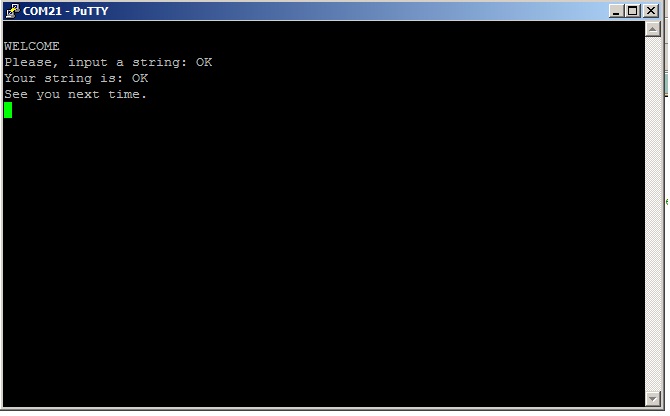
    Kindly read the carefully the code in bellow, for your kind information it is now working and attached is the snapshot of the hyper terminal .

    //*****************************************************************************
    //
    // Configure the UART and perform reads and writes using polled I/O.
    //
    //*****************************************************************************
    int
    main(void)
    {
    char uartrecv;
    char stringrecv[4];
    int i=0;
    //SysCtlClockSet(SYSCTL_SYSDIV_5 | SYSCTL_USE_PLL | SYSCTL_OSC_MAIN | SYSCTL_XTAL_16MHZ);

    //
    // Set the clocking to run directly from the external crystal/oscillator.
    // TODO: The SYSCTL_XTAL_ value must be changed to match the value of the
    // crystal on your board.
    //
    SysCtlClockSet(SYSCTL_SYSDIV_1 | SYSCTL_USE_OSC | SYSCTL_OSC_MAIN |
    SYSCTL_XTAL_16MHZ);

    inituart0();
    UARTsendString("\n\rWELCOME\n\r");
    UARTsendString("Please, input a string: ");
    do
    {
    //
    // Read a character using the blocking read function. This function
    // will not return until a character is available.
    //
    uartrecv = UARTCharGet(UART0_BASE);
    stringrecv[i] = uartrecv;
    i++;

    //
    // Write the same character using the blocking write function. This
    // function will not return until there was space in the FIFO and
    // the character is written.
    //
    //UARTCharPut(UART0_BASE, '\n');
    //UARTCharPut(UART0_BASE, '\r');
    UARTCharPut(UART0_BASE, uartrecv);

    //
    // Stay in the loop until either a CR or LF is received.
    //
    } while((uartrecv != '\n') && (uartrecv != '\r'));

    UARTCharPut(UART0_BASE, '\n');
    UARTCharPut(UART0_BASE, '\r');
    //UARTCharPut(UART0_BASE, '\n');
    //
    // Put a character to show the end of the example. This will display on
    // the terminal.
    //
    UARTsendString("Your string is: ");
    //UARTsendString(stringrecv);
    UARTCharPut(UART0_BASE, stringrecv[0]);
    UARTCharPut(UART0_BASE, stringrecv[1]);
    //UARTCharPut(UART0_BASE, stringrecv[2]);

    UARTsendString("\n\rSee you next time.\n\r");
    //
    // Return no errors
    //
    return(0);
    }

    By the way I suggest, you also take a class to learn manners and ethics.

  • Dear Amit,

    The issue has been fixed as it was a bug in the code. I have shared the solution as well.

  •  This guy has to be cancelled from community.

     Also not offensive word but also presunct none can see it apply'd what I suggested too...

     Amit please ask DON'T erase this thread and propose what we are just in proposal doing limit this worst screaming of bad kid... I fear this raise so down level we urgently need act.

     Against this one please save all record and all incoming IP and transaction I eventually need in the future.

     All post are reported as offensive and inappropriate language.

     >I reserve loyal action behind<