This thread has been locked.

If you have a related question, please click the "Ask a related question" button in the top right corner. The newly created question will be automatically linked to this question.

Question about MPU9150 sample code from TI

int
main(void)
{
int_fast32_t i32IPart[16], i32FPart[16];
uint_fast32_t ui32Idx, ui32CompDCMStarted;
float pfData[16];
float *pfAccel, *pfGyro, *pfMag, *pfEulers, *pfQuaternion;

//
// Initialize convenience pointers that clean up and clarify the code
// meaning. We want all the data in a single contiguous array so that
// we can make our pretty printing easier later.
//
pfAccel = pfData;
pfGyro = pfData + 3;
pfMag = pfData + 6;
pfEulers = pfData + 9;
pfQuaternion = pfData + 12;

i dont understand the addition operation of an array to an number! pfGyro = pfData + 3;

What does this mean?

Thanks!

...........................

  • Hello Happy Smile,

    It is initializing the pointers to the array entry for each of the functions for Acceleration, Gyro, Magentometer...

    Regards

    Amit

  • Correct me if I am wrong.

    float pfData[16] - has 16 elements of type float

    pfAccel = pfData;

    is also equal to as below. Since an array name is a constant pointer

    pfAccel = &pfData[0];

    meaning you are assigning the address of the first element of pfData to pfAccel pointer. So, if you want to store data to the first element of pfData[0]. You, can use the equation below.

    *pfAccel = (float)data;

    pfGyro = pfData + 3;

    is also equivalent to below. The "3" increments the address by 3 of size float;

    pfGyro = &pfData[0] + 3

    or

    pfGyro = &pfData[3];

    It is the same explanation to these 3 below.

    pfMag = pfData + 6;
    pfEulers = pfData + 9;
    pfQuaternion = pfData + 12;

    So, to summarize, the array pfData[16], will contain Acceleration data, Gryometer data, Magnetometer Data, Eulers Data and Quarternion Data.

    - kel

  • We have 5 quantities to measure, which will be stored in an array of size 16, why do we have to set the size to be 16 instead of 15 which will be just enough in my opinion?

  • Hello Happy Smile.

    Quaternions has 4. So 3+3+3+3+4 required the number to be 16. If you go to look into the application code line 656 to  690 the number of prints for the quantities is mentioned. You can refer to the MPU9150 part as well to double confirm

    Regards

    Amit

  • By the way, i want to ask a question, i use the tool Keil by ARM. 

    i already include the header file, but the linker error still occurs:

  • Hello Happy Smile,

    Add the uartstdio.c to the list of source files to compile as it does not exist in the driverlib.lib

    Regards

    Amit

  • Thanks very much, Amit!

  • Still be one linker error!


  • Hello Happy Smile,

    Please add the define UART_BUFFERED during compile of the uartstdio.c if you want to use the UART interrupt handler.

    Regards

    Amit

  • Can you say more clearly! Where and how will we define UART_BUFFERED?

    Thanks!

  • Hello Happy Smile,

    See attached image. This is a TM4C123 project that I have but would show where to place the define

    Regards

    Amit

  • Typically it is done as a "pre-defined" symbol in project settings.  This gives is a project wide scope and defines before any and all stuff that is explicitly written in the files.


    At a minimum it must be defined prior to any place where you #include "utils/uartstdio.h"

  • Actually, iam doing a project in which i need to interface TM4C to MPU 6050 sensor. I take the MPU9150 project from TivaWare for reference.

    I still have many confusions in this project, so hope you guys help me!

    1. What is the meaning of the Call Back Function?, namely MPU9150AppCallback(void *pvCallbackData, uint_fast8_t ui8Status)

    2. 

    //*****************************************************************************
    //
    // Global Instance structure to manage the DCM state.
    //
    //*****************************************************************************
    tCompDCM g_sCompDCMInst;

    what does DCM state mean?

    Thanks!


  • Happy Smile said:
    what does DCM state mean?

    I think it means "Direction Cosine Matrix".

    - kel

  • Happy Smile said:
    i need to interface TM4C to MPU 6050 sensor. I take the MPU9150 project from TivaWare for reference.

    You, don't need to refer to the MPU9150 libraries as there is a library for MPU6050. See, at the sensorlib folder.

    Happy Smile said:
    1. What is the meaning of the Call Back Function?, namely MPU9150AppCallback(void *pvCallbackData, uint_fast8_t ui8Status)

    I have not check what that is for at MPU9150AppCallback C API. But, at other C API's  *pvCallbackData, is a pointer to user defined data.

    You, can check how this parameter is set at the sensorlib libraries.

    As discussed in this post there is an issue with the library for MPU9150.

    Free 3D RealTime graphic AHRS for SensorHub + DCM Algorithm validation

    - kel

  • I see that for MPU9150, there is hardware for filter.

    I dont know whether MPU6050 has this kind of filter too, since i dont see nay define in the header file

    Thanks

  • //
    // Write application specifice sensor configuration such as filter settings
    // and sensor range settings.
    //
    g_sMPU9150Inst.pui8Data[0] = MPU9150_CONFIG_DLPF_CFG_94_98;
    g_sMPU9150Inst.pui8Data[1] = MPU9150_GYRO_CONFIG_FS_SEL_250;
    g_sMPU9150Inst.pui8Data[2] = (MPU9150_ACCEL_CONFIG_ACCEL_HPF_5HZ |
    MPU9150_ACCEL_CONFIG_AFS_SEL_2G);
    MPU9150Write(&g_sMPU9150Inst, MPU9150_O_CONFIG, g_sMPU9150Inst.pui8Data, 3,
    MPU9150AppCallback, &g_sMPU9150Inst);

    //
    // Wait for transaction to complete
    //
    MPU9150AppI2CWait(__FILE__, __LINE__);

    //
    // Configure the data ready interrupt pin output of the MPU9150.
    //
    g_sMPU9150Inst.pui8Data[0] = MPU9150_INT_PIN_CFG_INT_LEVEL |
    MPU9150_INT_PIN_CFG_INT_RD_CLEAR |
    MPU9150_INT_PIN_CFG_LATCH_INT_EN;
    g_sMPU9150Inst.pui8Data[1] = MPU9150_INT_ENABLE_DATA_RDY_EN;
    MPU9150Write(&g_sMPU9150Inst, MPU9150_O_INT_PIN_CFG,
    g_sMPU9150Inst.pui8Data, 2, MPU9150AppCallback,
    &g_sMPU9150Inst);

    //
    // Wait for transaction to complete
    //
    MPU9150AppI2CWait(__FILE__, __LINE__);

    Need help for the bold code above, i look for all include files, but i cant make myself clear about these code portions. Especially, 

    g_sMPU9150Inst.pui8Data

    Help me understand please, iam doing a project with MPU6050

  • Anybody helps me, please!

  • Hello Happy Smile,

    The Bold Section is actually performing the configuration of MPU9150 over I2C. This is required if the application requires certain specific behavior from MPU9150. I would suggest using the MPU9150 data sheet as reference to understand what the setting of the configuration register would cause on MPU9150 if it has to be related to the MPU6050.

    Regards

    Amit

  • You will have to be more specific about what is your confusion.


    The pui8Data is just a place in the instance variable to temporarily store the configuration settings. Each of the bold sections builds a MPU9150 register or set of consecutive registers.  These configuration values are then written to the MPU9150 registers with the write command that follows the fold section.


    It is a two step process.  First build the desired configuration values in a local memory location (pui8Data) then use the library write call to put those values into the correct register in the device itself over I2C.


  • All  what you said is really my confusion. Great help! Thanks

  • this is another problem. 

    If needed, i will upload my project!

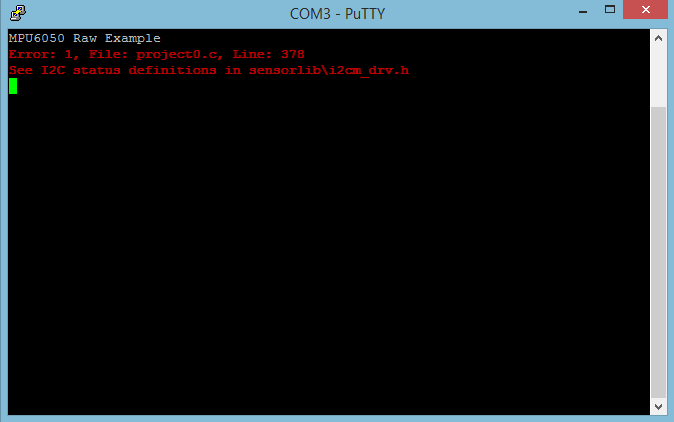
  • I found that my program stops here

    //
    // Initialize I2C3 peripheral.
    //

    I2CMInit(&g_sI2CInst, I2C3_BASE, INT_I2C3, 0xff, 0xff,
    ROM_SysCtlClockGet());

    //
    // Initialize the MPU6050 Driver, preparing it for operation.
    //
    MPU6050Init(&g_sMPU6050Inst, &g_sI2CInst, MPU6050_I2C_ADDRESS,
    MPU6050AppCallback, &g_sMPU6050Inst);

    //
    // Wait for transaction to complete
    //
    MPU6050AppI2CWait(__FILE__, __LINE__);

    I want to ask questions here!

    1. 

    void
    MPU6050AppCallback(void *pvCallbackData, uint_fast8_t ui8Status)
    {
    //
    // If the transaction succeeded set the data flag to indicate to
    // application that this transaction is complete and data may be ready.
    //
    if(ui8Status == I2CM_STATUS_SUCCESS)
    {
    g_vui8I2CDoneFlag = 1;
    }

    //
    // Store the most recent status in case it was an error condition
    //
    g_vui8ErrorFlag = ui8Status;
    }

    Why do we pass the MPU6050AppCallback to the MPU6050Init() without any parameters.

    2. I found that my program never set the g_vui8I2CDoneFlag = 1; in the MPU6050AppI2CWait

    void
    MPU6050AppI2CWait(char *pcFilename, uint_fast32_t ui32Line)
    {
    //
    // Put the processor to sleep while we wait for the I2C driver to
    // indicate that the transaction is complete.
    //
    while((g_vui8I2CDoneFlag == 0) && (g_vui8ErrorFlag == 0))
    {
    //
    // Do Nothing
    //
    }

    //
    // If an error occurred call the error handler immediately.
    //
    if(g_vui8ErrorFlag)
    {
    MPU6050AppErrorHandler(pcFilename, ui32Line);
    }

    //
    // clear the data flag for next use.
    //
    g_vui8I2CDoneFlag = 0;
    }

    Therefore my program get stuck in this MPU6050AppI2CWait() function?

    Thanks!


  • Need helps!

    Thanks!

  • Hi Happy Smile,

         Seems that you are modifying the compdcm_mpu9150 example program to work for mpu6050 now?

         How are you connecting the mpu6050 to your Tiva kit? What Tiva kit are you using anyways?

         At the MPU6050AppI2CWait, see if you get stuck at the while loop inside the C API. At the MPU9150 version this below is what the while loop is.

    //*****************************************************************************
    //
    // Function to wait for the MPU9150 transactions to complete. Use this to spin
    // wait on the I2C bus.
    //
    //*****************************************************************************
    void
    MPU9150AppI2CWait(char *pcFilename, uint_fast32_t ui32Line)
    {
        //
        // Put the processor to sleep while we wait for the I2C driver to
        // indicate that the transaction is complete.
        //
        while((g_vui8I2CDoneFlag == 0) && (g_vui8ErrorFlag == 0))
        {
            //
            // Do Nothing
            //
        }
    
        //
        // If an error occurred call the error handler immediately.
        //
        if(g_vui8ErrorFlag)
        {
            MPU9150AppErrorHandler(pcFilename, ui32Line);
        }
    
        //
        // clear the data flag for next use.
        //
        g_vui8I2CDoneFlag = 0;
    }

    - kel

  • 1. The AppCallback function:

    void
    MPU6050AppCallback(void *pvCallbackData, uint_fast8_t ui8Status)
    {
        //
        // If the transaction succeeded set the data flag to indicate to
        // application that this transaction is complete and data may be ready.
        //
        if(ui8Status == I2CM_STATUS_SUCCESS)
        {
            g_vui8I2CDoneFlag = 1;
        }
    
        //
        // Store the most recent status in case it was an error condition
        //
        g_vui8ErrorFlag = ui8Status;
    }

    But the function MPU6050Init() call MPUAPPCallback without any parameters. and the datasheet of the sensor says that g_sMPU6050Inst is a pointer that is passed to the callback function. How do we know which variable will be passed to call back function?

    MPU6050Init(&g_sMPU6050Inst, &g_sI2CInst, MPU6050_I2C_ADDRESS,
                    MPU6050AppCallback, &g_sMPU6050Inst);


    2. According to the datasheet:

    MPU6050Init Returns 1 if the MPU6050 driver was successfully initialized and 0 if it was not.

    I debug and see that the function does return 1. But after that, the program gets stuck here!

        //
        // Wait for transaction to complete
        //
        MPU9150AppI2CWait(__FILE__, __LINE__);

    void
    MPU6050AppI2CWait(char *pcFilename, uint_fast32_t ui32Line)
    {
        //
        // Put the processor to sleep while we wait for the I2C driver to
        // indicate that the transaction is complete.
        //
        while((g_vui8I2CDoneFlag == 0) && (g_vui8ErrorFlag == 0))
        {
            //
            // Do Nothing
            //
        }
    
        //
        // If an error occurred call the error handler immediately.
        //
        if(g_vui8ErrorFlag)
        {
            MPU6050AppErrorHandler(pcFilename, ui32Line);
        }
    
        //
        // clear the data flag for next use.
        //
        g_vui8I2CDoneFlag = 0;
    }

    g_vui8I2CDoneFlag = 0 and g_vui8ErrorFlag = 1. I dont know the reason why?

    Hope everybody will help me soon. I going to miss the deadline for this project!

  • Happy Smile said:

    I debug and see that the function does return 1. But after that, the program gets stuck here!

        //
        // Wait for transaction to complete
        //
        MPU9150AppI2CWait(__FILE__, __LINE__);

    Maybe, because you are using the wrong C API. I think this should be MPU6050AppI2CWait().

    If you have fixed that, the next problem would be if you are really able to communicate with MPU6050 through I2C.

    Post a schematic showing the circuitry of MPU6050 to Tiva kit, for review.

    - kel

  • Sorry! I did use the 

        MPU6050AppI2CWait(__FILE__, __LINE__);
    

    in my code

    Do you have any other idea?

  • As the previous poster has stated.  The next step is to get a logic analyzer and see what is physically happening on the I2C bus.  Saleae makes an excellent low cost ($149) device that I use.


    Dexter