Hello Guys
I downloaded and installed Tiva_C_series. My question is:
Can I use TivaWare_C_Series-2.1.0.12573 libraries with IAR embedded workbench?
This thread has been locked.
If you have a related question, please click the "Ask a related question" button in the top right corner. The newly created question will be automatically linked to this question.
Hello Guys
I downloaded and installed Tiva_C_series. My question is:
Can I use TivaWare_C_Series-2.1.0.12573 libraries with IAR embedded workbench?
Hello Radoslave
Yes, IAR embedded workbench is supported in TivaWare. Any specific questions regarding the IAR+TovaWare?
Regards
Amit
First, thank you Guys for replies.
Actually yes. How to alter the default directories for the #include files? When the compiler calls certain file, error occurs: The file can not be found. But, the file is there, just the compiler searches elsewhere. Should I get together all the drivers and headers into the current default directory (just by moving them) or there is more intelligent solution? I am asking for IAR.
Two points arise - not previously covered:
a) Have you attempted to create "your own" project? This most always fails - so much precision is required w/any IDE - unlikely that a new user will (instantly) succeed. What to do? Find the closest matching "existing project" - and gradually add your code to that. (you may gradually delete portions of that project - always testing to insure things (still) work) Reasoning behind "attaching" to an existing project - everything vital has been configured/set properly for you. There's little need for you to do all of this by yourself.
b) TivaWare (always) has newer projects, and definitions than those included w/in IAR's MCU directories. Point IAR to your TivaWare directory - yet choose the IAR version of your desired project - w/in TivaWare. If you allow IAR to default to the IAR project directories - and use latest/greatest TivaWare - you're likely to be "over-run" with errors and broken links. Note that this is no fault of this vendor - we encounter the same limitations when using 3 other maker's ARM MCUs - always best to use the ARM vendor's supplied code projects/examples - not those provided by IAR.
Thank you. But how to point IAR to TivaWare directory? I walked around all the IAR menues, bit didn't find the option that would allow me to change the default #include paths. Also, is it possible to add/remove default paths?
cb1_mobile said:Have you attempted to create "your own" project?
Your post (still) does not answer/clarify! Attempts to "create your own" are almost universally "doomed." (not to ask - how I know!)
I'd suspect that TivaWare includes "existing projects" in the IAR (.eww) format - and all such "hooks, paths, & defines" are (usually) well handled - there.
If you have tried using an, "existing project" - and still struggle - tomorrow I'll provide key screen shots from IAR "in action" but under StellarisWare. (we are prevented from using TivaWare till it gains more of the "correctness & robustness" of the long-proven StellarisWare - change for us did not prove useful nor error free - unfortunately (appears) was done more for convenience of vendor than hapless NRND M3 & LX4F users - cast from the temple...)
Hello Radoslav,
If I import a TivaWare existing project in IAR, then it compiles clean without any issue. On the pther hand as cb1 has been pointing out and what I too think is that you are attempting to create your own project?
If that is the case, the simpler solution would be import an existing example and then use it to modify your own code. I follow this approach on CCS (100+ times) and it reduces the effort of remembering small check boxes that i may miss now and then.
Regards
Amit
Thank you for the answers.
I don't mind to use existing projects provided by TivaWare, but I can't find the .eew file for IAR tool. This si a screenshot from the example directory. The example shows how to perform Blinking led program.
https://drive.google.com/file/d/0B5Y7MPFIDn9dQlpVRWRETG1EaDg/view?usp=sharing
And this is the code from example named Blinky:
#include <stdint.h>
#include "inc/tm4c123gh6pm.h"
//*****************************************************************************
//
//! \addtogroup example_list
//! <h1>Blinky (blinky)</h1>
//!
//! A very simple example that blinks the on-board LED using direct register
//! access.
//
//*****************************************************************************
//*****************************************************************************
//
// Blink the on-board LED.
//
//*****************************************************************************
int
main(void)
{
volatile uint32_t ui32Loop;
//
// Enable the GPIO port that is used for the on-board LED.
//
SYSCTL_RCGC2_R = SYSCTL_RCGC2_GPIOF;
//
// Do a dummy read to insert a few cycles after enabling the peripheral.
//
ui32Loop = SYSCTL_RCGC2_R;
//
// Enable the GPIO pin for the LED (PF3). Set the direction as output, and
// enable the GPIO pin for digital function.
//
GPIO_PORTF_DIR_R = 0x08;
GPIO_PORTF_DEN_R = 0x08;
//
// Loop forever.
//
while(1)
{
//
// Turn on the LED.
//
GPIO_PORTF_DATA_R |= 0x08;
//
// Delay for a bit.
//
for(ui32Loop = 0; ui32Loop < 200000; ui32Loop++)
{
}
//
// Turn off the LED.
//
GPIO_PORTF_DATA_R &= ~(0x08);
//
// Delay for a bit.
//
for(ui32Loop = 0; ui32Loop < 200000; ui32Loop++)
{
}
}
}
Unfortunately, The compiler doesn't allow me to compile this code.
I expect the The target board to arrive till the and of the week. I also downloaded The Code Composer Studio. Since I am beginner I am not sure which compiler to start with. By now I test my codes on IAR simulator.
Due to our contractual obligations our small group continues w/older, proven, StellarisWare. Here's the path we use which "finds" the critical .eww file:
StellarisWare/boards/ek-lm4f232
usually - the .eww file is found at the bottom of that directory. Multiple other files (related to other IDEs) are also present - but we've always found the .eww. You may employ the "Windows Search" pointed to TivaWare - if still challenged.
Using TivaWare - my hope is the file location is very similar. Amit can advise if you still have trouble.
IAR enables your use of SWD (saves 2 GPIO) & includes a "Cycle Counter" and accepts the full spectrum of ARM MCUs. (Rare to find - always - the best/brightest MCU from a single vendor...) A free "Kickstarter" version enables your creation of C programs up to 32KB. (I'd avoid the free "full version" initially - you'll need first to practice/learn - the 30 days will pass in an eye-blink - and you'll need then to load the Kickstarter...)
Hello Radoslav
I am using IAR Embedded Workbench 7.30 To import the project it would be
Project -> Add Existing Project
and then go to the respective example where it will look for the ewp file
Regards
Amit
We've a difference in the initial launch of IAR. In our case - the IAR "Workspace" which is represented by file suffix .eww - is the main (and first) concern. Indeed there are .ewp files - but these are secondary to the workspace - which is .eww.
When IAR opens it prompts for, "Recent Workspace?" - and that requires an .eww file - not .ewp...
Both our paid and Kickstarter versions of IAR require the .eww file - to operate properly.
Hello cb1
The eww files are generated when the Project is saved after being open using Project -> Add Existing Projects.
Am I missing something here?
Regards
Amit
Hi Amit,
We've both tried to alert poster to the danger of, "creating his own" project.
Now - our copies of StellarisWare have always included a premade .eww file - which (again) is the major workspace file. We do not have to "Add any Existing Projects" to view - and to select - this .eww file. (at least has long been true under StellarisWare)
We note the same holds true when we work w/other maker's ARM MCUs - always there is a "premade" .eww file - which insures that ALL projects for that targeted MCU load quickly/smartly and (most of all) correctly!
Does not the poster report inability to properly "open" a TivaWare project - under IAR? Thus - "Adding a project" to such uncertain "mix" does not seem the best/brightest means to simplify - and insure correct operation...
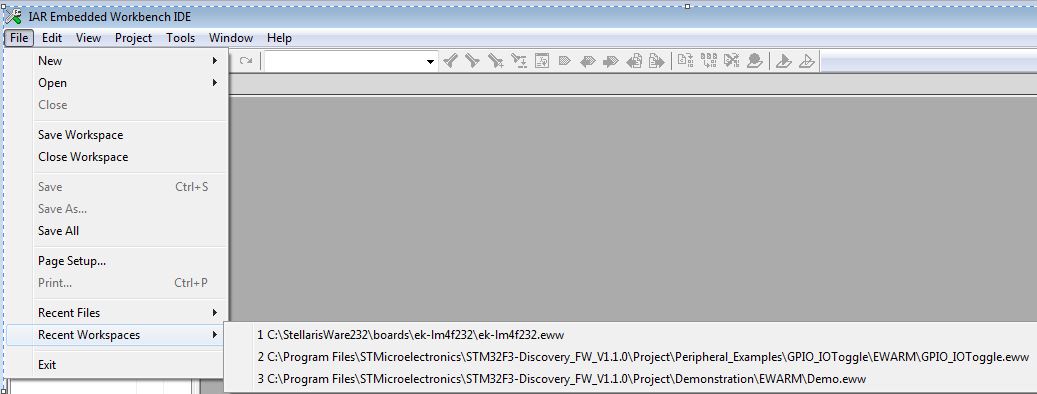
As an illustration - here's the vital, initial IAR start-up screen:
Note that IAR truly "seeks" the .eww files - as those represent the entire "workspace" and go far to insure proper operation. You may note that another's ARM files also include .eww - and (again) we added nothing to create such necessary .eww files - they arrived exactly (premade) as listed...
Projects appear of much less importance - in fact under "New" & "Open" the only choices are, "File" and "Workspace." While you may have succeeded w/"projects -> add" we believe "workspace" to be the safer - and more obvious - first action...
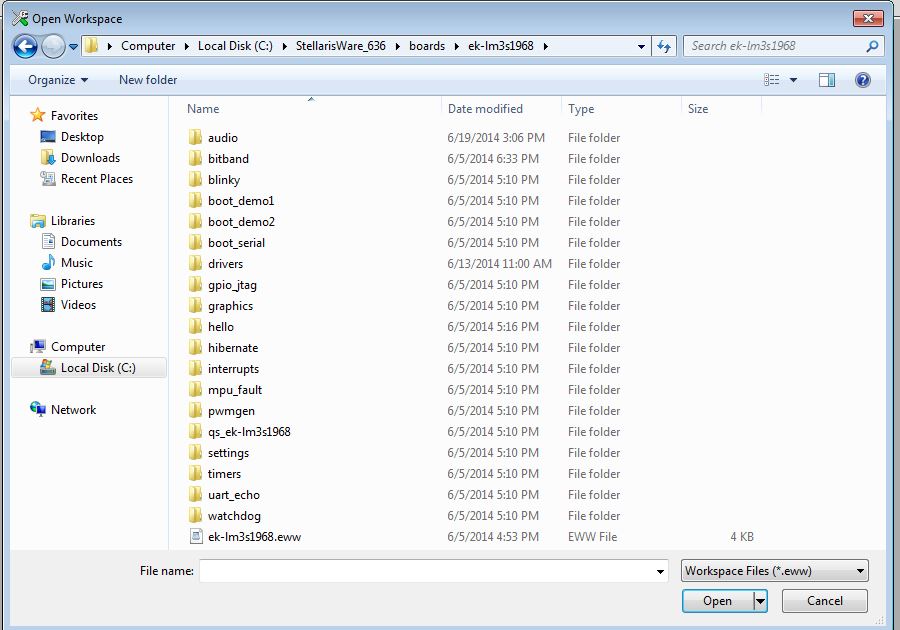
Here's one more screen-shot under IAR - this time showing the result after clicking, "Open":
Note that IAR really does seek the .eww file (we did nothing to modify this screen) - and that even our past LM3S1968 contains such a .eww file!
We did not "add to a project" nor do anything to "create" this .eww file - just as w/other ARM vendors SW - it was included as a pre-made file.
Perhaps TivaWare has "moved" from this .eww file scheme - yet each of our 3 other ARM MCU vendors all employ the .eww - seems to make sense to, "stay w/the herd." (thus our comfort w/StellarisWare - it's robustness/safety!)
Thank you Guys for guiding me.
If I understood correctly, .eww is an extension of workspace file and .ewp corresponds to project file? The better approach for beginners like me is to use premade environment as the workspace is? So, I successfully found the .eww files in my TivaWare directories. As soon as I receive my DevBoard I will try to perform a simple Blinking LED program using existing workspace.
Again, your support is greatly appreciated.
Your understanding of .eww vs. .ewp is correct.
Our belief - supported by the "opening screen's" heavy emphasis of "Workspace" - is that the workspace file (.eww) insures best & most complete operation.
You should be able to "start" IAR and examine the many choices under, "Project > Options." The .eww files should correctly, "fill in the many arcane IDE hooks/blanks" for you - thus easing & speeding your operation.
Again - start from one of the "known good" .eww workspace projects. The "workspace" should import a "group" of projects - (while "projects" alone does not) and you may then - one at a time - load & experiment with the many projects which both StellarisWare & the newer library provides.
There's much detail under IAR's "Help" and the "opening screen" also provides rich info for your study/review...