This thread has been locked.

If you have a related question, please click the "Ask a related question" button in the top right corner. The newly created question will be automatically linked to this question.

Stellaris Launchpad LM4F120

Other Parts Discussed in Thread: EK-TM4C123GXL, TM4C1233H6PM, TM4C123GH6PM

Hello

I have learned programming C with Atmega's from Atmel, but now I want to use the Cortex Chip's. So I bought the Stellaris Launchpad LM4F120 (EK-LM4F120XL).

I want to use GPIO, I2C, USART and I want to read PWM (RC Signal) Signal's on this chip.

But step by step:

I created a "Hello World" - Programm to Test the Board.

How can I use GPIO and I2C now.

Are the Libraries for that board, that I can use??

Thank you for your help

Marcel

  • Hi Marcel,

    Marcel de Vries said:
    Stellaris Launchpad LM4F120 (EK-LM4F120XL).

         The Stellaris Launchpad has been long re-branded to Tiva Launchpad.

         I have given you advice at your post at CCS forum for learning Tiva Launchpad. Anyway, you can also learn from other Tiva Launchpad tutorial elsewhere in the internet.

    Marcel de Vries said:

    How can I use GPIO and I2C now.

    Are the Libraries for that board, that I can use??

    You can learn some basic GPIO and I2C codes at Tivaware Peripheral Driver Library User's Guide doc which can be found at Tivaware docs folder. There are also example I2C codes at "\\examples\peripherals\i2c", that you can learn from.

    Beside those above mentioned do a search in the forum for GPIO and I2C related post. You can learn from those posts.

    - kel   

    Edited . . .

    Search at the TM4C forum.

    Also, next time post Tiva Launchpad related post at TM4C forum.

    FYI, Stellaris MCU's are now NRND(Not Recommended for New Designs)

    - kel

  • Where is this Tivaware folder??

    Do I have to install something for that?

  • Hello Marcel

    You can download it from

    http://www.ti.com/lsds/ti/microcontrollers_16-bit_32-bit/c2000_performance/control_automation/tm4c12x/tools_software.page#tivaware

    Regards

    Amit

  • Marcel de Vries said:
    Where is this Tivaware folder??

     Hi Marcel, before to starto learn old LX4 series remember and learn about they where NRND (Not Recommended for New Design), so if your is an occasional development no way but if you wish to do some production then switch to TIVA instead.

     Silicon can be equivalent to a new part,  old LX4 120 has a new counterpart but USB OTG and other feature present on new Launchpad where not present on old Launchpad.

     If you wish migrate project refer this forum thread:

    http://e2e.ti.com/support/microcontrollers/tiva_arm/f/908/p/258781/907587.aspx#907587

    you can find all information you need and also on second page broken link of http://www.ti.com/lit/an/spma050a/spma050a.pdf migration document reported again here.

     Here an OVERVIEW of family and direct substitute of LX4F120nnnn was on old LAUNCHPAD board

     Click on the link and you get all information you need.

     We encourage you to buy new TIVA launchpad if you don't wish to do test before port on particular code.


  • Marcel de Vries said:

    I want to use GPIO, I2C, USART and I want to read PWM (RC Signal) Signal's on this chip.

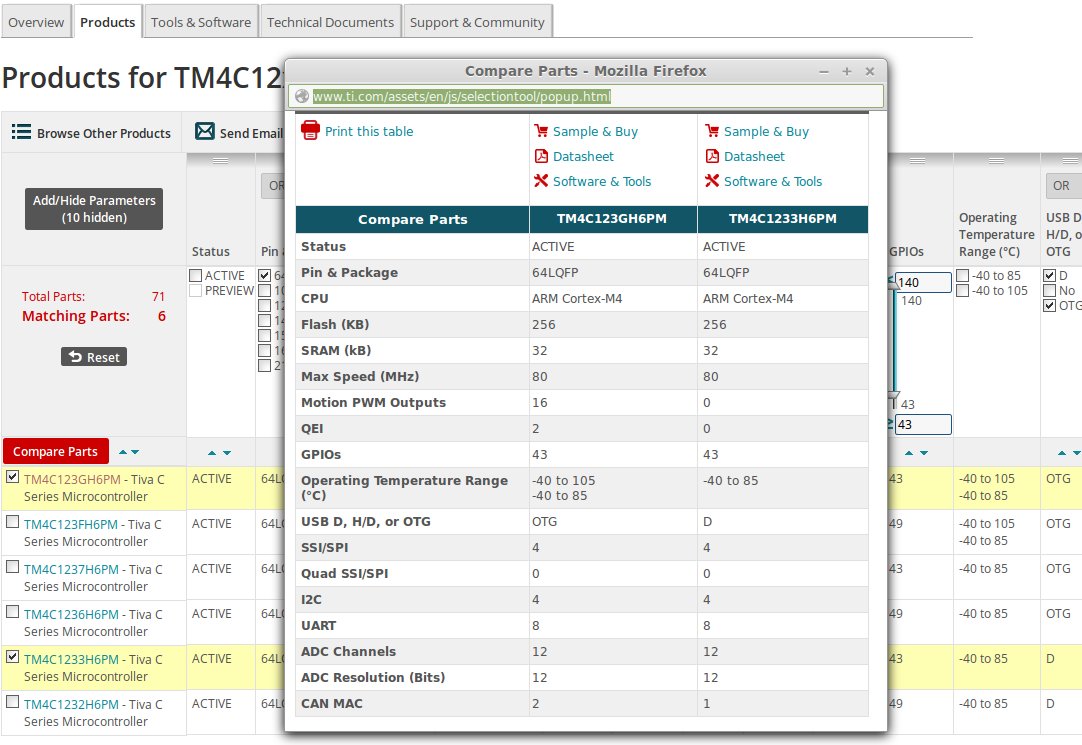
     Marcel, when you get more aquainted with family then you can choose chip at a glance but for now take an eye to this picture comparing new device to old device, also if you got to link of EK-LM4F120XL you get more information on new Launchpad, old miss PWM Motion, 1 CAN Channel USB is device only

     NEW Launchpad vs OLD Launchpad

  • I have downloaded these Libs now.

    I want to use them in a project so I included them, but I have only linked to the file instead of copying, because these files have includes again.

    But how can I include those files now, that I can use them???

    Thank your for the tip Roberto.

    Because those are Tiva Board I can also use the same Libs. Right?? But I have to create a project with the right device.

    Did you for example mean this Launchpad?

  •  About CCS, I suppose you installed latest version 6.01, if you are using under Linux no problem but on Winzz you MUST have all residing on same drive.

     Install TIVAWARE latest 2.1 version from link Amit suggested and install it, then on CCS use project import, choose one you like, remove main and insert your code or better customize one.

     Getting a project working from scratch is a real nightmare also for experienced programmers!!

     You can find on TIVAWARE base folder the directory BASE/ti/TIVAWare_2_1/examples/boards/ek-tm4c123gxl

     you can find examples project you can import and test then customize to learn about. BASE is where tivaware is instaalled, in my case /opt/ti in windows C:/TI or similar.

     Remember choose examples with peripheral on silicon.

  • Sorry for the dumb question, but I cant find TIVAWARE 2.1 for my Board: EK-LM4120XL or do I have to buy this Board?

  • TivaWare is for Tiva.

    LM4 is a stellaris so it's normal you can't find a board example for it in the TivaWare folder.

    There are some differences in the MCU itself (from Stellaris to Tiva) and probably in the board but this one seems more like yours, no? http://www.ti.com/tool/dk-tm4c123g

  • Hi,

    See the equivalent names in the picture below:

    Petrei

  • Luis Afonso said:
    There are some differences in the MCU itself (from Stellaris to Tiva) and probably in the board but this one seems more like yours, no? http://www.ti.com/tool/dk-tm4c123g

     No Luis, that board was based on LM4F232 and become 123 series EDIT  144 Pin [100 Pin], the old Stellaris version was different has only analog connector, the new one TIVA based also carry CAN drivers and cost 149US$ it is not a launchpad too.

    The LX120  Stallaris launchpad is same as TIVA 123 Launchpad, you can desolder old LM/LX4f120HQ solder TM4G123GH6 and you have the same version of new one with OTG dual CAN, QEI and PWM Motion.

    Example of 123 can be used on old 120 series till they don't use no implemented resources.

     So you can use one CAN not QEI nor PWM Motion nor USB Host mode.

  • Roberto Romano said:
    o Luis, that board was based on LM4F232 and become 123 series 100 Pin, the old Stellaris version was different has only analog connector, the new one TIVA based also carry CAN drivers and cost 149US$ it is not a launchpad to

    When i searched in google to check which board it was it appeared the evaluation kit (the expensive one)

    (hides in corner of shame) 

  • Marcel de Vries said:
    Sorry for the dumb question, but I cant find TIVAWARE 2.1 for my Board: EK-LM4120XL or do I have to buy this Board?

      Hi Marcel, not really, if you don't use DUAL CAN, QEI, OTG USB or PWM Motion then LX120 is OK so you can test all example that come for EK-TM4C123GXL, the board you pointed to.

     Every case if you installed TIVAWARE try do this:

     open CCS, confirm workspace or open a new one,

     file -> import

     Select on pane code composer studio -> CCS Project -> Next

     Select browse and open the base where you installed TIVAWARE, navigate directory to Examples board ek-tm4c123gxl

    select OK

    discovered project populate with found project

     Select for example Blinky and QS-rgb

    Check -> "automatically select referenced..." checkbox

    check -> "copy project into workspace" checkbox

     press button finish on bottom of popup.

    Now you have these two project on your workspace, try select qs-rgb, compile and try single step or run.

     If doesn't work tell again, I don't have at hand one old lx120 to test if it run as is or require some change to.

  • Luis Afonso said:

    When i searched in google to check which board it was it appeared the evaluation kit (the expensive one)

     Hi Luis, this is a now picture of old Stellaris equivalent to the one you pointed to, see connector on left has just 6 screw, and no can signal, the new one has two more screw CANH, CANL and is marked TIVA, processor is the same with name changed.

     Launchpad when stellaris was got away get upgraded from LX120->TIVA

    LM4F120H5QR -> TM4C1233H6PM pin to pin replacement and functional equivalent.

     As premium new TIVA LP got equipped with a top series of 64 pin TM4C123GH6PM. So old name for this was LM4F230H5QR -> TM4C123GH6PM and the Launchpad are same PCB with just silkscreen and few variant and new <TIVA> processor TI claim be same silicon.

     On new TIVA LP also the ICDI is a TM4C123GH6PM where it was more appropriate a smaller 1233 member. I suppose this is the most popular one.

  • Thank you very much for the extended clarification Roberto

  • Luis Afonso said:
    Thank you very much for the extended clarification

    EDIT:board->box

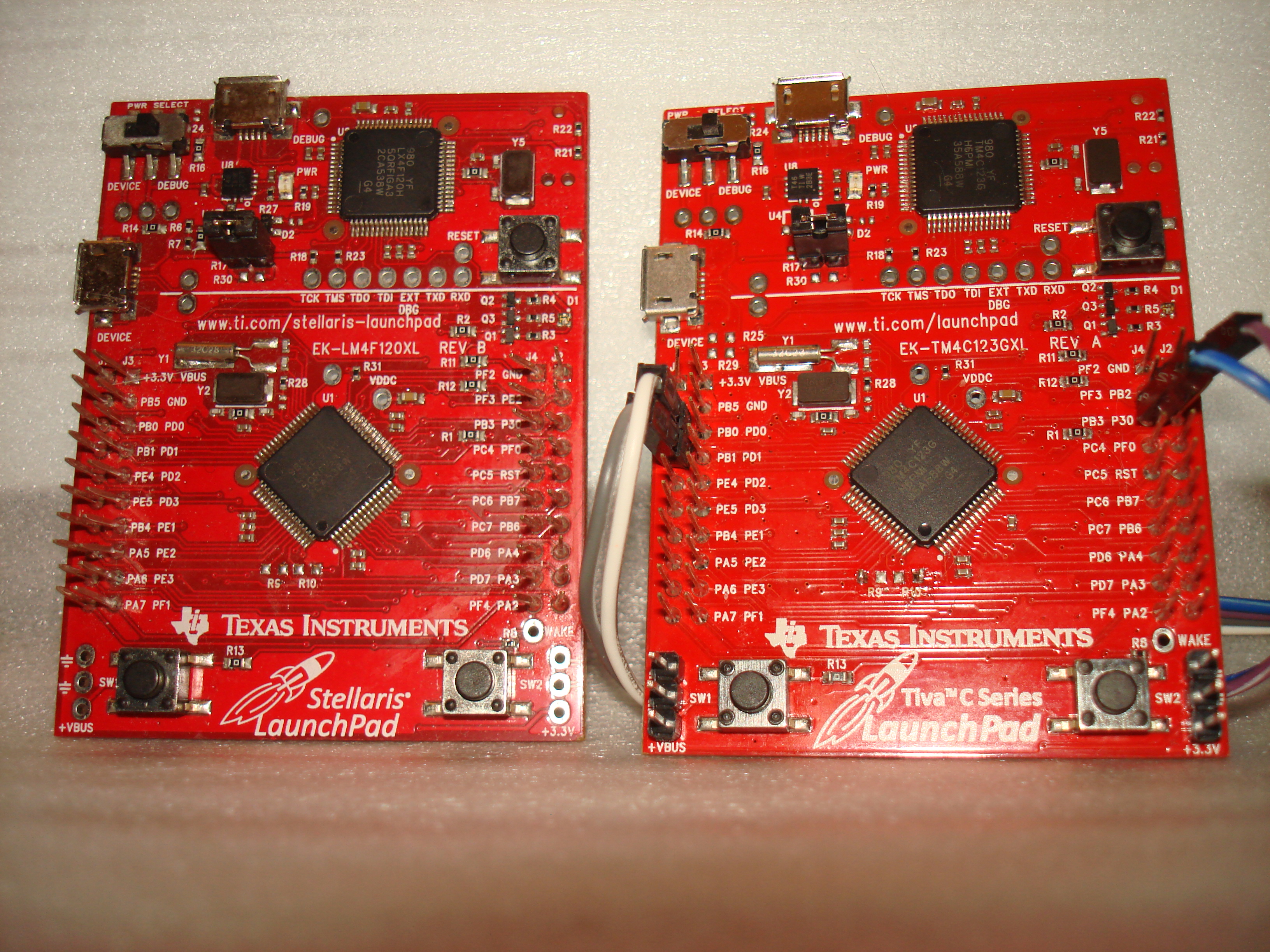
     I got an LX120 board from cardboardbox, so here the final overkill a comparison picture of old and new hand in hand.

     Of course zero resistor are removed from Stellaris and "tomb stoned" (CB1 copyright) on TIVA.

     I think this can clear all other doubt how old launchpad was.

  • Roberto,

    If one of those truly is "cardboard" - you have job in "special effects Dept". - most any movie studio!

    While we appreciate your kind mention - "tombstone" - though superbly descriptive - was invented/copyrighted by others - we (may) have been first to use it here... 

    Certain of our clients - having been badly burned by those (delightful) 0-ohmers - have simply "Drilled them out" to prevent any chance of their (mistaken) re-seating...

  • cb1- said:
    If one of those truly is "cardboard" - you have job in "special effects Dept". - most any movie studio!

     Just to be gentleman, I left trace of my error, ooopps :D

    cb1- said:
    Certain of our clients - having been badly burned by those (delightful) 0-ohmers - have simply "Drilled them out" to prevent any chance of their (mistaken) re-seating...

     I prefer them left on military  "stand up" to educate them prevent damages.

     In answer to your observation a similar tool has to be installed both part to signal one to other failures too:

    http://www.thinkgeek.com/product/8a0f/?cpg=gdrkp1&gclid=CI3n7PLVr8ICFXQatAod4goARg

     (make humour pleasure)