This thread has been locked.

If you have a related question, please click the "Ask a related question" button in the top right corner. The newly created question will be automatically linked to this question.

Tm4c129x Dev Board be used for debug TM4c129XNCZAD tatget

Other Parts Discussed in Thread: TM4C129XNCZAD

Dear all  

i have one Tm4c129x develop board.  i want to use it to debug my target with  TM4c129XNCZAD cpu.

after studying the document about TM4C129X Development Board User's Guide. i still have some question.

1. page 8 :The on-board ICDI can also be used to debug external boards using the ARM standard 20-pin connector (J1) and pulling all the shunts from J3.

   it means i use flat cable to connect the Tm4c129x develop board and our target .Pulling all the shunts from J3? every pin in J3?

   how did the ccs tool distinguish which cpu,Ev board or our target, i want to debug ?

2. in this mode we call debug out?

3. what is your suggestion for debug in our target ?  standard  ARM  jtag(what model ?) or on board ICDI or EK-TM4C123GXL  if i want to use LMFLASH to        program.

thx for your response 

BIZLINK .etc 

best regard 

Alex wang 

  • Hello Alex

    Yes, that is called debug out and you would need to remove every shunt pin out (UART exempted unless you need COM port function). From the CCS tool it only needs to know the emulator (ICDI) and target (end device). It does not look at any other signals except the JTAG,

    Also you would need to use a 20-pin ARM Header as the documentation mentions

    Regards
    Amit
  • Dear Amit:

    thx for your response first .

    1.could you explain debug out mode more in schematic ? if you have picture for shunt J1 and J3 , it will be perfect

    2. could you explain external debug mode(ads 100,standard arm jtag) more in schematic?  if you have picture for jump setting  J1 and J3 , it will be perfect

    best regards 

    Alex wang

  • Hello Alex

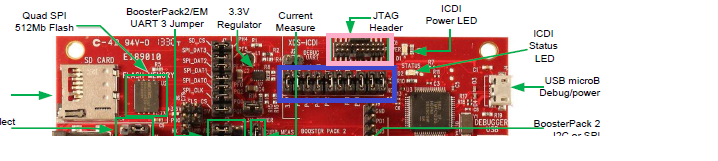
    I don't have a picture but, for debug out, there are the jumpers (shown in blue) that need to be removed. Then you can use the JTAG header (shown in pink) to connect to your board. I had done it with plain wires (but did not take a pic)

    Regards

    Amit

  • Dear Amit :

    thx for your concern first 


    according to your explanation , i make the debug out mode list step as follow 

    1. use ARM jtag flat cable to connect J1 and my target.

    2. remove all J3 jumper 

    3. shunt  TMS(J3.4 to J1.2 ) ,TCK(J3.6 to J1.4 ),TDO(J3.8 to J1.6),TDI(J3.10 to J1.8 ),RST(J3.12 to J1.10 ),UTX(J3.14 to J1.14 ),URT(J3.16 to J1.16 )

         except the 7 pins ,what pins i need to shunt ? do i need to shunt (J3.2 to J1.1)? J1(3,5,11,13,15,17) to ground?

    best regards 

    alex wang

  • Hello Alex

    J3 and J1 are already connected. So you do not need to shunt the pins. The ARM Jtag cable can be connected to the target and the DK is ready to work as debugger (though a pretty costly one).

    The other side of J3 is not going to be connected so it is OK to keep it floating (the internal pull of the TM4C129 would take care of some protection.

    Regards
    Amit
  • Dear Amit 

    thx for your concern first . 

    Finally our company design use the TM4C123 mcu for our ICDI to debug our develop boards with TM4C129X cpu as the schematic (UsersGuide_SPMU360) Ti suggestion 

    1. if I want to use TM4C123 to be ICDI  , we need the ICDI firmware? how to program ICDI firmware to TM4C123 ?  by lmflash ICDI firmware update?

    2  what is the firmware version in TM4C123 when factory produce ? Could we ask ti distribution program ICDI firmware when we get the new TM4C123  mcu ?

    best regards 

    alex wang 

  • Hello Alex

    TI does not distribute the ICDI binary. use of it is limited only to the LaunchPads and EVM and TI legal disclaimer will not provide any warranties outside the LP and EVM

    Regards
    Amit