This thread has been locked.

If you have a related question, please click the "Ask a related question" button in the top right corner. The newly created question will be automatically linked to this question.

Tiva API libraries - basic question

Other Parts Discussed in Thread: TM4C123GH6PM, TM4C1230C3PM, ENERGIA

Info: Using Keil uVision5, Tiva C series development board with a TM4C123GH6PM microcontroller

A really newbie question, unfortunately. I've never really fully understood including different files in the project directory.

All I am trying to do is make a basic SPI interface. I originally tried to do this by following the instructions in the data sheet by direct manipulation of the registers but I could never get anything working. It was suggested on here that I use the API libraries instead and this is what I have attempted to do, but I cannot get the code to compile because it always returns various errors. I added the ssi and systctl .h and .c files  to the project directory and included them in the source group. Then I added all the files specifically included in the ssi and systcl .c files to the project directory, so that they were actually referencing something present in the directory and now I'm stuck.
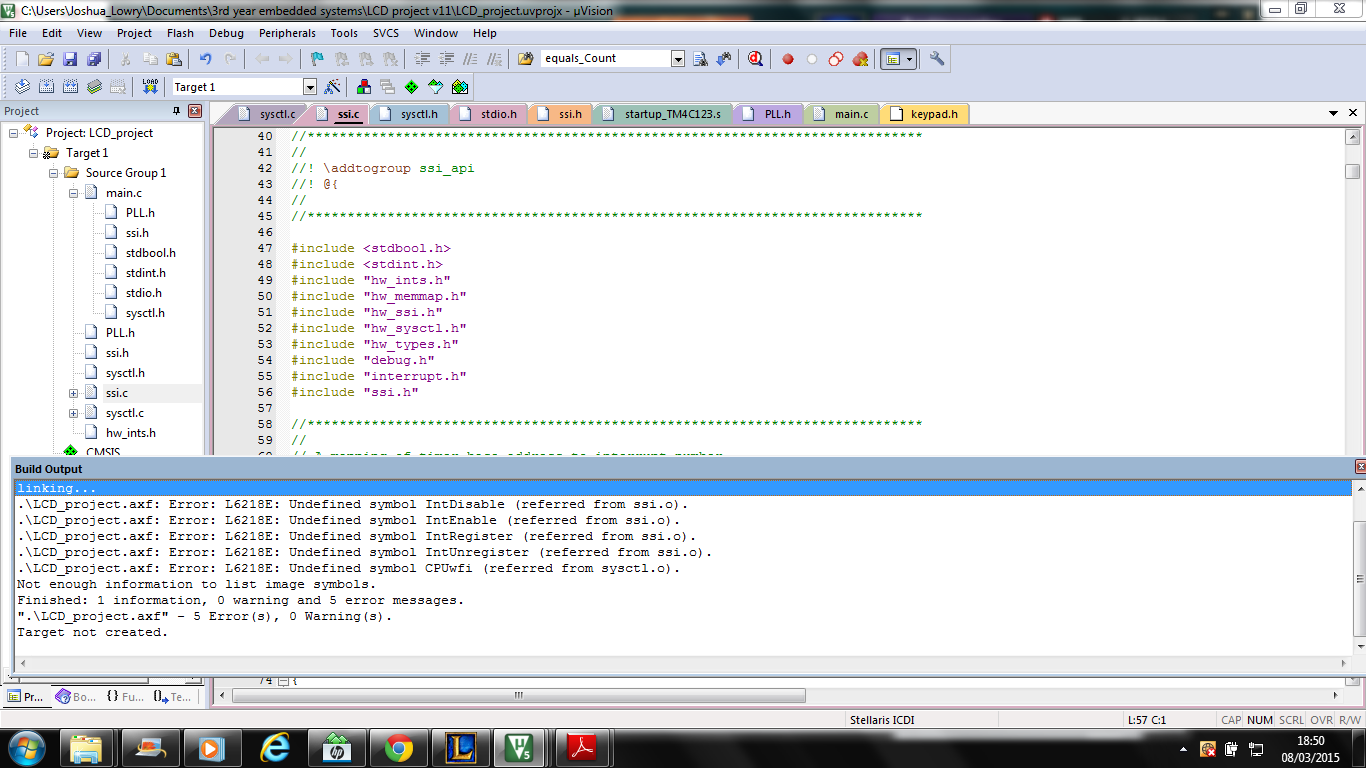
If you can't see the text, it says:

.\LCD_project.axf: Error: L6218E: Undefined symbol IntDisable (referred from ssi.o).
.\LCD_project.axf: Error: L6218E: Undefined symbol IntEnable (referred from ssi.o).
.\LCD_project.axf: Error: L6218E: Undefined symbol IntRegister (referred from ssi.o).
.\LCD_project.axf: Error: L6218E: Undefined symbol IntUnregister (referred from ssi.o).
.\LCD_project.axf: Error: L6218E: Undefined symbol CPUwfi (referred from sysctl.o).
Not enough information to list image symbols.
Finished: 1 information, 0 warning and 5 error messages.
".\LCD_project.axf" - 5 Error(s), 0 Warning(s).
Target not created.

I didn't even add a file ending in '.o' to the project directory so i am really confused as to where this comes from. I am totally stumped as to what to do next.


Am I at least on the right tracks here or should I just scrap it all and start again? If so, if any of you could spare the time, could give me step by step instruction on how to use the Tiva API libraries or direct me to somewhere that tells me, because I can't find anything on it.

  • Hello Joshua,

    The drivelib has to be added during the link phase, The functions are precompiled and kept in a library file

    Regards
    Amit
  • Hi Amit,

    Could I ask what you mean by adding during the link phase? I am unfamiliar with what this means.

    Thanks
    Josh
  • When the project is compiled to a binary, the implementations of all the API functions (that are referenced to by the .h files you #include) need to come from somewhere. TivaWare includes a pre-built binary library file that needs to be included in the build. I cannot help you with uVision as I haven't worked with it - but I'm wondering whether you have tried to build & run any of the included example projects? They should have the correct settings already in place.

  • Are you talking about the .c file every .h file seems to come with that includes the function definitions with the body of code that is implemented each time it is called? Because I have included those in the source group. I opened one of the projects but when I did, immediately upon opening it, I received an error message saying that the project was "referencing devices, files or libraries that weren't installed" and said that I should download "Third party device support for Texas Instruments: TM4C1230C3PM" which is odd because that's not even the device I am using. I should also add that the project is for uvision4 while I am using uvision5. It also gives no clear indication as to where I can get this software, I do indeed need it. I have done a Google search but it hasn't returned anything definite and I don't want to download any software unless I know it's what I am looking for.

    Do you know what this pre-built binary library file would be called?
  • Hello Joshua,

    Have you installed the TivaWare full release? If yes, then you can import the example project to your workspace in Keil.

    The pre build binary file driverlib.lib are all the driverlib files that you are referring to in your project already compiled. This is kept in C:\ti\TivaWare_C_Series-2.1.1.54\driverlib\rvmdk directory and must be added at linker time.

    Regards
    Amit
  • Thank you very much for your reply. I think it has brought me a step closer to getting the SPI working. I added the library file to the project directory and included it in the source group and the code now compiles and runs. However, when I look at the clock and dataTx pins PA2 and PA5, there is no output. I have been trying to solve this all day and I once again I am completely stumped as to what could be the cause. I even tried running the example code given in the TivaWare Peripheral Driver's Library User's Guide. Could you take a look at my source code?

    #include <stdio.h>
    #include "PLL.h"
    #include <stdbool.h>
    #include <stdint.h>
    #include "ssi.h"
    #include "sysctl.h"

    #define GPIO_PORTA_DATA_R (*((volatile unsigned long *)0x400043FC))
    #define GPIO_PORTA_DIR_R (*((volatile unsigned long *)0x40004400))
    #define GPIO_PORTA_AFSEL_R (*((volatile unsigned long *)0x40004420))
    #define GPIO_PORTA_PUR_R (*((volatile unsigned long *)0x40004510))
    #define GPIO_PORTA_DEN_R (*((volatile unsigned long *)0x4000451C))
    #define GPIO_PORTA_CR_R (*((volatile unsigned long *)0x40004524))
    #define GPIO_PORTA_AMSEL_R (*((volatile unsigned long *)0x40004528))
    #define GPIO_PORTA_PCTL_R (*((volatile unsigned long *)0x4000452C))

    #define SYSCTL_RCGC2_R (*((volatile unsigned long *)0x400FE108))
    #define SYSCTL_RCGC1_R (*((volatile unsigned long *)0x400FE104))

    //SSI API functions

    extern void
    SSIConfigSetExpClk(uint32_t ui32Base,
    uint32_t ui32SSIClk,
    uint32_t ui32Protocol,
    uint32_t ui32Mode,
    uint32_t ui32BitRate,
    uint32_t ui32DataWidth);

    extern void
    SSIClockSourceSet(uint32_t ui32Base,
    uint32_t ui32Source);

    extern void
    SSIDataGet(uint32_t ui32Base,
    uint32_t *pui32Data);

    extern int32_t
    SSIDataGetNonBlocking(uint32_t ui32Base,
    uint32_t *pui32Data);

    extern void
    SSIDataPut(uint32_t ui32Base,
    uint32_t ui32Data);

    extern int32_t
    SSIDataPutNonBlocking(uint32_t ui32Base,
    uint32_t ui32Data);

    extern void
    SSIDisable(uint32_t ui32Base);

    extern void
    SSIEnable(uint32_t ui32Base);

    extern uint32_t
    SSIClockSourceGet(uint32_t ui32Base);

    extern uint32_t
    SysCtlClockGet(void);

    //Global Variables
    unsigned long delay;

    //a variable to make sure the system clock is at expected speed
    int32_t num = 0x00;

    int main(void)
    {

    //set PLL (This has already been verified to work)
    PLL_Init();
    //SysTick_Init has als been verified to work but the SysTick is not used in this program
    SysTick_Init();

    //initialisation Port A
    SYSCTL_RCGC2_R |= 0x00000001;
    delay = SYSCTL_RCGC2_R; //wait for clock

    //CONFIGURE GPIO PINS
    SYSCTL_RCGC1_R |= 0x00000010; //1. EN and provide clock to SSI module 0
    SYSCTL_RCGC2_R |= 0x00000001; //2. EN and provide clock to GPIO module on port A

    // According to the datasheet, for SSI0, SSIOClk is PA2, SSIOFss is PA3, SSIORx is PA4 and SSIOTx is PA5

    GPIO_PORTA_AFSEL_R |= 0x3C; //3. EN alternative functions on PA 2-5
    GPIO_PORTA_PCTL_R |= 0x00222200;//4. Configure PMCn fieldsin the PCTL register to assign SSi signals to pins

    SSIDisable(0x40008000); //SSI must be disabled before any changes made to it, according to datasheet
    SSIConfigSetExpClk(0x40008000, SysCtlClockGet(), SSI_FRF_MOTO_MODE_0, SSI_MODE_MASTER, 2000000, 8);

    //configure SSI 0, 66.6MHz system clock supplied to SSI 0, config for freescale SPI mode with Polarity=0 and Phase=0, config as master divice, bit rate is 2Mb/s, 8 bits transferred per frame

    num = SysCtlClockGet(); //debug mode shows this as 66.6MHz
    SSIEnable(0x40008000); //Enable SSI 0

    while(1)
    {
    SSIDataPut(0x40008000,0x000000C3); //repeatedly transmit 0xC3
    }

    }
  • Hello Joshua,

    Extremely bad idea to mix Direct register access macro with TivaWare API's. Why not move the entire to TivaWare. That will simplify the code and make it a lot readable. Please visit one of the existing examples in TivaWare

    Regards
    Amit
  • Hi Amit,

    Thanks for the advice. I have done this. I have removed all of the macros in the main.c file and replaced it with TivaWare functions. My .h file that configures the PLL so that the system clock runs at 66.6MHz still uses them, but they are taken from tm4c123gh6pm.h instead. This took me a while and I'm sorry to keep bothering you, as I am more used to arduino so this is a big step for me.  I looked at the example given to initialise the SSI and I copied it directly. Then I looked at the GPIO initialisation example for enabling UART and I changed it so that it enables SSI 0 instead.

    The code compiles correctly but in debug mode, as I step through each line, it won't go past the GPIOPinTypeSSI function which configures the different pins for use of the SSI. Having done this, when I stop the debug session the startupTM4C123.s tab shows me a hardfault handler. Do you have any idea what could be causing this? Many thanks.

    #include <stdio.h>
    #include "PLL.h"
    #include <stdbool.h>
    #include <stdint.h>

    #include "ssi.h"
    #include "sysctl.h"
    #include "gpio.h"
    #include "tm4c123gh6pm.h"
    #include "pin_map.h"

    //SSI API functions

    extern void
    SSIConfigSetExpClk(uint32_t ui32Base,
    uint32_t ui32SSIClk,
    uint32_t ui32Protocol,
    uint32_t ui32Mode,
    uint32_t ui32BitRate,
    uint32_t ui32DataWidth);

    extern void
    SSIClockSourceSet(uint32_t ui32Base,
    uint32_t ui32Source);

    extern void
    SSIDataGet(uint32_t ui32Base,
    uint32_t *pui32Data);

    extern int32_t
    SSIDataGetNonBlocking(uint32_t ui32Base,
    uint32_t *pui32Data);

    extern void
    SSIDataPut(uint32_t ui32Base,
    uint32_t ui32Data);

    extern int32_t
    SSIDataPutNonBlocking(uint32_t ui32Base,
    uint32_t ui32Data);

    extern void
    SSIDisable(uint32_t ui32Base);

    extern void
    SSIEnable(uint32_t ui32Base);

    extern uint32_t
    SSIClockSourceGet(uint32_t ui32Base);

    extern uint32_t
    SysCtlClockGet(void);


    //GPIO API functions

    extern void
    GPIOPinTypeSSI(uint32_t ui32Port,
    uint8_t ui8Pins);

    extern void
    GPIOPinConfigure(uint32_t ui32PinConfig);

    //Global Variables

    unsigned long delay;

    //a variable to make sure the internal oscillator is at expected speed, given an arbitrary initial value, to be read in debug mode
    int32_t num = 0x2C;

    char *pcChars = "SSI Master send data.";
    int32_t i32Idx;

    int main(void)
    {

    PLL_Init();//already verified to work. Makes system clock run at 66.6MHz
    SysTick_Init();//already verified to work, though SysTick timer isn't used in this program

    //
    // Configure GPIO port A for SSI module 0
    // SSIOClk is PA2, SSIOFss is PA3, SSIORx is PA4 and SSIOTx is PA5

    GPIOPinTypeSSI(0x40004000, GPIO_PIN_2 | GPIO_PIN_3 | GPIO_PIN_4 | GPIO_PIN_5);// Configure PA 2, 3, 4 and 5 to use SSI 0


    //DEBUG MODE WILL NOT STEP BEYOND THIS LINE


    GPIOPinConfigure(GPIO_PA2_SSI0CLK);//Enable SSI functionality on those pins
    GPIOPinConfigure(GPIO_PA3_SSI0FSS);
    GPIOPinConfigure(GPIO_PA4_SSI0RX);
    GPIOPinConfigure(GPIO_PA5_SSI0TX);

    //
    // Configure the SSI.
    //

    SSIConfigSetExpClk(0x40008000, SysCtlClockGet(), SSI_FRF_MOTO_MODE_0,
    SSI_MODE_MASTER, 2000000, 8);

    //
    // Enable the SSI module.
    //

    SSIEnable(0x40008000);

    //
    // Send some data.
    //

    while(1)
    {
    i32Idx = 0;
    while(pcChars[i32Idx])
    {
    SSIDataPut(0x40008000, pcChars[i32Idx]);
    i32Idx++;
    }
    }
    }

  • Hi Joshua,

    I'd suggest looking at the TivaWare API even for setting the PLL. Look at SysCtlClockSet.

    I bet the reason why you're getting the hard fault is that you're accessing the SSI peripheral registers (through TivaWare API functions, though) without having enabled the clock to said peripheral. This is done with SysCtlPeripheralEnable. The same goes for the GPIO port that you access with GPIOPinTypeSSI.

    Another thing that pops up is your declaration of the TivaWare function prototypes - this should not be necessary, the only thing you need to do is to include the appropriate driverlib .h file - for example ssi.h.

    Now, don't get me wrong, but I'm intrigued by how have you been able to miss so much of the very basic stuff that's essential here. What's your "entry path" to the Tiva series? When I started with the previous version of the M4 LaunchPad (when the Tiva line was still called Stellaris), I spent one weekend watching through the provided lab videos & reading through the TivaWare driverlib user's guide - the links were provided in the leaflet included in the LaunchPad box. That way, most of the stuff you've been stumbling on now was not totally new to me when I actually started coding.

    One more thing pops up from your code - you use SysCtlClockGet() to supply the clock rate to the SSI module initialization function - that's the correct way per the documentation, but unfortunately SysCtlClockGet is broken in the latest TivaWare release (yes, the one dated feb-2014 - shame on TI!) and it will return a wrong value at least if your clock is 80 MHz. With SSI it's not fatal, but just so you know. I've spent my fair share of time scratching my head with CAN timings because of that. As a workaround you will need to manually supply the correct value. SysCtlClockSet works as intended, though.

  • Hello Joshua,

    The diagnostic tip would be equally useful

    e2e.ti.com/.../374640

    Also as you are starting on using a non-Arduino platform I could suggest using the ssi example as is.

    Regards
    Amit
  • It works now, thank you both very much for helping me out.

    This is for a project for university. Two years ago we used arduino to create a number of different projects like digital clocks and distance sensors. With arduino this was made extremely easy, as I'm sure you can imagine. Then the previous year we were introduced to the Tiva boards in order to learn about direct register manipulation, essentially so we would no more about what was going on 'behind' all the functions we were calling from the arduino library and to learn more about microcontroller architecture. We used them for about 3 months to create a calculator, using only direct register access macros. The Tivaware API was never mentioned and I personally had never even heard of it until a week ago. There was never really a need to use multiple different files for one code until now so I never learned all the procedures for it. Now I am doing an individual project and I chose to use the Tivaboard because I was somewhat familiar with it, despite having never heard of the Tivaware API. I would like to learn more though, could you recommend any resources?

  • Hello Joshua

    Analogous to Arduino is Energia and it runs on multiple TI platforms. It has a debug interface as well via CCS.

    Regards
    Amit
  • As Amit suggested there's Energia.
    But if you want to take all the power out of the Tiva you should stick with Tivaware or maybe do a combo since Energia does the job for most projects.
    I do Energia for the MSP430G launchpad. I don't intent to learn how to program the MSP430 in registers, I normally use it for small projects in which I require a cheap DIP.
    And Energia can be really useful to give morale boost. I learned how to use the Tiva with Energia. Started making "hibrid" projects with Tivaware and Energia, things I didn't know how to use with Tivaware I did with Energia and so that way I slowly learned how to use Tivaware. But if you go with Energia I advise you to port the projects into CCS, there's that feature. CCS as you may know allows you to use powerful debug features unlike a Arduino like IDE.

    Normally in classes like you referred they want you to use direct register access, the purpose is learning how to use them, like you now you rarely use assembly in practice but it's so useful to learn (at least IMO. Though I think it's very wrong not referring libraries like Tivaware which make it more easy and more safe (no wrong register accessing) to code.
    You can learn more in how to use Tivaware here, there's also reference to TI guides :
    sites.google.com/.../tiva-tutorials
  • I just had same issue. I was cleaning up my project and I mistakenly removed: cpu.c and interrupt.c. I didn't think I was using either, but sysctl uses them. Once I added them back to my source file group in Keil, it was all fixed. There was no need to link in driverlib.lib.