This thread has been locked.

If you have a related question, please click the "Ask a related question" button in the top right corner. The newly created question will be automatically linked to this question.

Measuring the time for each function execution

Other Parts Discussed in Thread: TM4C1294NCPDT

hi everyone,

I am working on TM4C1294XL Lauchpad. I want to measure the time for each function execution. I followed the steps to setup the profile clock in ccsv6. But I couldn't enable the clock, its not highlighted. Is it possible to measure the time using profile clock for this lauchpad. can you please suggest me any other methods are there to measure the time for each function execution or interrupt handler execution.

Thanks in advance.

Regards,

Krithika.S

  • May I suggest that the fast/free download of IAR's Kickstarter for ARM includes a built-in timing function - which fully automates - just what you seek!      This function works by "cycle counting" from program start to any function's "entry" as well as "exit" from that function.   

    If you wish - I can post a screen shot showing the clear implementation & ease of use. Notable is that no "execution penalty" is extracted - and you're freed from the necessity to write special code - just to make such measures.   

    Should you adopt this route - suggest that you download the 32KB - "code size limited" version - which has no expiration date.      Another version - w/out code size limit is available - but restricts use to 30 days - and then ceases operation.       (our observation - that time flies by - use the 32KB version...)

  • Thanks.. ya you can post the screen shots...
  • I need to measure the time for function execution. for that i am trying to set the profile clock in ccsv6, its not highlighted. is it possible to do interrupt profiling using profile clock...
  • Again - our tech firm uses a (real) IDE - not single-vendor restricted one.

    IAR - even the free, download, KickStarter version automates this measurement - rendering it quick/easy.

    We've no experience (nor any desire) to move to lesser - and so grossly limited - an IDE - thus I've no advice beyond what's offered...

  • cb1- said:
    IAR - even the free, download, KickStarter version automates this measurement - rendering it quick/easy.

    This thread https://e2e.ti.com/support/microcontrollers/hercules/f/312/p/287534/1004618#pi239031349=2 contains IAR screen shots for a LX4F Stellaris MCU which show the Cycle Counter in the CPU Registers view.

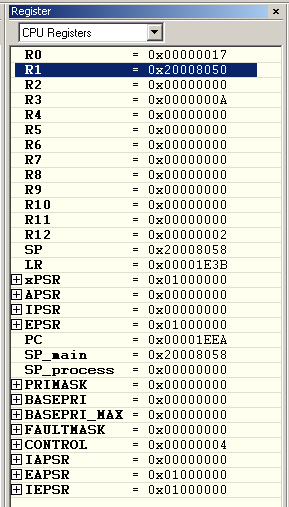
    However, using the free IAR KickStart v7.40.1.8472 with a TM4C1294NCPDT the CPU Registers view isn't showing the Cycle Counter:

    I found the Data Watchpoint and Trace Unit register view which contains the DWT_CYCNT cycle counter, which can be used to view the Cycle Count, but first had to manually set the CYCCNTENA bit in the DWT_CTRL register to enable the Cycle Counter before the counter would start incrementing:

    Does your paid full version of IAR display the Cycle Counter for TM4C129 devices in the CPU Register view?

  • Chester Gillon said:
    Does your paid full version of IAR display the Cycle Counter for TM4C129 devices in the CPU Register view?

    Indeed it does - just as I described, earlier.    Iirc - the free version also reveals it - under the System Control Register View.    I should note that we've never employed any of the 129 series - preferring faster devices - but I don't think the "cycle counter" is MCU "sensitive."     (we've tested under past, LX4F)    Cycle counter appears & works well with (at least) 2 other ARM MCU vendor's M0, M3 & M4.    (we're awaiting our new M7)

    Now we always (and only) connect to ARM MCUs via our J-Links - and that via (again only) SWD.     (doubtful that SWD aids - but J-Link may)

    I've past posted screen caps - right here - showing the Cycle Count display in action.     All of our IAR "dongles" are in use right now - as soon as one frees I'll hook-up - and try for a fresh cap.

  • cb1- said:
    Now we always (and only) connect to ARM MCUs via our J-Links - and that via (again only) SWD.     (doubtful that SWD aids - but J-Link may)

    My previous screen-shots without the Cycle Counter were made when the IAR KickStart was connecting to a TMC129 device using the Stellaris-ICDI.

    When I connected to the same device with a J-Link (via JTAG) then the Cycle Counter was shown in the CPU Registers view and was enabled:

    So, you are correct in that the IAR use of the Cycle Counter depends upon the debug probe used.

  • Chester Gillon said:
    So, you are correct in that the IAR use of the Cycle Counter depends upon the debug probe used.

    Nice of you to credit my, "being right" - was simply "casting for an explanation" - again we always (and only) use the J-Link & improved, newer devices.

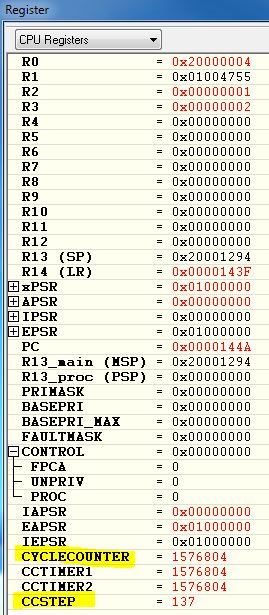
    I found past screen shot which I had posted here - it very much agrees w/yours - so this is not confined to, "paid" version.   

    Do note that "CC Step" bottom row - its the one which reveals the cycle burden of an individual function.     We first "break" upon entry to the function - and then break again upon exit.    CC Step value reveals the cycle burden of the target function...  (did I say, its "fully AUTOMATIC!")

  • One last point - we've purchased a volume of another vendor's ARM M0 eval boards.    (even w/pickNplace & 20' reflow oven - we cannot build/test as inexpensively & quickly)

    And while we can attach via J-Link - I believe we've also connected via their SWD implementation (w/out J-Link - and the "Cycle Counter" revealed then as well...

    Clearly - this automatic feature is powerful - and along with the (long) support for SWD - and "all vendor MCUs welcome" - surely places single vendor - less powerful/efficient IDEs - at great disadvantage...     Sometimes you DO....Get what you pay for....

  • krithika sundaramoorthy said:
    But I couldn't enable the clock, its not highlighted. Is it possible to measure the time using profile clock for this lauchpad.

    Reading the ARM®v7-M Architecture Reference Manual shows that the Data Watchpoint and Trace (DWT) which contains the Cortex-M4 Cycle Counter is memory addressable, and thus it is possible to access the Cycle Counter from a GEL script.

    The attached tm4c1294ncpdt.gel GEL file is a modified version of the tm4c1294ncpdt.gel file from the CCS 6.1 installation which:

    a) Enables and zeros the Cycle Counter when a program has been loaded.

    b) After the debugger has halted displays the current CYCLECOUNTER value and CCSTEP which is the change in the Cycle Counter since the previous halt.

    As you single step the program the Cycle Counter is reported to the CCS Console. E.g. I got the following output when stepped over a _delay_cycles (1200000000) call:

    CORTEX_M4_0: GEL Output: CYCLECOUNTER=1200109633 CCSTEP=1199999999

    Note that the reported CCSTEP value matches the generated delay, which demonstrates the Cycle Counter is reporting valid results.

     To make use of this, place the modified tm4c1294ncpdt.gel file in the same directory as the CCS Target Configuration file and change the "initialization scripts" for the CORTEX_M4_0 processor to point at the modified GEL file:

  • We note that this method "demands" time & focused effort - may require modification during IDE upgrades - (still) cannot launch SWD - nor expand user's field of MCUs beyond (single) vendor - who (notably) has "cast off" M0, M3, M7... Paint job and newer (used) tires - bolted upon a Chevy - does not a Porsche make....

    Your work is certainly resourceful - yet the IDE should (remain) a tool - not a chronic under-performer - in need of endless, rescue, "add ons."  

  • A possible alternative to cb1's good suggestion.

    What I usually do, when I can, is dedicate a few pins to profiling.  These can be shared with status LEDs and switched in and out with macros.

    Disadvantages

    • You need pins you can either dedicate to this task or are share with uses that do not matter during profiling (thus the status LEDs)
    • You need a logic analyzer or 'scope
    • You affect the code when you are instrumenting it

    Advantages

    • You get Jitter measurements, min and maximum execution times can be read right off the logic analyzer and with some you can read off something like the mode or median as well.
    • Phase measurements.  With multiple channels you can measure the time between events in different threads of execution. Not as often needed but it can be a powerful tool.
    • CPU execution measurement. If (and it can be a big if) you can instrument your threads of execution this way you can see how the micro's time is used (sometimes even a few threads can be illuminating).  For instance you can see that you may normally have plenty of processing power to spare but occasionally there will be bursts of activity (like a beat) that will use most or all of the processing power  available threating the ability of some threads to finish their allotted tasks.
    • You don't need a JTAG/SWO adapter.  Usually though the JTAG adapter is easier to leave attached than a logic analyzer.
    • You can associate certain timing events with real analog I/O.  IE trigger when the particular operation being measured is longer than expected and correlate with other actions.
    • Finally this is all immediately visual, which makes it intuitively easy to see but not necessarily convert to a good improvement
    • Which method is better depends on your available tools, resources and what, exactly, you are trying to measure/solve. You can use either tool to measure most items.

    Robert

  • May I applaud the contributions of both Chester & Robert - both have added greatly to poster's quest for (some) code insight.

    Again - Chester shows great resourcefulness to "back door" for CCS - that which IAR has long delivered - in a, "fully automatic" and effort-free manner.    If (and when) the mission allows the (ongoing) extra "time/effort" - to enable the single-vendor (severely limited) IDE to begin to approach the performance & capability of a more mature, superior (all vendor) IDE - then maybe such time/effort is (sometimes) justified.   

    Robert builds upon this "extra activity" and properly notes that many such methods prove intrusive.     (i.e. it remains hard to measure the charge upon an electron - without disturbing it - in the process!)     Like Robert - our small firm has "banged" multiple, special GPIO pins - in the attempt to "create & leave a "measureable trail" - so that MCU execution may be (somewhat) charted.   Being in the display biz - we're intrigued w/Robert's mention of, "immediately visual" - although most often such results are transient - and occur so quickly that the eye cannot (really) register nor note.

    Robert's "trick" of forcing lowly indicator/status Leds to serve "double duty" as a, "code was here detector" is one we employ - and by simultaneously clocking 4 pins - 8 different MCU states/addresses/function executions may be logged.    (1 of those pins serves as clock)

    I return to the uncertainty & limitation of, "all things in one basket" and that basket not quite, "Good for Gov't work!"   (i.e. must be painfully massaged to begin to reach the levels - long achieved by others - which necessarily subtracts from time/energy available for the "mission!")     Free may not prove "so good" should your deliverables "slide" - and client becomes displeased...

  • krithika sundaramoorthy said:
    But I couldn't enable the clock, its not highlighted. Is it possible to measure the time using profile clock for this lauchpad. can you please suggest me any other methods are there to measure the time for each function execution or interrupt handler execution.

    I have found the following Wiki page http://processors.wiki.ti.com/index.php/Watchpoints_for_Stellaris_in_CCS#Configure_a_Count_Event which explains that the "Profile Clock on Cortex M3/M4F is disabled due to Hardware limitations".

    The Wiki page does however explain how to use a Count Event breakpoint to measure CPU Cycles - I tested with CCS 6.1 and it worked as described.