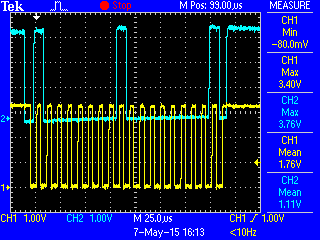
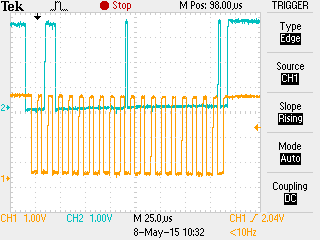
Hello,
I am using TIVA C launch pad for my experiment. With reference to TIVA ware I2C example (loopback) mode I am configuring my application. Below is my schematic for the application.

SCL and SDA line continuously stay low. Please let me is there any corrections I need to do in hardware.
Below is my code. Reference is taken from Tiwaware example , I'm kind of stuck in it.
#include <stdbool.h>
#include <stdint.h>
#include "inc/hw_i2c.h"
#include "inc/hw_memmap.h"
#include "inc/hw_types.h"
#include "driverlib/gpio.h"
#include "driverlib/i2c.h"
#include "driverlib/pin_map.h"
#include "driverlib/sysctl.h"
#include "driverlib/uart.h"
#include "utils/uartstdio.h"

//*****************************************************************************
//
//! \addtogroup i2c_examples_list
//! <h1>I2C Master Loopback (i2c_master_slave_loopback)</h1>
//!
//! This example shows how to configure the I2C0 module for loopback mode.
//! This includes setting up the master and slave module.  Loopback mode
//! internally connects the master and slave data and clock lines together.
//! The address of the slave module is set in order to read data from the
//! master.  Then the data is checked to make sure the received data matches
//! the data that was transmitted.  This example uses a polling method for
//! sending and receiving data.
//!
//! This example uses the following peripherals and I/O signals.  You must
//! review these and change as needed for your own board:
//! - I2C0 peripheral
//! - GPIO Port B peripheral (for I2C0 pins)
//! - I2C0SCL - PB2
//! - I2C0SDA - PB3
//
// Number of I2C data packets to send.
//
//*****************************************************************************
#define NUM_I2C_DATA 3

//*****************************************************************************
//
// Set the address for slave module. This is a 7-bit address sent in the
// following format:
//                      [A6:A5:A4:A3:A2:A1:A0:RS]
//
// A zero in the "RS" position of the first byte means that the master
// transmits (sends) data to the selected slave, and a one in this position
// means that the master receives data from the slave.
//
//*****************************************************************************
#define SLAVE_ADDRESS 0x40

int
main(void)
{
    //
    // Set the clocking to run directly from the external crystal/oscillator.
    // TODO: The SYSCTL_XTAL_ value must be changed to match the value of the
    // crystal on your board.
    //
    SysCtlClockSet(SYSCTL_SYSDIV_1 | SYSCTL_USE_OSC | SYSCTL_OSC_MAIN |
                   SYSCTL_XTAL_16MHZ);

    //
    // The I2C0 peripheral must be enabled before use.
    //
    SysCtlPeripheralEnable(SYSCTL_PERIPH_I2C0);

    //
    // For this example I2C0 is used with PortB[3:2].  The actual port and
    // pins used may be different on your part, consult the data sheet for
    // more information.  GPIO port B needs to be enabled so these pins can
    // be used.
    // TODO: change this to whichever GPIO port you are using.
    //
    SysCtlPeripheralEnable(SYSCTL_PERIPH_GPIOB);

    //
    // Configure the pin muxing for I2C0 functions on port B2 and B3.
    // This step is not necessary if your part does not support pin muxing.
    // TODO: change this to select the port/pin you are using.
    //
    GPIOPinConfigure(GPIO_PB2_I2C0SCL);
    GPIOPinConfigure(GPIO_PB3_I2C0SDA);

    //
    // Select the I2C function for these pins.  This function will also
    // configure the GPIO pins pins for I2C operation, setting them to
    // open-drain operation with weak pull-ups.  Consult the data sheet
    // to see which functions are allocated per pin.
    // TODO: change this to select the port/pin you are using.
    //
    GPIOPinTypeI2CSCL(GPIO_PORTB_BASE, GPIO_PIN_2);
    GPIOPinTypeI2C(GPIO_PORTB_BASE, GPIO_PIN_3);

    //
    // Enable loopback mode.  Loopback mode is a built in feature that is
    // useful for debugging I2C operations.  It internally connects the I2C
    // master and slave terminals, which effectively let's you send data as
    // a master and receive data as a slave.
    // NOTE: For external I2C operation you will need to use external pullups
    // that are stronger than the internal pullups.  Refer to the datasheet for
    // more information.
    //
    HWREG(I2C0_BASE + I2C_O_MCR) |= 0x00;

    //
    // Enable and initialize the I2C0 master module.  Use the system clock for
    // the I2C0 module.  The last parameter sets the I2C data transfer rate.
    // If false the data rate is set to 100kbps and if true the data rate will
    // be set to 400kbps.  For this example we will use a data rate of 100kbps.
    //
    I2CMasterInitExpClk(I2C0_BASE, SysCtlClockGet(), false);

    // Tell the master module what address it will place on the bus when
    // communicating with the slave.  Set the address to SLAVE_ADDRESS
    // (as set in the slave module).  The receive parameter is set to false
    // which indicates the I2C Master is initiating a writes to the slave.  If
    // true, that would indicate that the I2C Master is initiating reads from
    // the slave.
    //
    I2CMasterSlaveAddrSet(I2C0_BASE, SLAVE_ADDRESS, false);


        // Place the data to be sent in the data register
        //
        I2CMasterDataPut(I2C0_BASE,0x00);

        //
        // Initiate send of data from the master.  Since the loopback
        // mode is enabled, the master and slave units are connected
        // allowing us to receive the same data that we sent out.
        //
        I2CMasterControl(I2C0_BASE, I2C_MASTER_CMD_SINGLE_SEND);

        // Wait until master module is done transferring.
        //
        while(I2CMasterBusy(I2C0_BASE))
        {
        }

        while(1)
        {

        }
}