This thread has been locked.

If you have a related question, please click the "Ask a related question" button in the top right corner. The newly created question will be automatically linked to this question.

PWM clock count


Hi, I'm trying to configure the tiva tm4c1294xl board to control the sparkfun quadstepper driver. This driver works with ENABLE DIR and STP signals to rotate one or more stepper motors. The question is: is possible to generate a PWM frequency and count the transitions from up to down? the number of transitions is the number of step of the stepper motor. if i want to rotate all motors, i have to generate 4 pwm and each channel should work with a different amount of steps. Now i configure the tiva to generate a PWM frequency of 10.0 KHz and a duty of 50%, but i'm not able to count the transitions of the PWM squarewave. I red the driverlib manual, but i found nothing about my application. Thanks in advance

  • Georg Tornqvist said:
    ...generate a PWM frequency of 10.0 KHz, 50% duty ... unable to count the transitions of the PWM squarewave.

    Would it not prove quick/simple to route that PWM output signal into one of the (many) ARM counter inputs - and have that counter do the "dirty work?"   Such is very much "in the background" - should be almost, "automatic."

    You "cloud" the issue w/4 channels - (violation of KISS) - why not get a single channel to perform to your satisfaction - and once that's achieved (as/if needed) we can extend the capability...   Doing "too much" ... "too soon"  most always proves NOT in posters' best interest...

  • Make sure that both your motor and what is attached to can support that rate. Even if they should be able to be aware that mechanical resonances can cause you to skip or miss steps.

    Robert
  • Hi cb1,

    now i'm working only with one channel, i think i have not explained well, i wrote of four channel as a future improvement. Now i'm working to your idea, to let a counter do the job, and stop the pwm when the time has gone.

    Thanks for your answer, regards

    G.

  • Hi Robert,
    the freq seems ok, i try a different amount of combination of freq and duty, and now the motor runs well, to verify steploss first i have to perform a precise count of the steps the motor should do.

    Thanks
  • It would appear that "one here" has qualified for a, "non self-awarded" Verified Answer. (as featured in Robert's sticky post entry, yesterday...)

    (strange forum action here - this post was aimed at Robert - not George - yet forum improperly cites "response target"...)

  • Hi cb1,
    I read many times over the driverlib manual , but I did not understand how to setup a timer to count the pwm edges generated by pwm0 on pin PG0. Could you please let me understand how to configure the timer in capture mode to trigger an interrupt when a value of 100 clocks occoured?

    Thanks in advance
  • @Georg  (that was my grandfather's name)

    Georg Tornqvist said:
    how to configure the timer in capture mode to trigger an interrupt

    May I note that your request - quoted above - rises above the goal of "KISS?"   Kindly look here:

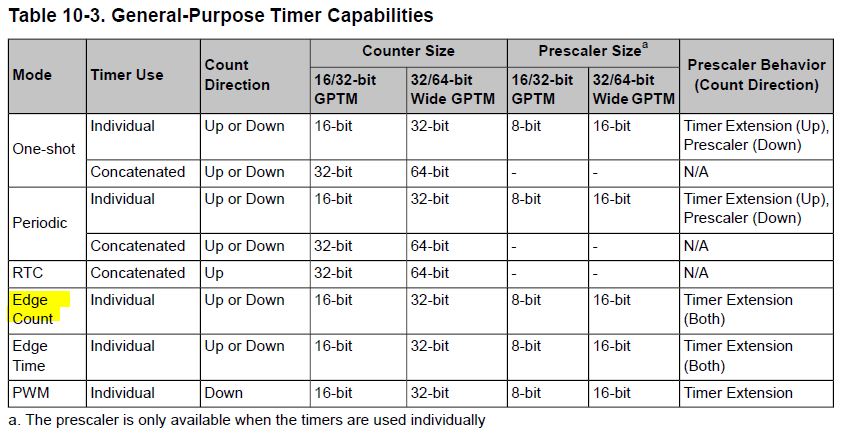
    The highlighted "Edge Count" seems best for your objective - don't you agree?   You ask about adding the complexity of interrupts - yet might it make more sense to feed your (selected) Edge Count configured, Timer input - with a low frequency test signal, initially?   I'd suspect that the timer would perform as a counter - and not require the complexity & demands enforced by interrupts - at least in your early, investigative stage.

    You may further simplify your study by using a free MCU GPIO to provide a "known" number of pulses into your timer - and then simply reading the appropriate timer register - to confirm that the count is proceeding as expected.

    Once you've mastered this (simpler) method - we can continue into interrupt - but too often the (early) introduction of interrupts confounds - we find it far more productive to follow KISS - one small battle - yielding one small solution - at a time...   Are we in agreement?

  • Hi cb1,
    now i'm working following your instructions to KeepItSimple, the only think i don't understand is, how to connect the generator with the timer counter, the question is: have i to connect the output pin with a jumper with the input pin of the counter, or there is a better/simple way to do it?
    Yes, we are in agreement
  • Georg Tornqvist said:
    ...output pin with a jumper with the input pin of the counter, or there is a better/simple way to do it?  

    Mon Ami - could there (possibly) be a "simpler/quicker" means?   Firm/my limited ability/skill lures us (always) to KISS.

    Do read again - the "Generator as input signal" (to the Counter/Timer) is too complex!   (Do NOT add complexity - certainly NOT NOW!)   Instead - as past written - employ one of the MCU's (ideally nearby) free GPIO pins - and program it to produce 5-10 low frequency, output bit toggles.   Dare I state that, "nothing" could be as simple - or helpful - in leading you to the end solution?  (the "generator" adds complexity - "eats our time/effort" - your attempt to "move so forcefully/directly" will delay & confound - not speed/ease!   (Not to ask, "How I know?")

    One wonders, "How/why" the jumpered interconnect between GPIO output pin - and Timer input pin - can (ever) be judged (anything) other than best/simplest?

  • Ok, I test this part of the program and seems to woork good, in this way i can count the number of transitions without use a timer, what do you think?

    #define MOT1_PORT (GPIO_PORTL_BASE )
    #define MOT1_STP (GPIO_PIN_1 )
    #define CLK_DELAY (30000 )

    int number_of_steps = 10;
    int i = 0;
    for(i=1; i <= number_of_steps; i++){

    //generate clock transitions from HI to LO. 1 transition = 1 step
    GPIOPinWrite(MOT1_PORT, MOT1_STP, 0x02);
    SysCtlDelay(CLK_DELAY);
    GPIOPinWrite(MOT1_PORT, MOT1_STP, 0x00);
    SysCtlDelay(CLK_DELAY);
    }
  • My friend - I must go to "real job" now - and your writing reveals (only) a method to produce pulses upon a GPIO. (hopefully configured as push-pull output - yet that detail is not shown!)
    Your writing "gives no hint" as to how you'll (automatically/really) "count" transitions! And - worse yet - you speak of "abandoning the Timer!"
    KISS appears wounded/bleeding - kicked to the curb - and that's not (ever) been my message. How/where have I failed you?
  • Hi cb1, i'm back, after a lot of reads and a lot of work now i can count the ticks generated by a timer, and do things after a certain number of ticks. The code works, i don't know if it is enough KISS, but is the best i can do, every suggestion is appreciate. You have not failed, unfortunatly a am not so expert in embedded programming, and i don't understand every think. So, this is my code:

    #include <stdint.h>
    #include <stdbool.h>
    #include "inc/hw_ints.h"
    #include "inc/hw_memmap.h"
    #include "inc/hw_types.h"
    #include "driverlib/debug.h"
    #include "driverlib/fpu.h"
    #include "driverlib/gpio.h"
    #include "driverlib/interrupt.h"
    #include "driverlib/pin_map.h"
    #include "driverlib/rom.h"
    #include "driverlib/rom_map.h"
    #include "driverlib/sysctl.h"
    #include "driverlib/timer.h"
    #include "driverlib/uart.h"
    #include "utils/uartstdio.h"


    //****************************************************************************
    //
    // System clock rate in Hz.
    //
    //****************************************************************************
    uint32_t g_ui32SysClock;

    //****************************************************************************
    //
    // Timer1 interrupt flag.
    //
    //****************************************************************************
    bool g_ui32Flags = 0;

    //*****************************************************************************
    //
    // The interrupt handler for TIMER1.
    //
    //*****************************************************************************
    void
    Timer1IntHandler(void)
    {


    //
    // Clear the timer interrupt.
    //
    TimerIntClear(TIMER1_BASE, TIMER_TIMA_TIMEOUT);

    if (g_ui32Flags == 0){
    GPIOPinWrite(GPIO_PORTN_BASE, GPIO_PIN_1, 0x00);
    GPIOPinWrite(GPIO_PORTL_BASE, GPIO_PIN_0, 0x00);
    g_ui32Flags = 1;
    }

    else {
    GPIOPinWrite(GPIO_PORTN_BASE, GPIO_PIN_1, 0x02);
    GPIOPinWrite(GPIO_PORTL_BASE, GPIO_PIN_0, 0x01);
    g_ui32Flags = 0;
    }


    }

    //*****************************************************************************
    //
    // The interrupt handler for TIMER0.
    //
    //*****************************************************************************
    void
    Timer0IntHandler(void)
    {


    //
    // Clear the timer interrupt.
    //
    TimerIntClear(TIMER0_BASE, TIMER_CAPA_MATCH);

    // code to execute after N ticks


    }

    int main(void)
    {
    //
    // Set the clocking to run directly from the crystal at 120MHz.
    //
    g_ui32SysClock = SysCtlClockFreqSet((SYSCTL_XTAL_25MHZ |
    SYSCTL_OSC_MAIN |
    SYSCTL_USE_PLL |
    SYSCTL_CFG_VCO_480), 120000000);

    //
    // Enable the GPIO port that is used for the on-board LEDs.
    //
    SysCtlPeripheralEnable(SYSCTL_PERIPH_GPION);
    SysCtlPeripheralEnable(SYSCTL_PERIPH_GPIOL);


    //
    // Enable the GPIO pins for the LEDs (PN0 & PN1).
    //
    GPIOPinTypeGPIOOutput(GPIO_PORTN_BASE, GPIO_PIN_0 | GPIO_PIN_1);
    GPIOPinTypeGPIOOutput(GPIO_PORTL_BASE, GPIO_PIN_0);

    //Timers GPIO
    GPIOPinConfigure(GPIO_PL4_T0CCP0 );// configure for peripherals
    GPIOPinTypeTimer(GPIO_PORTL_BASE, GPIO_PIN_4);// enable the GPIO pins for timer

    //
    // Enable the peripherals used by this example.
    //
    SysCtlPeripheralEnable(SYSCTL_PERIPH_TIMER0);
    SysCtlPeripheralEnable(SYSCTL_PERIPH_TIMER1);


    //
    // Timer0 cfg
    //
    // timer0A configured 16 bit time capture count UP
    TimerConfigure(TIMER0_BASE, (TIMER_CFG_SPLIT_PAIR | TIMER_CFG_A_CAP_COUNT_UP));
    TimerControlEvent(TIMER0_BASE, TIMER_A, TIMER_EVENT_POS_EDGE);
    TimerMatchSet(TIMER0_BASE, TIMER_A, 10);


    //
    // Timer1 cfg
    //
    TimerConfigure(TIMER1_BASE, TIMER_CFG_PERIODIC);
    TimerLoadSet(TIMER1_BASE, TIMER_A, g_ui32SysClock / 10);

    //
    // Setup the interrupts for the timer timeouts.
    //
    IntEnable(INT_TIMER0A); // interrupt enabled for the timer0A
    IntEnable(INT_TIMER1A); // interrupt enabled for the timer0A
    TimerIntEnable(TIMER1_BASE, TIMER_TIMA_TIMEOUT);
    TimerIntEnable(TIMER0_BASE, TIMER_CAPA_MATCH); // interrupt setup for the timer0 capture events

    //
    // Enable processor interrupts.
    //
    IntMasterEnable();

    //
    // Enable the timers.
    //
    TimerEnable(TIMER0_BASE, TIMER_A); // enable the timer0A
    TimerEnable(TIMER1_BASE, TIMER_A); // enable the timer1A

    //Clear timer0 counter interrupt
    TimerIntClear(TIMER0_BASE, TIMER_CAPA_EVENT);

    //
    // Loop forever while the timers run.
    //
    while(1)
    {
    }

    }
  • Good for you - appears you've made nice progress.

    Only thing left to do is to "Halt" the PWM Generator upon reaching your target count. Timer's interrupt handler should manage that - I'd suspect...
  • yes, now the program runs pretty good, now the question is: is there a way to do the same thing using oly the pwm generator, without route the PWM signal in T0CCP0 pin?
  • Isn't the bigger question - why would one (want) to expend that additional time/effort?

    We've achieved your stated, "PWM Clock Count" (Forum title) objective - have we not?   (indeed we have - yet post is unmarked)

    "Now" you (seem) to seek, "PWM Generator's (proper) awareness" of its output count - do you not?   Have you exhaustively read/reviewed all available MCU documentation & API software examples - before adding this task?   (such would appear a good "first step")

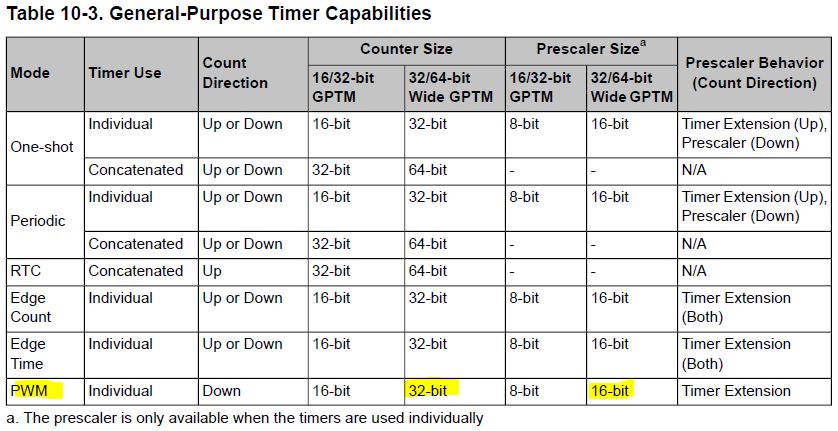
    Possibly I can devise (some) means to "tease such awareness" into the "timer" (not the PWM Generator) when that timer is employed w/in Timer-PWM mode.   Yet - such seems "outside of normal/expected usage" - and may have limited utility.   (i.e. you may have to SELL your justification for this extra analysis...)

  • Hi cb1,
    you are right, i'm using the solution we found, to route the pwm into a counter, and it works, is simple and is ok for my application. The only issue i found is the second time i enter a value in TimerMatchSet() function, if the value is dofferent from the first, the counter never reach its target, and never stops PWM module. I read the driverlib manual, but i was not able to find how to reset the counter before insert a new value. I clear the interrupt register every time the imput is triggered, and with the same value works perfect. the problem comes when i set a different number of steps. In this case i set 200 first and next target is 300, number not so high for a 16bit counter. Thanks in advance, for your support and your patience
  • Georg Tornqvist said:
    ...not able to...reset the counter before inserting a new (match) value.

    Pity that - yet shouldn't your time/effort be directed to solving that - rather than "forcing" the PWM Generator into an (unnatural) count recognition?

    I haven't used this family MCU in ages - yet I recall some restrictions in both, "when & how" the "TimerMatchSet()" may be properly invoked.   (purely a "swag" - perhaps the Timer must be "disabled" prior to such setting?)   I do believe your issue IS covered - more likely w/in the MCU manual than API.  (although I'd exhaustively search both)

    While inelegant - you could always "duplicate" the "code block" used to implement your initial match - which works.

    Single stepping should pay huge dividends here - first in examining the Timer values pre & post "Successful" match.   And then after you've changed that match value.   In both cases - reverting to the GPIO pulse rather than the faster PWM Generator (as Timer/Counter input signal) - should, "speed, ease, enhance" your investigation.   And that is "pure" (uber effective) KISS...

  • Hi cb1,
    the only way to reset the counter is the way i found here in the forum: e2e.ti.com/.../1324816 consist to add HWREG(TIMER0_BASE+0x50)=0; after the interrupt mask clearing, now the code works perfect we could set the post as answered, could we?
  • Good for you - persistence (and your focus) are rewarded. Perhaps your "tick" of "Verify" above that post suggesting the routing of the PWM output into the Timer - and your (find) of the Timer Reset mechanism signals post, "answered?"