This thread has been locked.

If you have a related question, please click the "Ask a related question" button in the top right corner. The newly created question will be automatically linked to this question.

Using SD Card on RM48 HDK

Other Parts Discussed in Thread: TMS570LS3137, HALCOGEN, TMS570LS1224

Hi,

I want to use an SD Card on RM48 HDK. Is there any sample code available i.e. any device drivers for SD card available? Can anyone send me the link or give me some starting point to do low-level sector read/write on SD card. Any help would be highly regarded.

Thanks

dranne

  • Anila,

    A similar question was asked few days ago.

    Please have a look at the following post:

    The code provided is running on TMS570LS3137 HDK.
    It provides a File System and SD Card low level driver using SPI2 (or SPI1)
    Please have a look and let me know if this will help.

  • Anila,


    I've modified the SD card example to run on RM48 HDK,

    Here is the full CCS project as well as Halcogen project.

    38807.RM48_HDK_SD_Card.zip

  • Hello Jean-Marc,

    What are the differences in this and the code that was posted previously - just that you've made the changes to run on the RM48 HDK vs. the 3137 HDK? Anything else updated?

    I see there are two versions of mmc-hdk-heculesX.c .

    Thanks,
    John W.
  • The version with 1 has to be used with spi1.c

    The version with 2 has to be used with spi2.c

    On HDK board, spi2 is used to connect to SD Card slot.

  • Hello Jean-Marc,

    OK - thanks for that - guess that is intuitive.

    Do you guys keep up2date with this: elm-chan.org/.../00index_e.html

    Just wondering.

    Thanks,
    John W.
  • I would like to know to what size of memory can control with these libraries SD memory and if some more hardware environment is necessary for its operation.

    I'm using a Hercules Launchpad RM57L, maybe you can help me?

    Greetings
    Martin Valencia
  • Thanks very much Jean. I'll use this code and let you know my results.

    Regards
    Anila
  • please share your results, I'm also interested in applying this code but with a Hercules RM57L Launchpad, this doesn't have the SD memory module, so I have to add.
  • John,

    No the code that I've provide is not the latest release.(FatFs - FAT file system module  R0.09b)
    The latest release is: FatFs - FAT file system module  R0.11a
    I will suggest you to use the latest version.
    If time permits, I will try to use the latest FS and will update the link.

  • Martin,

    Here are the limitation of this File System.

    • FAT sub-types: FAT12, FAT16 and FAT32.
    • Number of open files: Unlimited. (depends on available memory)
    • Number of volumes: Upto 10.
    • File size: Upto 4G-1 bytes. (by FAT specs.)
    • Volume size: Upto 2T bytes at 512 bytes/sector. (by FAT specs.)
    • Cluster size: Upto 64K bytes at 512 bytes/sector. (by FAT specs.)
    • Sector size: 512, 1024, 2048 and 4096 bytes. (by FAT specs.)
  • Hello Jean-Marc,

    OK - yes, I already took a look and did that.

    Note I have used 64 GB SD Cards - the real issue isn't the Hercules side as much as the PC side.  Most PC's require you to load a special driver;
    and it can be very slow.  So unless you really need a card that big; sticking to 32 GB and below is probably a good idea until at least better PC side
    drivers are available.

    Thanks and Regards,
    johnw

  • Hi Martin,

    The code worked on RM48 HDK. I was able to do the commands they have provided. Yet to test creation of files and formatting and such other stuff.

    Regards
    Anila
  • Hi Jean-Marc,

    I was able to use the code provided by you. Its working fine on RM48 HDK, I'll however get back to you on this after complete testing. Can you please tell me from where can I get the latest FAT file system module R0.11a as I would need to use the latest version.

    Regards
    Anila
  • Good day, thank you very much for your reply.


    I'm currently trying to adapt the code for Launchpad Hercules; at this time I try settings with RM46, for its resemblance to the RM48.


    I have a problem because the RM46 hasn't SPI2, where in the code should change the configuration of the SPI register??

    as the Launchpad  card doesn't have the SD module, I tried to adapt a module.

    my question here is whether some extra pin is required to run the libraries or only need to use ??

    CS
    MISO
    MOSI
    CLOCK

  • Anila,

    The webpage for FATFS is

    The latest release R0.11a is almost compatible with the one provided in previous post.

    There is a need to modify the following files:

    mmc-hdk-hercules1.c or mmc-hdk-hercules2.c (This file is in the port directory. It is the low level SPI function and is custom made for Hercules products)

    1] In DRESULT disk_read (
        BYTE drv,            /* Physical drive nmuber (0) */
        BYTE *buff,          /* Pointer to the data buffer to store read data */
        DWORD sector,        /* Start sector number (LBA) */
        UINT count           /* Sector count (1..255) */                //JMM1 Was BYTE
    )

    2] DRESULT disk_write (
        BYTE drv,            /* Physical drive nmuber (0) */
        const BYTE *buff,    /* Pointer to the data to be written */
        DWORD sector,        /* Start sector number (LBA) */
        UINT count           /* Sector count (1..255) */                //JMM1 Was BYTE
    )

    In sd_card.c

    1] In SD_Test(void)

        iFResult = f_mount(0, &g_sFatFs,1); instead of
        iFResult = f_mount(0, &g_sFatFs);

    In new ffconf.h, you have to configure the options you want for your application. But here are some option I'm using:

    #define _CODE_PAGE    437                     For US This will need the ccsbsc.c file to be part of your project. It is located in ff11a\src\option directorry.
    #define _FS_NORTC    1
    #define _WORD_ACCESS    0
    #define    _USE_LFN    1                            If you want support for long filename.
    #define _FS_MINIMIZE    0                         Application dependent.     
    #define _FS_READONLY    0                    Application dependent.

    Also in the integer.h file coming with R0.11a I had to add the following definition:

    typedef int BOOL;
    #define TRUE 1
    #define FALSE 0

  • Martin,


    The SPI code to emulate SD Card operation is located in the port directory.
    It is the mmc-hdk-hercules1.c (for SPI1) or mmc-hdk-hercules2.c (for SPI2) These file are special port for Hercules.
    Any other SPI can be used.

    The mandatory signals are SPIxSOMI, SPIxSIMO, SPIxCLK. These signals are used as SPI function.
    SPIxCSx is used as Chip Select for SD Card and is used as a GIO output pin.
    SPIxENA is used on the HDK as GIO input pin for the Card Detect. As far as I know, it is not used in mmc-hdk-herculesx.c

  • Thank you very much for directions, I'll get to work on this!
  • good day, sorry but I have problems with memory read SD

    I seem to have problems with the configuration of HalCoGen with RM46 LP SPI, could you please review it

    0675.RM46_SD_MMC.rar

    In the RM46, there MISO0, MISO1 and MOSI0, MOSI1, I'm not sure which of these pins out the data signal and input, I'm assuming it's for MISO0 and MOSI0, but not if it is properly setup in Halcogen.

    please help.

    BTW: I am using a micro SD adapter, such as a slot.

  • Martin,

    Your Halcogen configuration looks correct to me.
    It is correct to use SPI1SOMI(0) and SPI1SIMO(0)

    Have you done any modification in mmc-hdk-hercules1.c?

    Are you using FatFS R0.11a?

    Without the rest of the code I can't really debug what is going on.

  • Thank you very much for your help, I made changes to the version R0.11 RM46 Hercules LP, attached this time around the entire project

    5635.Hercules_SD.rar

    I changed the code to the FATFS R0.11, I have not been successful; still I can't read the SD Memory

    I made the changes in the libraries mmc-hdk-hercules1.c and other that  you indicated here:

    I'm beginning to doubt the SPI port, maybe if I try another port as the SPI3?, can function properly.

    I have a 4GB "Kingston".

  • Martin,


    In a previous post I've mentioned that the mmc-hdk-hercules1.c was used for a specific implementation I'm using on a custom board I did.
    Yes it is using SPI1 instead of SPI2 used on HDK but there is a trick.

    The void DESEECT(void) and void SELECT(void) are used to assert and de-assert the SD Card chipselect line.

    If you look the code in mmc-hdk-hercules1.c you will find:

    // de-asserts the CS pin to the card
    static
    void DESELECT (void)
    {
    //  spiREG2->PCDOUT |=  0x01;   // SCS[0] = high
    //  spiPORT2->DSET = 0x01;        // SCS[0] = high
    //  spiPORT2->DSET = 0x02;        // SCS[1] = high
        gioPORTA->DSET = 0x04;        // A2 = high

    }

    // asserts the CS pin to the card
    static
    void SELECT (void)
    {
    //  spiREG2->PCDOUT &= ~0x01;    // SCS[0] = low
    //  spiPORT2-> DCLR = 0x01;        // SCS[0] = low
    //  spiPORT2-> DCLR = 0x02;        // SCS[1] = low
        gioPORTA->DCLR = 0x04;        // A2 = low
    }

    You have to comment out the assertion de-assertion of GIOA2 (in red).
    And un-comment the green line if you are using SPI2nCS0 to select the Card.

    Please have a try and let me know the result.

  • Good day, I tried what you recommended me to do.

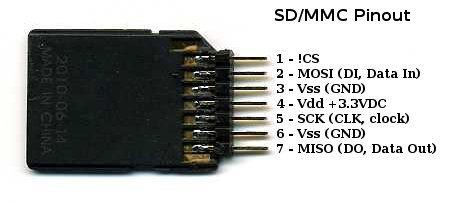
    first of all check my connection pinout of the SD memory and  RM46, i'm following this diagram.

    Unfortunately I still do not succeed in communicating with the SD memory!

    Also try changing the control register spiPORT2 to spiPORT1, to see if any changes emerged, but in vain.

    I reviewed whether pins spi1CLK and spi1MOSI , give output signals and everything is correct, also check the spi1CS0, also it gives a signal went out.

    can't understand because it does not work!

    please Help me solve this problem.

  • Martin,

    Have you check with a scope or logic analyzer the SPI1CLK, SPI1SIMO, SPI1SOMI and SPI1nCS0?

    On my side, I've ordered the following adapter board to test SD Card.

    Here is the schematics for this shield.

    I did check this schematics against your SD Card adapter and it looks correct.

    I will make a try as soon as possible.

  • Thank you very much for your help!
    sure this will be very useful for all Hercules!

    I will review the output signals of each, unfortunately I don't have a logic analyzer, but will manage with the oscilloscope.

    Regards
    Martin
  • Martin,


    I did more debug with the Arduino shield.
    I use also different kind of SD Card (versus micro SD) and realize that the code was not running on all card.

    To make it working, I had to change the clock polarity from 0 to 1.
    Also, in the set_max_speed, I had to reduce the speed. (Prescaler = 3 to Prescaler = 5)

    Please have a try and let me know.

  • Very good day and thanks for your help, I have made changes to the polarity of the clock!

    I have no knowledge of where I should change the speed you mention

    Also, in the set_max_speed, I had to reduce the speed. (Prescaler = 3 to Prescaler = 5)


    with the change of polarity, the memory still can not read, maybe the change in speed is the last parameter to set for success :-)

     BTW: I tried to see the output signals on the oscilloscope MOSI  and SPICLK, pins not change state both remain high.

  • Martin,

    Can you send me your CCS and Halcogen project so I can have a look?

    I have the SD card software working on my TMS570LS1224 launchpad.

  • 1643.RM46_MMC_SD.rar

    good day, have you!


    send you, my project on CCS and Halcogen (Hercules RM46)!

    Thank you very much for your help!


    Best Regards
    Martin V.

  • Martin,


    I got your code running.
    1] I did a mistake in my instruction for the changes necessary for the latest FatFS release.
    The f_mount need the following arguments:

        iFResult = f_mount(&g_sFatFs,"",1);

    This is in sd_card.c on line 709

    Also, in your Halcogen project, you have to setup the SPI with:

    Clock Polarity = 1
    Clock Phase   = 0 (Not 1 like it is in your code)

    After these 2 modifications, the code runs correctly.

    I was also able to speed up the SPI1 up to:

          spiREG1->FMT0 |= 4 << 8;     // baudrate prescale

    This may be also dependent on the way your SD Card slot is wired. So for now don't change the speed.

    Please have a try and let me know your result.

  • Thank you very much for your great help, I am pleased to say that works perfectly the new changes.

    Change in CCS

    Change in Halcogen

    I used two different memories of 2GB and a 4GB, for testing and are read correctly!

    I leave them here, with the latest program changes and the FAT file system module version R0.11a!

    8053.HERCULES_RM46_LAUNCHPAD_SD.rar

    I wonder if there is any guidance on how to use the fat librery, to write data to and read data from memory?

  • I've got this working too. Thank you!
    A few remarks:
    - double check that the clock phase checkbox of SPI1 is disabled (as shown above), and regenerate source code in HALCoGen (F5).
    - Set up an RTI 10ms interrupt, and call disk_timerproc() in the handler.
  • Hi Guys,

    Recently I have try to read SD Card, using the source code just you build.
    This time I use TMS570LS1227 HDK to rebuild the project. I have try to check one by one, but seems that I cannot find the error.
    But when I run the program it always show "FR not ready" so it means cannot initialize the SD card. I use 4GB micro sd, is this too big?
    Would you please help me check my project? I am wondering what is the problem. I attached the screen shot of my error project & my project including the Halcogen setting. I appreciate your time for help me.


    6354.SD_CARD_1227ZWT.rar

    Thank you very much.


    Best Regards,

    Lukman

  • Hi good day.

    I think to solve your problem you should change settings here:

    change the pin SPI -----> GIO.

    Regards and good day!

  • Dear Martin,

    Thank you for your help, I have change the GIO as your advice and right now it work as below picture:


    Thank you very much for your help.

    Best Regards,


    Lukman Arif Kurniawan