This thread has been locked.

If you have a related question, please click the "Ask a related question" button in the top right corner. The newly created question will be automatically linked to this question.

TM4C1294XL Launchpad lwIP UDP Receive Issue

Other Parts Discussed in Thread: EK-TM4C1294XL

Hello all,

I am trying to set up a very simple udp echo server and I am not sure what is going wrong with my setup. There is a lot of sample code available on this topic but for some reason I cannot get my code to function correctly. This is running on EK-TM4C1294XL connected Launchpad (cortex M4)

My procedure is as follows:

    - Set up some pins

    - Set interrupts for system tick and ethernet

    - Initialize lwIP with a static IP (Connection directly from evaluation board to PC through Ethernet)

    - Allocate memory for a udp pcb

    - Bind the udp pcb to any IP address on the port number I want (7)

    - Register the udp_recv callback as my own function

    - Allocate memory for a pbuf

This is my code for my callback function:

void UDPRecvData(void *arg, struct udp_pcb *pcb, struct pbuf *p,
	    ip_addr_t *addr, u16_t port) {
	LWIP_UNUSED_ARG(arg);
	// Just echo for now
	udp_sendto(pcb, p, addr,port);
	pbuf_free(p);
}

After this, I let my evaluation board sit in an infinite loop while it waits for UDP packets to be sent to it. To be clear, I am able to send out UDP packets and receive them on my PC just fine, my problem is that my callback function is never called by lwIP. I am monitoring traffic on wireshark and I can see my computer sending packets to my evaluation board's IP address but I am seeing no activity from my evaluation board.

One last note on my setup:

I solved a problem I had with ARP by hardcoding my evaluation board's mac address via the command arp -s 'evaluation board IP' 'evaluation board mac' 'interface ip'. Before I did that no packets were sent by my PC, only ARP's for my evaluation board's mac address.

Thanks,

Bryan

  • Hello Bryan,

    Can you please send the code that you are using to setup the udp and bind the port.

    Regards
    Amit
  • Hello Amit,

    The code is as follows:

    void UDPServerInit() {
    	uint32_t ui32User0, ui32User1;
    	uint8_t pui8MACArray[8];
    
    	// Configure the device pins.
    	UDPPinSet();
    
    	// Configure UART.
    	UARTStdioConfig(0, 115200, g_ui32SysClock);
    	UARTprintf("\033[2J\033[H");
    	UARTprintf("lwIP UDP Test Server\n\n");
    
    	// Configure SysTick for a periodic interrupt.
    	MAP_SysTickPeriodSet(g_ui32SysClock / SYSTICKHZ);
    	MAP_SysTickEnable();
    	MAP_SysTickIntEnable();
    	MAP_IntPrioritySet(INT_EMAC0, ETHERNET_INT_PRIORITY);
    	MAP_IntPrioritySet(FAULT_SYSTICK, SYSTICK_INT_PRIORITY);
    
    	// Configure the hardware MAC address for Ethernet Controller filtering of
    	// incoming packets.  The MAC address will be stored in the non-volatile
    	// USER0 and USER1 registers.
    
    	MAP_FlashUserGet(&ui32User0, &ui32User1);
    	if ((ui32User0 == 0xffffffff) || (ui32User1 == 0xffffffff)) {
    		// We should never get here.  This is an error if the MAC address has
    		// not been programmed into the device.  Exit the program.
    		// Let the user know there is no MAC address
    
    		UARTprintf("No MAC programmed!\n");
    
    		while (1) {
    		}
    	}
    
    	// Convert the 24/24 split MAC address from NV ram into a 32/16 split MAC
    	// address needed to program the hardware registers, then program the MAC
    	// address into the Ethernet Controller registers.
    	pui8MACArray[0] = ((ui32User0 >> 0) & 0xff);
    	pui8MACArray[1] = ((ui32User0 >> 8) & 0xff);
    	pui8MACArray[2] = ((ui32User0 >> 16) & 0xff);
    	pui8MACArray[3] = ((ui32User1 >> 0) & 0xff);
    	pui8MACArray[4] = ((ui32User1 >> 8) & 0xff);
    	pui8MACArray[5] = ((ui32User1 >> 16) & 0xff);
    
    	// Initialize the lwIP library, using a static IP
    	lwIPInit(g_ui32SysClock, pui8MACArray, IPADDRESS, NETMASK, GATEWAY,
    	IPADDR_USE_STATIC);
    
    	// Save the IP, NM and GW that was actually set by lwIP
    	g_ui32IPAddress = lwIPLocalIPAddrGet();
    	g_ui32NM = lwIPLocalNetMaskGet();
    	g_ui32GW = lwIPLocalGWAddrGet();
    
    	showServerInfo();
    
    	upcb = udp_new();
    
    	if (upcb) {
    		// Bind the PCB to be listening to any IP address on the defined port number
    		if (udp_bind(upcb, IP_ADDR_ANY, PORTNUMBER) != ERR_OK)
    			UARTprintf("Initialization failure, couldn't bind PCB to target port\n");
    
    		udp_recv(upcb, UDPRecvData, NULL);
    		udp_pbuf = pbuf_alloc(PBUF_TRANSPORT, (DATALEN), PBUF_ROM);
    
    	}
    	else {
    		UARTprintf(
    				"Memory allocation failed while initializing UDP Test Server.\n");
    	}
    }

    Regards,

    Bryan

  • Hello Bryan

    And I would assume that you are not getting any "Initialization failure" message.

    If you use the value g_ui32IPAddress instead of IP_ADDR_ANY then does the breakpoint in the receive function callback get asserted?

    Regards
    Amit
  • Hi Amit,

    I just tried that and it didn't seem to work.

    I observed that the call made it so that the pcb I was using for UDP had the same local IP as what I report to the PC through the comport as opposed to zero.

    Any other ideas? I have seen other people mention using locator.c in the same way that it was used for examples such as enet_io. I decided against that since there was no need for my uC to respond to ARPS since I hardcoded the MAC address associated with the static IP into my operating system already.

    Regards,
    Bryan
  • Hello Bryan

    The PC sending packets is different from the switch/router sending the packets to the board. If the Managed switch is connected for the port meant to route the UDP packets to the Board, then do the same appear on Wireshark

    I have a similar setup but I used DHCP to run rather than STATIC mode of allocation since my router does not allow for STATIC IP address support that well.

    Regards
    Amit
  • Hi Amit,

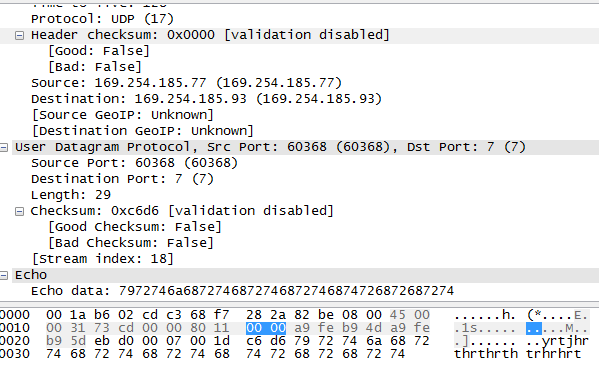
    I am not using any switch. Between the board and the PC there is only an Ethernet cable directly connecting the two. Or are you talking about a possible internal switch within my PC? Here is a screenshot of my packet I am trying to have echo'd. It is being sent to port 7 of my board (I am trying to anyways)

    Regards,

    Bryan

  • Hello Bryan

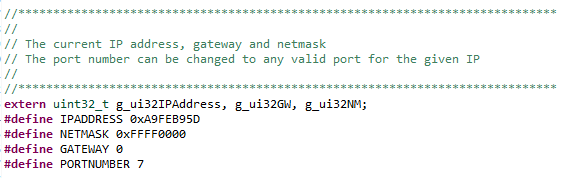
    If it is a direct connection then it should not be a problem. And is PORTNUMBER 0x7 on the LaunchPad.

    Regards
    Amit
  • Hello Amit,

    I can confirm my port settings here.

    Thanks,

    Bryan

  • Hello Bryan,

    I would suggest trying with DHCP instead of STATIC address allocation.

    Regards
    Amit
  • Hello Amit,

    If possible I would like to keep using a static IP. It takes a long time for me to establish an IP if I use a DHCP/AUTOIP. Do you think it is a matter of me choosing an IP address that is not available for use? I can try to experiment with choosing different ones.

    Thanks,
    Bryan
  • Hello Bryan,

    To be able to reduce the problem statement to essentials I would suggest DHCP, If that still shows the problem, then at least we would know where to course correct.

    Regards
    Amit