Other Parts Discussed in Thread: TM4C123GH6PM
Dear all,
I was interfacing Color TFT LCD using the controller ILI9341 with TM4C123GH6PM and have seen that there were not too many posts in E2E or even on the web. I have successfully done the intialization and so I am sharing the code.
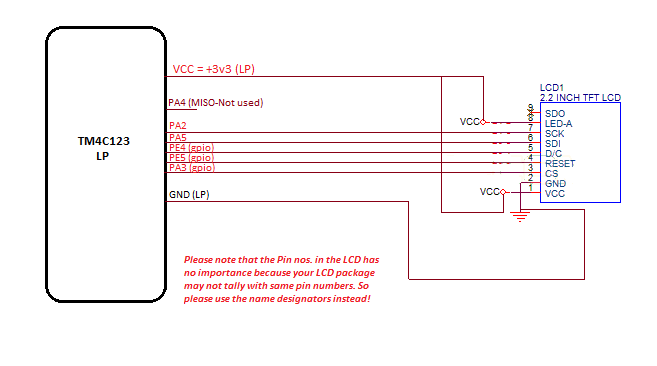
First the interconnections:
This LCD comes with a SPI connection header along with some extra control pins. Mine was a 2.2" LCD, but yours may be different and will work as long as controller and important parameters remains the same. I did not use the parallel connection, so have no clue.
Second is the initialization code:
Please take care that the code to be written first initializes the MCU ports and configures the SPI and GPIO fns. Then initializes the LCD as per the datasheet commands. The initialization function that I used for Tiva or MCU is given below. You have to ensure that the proper headers are included and the Tivawares used here are properly installed. Otherwise, errors will come during compilation of these functions. Also the project folder settings, path variables and other workspace related settings have to be good in your IDE. I have used CCS v6.0 here:
#include <stdint.h>
#include <stdbool.h>
#include "IFT_LCD_PenColor.h"
#include "IFT_LCD_font.h"
#include "IFTSPI2_2LCD.h"
#include "inc/hw_memmap.h"
#include "inc/hw_types.h"
#include "driverlib/rom.h"
#include "driverlib/rom_map.h"
#include "driverlib/sysctl.h"
#include "driverlib/gpio.h"
#include "driverlib/ssi.h"
#include "inc/hw_gpio.h"
#include "driverlib/pin_map.h"
void TivaInit(void)
{
SysCtlPeripheralEnable(SYSCTL_PERIPH_GPIOE); // PE4 = D/C' , PE5 = RESET
SysCtlPeripheralEnable(SYSCTL_PERIPH_GPIOF); // LEDs for debugging only, not requierd in final
SysCtlPeripheralEnable(SYSCTL_PERIPH_GPIOA);// SSI pins
SysCtlDelay(SysCtlClockGet()/10);// 100mS delay
SysCtlPeripheralEnable(SYSCTL_PERIPH_SSI0);
// never_declared = 35qr;
GPIOPinTypeGPIOOutput(GPIO_PORTF_BASE, LPLEDs);
/////////////////////OTHER CONTROL LINES////////////////////////////////////////////
GPIOPinTypeGPIOOutput(GPIO_PORTA_BASE, CS);//
GPIOPinTypeGPIOOutput(GPIO_PORTE_BASE, DC|RESET);
/////////////////SSI CONFIG HERE//////////////////////////////////////////////////////
SSIDisable(SSI0_BASE); // disables th SSI module as required for init
GPIOPinConfigure(GPIO_PA2_SSI0CLK);
GPIOPinConfigure(GPIO_PA4_SSI0RX);
GPIOPinConfigure(GPIO_PA5_SSI0TX);
GPIOPinTypeSSI(GPIO_PORTA_BASE, GPIO_PIN_2 | GPIO_PIN_4|GPIO_PIN_5);
SSIClockSourceSet(SSI0_BASE, SSI_CLOCK_SYSTEM); // sets the system clock as the source of clock
SSIConfigSetExpClk(SSI0_BASE, SysCtlClockGet(), SSI_FRF_MOTO_MODE_2,SSI_MODE_MASTER, 20000000, 8);// defines base, System clk, Mode 0 = SPH = SPO = 0,Master, 20MHz, no. of bits = 8 = 1 byte transfer
SSIEnable(SSI0_BASE); // enables SSI
////////////////////// SSI CONFIG ENDS/////////////////////////////////////////
}
Next is the function used for initialization of the LCD:
This fn. Will initialize the ILI9341 and will also clear the screen to a black screen. The constants used below are here as follows:
#define AllPins GPIO_PIN_0|GPIO_PIN_1|GPIO_PIN_2|GPIO_PIN_3|GPIO_PIN_4|GPIO_PIN_5|GPIO_PIN_6|GPIO_PIN_7
#define TFTControlPins GPIO_PIN_4|GPIO_PIN_5|GPIO_PIN_6|GPIO_PIN_7
#define TFTReset GPIO_PIN_4
#define LPLEDs GPIO_PIN_1|GPIO_PIN_2|GPIO_PIN_3
#define u8 unsigned char
#define u16 unsigned int
#define u32 unsigned long
#define MSB GPIO_PORTB_BASE
#define LSB GPIO_PORTD_BASE
// SSI RELATED DEFINITIONS, ONLY FOR 2.2" LCD //
#define SCK GPIO_PIN_2//PORT A, SSI 0 ONLY
#define CS GPIO_PIN_3
#define MISO GPIO_PIN_4
#define MOSI GPIO_PIN_5
#define DC GPIO_PIN_4// PORT E
#define RESET GPIO_PIN_5// PORT E
//Pallete Colors in 16 bit values
#define WHITE 0xFFFF
#define BLACK 0x0000
#define BLUE 0x001F // 0000 0000 0001 1111
#define BRED 0XF81F
#define GRED 0XFFE0
#define GBLUE 0X07FF
#define RED 0xF800 // 1111 1000 0000 0000
#define MAGENTA 0xF81F
#define GREEN 0x07E0 // 0000 0111 1110 0000
#define CYAN 0x7FFF
#define YELLOW 0xFFE0
#define BROWN 0XBC40 //Brown
#define BRRED 0XFC07 //Brownish red
#define GRAY 0X8430 //Gray
And here is the initialization function:
void Lcd_Init(void)
{
GPIOPinWrite(GPIO_PORTA_BASE, CS,CS);
//TFT_RST=1;
GPIOPinWrite(GPIO_PORTE_BASE, RESET,0x20);
//delay_ms(5);
SysCtlDelay(SysCtlClockGet()/2);// 5 ms delay
//TFT_RST=0;
GPIOPinWrite(GPIO_PORTE_BASE, RESET,0);
//delay_ms(15);
SysCtlDelay(SysCtlClockGet()/2);// 15 ms delay
//TFT_RST=1;
GPIOPinWrite(GPIO_PORTE_BASE, RESET,0x20);
//delay_ms(15);
SysCtlDelay(SysCtlClockGet()/2);// 15 ms delay
//TFT_CS =0;
GPIOPinWrite(GPIO_PORTA_BASE, CS,0x08);
SysCtlDelay(SysCtlClockGet()/100);// 15 ms delay
GPIOPinWrite(GPIO_PORTA_BASE, CS,0);
LCD_WR_REG(0xCB);
LCD_WR_DATA8_SSI(0x39);
LCD_WR_DATA8_SSI(0x2C);
LCD_WR_DATA8_SSI(0x00);
LCD_WR_DATA8_SSI(0x34);
LCD_WR_DATA8_SSI(0x02);
LCD_WR_REG(0xCF);
LCD_WR_DATA8_SSI(0x00);
LCD_WR_DATA8_SSI(0XC1);
LCD_WR_DATA8_SSI(0X30);
LCD_WR_REG(0xE8);
LCD_WR_DATA8_SSI(0x85);
LCD_WR_DATA8_SSI(0x00);
LCD_WR_DATA8_SSI(0x78);
LCD_WR_REG(0xEA);
LCD_WR_DATA8_SSI(0x00);
LCD_WR_DATA8_SSI(0x00);
LCD_WR_REG(0xED);
LCD_WR_DATA8_SSI(0x64);
LCD_WR_DATA8_SSI(0x03);
LCD_WR_DATA8_SSI(0X12);
LCD_WR_DATA8_SSI(0X81);
LCD_WR_REG(0xF7);
LCD_WR_DATA8_SSI(0x20);
LCD_WR_REG(0xC0); //Power control
LCD_WR_DATA8_SSI(0x23); //VRH[5:0]
LCD_WR_REG(0xC1); //Power control
LCD_WR_DATA8_SSI(0x10); //SAP[2:0];BT[3:0]
LCD_WR_REG(0xC5); //VCM control
LCD_WR_DATA8_SSI(0x3e);
LCD_WR_DATA8_SSI(0x28);
LCD_WR_REG(0xC7); //VCM control2
LCD_WR_DATA8_SSI(0x86); //--
LCD_WR_REG(0x36); // Memory Access Control
LCD_WR_DATA8_SSI(0x48);
LCD_WR_REG(0x3A);
LCD_WR_DATA8_SSI(0x55);
LCD_WR_REG(0xB1);
LCD_WR_DATA8_SSI(0x00);
LCD_WR_DATA8_SSI(0x18);
LCD_WR_REG(0xB6); // Display Function Control
LCD_WR_DATA8_SSI(0x08);
LCD_WR_DATA8_SSI(0x82);
LCD_WR_DATA8_SSI(0x27);
LCD_WR_REG(0xF2); // 3Gamma Function Disable
LCD_WR_DATA8_SSI(0x00);
LCD_WR_REG(0x26); //Gamma curve selected
LCD_WR_DATA8_SSI(0x01);
LCD_WR_REG(0xE0); //Set Gamma
LCD_WR_DATA8_SSI(0x0F);
LCD_WR_DATA8_SSI(0x31);
LCD_WR_DATA8_SSI(0x2B);
LCD_WR_DATA8_SSI(0x0C);
LCD_WR_DATA8_SSI(0x0E);
LCD_WR_DATA8_SSI(0x08);
LCD_WR_DATA8_SSI(0x4E);
LCD_WR_DATA8_SSI(0xF1);
LCD_WR_DATA8_SSI(0x37);
LCD_WR_DATA8_SSI(0x07);
LCD_WR_DATA8_SSI(0x10);
LCD_WR_DATA8_SSI(0x03);
LCD_WR_DATA8_SSI(0x0E);
LCD_WR_DATA8_SSI(0x09);
LCD_WR_DATA8_SSI(0x00);
LCD_WR_REG(0XE1); //Set Gamma
LCD_WR_DATA8_SSI(0x00);
LCD_WR_DATA8_SSI(0x0E);
LCD_WR_DATA8_SSI(0x14);
LCD_WR_DATA8_SSI(0x03);
LCD_WR_DATA8_SSI(0x11);
LCD_WR_DATA8_SSI(0x07);
LCD_WR_DATA8_SSI(0x31);
LCD_WR_DATA8_SSI(0xC1);
LCD_WR_DATA8_SSI(0x48);
LCD_WR_DATA8_SSI(0x08);
LCD_WR_DATA8_SSI(0x0F);
LCD_WR_DATA8_SSI(0x0C);
LCD_WR_DATA8_SSI(0x31);
LCD_WR_DATA8_SSI(0x36);
LCD_WR_DATA8_SSI(0x0F);
LCD_WR_REG(0x11); //Exit Sleep
// delayms(120);
SysCtlDelay(SysCtlClockGet()/2);// 200 ms delay
LCD_WR_REG(0x29); //Display on
LCD_WR_REG(0x2c);
SysCtlDelay(SysCtlClockGet()/10);
LCD_Clear(BLACK);
BACK_COLOR=BLUE;
POINT_COLOR=WHITE;
}
However, if you want to view a screen in other colors, you can select other colours in the LCD_Clear function, e.g.: LCD_Clear(GREEN) or LCD_Clear(BLUE);
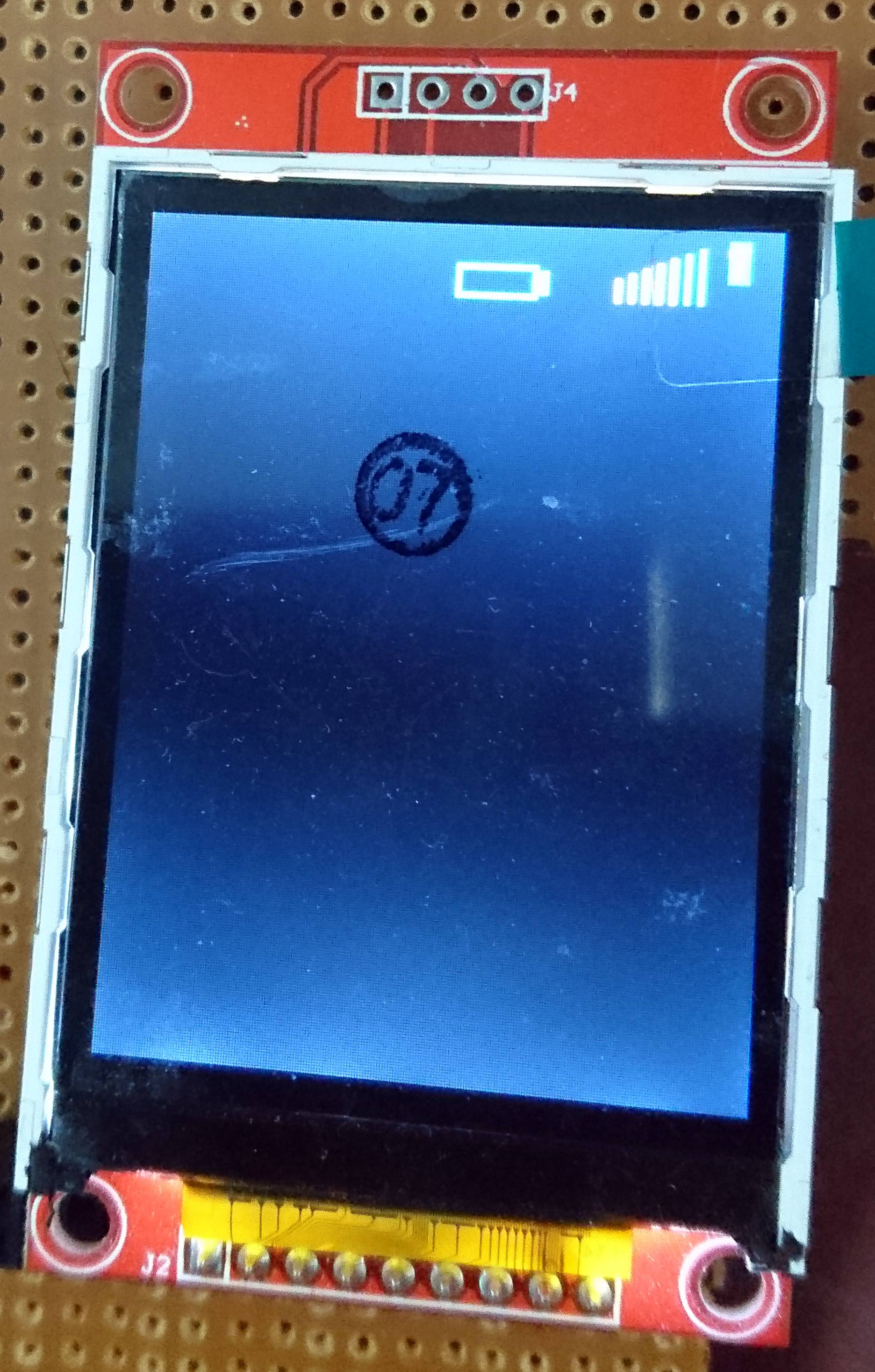
I have also included the export of the CCS project for your need. If you want, you can use the included functions like TFTFill, Draw rectangle, draw circle, etc to create your own simple GUI. Detailed explanation of the initialization codes are out of scope of this space. If needed I can explain. The included project will display a mobile tower bar and increment from 0% signal to 100% singal from white to green in colour. Also a charging battery symbol is there. AND SORRY AS THE CODE IS A BIT MESSED UP AS IT WAS MADE IN A HASTE. WORKING ON IT TO MAKE IT MORE STRUCTURED.
THANKS TO AMIT ASHARA, cb1, BP101, ROBERT ADSETT FOR HELPING ME RESOLVE MY CODE ISSUES!