This thread has been locked.

If you have a related question, please click the "Ask a related question" button in the top right corner. The newly created question will be automatically linked to this question.

Error Occurred in Launching Debug Session

Hello Team

I am trying to debug my code,  I am getting error : "Load Program Error" .

Actually I am using My laptop for development of software. I was doing Master slave SSI (SPI) code. There was not any problem and I was able to built and debug code on Development board TM4C1294. After doing it for 2-3 days , today I am facing an issue. i am not able to debug same code because of Launching session error/ load program error is there while trying to debug it. And the error description is like " Encountered a problem loading file project.out. could not open file"

Even i opened example codes for the TI target board Same error occurs. I am not able to resolve this and got stuked there only. Please help me in this.

  • Feel your pain - those error codes prove (not especially) useful to we mortals.    (those w/"held private" special info fare far better.)

    Classic causes of being, "Locked out" (your plight) are:

    • Code which "re-purposes" any of PC0-PC3 - either deliberately or inadvertently
    • Code which improperly sets the MCU's system clock

    From your description of SPI code use - It may be that you altered the system clock - in the attempt to increase SPI transfer rates.   Worth your while to check that.

    You may be able to restore contact via LM Flash Programmer's "other utilities" Debug Port Unlock.   The exact method required is well detailed here - use the forum's search feature to learn the fine details.

  • Hello Sagar,

    To add to cb1's point, the following thread would be useful for Unlock Process.

    e2e.ti.com/.../374640

    Regards
    Amit
  • Dear Amit

    I think you have not understood our issue clearly. We are not able to load the code in target board( while debugging) because of the error "could not open Project.out file" .  Problem is not with target board. Same project if We open in another PC and try to debug with same target board it is working. but only with my laptop that problem comes, previously it was working there also. But this " "could not open Project.out file" ERROR, in launching debug session.

    We uninstall whole CCS setup form Laptop and again installed it. But that also doesn't work, problem remained same 

    Error... "could not open Project.out file"

  • Hello Sagar

    Then the issue could be that the out file did not get created due to a compilation or linker error. Please check the compilation logs for the project

    Regards
    Amit
  • Hello Amit,

    I am facing lots of issues still. As u said regarding that issue could be due to compilation/linker error., true, but i could not figure out that. So I uninstalled CCS 6 and again tried to install it. After that reinstallation, the projest got error saying "project created in older version and needs to update in new version from CCS App center" New version of ccs is 6.1.1

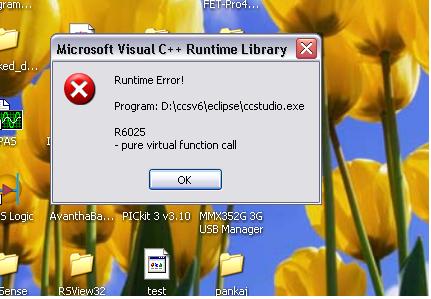
    I did that also. But now i am unable to open CCS with old or new workspace. Its showing runtime error. Screen shot attached here

  • Hello Sagar

    You would need to copy the project contents manually into a new project in the new version of CCS

    Regards
    Amit