This thread has been locked.

If you have a related question, please click the "Ask a related question" button in the top right corner. The newly created question will be automatically linked to this question.

CCS got stuck while flashing, LaunchPad isn't recognized by PC anymore

Other Parts Discussed in Thread: LMFLASHPROGRAMMER, TM4C123GH6PM, SEGGER

Hi All,

my TM4C123GH6PM LaunchPad was recognized before and I could work with it. Yesterday I tried flashing the LaunchPad with another program, but somehow CCS got stuck while flashing. After closing the CCS and relaunching it again, my PC is not recognizing the LaunchPad anymore.

I am using CCS v6 on a Win7 64-bit machine. The device manager is not showing anything when the LaunchPad is connected. I tried reinstalling CCS and the Tiva C Series drivers, but that didn't help. Also when removing the Vdd jumper nothing changes. LMflashprogrammer tells me "ERROR: Unable to find a target". CCS is giving the "Frequency out of range" error.

Another LaunchPad (MSP432-EXP432P401R) is recognized by the PC and works as it should.

What can I do to make the TM4C work again?

Thanks for your help in advace and best regards,
Felix

  • Hello Felix,

    Can you double check your project settings, specifically your device configuration settings that should be for the TM4C129 and not for the MSP432. these are 2 separate technologies and use different debug mechanisms and drivers. The fact that one connects and the other does not only verifies that the USB port is working. they should each have their own unique device configurations in CCS.

    If you find that you have used the MSP432 settings to program the board, it is possible that you have inadvertently programmed or erased the TM4C123 used for the JTAG emulator on the TM4C1294 launchpad. Let me know what you find when you investigate further.
  • Hello Chuck,

    thanks for your response.

    Yes, the project settings are correct. I did not try to flash both the controllers with the same project. I did not flash anything on the MSP432, I just connected it to my PC to see if it gets recognized and check if it's a USB Port problem or a problem with the TM4C. I also tried to connect the TM4C to another Win7-PC, which also did not recognize the LaunchPad.

    The project I wanted to flash on the TM4C123 was on there before. I just changed a variable to get a different PWM dutycycle. So the controller worked before. I still think the problem is that CCS got stuck while connecting/flashing the device.

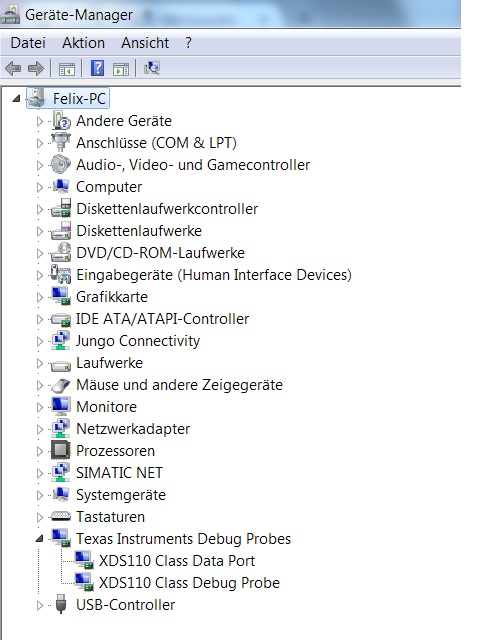
    This is what the device manager looks like when connecting the MSP432 board. I just connected it to the USB Port and did not do anything else.

    Whereas the device manager looks like this, when connecting the TM4C123 LaunchPad:

    If you need any further information please let me know and once again thanks for your help in advance!

    Regards,

    Felix

  • I'm confused by your alternating quotation of "MSP432" and "TM4C". Which Launchpad you mean, and when ?

    My (older LM4C) Launchpad shows up in the hardware manager as "Stellaris In-Circuit Debug Interface".

    Have you installed the USB drivers ?  I'm pretty sure the MSP432- and TM4C are not the same, despite both being Cortex M4 ...

  • Hi,

    I am working with a TM4C123GH6PM LaunchPad. While flashing it, CCS got stuck and afterwards it wasn't recognized by my PC anymore. Also it wasn't recognized by another PC.

    I do have a second LaunchPad, the MSP432P401R, which I never flashed, programmed or even touched before. To check if the problem is related to the USB Port on my machine, I connected the LaunchPad to it. What happened then was, that the example programm started working (flashing LEDs which change colors when pressing the Buttons). So the MSP432P401R is recognized as it should, whereas the other LaunchPad (TM4C123GH6PM) is not recognized anymore since CCS crashed while flashing.

    Now I am trying to fix the "broken" LaunchPad (TM4C123GH6PM) and make it visible again for my computer to work with it. The device manager was showing "Stellaris In-Circuit Debug Interface" before.

    Yes, I reinstalled all the needed drivers and also tried reinstalling CCS.
  • Hi Felix,

    I think you might have possibly done something to the FTDI chip that is part of the ICDI interface on the TM4C123 launchpad. Let me check on possible fixes and get back with you.
  • I think you might have possibly done something to the FTDI chip that is part of the ICDI interface on the TM4C123 launchpad. Let me check on possible fixes and get back with you.

    I would suggest to check the supply voltage (+5V,+3.3V) on the launchpad, too. Just to rule out a "killed" board ...

  • Felix,

    Apologies for the misinformation. The TM4C123 LP uses another TM4C123 device for the ICDI MCU not the FTDI chip. In either case, there is no solution to recover the ICDI interface on the launchpad that I have been able to find. However, there are solutions on this forum related to using a second LP as the debug/programming interface for your board or you could mount a conventional JTAG connector and use an external JTAG emulator for debug/development.

    Note that I will do a bit more checking on this to be 100% certain with my diagnosis and to see if there are potentially other methods to either confirm the diagnosis or point somewhere else.
  • Thaniks f.m.,

    felix could also simply check to see if the power LED is illuminated as a very quick check for this. If it is ON, then there is still the possibility of damage causing improper voltages leading to a need to verify the voltage levels with a voltmeter. If it is OFF, the first point I would check is the power select switch on the same end as the USB connector. This could have inadvertently been moved to the device setting while unplugging or plugging the USB debug cable.
  • Thanks Chuck,
    Thanks f.m.,

    sorry for the late response. I wasn't able to check the voltages over the weekend. Now I've done it and the pins deliver +3.3V or +5V as they should. The LED is on and the switch in the right position.

    So it seems like Chuck is right and the ICDI interface might be broken.

    Thanks for your help to the both of you!

    Regards,
    Felix
  • So it seems like Chuck is right and the ICDI interface might be broken.

    You could try to connect an external debug interface (like a J-Link) on the provided connector of your Launchpad, to prove your theory.

    If you don't have one - a new Launchpad is much cheaper than a J-Link or something comparable. However, it (J-Link or similar) would still be a good investment for a serious developer.

  • f. m. said:
    a new Launchpad is much cheaper than a J-Link or something comparable.

    While that's true - really there's "no comparison" between the performance, capability & robustness of the J-Link & LPad.  (re: JTAG/SWD function)

    Poster should note that terrific discounts may be had for the "educational" versions of the "J-Link!"   These are the (same) as normal J-Links and you do NOT have to create (any) "I'm a student" fiction.   (simply employ the J-Link as Segger directs)

    If not, "Deal of the century" - surely comes close.

    To realize the "full power" of the J-Link consider migrating to IAR.   Single vendor "solution" never quite matches the performance & capability of a REAL IDE...  (and it is unlikely that, "One and only one" vendor - will at all times - have an "idealized" MCU for your application.   REAL IDEs prove vendor agnostic - support MCUs from many - it IS a big world!)   And M0's, M3s, M4s & M7s lurk!   (while just one resides this (limited) space)