This thread has been locked.

If you have a related question, please click the "Ask a related question" button in the top right corner. The newly created question will be automatically linked to this question.

TM4C, Serial Falsh DownLoader

Other Parts Discussed in Thread: LMFLASHPROGRAMMER, UNIFLASH

 The following  description Serial Flash Downloader  in SW-DK-TM4C123G-UG.

   i'm using by Example Source  in "examples\boards\dk-tm4c123g\boot_serial"  with DK-TM4C123G  Development Board

    it's  no Problem Connection COM3 (PC)  of  DK-TM4C123G Board (it's OK UART0) 

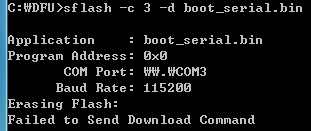
    It was executed  by "sflash -c 3 -d boot_serial.bin" in DOS mode

    An error occurred.

       -------------------------------------------------  

       C:\> sFlash -c 3 -d boot_serial.bin

              Application : boot_serial.bin

    Program Address : 0x0

        COM Port : \\.\COM3

   Baud Rate : 115200

  Erasing Flash

  Failed to Send Download Command

--------------------------------------------------------

It proceeded  as  below  SW-DK-TM4C-123G-UG.

why can not download  ?

thanks

-  Serial Flash Downloader  (in SW-DK-TM4C123G-UG.) -

sflash [OPTION]... [INPUT FILE]
Description:
Downloads a firmware image to a Tiva board using a UART connection to the TivaWare Serial
Flash Loader or the TivaWare Boot Loader. This has the same capabilities as the serial
download portion of the LM Flash Programmer tool.
The source code for this utility is contained in tools/sflash, with a pre-built binary contained in tools/bin.

Arguments:
-b BAUD specifies the baud rate. If not specified, the default of 115,200 will be used.
-c PORT specifies the COM port. If not specified, the default of COM1 will be used.
-d disables auto-baud.
-h displays usage information.
-l FILENAME specifies the name of the boot loader image file.
-p ADDR specifies the address at which to program the firmware. If not specified, the default  of 0 will be used.
-r ADDR specifies the address at which to start processor execution after the firmware has
    been downloaded. If not specified, the processor will be reset after the firmware has been downloaded.
-s SIZE specifies the size of the data packets used to download the firmware date. This must
     be a multiple of four between 8 and 252, inclusive. If using the Serial Flash Loader, the
    maximum value that can be used is 76. If using the Boot Loader, the maximum value that
    can be used is dependent upon the configuration of the Boot Loader. If not specified, the
    default of 8 will be used.


INPUT FILE specifies the name of the firmware image file.

Example:
The following will download a firmware image to the board over COM2 without auto-baud support:

sflash -c 2 -d image.bin

  • Hello Jame

    Is the flash on the TM4C device already in erased state?

    Regards
    Amit
  • Hello Amit

    It is already exist example program("\examples\boards\dk-tm4c123g\hello ") in flash

    No erased state.

    What should I do?

    thanks
  • Hello Jame,

    Use LMFlashProgrammer to erase the device. The serial download utility will not have anything to communicate with on the device since the ROM based boot loader will only be instantiated if Flash is completely erased or if the code executing on the device is configured to call the ROM based boot loader on some hardware event. Alternatively, you could program you own boot loader into the device, but still there would need to be some reason to enter the boot loader (pin toggle, UART command or some combination of both).

    For our general understanding, what is the reason you are trying to write your own download utility rather than simply use LMFlashProgrammer, Uniflash, or some other programmer already in existence?

    More info on the LMFlashProgrammer software is available here: www.ti.com/.../lmflashprogrammer
  • Hello Chuck

    It was updated recent LM Flash Program- Build 1613 and reading LMFlash Help
    I have tride download to DK-TM4C123G Board but An error occurred.

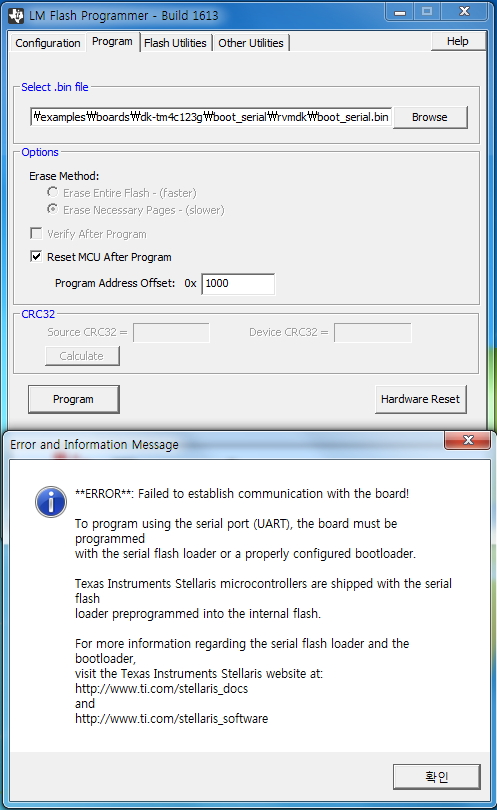
    Pop-Up Window "
    ----------------------------------------------------------------------------------------------------------
    *** ERROR *** Failed to establish communication the board!
    .
    .
    .
    ---------------------------------------------------------------------------------------------------------
    Set LM Flash Programmer

    [configuration]
    Maual Configuration -see below, Serial(UART) , COM3, 115200, 76
    [v] disable AutoBbaud

    [Program]
    boot_serail.bin
    [v] Reset MCU After Program , program Address Offset 0x1000


    What should I do?


    thanks
  • Jame,

    You need to insure the ICDI drivers are installed on your machine. Have you installed CCS or any other tools from TI? Also, make certain you have used the correct USB port on the DK board for debug/programming. You can consult the DK board user guide to see which port to use. You can use this page to access the related documentation including the user guide, a getting started guide and device datasheet - 

    Also, to install the ICDI drivers independent of any of the other tools, you can get the drivers on this page: 

    Also, how were you able to program the hello example into the board if you are not able to download any code or get LMFlashProgrammer to connect? I am curious about this. Was the connection working at some point?

  • Chuck

    Use it was previously installed. ( ICDI Driver, Keil Tools, LM Flash Program,..)

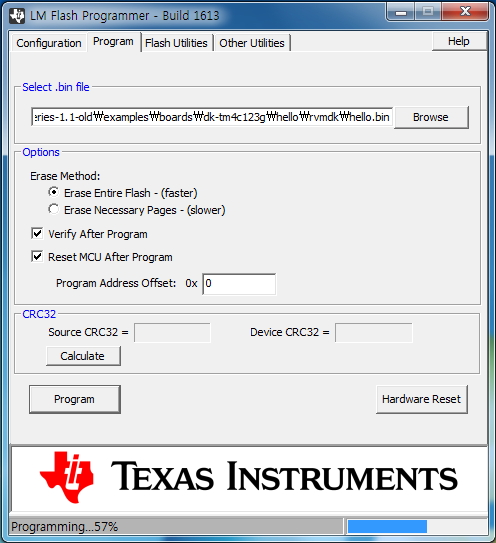
    Program downloaded via Keil Tools(Hello example) or LM Flash Program (Hello example),
    LM Flash Program Set [configuration] TM4C123G Development Board , [Program] program Address Offset 0x0.

    it's download no problem

    I want to know how to download via the UART. (BootLader(boot_serail.bin ) , Image.bin) ?

    thanks
  • Jame,

    So, to summarize, you have previously been able to program the device using the Keil Tools and LM Flash programmer and the binary currently programmed into the device is the Hello example binary included with TivaWare. Is this summary correct?

    As we stated before, in order for a pc host program to download code to the device over UART, the device needs to
    1.) be programmed with either a flash based boot loader
    2.) to be completely erased so that the ROM based bootloader can be used
    3.) be configured such that an external event such as a GPIO input can cause the application to call the ROM based boot loader explicitly

    If none of the three conditions mentioned above are in place you will not be able to program via a Host application on the PC using UART to transfer the image to the device.

    option 2 is simple enough to guarantee by using LMFlashProgrammer or your Keil tools to erase the device without programming another image.

    It is also worth noting that LM FlashProgrammer has the capability to program the device using multiple protocols. It can be used with ICDI, UART, USB or Ethernet each with its own set of needs and requirements. For the UART option, it is using the same code as provided in TivaWare for the sflash example code for the PC. This example, however, requires one of the three conditions I mentioned above to be true in order for it to work.

    In my initial response, I asked for some simple debug on your side. i.e., put a scope on your UART Tx and Rx lines and see what information is going out to the device and/or coming back from the device. This will, at least, tell us if the code on the PC side is attempting to communicate or not. Once confirmed that it is communicating you could go one step further and attempt to do some basic decode on the bit stream to insure it is the right content and format. Once you are sure the PC side is doing what you want, it should work as long as the previously mentioned conditions are met on the device side.
  • Chuck

    It' is Correct

     send attachment :  Picture-cation (JPG)

    I can't understand what you're saying.

    LooK at the pictures.

    what is wrong with this Picture

    Please Let Me Know ?

    thanks.

    [SFalsh]

    [ ICDI ]

    [ Hello.bin Downloaded]

    [Hello UART Log Message  COM3  Port OK ]

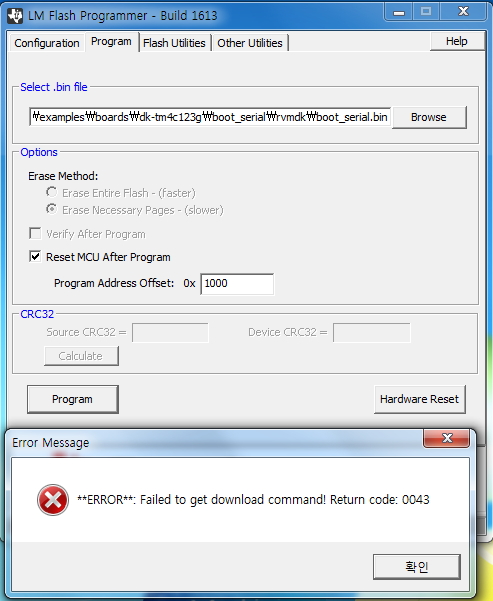
    [ boot _serail.bin  DownLoad ]

    [ UART  Seting ]

    [ UART, DownLoad]

  • Jame,

    You do not erase the device after programming Hello example before attempting to program boot_serial.bin via UART interface. The on chip ROM Boot Loader cannot work with the Hello example programmed into it already!!

    Second, you are attempting to load boot_serial.bin to offset 0x1000. This will not work. It needs to be at address 0x00000000.

    Finally, as I said before, you are not making any effort to change what you are doing or provide any debug related information. This is not helpful in solving your problem. You need to do these steps.

    1.) Erase the device using LMFlashProgrammer ICDI (ONLY Erase, DO NOT PROGRAM Hello Example!).
    2.) Program boot_serial.bin at offset 0x00000000 using LMFlashProgrammer - Your choice of UART or ICDI
    3.) Try your PC DOS tool to program hello example bin file to the device at offset 0x1000. Hello example should run now.
  • Chuck 

    3 Step Sequence Correct ?

     Some will not be downloaded. 

     Please check in attached picture.

    thanks

    [1 STEP]  Flash Erase Only

    [2 STEP]  Serial_boot_bin Download,   ICDI  interface 

    Download Complete 


    [3 STEP ]  Hello.bin Download  by  sflash Dos Mode ( Address 3 type, try) Error !!


    Try  to UART Interface of LM Flash Programmer, 

  • Jame,

    So far all you have shown me is the end result of failed communications with the device. Are you able to do any debug of the problem? In other words, do you have a debugger (CCS, IAR, KEIL, etc) where you can place break points in the code to see what is actually happening in the code execution? I have repeatedly asked for this and still only get screen shots of error messages which is not helpful. You need to examine the code execution and the UART signals to figure out what is going wrong. Simply identifying that it is failing is not allowing me to help you.
  • Dear anybody.

    I want to download about "serial boot-Loader" & " Image.bin" file

    An error occurred.

    What should I do?

    thanks.

  • Hello Jame,

    The flash based boot loader and the ROM based boot loader have specific steps to be followed. Each command sent over the serial interface has a response code associated with it. Can you use the flow diagram in the following application note to debug (with a scope or logic analyzer) which step is failing?

    www.ti.com/.../spma074a.pdf

    Regards
    Amit