This thread has been locked.

If you have a related question, please click the "Ask a related question" button in the top right corner. The newly created question will be automatically linked to this question.

TM4C123GH6PM: print message through UART

Part Number: TM4C123GH6PM


Hi all,

I am using a tiva C controller, TM4C123GH6PM, for my IMU application. I want to print my debug message through UART. My code is below. Function description:

ConfigUART: Configure UART

UARTIntHandler: Interrupt handler. In this function, I check for UART message receiving and transmitting interrupt. If there is a transmitting interrupt, it means that the previous byte is transmitted, I will check if there is any byte in my transmitting buffer, UARTTXBuffer. If yes, transmit that byte, if no, annouce the upper layer that transmitting is done.

UARTSend: Put bytes in to buffer and send the first byte using UARTCharPutNonBlocking to create an interrupt.

UART.c

inline void ConfigUART(uint32_t sysClk, uint32_t baudrate)
{
	SysCtlPeripheralEnable(SYSCTL_PERIPH_UART0);
	SysCtlPeripheralEnable(SYSCTL_PERIPH_GPIOA);

	GPIOPinConfigure(GPIO_PA0_U0RX);
	GPIOPinConfigure(GPIO_PA1_U0TX);
	GPIOPinTypeUART(GPIO_PORTA_BASE, GPIO_PIN_0 | GPIO_PIN_1);

//	UARTConfigSetExpClk(UART0_BASE, sysClk, baudrate,
//			(UART_CONFIG_WLEN_8 | UART_CONFIG_STOP_ONE |
//					UART_CONFIG_PAR_NONE));
	UARTStdioConfig(0, baudrate, sysClk);

	UARTIntRegister(UART0_BASE, &UARTIntHandler);
	IntEnable(INT_UART0);
	UARTIntEnable(UART0_BASE, UART_INT_RX | UART_INT_RT | UART_INT_TX);
	UARTTxIntModeSet(UART0_BASE, UART_TXINT_MODE_EOT);
	IntMasterEnable(); //Enable processor interrupts
	UARTClearEvtQueue();
}

/** Description:
 * @param :
 * @return:
 */
static void UARTIntHandler()
{
	uint32_t IntStatus;
	IntStatus = UARTIntStatus(UART0_BASE, true);
	UARTIntClear(UART0_BASE, IntStatus);

	// Check for UART transmitting interrupt
	if (IntStatus & UART_INT_TX)
	{
		if (txFootCounter < MAX_TX_BUFFER)
		{
			if (txHeadCounter != txFootCounter)
			{
				UARTCharPutNonBlocking(UART0_BASE, UARTTXBuffer[txFootCounter++]);
			}
			else
			{
				UARTPutEvtIntoQueue(UART_TX_DONE_EVENT);
			}
		}
		else
		{
			if (0 != txHeadCounter)
			{
				UARTCharPutNonBlocking(UART0_BASE, UARTTXBuffer[0]);
				txFootCounter = 1;
			}
			else
			{
				UARTPutEvtIntoQueue(UART_TX_DONE_EVENT);
			}
		}
	}
	// Check for UART receiving interrupt
	while (UARTCharsAvail(UART0_BASE))
	{
		isNewData = true;
		if (rxHeadCounter + 1 < MAX_RX_BUFFER)
		{
			if ((rxHeadCounter + 1) != rxFootCounter)
			{
				UARTRXBuffer[rxHeadCounter++] = UARTCharGet(UART0_BASE);
				rxSize++;
			}
		}
		else
		{
			if (0 != rxFootCounter)
			{
				UARTRXBuffer[rxHeadCounter] = UARTCharGet(UART0_BASE);
				rxSize++;
				rxHeadCounter = 0;
			}
		}
	}

}
bool UARTSend(uint8_t *pui8Buffer, uint32_t ui32Count)
{
	//
	// Loop while there are more characters to send.
	//
	while (ui32Count--)
	{
		if (txHeadCounter + 1 < MAX_TX_BUFFER)
		{
			if ((txHeadCounter + 1) != txFootCounter)
			{
				if(*pui8Buffer == '\n')
					UARTTXBuffer[txHeadCounter++] = '\r';

				UARTTXBuffer[txHeadCounter++] = *pui8Buffer++;
			}
			else
				return false;
		}
		else
		{
			if (0 != txFootCounter)
			{
				if(*pui8Buffer == '\n')
					UARTTXBuffer[txHeadCounter++] = '\r';

				UARTTXBuffer[txHeadCounter] = *pui8Buffer++;
				txHeadCounter = 0;
			}
			else
				return false;
		}
	}
	UARTCharPutNonBlocking(UART0_BASE, UARTTXBuffer[txFootCounter]);
	txFootCounter++;
	return true;
}

I have another c file for definition of log functions:

Log.c

void PrintDebug(const char *string, ...)
{
	volatile char txBuf[100];

    DEBUG_HEADER();
    va_list arg;

    va_start(arg, string);
    int len = vsprintf((char *) txBuf, string, arg);
    va_end(arg);
    UARTSend((uint8_t *) txBuf, len);

    COLOR_ENDL();
}

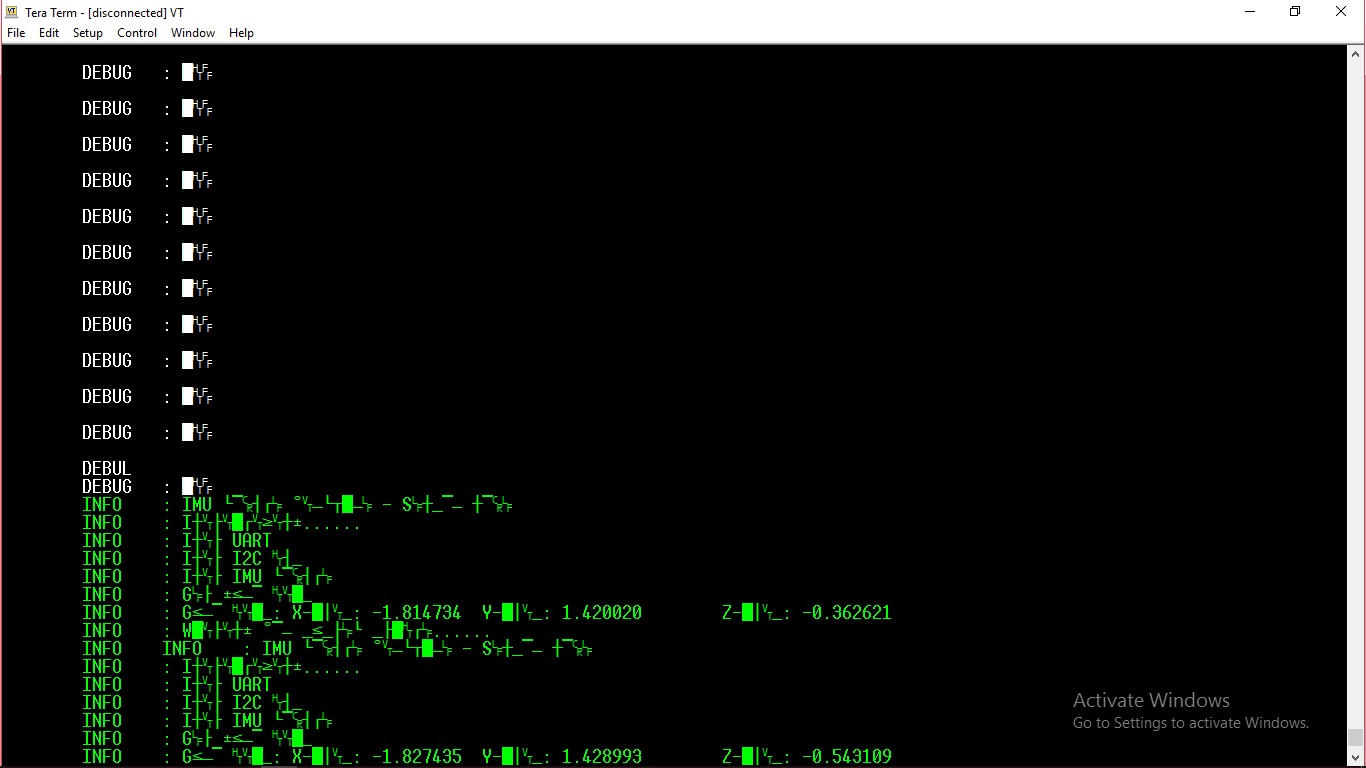
My question is that when I print message through UART, I get the flowing issue. My baudrate in my terminal and MCU is match.
I have another question. In my PrintDebug function, I have use a static array txBuf[100]. I use it with function vsprintf to create a string to send. But that will lead to memory problem. How can I avoid that?

  • If indeed you've "matched baud rates" then you must have unmatched "bit numbers" and/or parity disagreement. (many of your received characters have the msbit set.)
  • Hi cb1_mobile,

    My problem is fixed, I have unmatched "bit numbers". I have another question as above: "In my PrintDebug function, I have use a static array txBuf[100]. I use it with function vsprintf to create a string to send. But that will lead to memory problem. How can I avoid that?"
  • Tuan Hua said:
    and send the first byte using UARTCharPutNonBlocking

    One point of attention: when you use NonBlocking, be aware that your function might return sending nothing, in case the FIFO buffer was full. It seems you are trying to build a reliable UART communication solution, hence you should not take that risk - if you don't have FIFO room available, your code can't go on assuming the byte was properly sent.

    On your other question, what kind of memory problem do you mean? If your string might become longer that 100 bytes, then you surely need a larger array...

  • hi Bruno Saraiva,

    I use UARTCharPutNonBlocking because I afraid that it can block my program if I use UARTCharPut, which will wait to send before return.

    On my other question, I would like to use a dynamic array because my string may be larger or smaller than 100 bytes. Do you have any advices?

    Thanks
  • Tuan Hua said:
    Do you have any advice? ... Re: dynamic array.

    If you seek to compare/contrast dynamic vs static - that's an easy experiment for you - is it not?

    Every application has unique requirements - what may impact one may prove insignificant to another.   Thus - its best that you test/verify each - and then compare/contrast.

    My group prefers (lives by, really) KISS so we'd suggest that you start w/Static Array.   Once that's working well & measured - you may move to dynamic and note any differences.

  • hi cb1,

    I am sorry that my english is not so good and may be you misunderstand me. I mean that I'm trying to give a better solution for my code.

    void PrintDebug(const char *string, ...)
    {
        volatile char txBuf[100];
    
        DEBUG_HEADER();
        va_list arg;
    
        va_start(arg, string);
        int len = vsprintf((char *) txBuf, string, arg);
        va_end(arg);
        UARTSend((uint8_t *) txBuf, len);
    
        COLOR_ENDL();
    }

    On my code above, I have a solution using strlen to get number of bytes in the string as below. Is it a good idea?

    void PrintDebug(const char *string, ...)
    {
    	volatile char *txBuf;
    
        DEBUG_HEADER();
        va_list arg;
    
        int len = strlen(string);
        txBuf = (char*)calloc(len + 1, sizeof(char));
    
        va_start(arg, string);
        len = vsprintf((char *) txBuf, string, arg);
        va_end(arg);
        UARTSend((uint8_t *) txBuf, len);
    
        COLOR_ENDL();
    }


  • Tuan Hua said:
    because I afraid that it can block my program if I use UARTCharPut

    Tuan,

    Consider it: if you don't wait, and return to your main code execution, you will miss sending those important bytes!

    The FIFO buffer will always "eventually get free", as long as the UART clock was set properly - there is no risk of a stall. The faster the communication settings you are using, the faster you will have room on your FIFO again.

    BUT if your main code can't wait for that (and it usually can't), then you need to implement a different strategy: send as many bytes as possible to the FIFO and go back to your main code, enabling an TX interrupt to call you back when more FIFO room is available. Then, send some more bytes, until your transmission buffer is all sent.

    As for the dynamic sizing of the buffer... at least for me, it is quite complicated and error leading to try to allocate a magic dynamic array. If you are running out of ram, then you should use a whole strategy of a dynamic area to share this buffer with other temporary things on your code, but you will be better of letting RTOS handle it for you. Using "pure C", I'd say just choose a big enough array and stick to it. If you need to send more bytes than your array can handle, something is probably wrong with your system, you might run out of resources anyway... You can control the overflow of your buffer with a buffer free counter, and create your blocking point before that buffer... Something like "while (!bufferHasRoom); sendBytesToBuffer();

    Anyway, these are all just concepts... They will make more sense to you when the problems they intend to solve become a reality!

    Cheers

    Bruno

  • As poster Bruno well notes - the larger your "UART Payload" - the greater your complexity and opportunity for error.

    Do you (really) need to create so massive a transfer? Why is that?

    Usually superior (i.e. some) "up front planning" enables smaller, easier & more robust transfer mechanisms...
    KISS rules - exploit it...