This thread has been locked.

If you have a related question, please click the "Ask a related question" button in the top right corner. The newly created question will be automatically linked to this question.

TM4C1294NCPDT: Using full width timer for edge time capture - Explaining PRESCALE

Part Number: TM4C1294NCPDT

Gents,

Just came across a "demand" that I assumed was possible but now I'm not so sure: I'd like to use a Timer to capture 4 events that take longer than 16-bits count would suffice.

My signal is wired into TxCCP0. The typical period is ~1ms. Image below shows the PWM signal which is being measured, and a 16-bit timer below it, with system clock set at 120MHz.

The transitions are automatically transferred to an array via DMA - which is the less invasive method to read the timers. However, this particular signal spans more than two timer roll-overs, hence I can't use the solution with just one 16-bit timer.

Some ideas below (I'm reading the datasheet while writing the question, so it is likely that an answer will come up in the meantime... but let's keep this for the sake of confirmation or suggestions!)

- If I call TimerConfigure() without TIMER_CFG_SPLIT_PAIR, using just TIMER_CFG_A_CAP_TIME, will the "B" part of the timer decrease 1 unit for every roll of part "A", while still having the CCP active?
(No, interrupts/DMA's are not executed when transitions occur).

- Use prescaler: use of prescaler is not really that clear when checking both the datasheet plus the driverlib user guide. Apparently, there is no function to "enable" it - so I wonder if the mere fact of writing a value with TimerPrescaleSet() enables it? What if the value is 0x00? The function does nothing other than writing into ONE register...

Can we take the opportunity to properly explain what each of the Prescale registers do?

- GPTMTAPR (simple called Prescale): modified by TivaWare with TimerPrescaleSet() and read with TimerPrescaleGet();
What does it do, in human-English?

- GPTMTAPMR (Prescale Match): modified with TimerPrescaleMatchSet() and read with TimerPrescaleMatchGet();
What does it do?

- GPTMTAPS (Prescale snapshot): no TivaWare function.
What does it do?

Registers are hardcoded for TimerA for clarity/search convenience.

Just for the record, I also followed this link for help, but then a TAPV register is mentioned on the post to make things more challenging, as it does not appear in the datasheet registers table...
e2e.ti.com/.../354038

ANYWAY, the real nice feature is that the documentation is confusing but the use is easy: I added a non-zero value to the prescaler after the timer configuration, and as per GPTM chapter on the datasheet, Register Descriptions, entry 18 (GPTMTAR), the value of the prescaler when the capture event occurred is automatically transported to bits 23-16 of that register! So I simply had to do nothing to read it, the timer is now a 24 bits.

    TimerConfigure(TIMER0_BASE,(TIMER_CFG_SPLIT_PAIR | TIMER_CFG_A_CAP_TIME_UP));
    TimerPrescaleSet(TIMER0_BASE, TIMER_A, 4);

Sorry for the meandering post, as it was written during research - there are a few unanswered questions here, mostly due to misleading documentation - help/insight most welcome! - but there are some useful conclusions as well.

Regards

Bruno

  • Hi Bruno,

      You are not alone in having difficulty understanding the timer. I have the same problem reading it the first time. I think a diagram will help a lot. 

      If you are using input capture time mode then you don't need to use the GPTMTAPMR and GPTMTAPS. 

      Physically there is a 8-bit prescale register GPTMTAPR and a 16-bit GPTMAILR register. These two registers concatenated together forms a 24-bit preload register. If you are in count down mode then the 24-bit preload register is loaded to the free-running counter GPTMTAV. Physically the GPTMTAV is only 24-bit. The datasheet shows 32-bit but the upper 8bits are simply tied zeros. There is no physical flip-flops for the 31:24 of the GPTMTAV. When an edge is detected, a snap-shot (or timestamp in another word) of the GPTMTAV register is transferred to the GPTMTAR register. Since you are using TIMER_CFG_A_CAP_TIME_UP as in count up mode, the 24-bit GPTMTAV is first loaded with 0. It will count up until the upper bound defined in the GPTMTAPR and GPTMAIRL by which time it will timeout and then reset to zero again.

  • Charles Tsai said:
    You are not alone in having difficulty understanding

    Might those (exact) words have been past used here - and now "repeated?"     Good that.      Reveals great user care/concern (via "not alone") and "softens" any sense of "user ineptness."     Again, good that!

    Charles Tsai said:
    I think a diagram will help a lot. 

    So does my small tech group!     Our hopes "raised high" - yet the diagram has (not yet) arrived!        We MUST assume it is, "In the works!"     (hope that's the case...other ARM MCU Vendors provide such - should "inspiration" prove helpful...)

  • Charles,

    Thanks for the words, and I agree with yourself and cb1 on this one. We need diagrams!

    - My project is working now and I'm still not sure why! If I start my prescaler TimerPrescalerSet() with something reasonably big, every sequence of events is recorded in ascending order. If I start it with a smaller value, a few series of evens capture unsorted values, which makes no sense - still, for now I'll hope it is safe to leave my code at the current status (there are safeguards against weird readings anyway).

    - No matter how one tries to rewrite the explanations in good English, in Shakespearian style or in Gaelic, reading it is usually confusing and inconclusive. Maybe TI will allow/sponsor you open a post "free launchpad set (one ain't enough) for the most liked set of posted diagrams that explains ARM/Tiva timers"!

    I trust I know these timers quite well, and can nearly make it rain just with timers! But still some registers and uses (prescaler included) are hard to read.

    Cheers

    Bruno

  • Hi Bruno,

    In input capture time mode, the prescale register is used to extend the 16-bit timer to 24-bit. I think you already know this. Perhaps let me give an example to illustrate. Let's use your code. You wrote:

    TimerPrescaleSet(TIMER0_BASE, TIMER_A, 4);

    This means that the prescale register GPTMTAPR will have the value of 0x4. Since you did not configure the GPTMAILR register using TimerLoadSet which is the 16-it timer preload register and therefore the GPTMAILR is 0. Note that the GPTMAPR and the GPTMAILR forms one 24-bit preload register in input capture timer mode with the GPTMAPR occupies bits 23:16 and the GPTMAILR at 15:0. With GPTMTAPR =0x4 and GPTMAILR =0x0 you have a preload value of 0x4_0000. This is 262144 in decimal. When you are counting up you start with the free running counter equal to 0 and increments until it reaches 0x4_0000 by which time it will reset to zero again. If you detect an edge, the timestamp of the free running counter GPTMTAV is saved to GPTMTAR to be later retrieved by the application.

    With the system clock at 120MHz. The maximum resolution will be 8.3ns * 262144 ~= 2.17ms if you have use a prescale of 0x4. Let's use another example. If you write:

    TimerPrescaleSet(TIMER0_BASE, TIMER_A, 0x80); // 0x80 = 128

    The 24-bit preload register will be 0x80_0000. This is equal to 8388608 decimal. At 120MHz this will give a maximum resolution of 69ms.

    If you write:

    TimerPrescaleSet(TIMER0_BASE, TIMER_A, 0xFF);
    TimerLoadSet(TIMER0_BASE, TIMER_A, 0xFFFF);

    This will create a full 24-bit timer since the preload value would be 0xFF_FFFF. The free running counter will count from 0 to 0xFF_FFFF before it resets to zero again. The 24-bit counter gives a maximum 139.25ms at 120MHz.
  • Charles,
    Thanks a lot for the persistence and time into this elaborate reply! Maybe it IS possible to explain timers in English!
    I went back to the datasheet to see if I could find equivalent explanation there, but it certainly ain't possible - no matter how one reads it, that text does not explain that the prescaler is the limit to which the extended 8 bits of the timer will count.
    Those diagrams above are still a major need, not? My suggestion for a Timer Diagram Contest stands!
    And the code prescaler for my particular application is now hard set at 0xFF!
    Can I ask for one more confirmation while we are at it? Is the GPTMTAV register REALLY zeroed when TimerEnable(TIMER1_BASE, TIMER_A) is called? Don't we need to reset it from a previous usage, for example, with something like HWREG(TIMER1_BASE + 0x050) = 0; ?
    Regards
    Bruno
  • Hi Bruno,

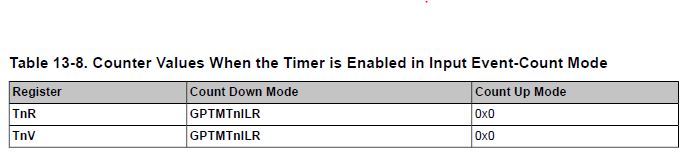
     Please see below table from the datasheet. Note that there is a typo in the title where it should have meant for Input Edge-Time mode, not Input Event-Count Mode. Here you see that if you are in Count Up mode the TnV (GPTMTAV) is loaded with 0. You do not need to reset the TnV manually. The circuitry is supposed to reset the counter to 0 based on the Count Up Mode selection. 

  • Bruno - my group has long found that "down-count" - rather than "up-count" - proves much easier to implement & understand.     And - (hope this is true for this vendor's MCUs) most Timer functions accommodate "down-count" while more than one, "block" up-count.      Best to "align yourself" w/the majority - I would think.

    As good as a "diagram" may be - (multiple diagrams would likely be required) thus a "gif" file - showing Key Timer Registers "LIVE" while the Timer is operating - would be even better!    The Timer/Counter operation is "dynamic" - a diagram can capture (ONLY) one moment in time - when in fact, "multiple, key/critical such moments" placing those key Timer Registers upon clear display - would be far more clarifying.     N'est pas - mon ami?

    Note: the Timer would be "slowed" (to maximize viewability) and directed (jumped)  to (near) those key/critical output and/or inflection points (so one does not wait - forever) so that "ALL key/critical Timer Registers" stand naked (viewable) - and present their (most hidden) secrets...

  • Gents,

    Going a bit further into this: I had been using an external timeout control, to avoid problems in case I don't capture 4 transitions of one given TCCP. I figured that the same timer used for capturing the transitions could be used to check for a timeout, by simply enabling another interrupt flag (TIMER_TIMA_TIMEOUT). However, we are not getting any interrupts for timeout (with the input signal turned off on purpose).

        // Configure Timer3A
        SysCtlPeripheralDisable(SYSCTL_PERIPH_TIMER3);
        SysCtlPeripheralReset(SYSCTL_PERIPH_TIMER3);
        SysCtlPeripheralEnable(SYSCTL_PERIPH_TIMER3);
        while( !SysCtlPeripheralReady( SYSCTL_PERIPH_TIMER3 ) ){}
        TimerConfigure(TIMER3_BASE,(TIMER_CFG_SPLIT_PAIR | TIMER_CFG_A_CAP_TIME_UP));
        TimerPrescaleSet(TIMER3_BASE, TIMER_A, 37);
        TimerLoadSet(TIMER3_BASE, TIMER_A, 0);
        TimerControlEvent(TIMER3_BASE, TIMER_A, TIMER_EVENT_BOTH_EDGES);
        TimerDMAEventSet(TIMER3_BASE, TIMER_DMA_CAPEVENT_A);
        TimerIntEnable(TIMER3_BASE, TIMER_TIMA_DMA | TIMER_TIMA_TIMEOUT);
        IntEnable(INT_TIMER3A);

    Am I missing something, or is it a fact that TIMEOUT interrupt does not occur when the timer is configured as TIMER_CFG_A_CAP_TIME_UP? Or does the DMA usage have something to do with it?

    The plan here would be to generate an interrupt EITHER when 4 transitions are captured (that's already working perfectly), OR when a period a bit over 20ms expire (LoadSet at 0 and PrescaleSet at 37 would translate to decimal 2424832, or 20.2ms at 120MHz).

    Regards

    Bruno