This thread has been locked.

If you have a related question, please click the "Ask a related question" button in the top right corner. The newly created question will be automatically linked to this question.

Starterware/TM4C1294NCPDT: Problem programming the XDS110 boot loader to a custom board.

Part Number: TM4C1294NCPDT
Other Parts Discussed in Thread: RM57L843, UNIFLASH, CC2650

Tool/software: Starterware

Hi,

I developed a custom board based on the RM57LM843 launchpad. The custom board contains the same chips the launchpad, but is smaller and with less peripherals acces.

When i connect a fresh custom board to the PC i've got the message "Tiva Device Firmware Update" in the USB interface. The problem is that after updating the XDS110 boot loader firmware through the LM Flashing Programmer the PC stops recognizing the board and i've got the message "Unknow device" in the USB interface. After this i'm not able to erase the flash nor program the firmware.bin because the PC doesn't recognize the board anymore. Any clue of what is happening?

I've got some RM57L843 launchpads here, so is it possible to erase the customs board TM4C1294 through the UniFlash Programmer and the Lauchpads TM4C1294?

  • Anselmo,
    I'm confused. The RM57x device is a Hercules, not a TM4C... What do you mean by "customs board TM4C1294", and how does that relate to the XDS110 and to the Hercules on your setup?
    If I overlook the other sentences on your post and reply to just the last one, yes, it is possible to erase a custom board with a TM4C1294 using UniFlash and a launchpad - you just need to follow the "unlock" procedure of that program.
    Bruno
  • Is it (proper) to (now) note that a lone (equally confused) TM4C post has invaded "hallowed" Hercules forum space?
    "TM4C" is as unusual & unrecognized there - as RM57Lxyz is here.
  • Sorry if i was not clear before,

    For the sake of simplicity let's consider that i've changed the original TM4C of the RM57L Launchpad for a fresh one, without any firmware. Now i want to program the XDS110 boot_loader.bin on it and , after that, the XDS 2.3.0.7 firmware.bin.
    When i plug the USB cable of the Launchpad with the brand new TM4C the PC recognizes the board as "Tiva Device Firmware Update". So, using the LM Flash Programmer i'm able to program the XDS boot_loader.bin file to the TM4C, but after the chip reset the board appears as "Unknow Device", why? Should i try to directly program the firmware.bin?
  • Anselmo,
    OK, it does seem to make more sense now! So, let me see if I understood it:
    You manufactured a "simpler version" of a RM57L Launchpad. Your board has not only a RM57 Hercules target, but also a TM4C1294 which you intend to use as your XDS110 to program/debug the Hercules MCU.
    If that's correct, some comments are:
    - Why did you do that? The usual way for programming custom boards is to have an external debugger (for example, the very XDS110 present on the original evaluation kit), temporarily connected to the custom board - and when you are happy with the results, you just disconnect the interface, and use your product away from a debugger IDE, with the finished firmware.
    - Although XDS110 seems to have been created with the intention of being open, posts recent as Nov/2016 point to the fact that there is no such available firmware that can be downloaded by the public.
    - As your TM4C1294 will be completely blank, you obviously don't have any firmware in it - and you need a solution to program it for the first time, provided that you are able to obtain the xds110 firmware. For such, you will need to learn how to use the TM4C's bootloader via your selected communication channel (probably the USB?). Won't be too much of a simple task, but there are several posts in this forum about bootloader, and a specific document to guide it (www.ti.com/.../spmu301). An interesting discussion can be seen here:
    e2e.ti.com/.../1051377
    Regards
    Bruno
  • Answers:
    -Space constraints would made the field tests to difficult to be performed without the embedded debugger.
    - The binary files can be found in the folder: "..\ti\ccsv7\ccs_base\common\uscif\xds110". There are even a ReadMe.txt explaining the procedure to update the firmwares.
    - I've programmed the boot_loader.bin to the TM4C in two ways: first, using the Stellaris Launchpad Debugger JTAG with the UniFlash Programmer; second, using directly the USB and the LM Flash Programmer through the DFU option. Both ways indicated a correct programation, but after reset the board stopped being recognized. Anyway, i'm going to take a look at those links;

    Thank you again for the attention.
  • ANSELMO SILVA said:
    -Space constraints would made the field tests to difficult to be performed without the embedded debugger.

    Sounds like you became victim of your own armadilha... Wherever a TM4C fits, so does a simple connector with USB or serial communication coming out of the main MCU... It would certainly be more efficient to capture faster/more adequate data from your Hercules than to see code running on the IDE on the field... We did get lured by the need of field debugging in the past, but it was a nightmare (our hardwares are usually underneath a train!) - so we came up with a house rule: the "basic firmware" must be robust enough not to require field debugging, and any advanced evaluation must be done by dedicated collected data, and provided via serial or other communication - real time or not.

    ANSELMO SILVA said:
    - The binary files can be found in the folder: "..\ti\ccsv7\ccs_base\common\uscif\xds110". There are even a ReadMe.txt explaining the procedure to update the firmwares.

    Thanks a lot for the updated info, I was not aware of that!

    ANSELMO SILVA said:
    Both ways indicated a correct programation, but after reset the board stopped being recognized.

    Just for the record, did you allow for an intermediate JTAG access between the TM4C and the Hercules? In other words, is is physically possible to test the XDS110 side of your hardware on a different target, such as a another simple TM4C123 launchpad? Just trying to isolate the monster. O maybe the XDS110 firmware you got is outdated? The XDS110 that came with some of my CC2650 launchpads required an update on first connection, I'm not sure where the "new version" came from and how CCS managed it, but it is just another thought.

    Cheers

    Bruno

  • Bruno Saraiva said:
    ANSELMO SILVA
    -Space constraints would made the field tests to difficult to be performed without the embedded debugger.

    Sounds like you became victim of your own armadilha... Wherever a TM4C fits, so does a simple connector with USB or serial communication coming out of the main MCU... It would certainly be more efficient to capture faster/more adequate data from your Hercules than to see code running on the IDE on the field... We did get lured by the need of field debugging in the past, but it was a nightmare (our hardwares are usually underneath a train!) - so we came up with a house rule: the "basic firmware" must be robust enough not to require field debugging, and any advanced evaluation must be done by dedicated collected data, and provided via serial or other communication - real time or not.

    Yeah, it seems. We already planned a workaround to, at least, validate the target MCU. We will probably need to figure out a different way to accomplish the field tests requirements. Anyway, i will try to understand the procedure problem soon as possible.

    Bruno Saraiva said:
    ANSELMO SILVA
    Both ways indicated a correct programation, but after reset the board stopped being recognized.

    Just for the record, did you allow for an intermediate JTAG access between the TM4C and the Hercules? In other words, is is physically possible to test the XDS110 side of your hardware on a different target, such as a another simple TM4C123 launchpad? Just trying to isolate the monster. O maybe the XDS110 firmware you got is outdated? The XDS110 that came with some of my CC2650 launchpads required an update on first connection, I'm not sure where the "new version" came from and how CCS managed it, but it is just another thought.

    Cheers

    Bruno

    I've tested the firmware.bin file programming it to a RM57Lx Launchpad. It worked perfectly and firmware was updated from 2.3.0.0 to 2.3.0.7. The TM4C JTAG present on the pins PC0~PC3 is available in an external header. To acces the Hercules JTAG, PA2~PA5, I can solder external wires to the pins.

    In order to avoid further delays in the development I desoldered the target MCU from one Launchpad and the TM4C from one custom board. Now i'm going to connect wires from one board to another and validate target MCU from our board. As soon as the Software team is able to continue their work I will keep searching for a solution or at least a clear explanation why the boot_loader.bin didn't work.

  • Not sure if I am too late to this party, but I have a similar setup where I have a custom board with a Tiva 129 on which I use for an XDS110.

    The programming sequence I use to configure this Tiva as a 129 is as follows...

    Make sure no other Tiva devices are on the USB bus
    Open command prompt in XDS110 FW directory
    Check with 'xdsdfu -e' to make sure Tiva is in DFU mode. It should report "Tiva Device Firmware Update"
    Execute "xdsdfu -b boot_loader.bin -r"
    Power cycle or reset the board then execute "xdsdfu -f firmware.bin -r"
    After completing an additional LED should illuminate by the Tiva 129 if you have included it.

    The XDS110 should then also appear on the USB bus.

    BR,

    Steve

  • Greetings Mr. Clynes - and thank you.     While the beer is (long) gone - party continues - and may even be enhanced - thanks to your noted & valued contribution... 

  • Steve Clynes said:

    Not sure if I am too late to this party, but I have a similar setup where I have a custom board with a Tiva 129 on which I use for an XDS110.

    The programming sequence I use to configure this Tiva as a 129 is as follows...

    Make sure no other Tiva devices are on the USB bus
    Open command prompt in XDS110 FW directory
    Check with 'xdsdfu -e' to make sure Tiva is in DFU mode. It should report "Tiva Device Firmware Update"
    Execute "xdsdfu -b boot_loader.bin -r"

    After the command to program the boot loader firmware the PC stops recognizing the board and i get the message "Unknow Device", exactly the same behavior as when i tried to program it through the LM Flash Programmer.

    Steve Clynes said:

    Power cycle or reset the board then execute "xdsdfu -f firmware.bin -r"
    After completing an additional LED should illuminate by the Tiva 129 if you have included it.

    The XDS110 should then also appear on the USB bus.

    BR,

    Steve

    Unfortunately after programming the boot_loader.bin the command "xdsdfu -e" return no device found, making it impossible to program the firmware.bin file.

    Att,

  • Hi,

     I assume if you run the xdsdfu on the RM57 LaunchPad it is working to update the FW, correct?

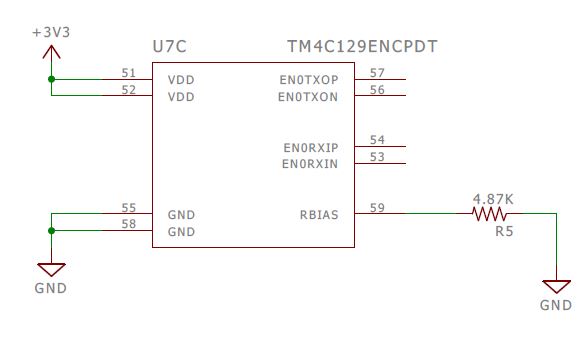
     Can you please also double check you have the 4.87Kohm resistor on the RBIAS pin like shown below in the RM57 LaunchPad schematic?

  • I have found that if ANY code is previously loaded then the 'clean' procedure outlined above does not work so well.

    I have still to determine exactly how to fully erase the Tiva through DFU/USB.

    If you have access to the JTAG pins then you can use LMFlash and do a full erase. This should then allow you to perform the 'clean' procedure I mention above.

    BR,

    Steve