Part Number: TM4C123GH6PM
Tool/software: Code Composer Studio
Hi
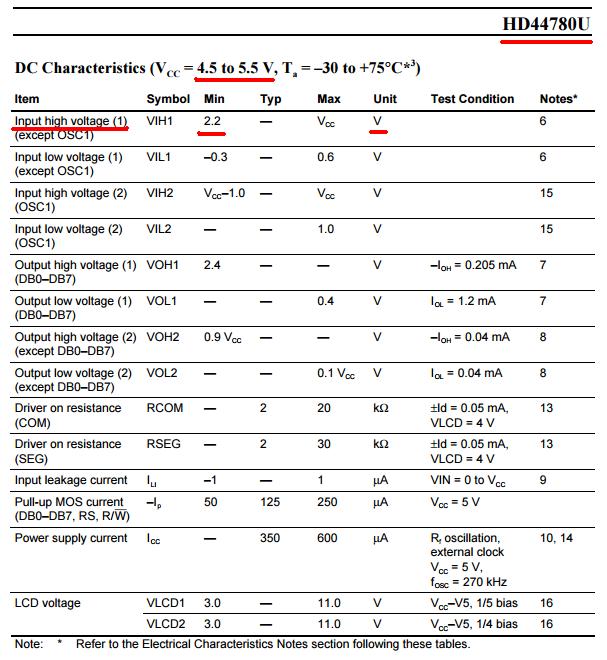
I am using JHD 162A LCD module to display a message("Hello world").
I am able to build code without errors but when I tried to run it, the program stucked into exit.c file.
And the LCD is displaying:
1st row - 16 "5X7" matrix
2nd row - blank.
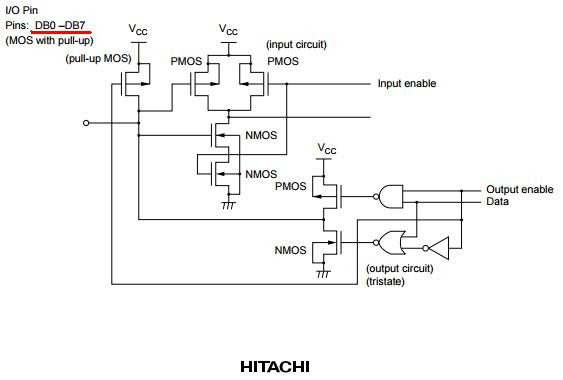
// PB0-7 -> Data lines D0-D7
// PD0 -> RS
// PD1 -> Enable

//**********************************************************************88

#include <stdint.h>
#include <stdbool.h>
#include "inc/hw_memmap.h"
#include "inc/hw_types.h"
#include "driverlib/sysctl.h"
#include "driverlib/gpio.h"

unsigned char pins=(GPIO_PIN_0 | GPIO_PIN_1 | GPIO_PIN_2 | GPIO_PIN_3 | GPIO_PIN_4 | GPIO_PIN_5 | GPIO_PIN_6 | GPIO_PIN_7);

void Lcd_data(unsigned char data)
{
    GPIOPinWrite(GPIO_PORTB_BASE, pins, data); //Put on the Data Pins 0x01 to Clear LCD screen
    GPIOPinWrite(GPIO_PORTD_BASE, GPIO_PIN_0|GPIO_PIN_1,0x03); //RS=1 | E=1
    SysCtlDelay(2); //Enable Pulse Width (High Level) 230 nano second
    GPIOPinWrite(GPIO_PORTD_BASE, GPIO_PIN_0|GPIO_PIN_1,0x01); //RS=1 | E=0

    SysCtlDelay(4167); //1 milliseconds delay
}


void Display(unsigned char *str)
{
    while(*str)
    {
        Lcd_data(*str);
        str++;
    }
}


int main(void)
{

    SysCtlClockSet(SYSCTL_SYSDIV_16|SYSCTL_USE_PLL|SYSCTL_XTAL_16MHZ|SYSCTL_OSC_MAIN); //12.5MHz

    SysCtlPeripheralEnable(SYSCTL_PERIPH_GPIOD);
    SysCtlPeripheralEnable(SYSCTL_PERIPH_GPIOB);

    GPIOPinTypeGPIOOutput(GPIO_PORTB_BASE, GPIO_PIN_0|GPIO_PIN_1|GPIO_PIN_2|GPIO_PIN_3| GPIO_PIN_4| GPIO_PIN_5| GPIO_PIN_6| GPIO_PIN_7);
    GPIOPinTypeGPIOOutput(GPIO_PORTD_BASE, GPIO_PIN_0|GPIO_PIN_1);

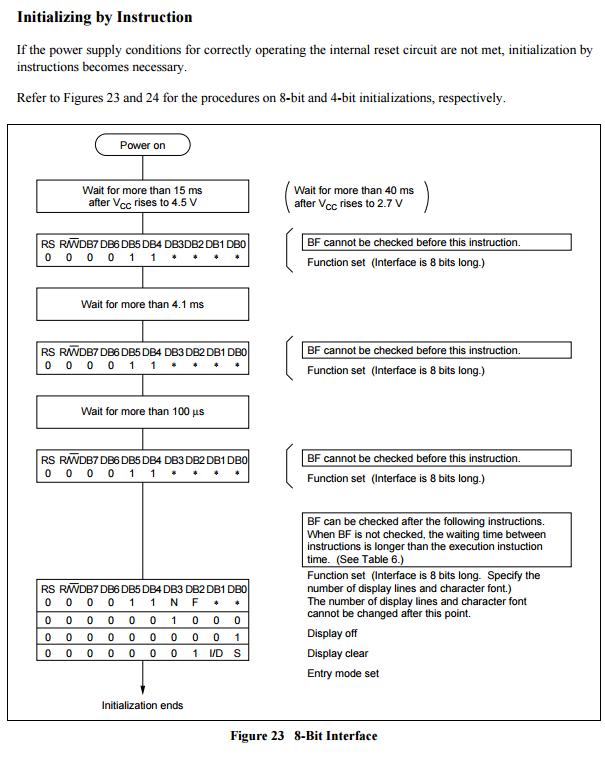
    //Wait 15 Miliseconds after LCD Power Up//
    SysCtlDelay(62500);

    GPIOPinWrite(GPIO_PORTD_BASE, GPIO_PIN_0|GPIO_PIN_1,0x00); //RS=0 | E=0


    //Initialize the LCD display with commands

    GPIOPinWrite(GPIO_PORTB_BASE, pins, 0x38); //Put on the Data Pins 0x38 to get 2 Lines 5x7 Matrix
    GPIOPinWrite(GPIO_PORTD_BASE, GPIO_PIN_0|GPIO_PIN_1,0x02); //RS=0 | E=1
    SysCtlDelay(2); //Enable Pulse Width (High Level) 230 nano second
    GPIOPinWrite(GPIO_PORTD_BASE, GPIO_PIN_0|GPIO_PIN_1,0x00); //RS=0 | E=0

    SysCtlDelay(4167); //1 milliseconds delay

    GPIOPinWrite(GPIO_PORTB_BASE, pins, 0x0c); //Put on the Data Pins 0x0c to Display ON cursor OFF
    GPIOPinWrite(GPIO_PORTD_BASE, GPIO_PIN_0|GPIO_PIN_1,0x02); //RS=0 | E=1
    SysCtlDelay(2); //Enable Pulse Width (High Level) 230 nano second
    GPIOPinWrite(GPIO_PORTD_BASE, GPIO_PIN_0|GPIO_PIN_1,0x00); //RS=0 | E=0

    SysCtlDelay(4167); //1 milliseconds delay

    GPIOPinWrite(GPIO_PORTB_BASE, pins, 0x0e); //Put on the Data Pins 0x0e to Display ON cursor ON
    GPIOPinWrite(GPIO_PORTD_BASE, GPIO_PIN_0|GPIO_PIN_1,0x02); //RS=0 | E=1
    SysCtlDelay(2); //Enable Pulse Width (High Level) 230 nano second
    GPIOPinWrite(GPIO_PORTD_BASE, GPIO_PIN_0|GPIO_PIN_1,0x00); //RS=0 | E=0

    SysCtlDelay(4167); //1 milliseconds delay

    GPIOPinWrite(GPIO_PORTB_BASE, pins, 0x01); //Put on the Data Pins 0x01 to Clear LCD screen
    GPIOPinWrite(GPIO_PORTD_BASE, GPIO_PIN_0|GPIO_PIN_1,0x02); //RS=0 | E=1
    SysCtlDelay(2); //Enable Pulse Width (High Level) 230 nano second
    GPIOPinWrite(GPIO_PORTD_BASE, GPIO_PIN_0|GPIO_PIN_1,0x00); //RS=0 | E=0

    SysCtlDelay(4167); //1 milliseconds delay

    GPIOPinWrite(GPIO_PORTD_BASE, GPIO_PIN_0|GPIO_PIN_1,0x01); //RS=1 | E=0

    Display("Hello world");


}
I have compiled this code from various posts from this community.