


Part Number: EK-TM4C129EXL
Tool/software: Code Composer Studio
Hi, I am developing a CAN based communication system whereby I will need to transmit CAN messeges to multiple nodes. As a start, I have attempted my setup using 2 Nodes (2 TM4C129EXL launchpads) and this seems to work as expected although I have a some minor issues in filtering the message ID which is not related to this issue (refer to : e2e.ti.com/.../641798).
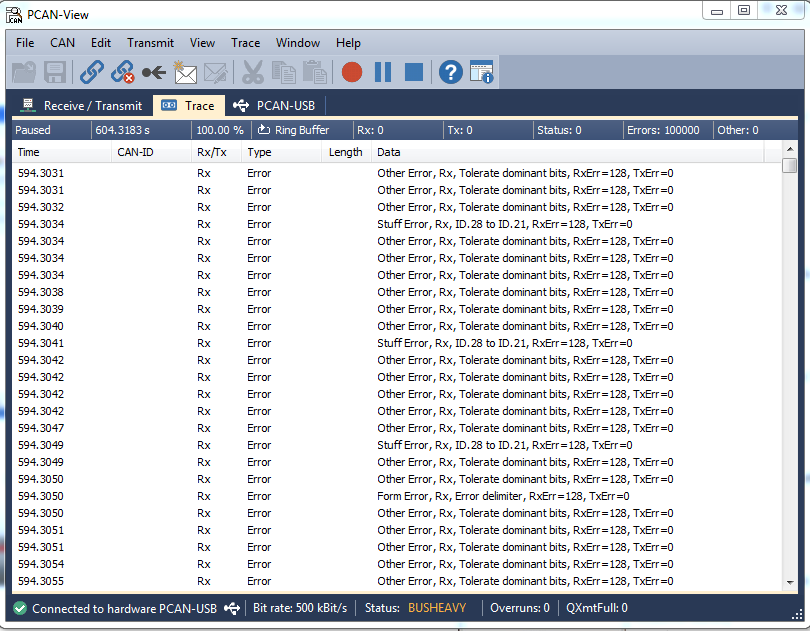
However when I attempted to communicate with PCAN-USB Adapter (Transmit from launchpad and receive from PCAN-USB adapter), there seems to be some error messages. The transmit will stop after a single transmit. I am using PCAN-View to trace the received messages.
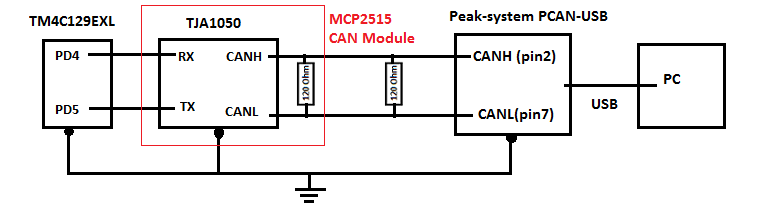
I am still trying to figure out what is causing this errors. Attached the schematics, terminal output and error messages.
Simple Schematics:
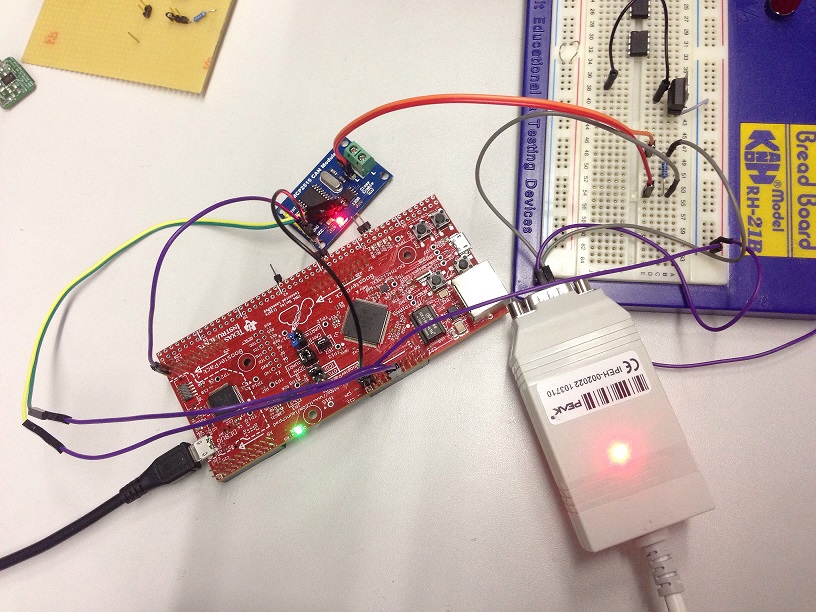
Hardware setup:
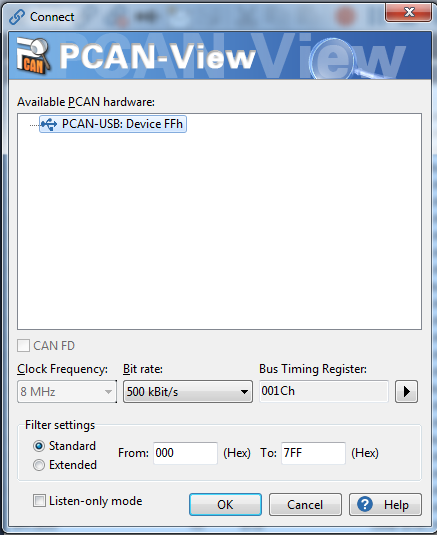
PCAN-USB setup:
Error message:
Terminal output at transmit side:

//*****************************************************************************
//
// multi_tx.c - Peripheral example demonstrating multiple CAN message
//              transmission.
//
// Copyright (c) 2010-2017 Texas Instruments Incorporated.  All rights reserved.
// Software License Agreement
//
//   Redistribution and use in source and binary forms, with or without
//   modification, are permitted provided that the following conditions
//   are met:
//
//   Redistributions of source code must retain the above copyright
//   notice, this list of conditions and the following disclaimer.
//
//   Redistributions in binary form must reproduce the above copyright
//   notice, this list of conditions and the following disclaimer in the
//   documentation and/or other materials provided with the
//   distribution.
//
//   Neither the name of Texas Instruments Incorporated nor the names of
//   its contributors may be used to endorse or promote products derived
//   from this software without specific prior written permission.
//
// THIS SOFTWARE IS PROVIDED BY THE COPYRIGHT HOLDERS AND CONTRIBUTORS
// "AS IS" AND ANY EXPRESS OR IMPLIED WARRANTIES, INCLUDING, BUT NOT
// LIMITED TO, THE IMPLIED WARRANTIES OF MERCHANTABILITY AND FITNESS FOR
// A PARTICULAR PURPOSE ARE DISCLAIMED. IN NO EVENT SHALL THE COPYRIGHT
// OWNER OR CONTRIBUTORS BE LIABLE FOR ANY DIRECT, INDIRECT, INCIDENTAL,
// SPECIAL, EXEMPLARY, OR CONSEQUENTIAL DAMAGES (INCLUDING, BUT NOT
// LIMITED TO, PROCUREMENT OF SUBSTITUTE GOODS OR SERVICES; LOSS OF USE,
// DATA, OR PROFITS; OR BUSINESS INTERRUPTION) HOWEVER CAUSED AND ON ANY
// THEORY OF LIABILITY, WHETHER IN CONTRACT, STRICT LIABILITY, OR TORT
// (INCLUDING NEGLIGENCE OR OTHERWISE) ARISING IN ANY WAY OUT OF THE USE
// OF THIS SOFTWARE, EVEN IF ADVISED OF THE POSSIBILITY OF SUCH DAMAGE.
//
// This is part of revision 2.1.4.178 of the Tiva Firmware Development Package.
//
//*****************************************************************************

#include <stdbool.h>
#include <stdint.h>
#include "inc/hw_can.h"
#include "inc/hw_ints.h"
#include "inc/hw_memmap.h"
#include "driverlib/can.h"
#include "driverlib/gpio.h"
#include "driverlib/interrupt.h"
#include "driverlib/pin_map.h"
#include "driverlib/sysctl.h"
#include "driverlib/uart.h"
#include "utils/uartstdio.h"

//*****************************************************************************
//
//! \addtogroup can_examples_list
//! <h1>Multiple CAN TX (multi_tx)</h1>
//!
//! This example shows how to set up the CAN to send multiple messages.  The
//! CAN peripheral is configured to send messages with 4 different CAN IDs.
//! Two of the messages (with different CAN IDs) are sent using a shared
//! message object.  This shows how to reuse a message object for multiple
//! messages.  The other two messages are sent using their own message objects.
//! All four messages are transmitted once per second.  The content of each
//! message is a test pattern.  A CAN interrupt handler is used to confirm
//! message transmission and count the number of messages that have been sent.
//!
//! This example uses the following peripherals and I/O signals.  You must
//! review these and change as needed for your own board:
//! - CAN0 peripheral
//! - GPIO Port B peripheral (for CAN0 pins)
//! - CAN0RX - PB4
//! - CAN0TX - PB5
//!
//! The following UART signals are configured only for displaying console
//! messages for this example.  These are not required for operation of CAN.
//! - GPIO port A peripheral (for UART0 pins)
//! - UART0RX - PA0
//! - UART0TX - PA1
//!
//! This example uses the following interrupt handlers.  To use this example
//! in your own application you must add these interrupt handlers to your
//! vector table.
//! - INT_CAN0 - CANIntHandler
//
//*****************************************************************************

//*****************************************************************************
//
// A counter that keeps track of the number of times the TX interrupt has
// occurred, which should match the number of TX messages that were sent.
//
//*****************************************************************************
volatile uint32_t g_ui32IntCount = 0;

//*****************************************************************************
//
// Counters that are used to count the number of messages on each of the
// three message objects that are used in this example.
//
//*****************************************************************************
volatile uint32_t g_ui32Msg1Count = 0;
volatile uint32_t g_ui32Msg2Count = 0;
volatile uint32_t g_ui32Msg3Count = 0;
volatile uint32_t g_ui32Msg4Count = 0;

//*****************************************************************************
//
// A flag to indicate that CAN controller message object 3 has sent a message.
//
//*****************************************************************************
volatile bool g_bMsgObj3Sent = 0;

//*****************************************************************************
//
// A flag to indicate that some transmission error occurred.
//
//*****************************************************************************
volatile bool g_bErrFlag = 0;

//*****************************************************************************
//
// CAN message objects that will hold the separate CAN messages.  These could
// also be allocated on the stack but be careful because these structures
// each take about 20 bytes.
//
//*****************************************************************************
tCANMsgObject g_sCANMsgObject1;
tCANMsgObject g_sCANMsgObject2;
tCANMsgObject g_sCANMsgObject3;
tCANMsgObject g_sCANMsgObject4;
//*****************************************************************************
//
// Message buffers that hold the contents of the 4 different messages that
// are being transmitted.  Each one is a different length.
//
//*****************************************************************************
uint8_t g_pui8Msg1[4] = { 0, 0, 0, 0 };
uint8_t g_pui8Msg2[5] = { 2, 2, 2, 2, 2 };
uint8_t g_pui8Msg3[6] = { 3, 3, 3, 3, 3, 3 };
uint8_t g_pui8Msg4[8] = { 4, 4, 4, 4, 5, 5, 5, 5 };

uint8_t g_pui8Msg_t[4] = { 10, 15, 3, 2 };

//*****************************************************************************
//
// This function sets up UART0 to be used for a console to display information
// as the example is running.
//
//*****************************************************************************
void
InitConsole(void)
{
    //PD4/PD5
    // Enable GPIO port A which is used for UART0 pins.
    // TODO: change this to whichever GPIO port you are using.
    //
    SysCtlPeripheralEnable(SYSCTL_PERIPH_GPIOD);

    //
    // Configure the pin muxing for UART0 functions on port A0 and A1.
    // This step is not necessary if your part does not support pin muxing.
    // TODO: change this to select the port/pin you are using.
    //
    GPIOPinConfigure(GPIO_PD4_U2RX);
    GPIOPinConfigure(GPIO_PD5_U2TX);

    //
    // Enable UART0 so that we can configure the clock.
    //
    SysCtlPeripheralEnable(SYSCTL_PERIPH_UART2);

    //
    // Use the internal 16MHz oscillator as the UART clock source.
    //
    UARTClockSourceSet(UART2_BASE, UART_CLOCK_PIOSC);

    //
    // Select the alternate (UART) function for these pins.
    // TODO: change this to select the port/pin you are using.
    //
    GPIOPinTypeUART(GPIO_PORTD_BASE, GPIO_PIN_4 | GPIO_PIN_5);

    //
    // Initialize the UART for console I/O.
    //
    UARTStdioConfig(2, 115200, 16000000);
}

//*****************************************************************************
//
// This function prints some information about the CAN message to the
// serial port for information purposes only.
//
//*****************************************************************************
void
PrintCANMessageInfo(tCANMsgObject *psCANMsg, uint32_t ui32MsgObj)
{
    unsigned int uIdx;

    UARTprintf("Sending msg: obj=%d ID=0x%04X msg=0x", ui32MsgObj,
               psCANMsg->ui32MsgID);
    for(uIdx = 0; uIdx < psCANMsg->ui32MsgLen; uIdx++)
    {
        UARTprintf("%02X ", psCANMsg->pui8MsgData[uIdx]);
    }
    UARTprintf("\n");
}

//*****************************************************************************
//
// This function provides a 1 second delay using a simple polling method.
//
//*****************************************************************************
void
SimpleDelay(void)
{
    //
    // Delay cycles for 1 second
    //
    SysCtlDelay(16000000 / 3);
}

//*****************************************************************************
//
// This function is the interrupt handler for the CAN peripheral.  It checks
// for the cause of the interrupt, and maintains a count of all messages that
// have been transmitted.
//
//*****************************************************************************
void
CANIntHandler(void)
{
    uint32_t ui32Status;

    //
    // Read the CAN interrupt status to find the cause of the interrupt
    //
    ui32Status = CANIntStatus(CAN0_BASE, CAN_INT_STS_CAUSE);

    //
    // If the cause is a controller status interrupt, then get the status
    //
    if(ui32Status == CAN_INT_INTID_STATUS)
    {
        //
        // Read the controller status.  This will return a field of status
        // error bits that can indicate various errors.  Error processing
        // is not done in this example for simplicity.  Refer to the
        // API documentation for details about the error status bits.
        // The act of reading this status will clear the interrupt.  If the
        // CAN peripheral is not connected to a CAN bus with other CAN devices
        // present, then errors will occur and will be indicated in the
        // controller status.
        //
        ui32Status = CANStatusGet(CAN0_BASE, CAN_STS_CONTROL);

        //
        // Set a flag to indicate some errors may have occurred.
        //
        g_bErrFlag = 1;
    }

    //
    // Check if the cause is message object 1, which is used for sending
    // message 1.
    //
    else if(ui32Status == 1)
    {
        //
        // Getting to this point means that the TX interrupt occurred on
        // message object 1, and the message TX is complete.  Clear the
        // message object interrupt.
        //
        CANIntClear(CAN0_BASE, 1);

        //
        // Increment a counter to keep track of how many messages have been
        // sent.  In a real application this could be used to set flags to
        // indicate when a message is sent.
        //
        g_ui32Msg1Count++;

        //
        // Since the message was sent, clear any error flags.
        //
        g_bErrFlag = 0;
    }

    //
    // Check if the cause is message object 2, which is used for sending
    // message 2.
    //
    else if(ui32Status == 2)
    {
        //
        // Getting to this point means that the TX interrupt occurred on
        // message object 2, and the message TX is complete.  Clear the
        // message object interrupt.
        //
        CANIntClear(CAN0_BASE, 2);

        //
        // Increment a counter to keep track of how many messages have been
        // sent.  In a real application this could be used to set flags to
        // indicate when a message is sent.
        //
        g_ui32Msg2Count++;

        //
        // Since the message was sent, clear any error flags.
        //
        g_bErrFlag = 0;
    }

    //
    // Check if the cause is message object 3, which is used for sending
    // messages 3 and 4.
    //
    else if(ui32Status == 3)
    {
        //
        // Getting to this point means that the TX interrupt occurred on
        // message object 3, and a message TX is complete.  Clear the
        // message object interrupt.
        //
        CANIntClear(CAN0_BASE, 3);

        //
        // Increment a counter to keep track of how many messages have been
        // sent.  In a real application this could be used to set flags to
        // indicate when a message is sent.
        //
        g_ui32Msg3Count++;

        //
        // Set the flag indicating that a message was sent using message
        // object 3.  The program main loop uses this to know when to send
        // another message using message object 3.
        //
        g_bMsgObj3Sent = 1;

        //
        // Since the message was sent, clear any error flags.
        //
        g_bErrFlag = 0;
    }
    else if(ui32Status == 4)
    {
        //
        // Getting to this point means that the TX interrupt occurred on
        // message object 3, and a message TX is complete.  Clear the
        // message object interrupt.
        //
        CANIntClear(CAN0_BASE, 4);

        //
        // Increment a counter to keep track of how many messages have been
        // sent.  In a real application this could be used to set flags to
        // indicate when a message is sent.
        //
        g_ui32Msg4Count++;

        //
        // Since the message was sent, clear any error flags.
        //
        g_bErrFlag = 0;
    }
    //
    // Otherwise, something unexpected caused the interrupt.  This should
    // never happen.
    //
    else
    {
        //
        // Spurious interrupt handling can go here.
        //
    }
}

//*****************************************************************************
//
// Configure the CAN and enter a loop to transmit periodic CAN messages.
//
//*****************************************************************************
int
main(void)
{
#if defined(TARGET_IS_TM4C129_RA0) ||                                         \
    defined(TARGET_IS_TM4C129_RA1) ||                                         \
    defined(TARGET_IS_TM4C129_RA2)
    uint32_t ui32SysClock;
#endif

    //
    // Set the clocking to run directly from the external crystal/oscillator.
    // TODO: The SYSCTL_XTAL_ value must be changed to match the value of the
    // crystal on your board.
    //
#if defined(TARGET_IS_TM4C129_RA0) ||                                         \
    defined(TARGET_IS_TM4C129_RA1) ||                                         \
    defined(TARGET_IS_TM4C129_RA2)
    ui32SysClock = SysCtlClockFreqSet((SYSCTL_XTAL_25MHZ |
                                       SYSCTL_OSC_MAIN |
                                       SYSCTL_USE_OSC)
                                       ,25000000);
#else
    SysCtlClockSet(SYSCTL_SYSDIV_1 | SYSCTL_USE_OSC | SYSCTL_OSC_MAIN |
                   SYSCTL_XTAL_16MHZ);
#endif

    //
    // Set up the serial console to use for displaying messages.  This is
    // just for this example program and is not needed for CAN operation.
    //
    InitConsole();
	UARTprintf("Debug: check console\n");
    //
    // For this example CAN0 is used with RX and TX pins on port B4 and B5.
    // The actual port and pins used may be different on your part, consult
    // the data sheet for more information.
    // GPIO port B needs to be enabled so these pins can be used.
    // TODO: change this to whichever GPIO port you are using
    //
    SysCtlPeripheralEnable(SYSCTL_PERIPH_GPIOA);

    //
    // Configure the GPIO pin muxing to select CAN0 functions for these pins.
    // This step selects which alternate function is available for these pins.
    // This is necessary if your part supports GPIO pin function muxing.
    // Consult the data sheet to see which functions are allocated per pin.
    // TODO: change this to select the port/pin you are using
    //
    GPIOPinConfigure(GPIO_PA0_CAN0RX);
    GPIOPinConfigure(GPIO_PA1_CAN0TX);

    //
    // Enable the alternate function on the GPIO pins.  The above step selects
    // which alternate function is available.  This step actually enables the
    // alternate function instead of GPIO for these pins.
    // TODO: change this to match the port/pin you are using
    //
    GPIOPinTypeCAN(GPIO_PORTA_BASE, GPIO_PIN_0 | GPIO_PIN_1);

    //
    // The GPIO port and pins have been set up for CAN.  The CAN peripheral
    // must be enabled.
    //
    SysCtlPeripheralEnable(SYSCTL_PERIPH_CAN0);

    //
    // Initialize the CAN controller
    //
    CANInit(CAN0_BASE);

    //
    // Set up the bit rate for the CAN bus.  This function sets up the CAN
    // bus timing for a nominal configuration.  You can achieve more control
    // over the CAN bus timing by using the function CANBitTimingSet() instead
    // of this one, if needed.
    // In this example, the CAN bus is set to 500 kHz.  In the function below,
    // the call to SysCtlClockGet() or ui32SysClock is used to determine the
    // clock rate that is used for clocking the CAN peripheral.  This can be
    // replaced with a  fixed value if you know the value of the system clock,
    // saving the extra function call.  For some parts, the CAN peripheral is
    // clocked by a fixed 8 MHz regardless of the system clock in which case
    // the call to SysCtlClockGet() or ui32SysClock should be replaced with
    // 8000000.  Consult the data sheet for more information about CAN
    // peripheral clocking.
    //
#if defined(TARGET_IS_TM4C129_RA0) ||                                         \
    defined(TARGET_IS_TM4C129_RA1) ||                                         \
    defined(TARGET_IS_TM4C129_RA2)
    CANBitRateSet(CAN0_BASE, ui32SysClock, 500000);
#else
    CANBitRateSet(CAN0_BASE, SysCtlClockGet(), 500000);
#endif

    //
    // Enable interrupts on the CAN peripheral.  This example uses static
    // allocation of interrupt handlers which means the name of the handler
    // is in the vector table of startup code.  If you want to use dynamic
    // allocation of the vector table, then you must also call CANIntRegister()
    // here.
    //
    CANIntRegister(CAN0_BASE, CANIntHandler); // if using dynamic vectors
    //
    CANIntEnable(CAN0_BASE, CAN_INT_MASTER | CAN_INT_ERROR | CAN_INT_STATUS);

    //
    // Enable the CAN interrupt on the processor (NVIC).
    //
    IntEnable(INT_CAN0);

    //
    // Enable the CAN for operation.
    //
    CANEnable(CAN0_BASE);

    //
    // Initialize the message object that will be used for sending CAN
    // messages.  The message will be 4 bytes that will contain an incrementing
    // value.  Initially it will be set to 0.
    //

    //
    // Initialize message object 1 to be able to send CAN message 1.  This
    // message object is not shared so it only needs to be initialized one
    // time, and can be used for repeatedly sending the same message ID.
    //
    g_sCANMsgObject1.ui32MsgID = 0x1001;
    g_sCANMsgObject1.ui32MsgIDMask = 0;
    g_sCANMsgObject1.ui32Flags = MSG_OBJ_TX_INT_ENABLE;
    g_sCANMsgObject1.ui32MsgLen = sizeof(g_pui8Msg1);
    g_sCANMsgObject1.pui8MsgData = g_pui8Msg1;

    //
    // Initialize message object 2 to be able to send CAN message 2.  This
    // message object is not shared so it only needs to be initialized one
    // time, and can be used for repeatedly sending the same message ID.
    //
    g_sCANMsgObject2.ui32MsgID = 0x2001;
    g_sCANMsgObject2.ui32MsgIDMask = 0;
    g_sCANMsgObject2.ui32Flags = MSG_OBJ_TX_INT_ENABLE;
    g_sCANMsgObject2.ui32MsgLen = sizeof(g_pui8Msg2);
    g_sCANMsgObject2.pui8MsgData = g_pui8Msg2;


    // using obj 4
    g_sCANMsgObject4.ui32MsgID = 0x4001;
    g_sCANMsgObject4.ui32MsgIDMask = 0;
    g_sCANMsgObject4.ui32Flags = MSG_OBJ_TX_INT_ENABLE;
    g_sCANMsgObject4.ui32MsgLen = sizeof(g_pui8Msg_t);
    g_sCANMsgObject4.pui8MsgData = g_pui8Msg_t;

    //
    // Enter loop to send messages.  Four messages will be sent once per
    // second.  The contents of each message will be changed each time.
    //
    for(;;)
    {
        //
        // Send message 1 using CAN controller message object 1.  This is
        // the only message sent using this message object.  The
        // CANMessageSet() function will cause the message to be sent right
        // away.
        //
        PrintCANMessageInfo(&g_sCANMsgObject1, 1);
        CANMessageSet(CAN0_BASE, 1, &g_sCANMsgObject1, MSG_OBJ_TYPE_TX);

        //
        // Send message 2 using CAN controller message object 2.  This is
        // the only message sent using this message object.  The
        // CANMessageSet() function will cause the message to be sent right
        // away.
        //
        PrintCANMessageInfo(&g_sCANMsgObject2, 2);
        CANMessageSet(CAN0_BASE, 2, &g_sCANMsgObject2, MSG_OBJ_TYPE_TX);

        //
        // Load message object 3 with message 3.  This is needs to be done each
        // time because message object 3 is being shared for two different
        // messages.
        //
        g_sCANMsgObject3.ui32MsgID = 0x3001;
        g_sCANMsgObject3.ui32MsgIDMask = 0;
        g_sCANMsgObject3.ui32Flags = MSG_OBJ_TX_INT_ENABLE;
        g_sCANMsgObject3.ui32MsgLen = sizeof(g_pui8Msg3);
        g_sCANMsgObject3.pui8MsgData = g_pui8Msg3;

        //
        // Clear the flag that indicates that message 3 has been sent.  This
        // flag will be set in the interrupt handler when a message has been
        // sent using message object 3.
        //
        g_bMsgObj3Sent = 0;

        //
        // Now send message 3 using CAN controller message object 3.  This is
        // the first message sent using this message object.  The
        // CANMessageSet() function will cause the message to be sent right
        // away.
        //
        PrintCANMessageInfo(&g_sCANMsgObject3, 3);
        CANMessageSet(CAN0_BASE, 3, &g_sCANMsgObject3, MSG_OBJ_TYPE_TX);

        //
        // Wait for the indication from the interrupt handler that message
        // object 3 is done, because we are re-using it for another message.
        //
        while(!g_bMsgObj3Sent)
        {
            SimpleDelay();
        }

        //
        // Load message object 3 with message 4.  This is needed because
        // message object 3 is being shared for two different messages.
        //
        g_sCANMsgObject3.ui32MsgID = 0x3002;
        g_sCANMsgObject3.ui32MsgIDMask = 0;
        g_sCANMsgObject3.ui32Flags = MSG_OBJ_TX_INT_ENABLE;
        g_sCANMsgObject3.ui32MsgLen = sizeof(g_pui8Msg4);
        g_sCANMsgObject3.pui8MsgData = g_pui8Msg4;

        //
        // Now send message 4 using CAN controller message object 3.  This is
        // the second message sent using this message object.  The
        // CANMessageSet() function will cause the message to be sent right
        // away.
        //
        PrintCANMessageInfo(&g_sCANMsgObject3, 3);
        CANMessageSet(CAN0_BASE, 3, &g_sCANMsgObject3, MSG_OBJ_TYPE_TX);

        PrintCANMessageInfo(&g_sCANMsgObject4, 4);
        CANMessageSet(CAN0_BASE, 4, &g_sCANMsgObject4, MSG_OBJ_TYPE_TX);

        //
        // Wait 1 second before continuing
        //
        SimpleDelay();

        //
        // Check the error flag to see if errors occurred
        //
        if(g_bErrFlag)
        {
            UARTprintf(" error - cable connected?\n");
        }
        else
        {
            //
            // If no errors then print the count of message sent
            //
            UARTprintf(" total count = %u\n",
                       g_ui32Msg1Count + g_ui32Msg2Count + g_ui32Msg3Count + g_ui32Msg4Count );
        }

        //
        // Change the value in the message data for each of the messages.
        //
        (*(uint32_t *)g_pui8Msg1)++;
        (*(uint32_t *)g_pui8Msg2)++;
        (*(uint32_t *)g_pui8Msg3)++;
        (*(uint32_t *)&g_pui8Msg4[0])++;
        (*(uint32_t *)&g_pui8Msg4[4])--;
        (*(uint32_t *)g_pui8Msg_t)++;
    }

    //
    // Return no errors
    //
    return(0);
}
