This thread has been locked.

If you have a related question, please click the "Ask a related question" button in the top right corner. The newly created question will be automatically linked to this question.

Compiler/TM4C123GH6PM: Complier and Linker is displaying errors when Build "CAN TI example "

Part Number: TM4C123GH6PM


Tool/software: TI C/C++ Compiler

 -------------------------------------
Recently, I am working in CAN BUS "Graduation Project" and I was build an can_tx example available in Tiva ware library and making copying this example and adding it in new CCSv7 project after adding the Tiva ware library at 
includes path form " properties > Build > Arm compiler > Inculde Options " . After I built the project I found this errors so I don't have any Idea to solve it , so kindly , someone here help me please ?

Regards, 
Ahmed  

  • Hello Ahmed,

    Welcome to the forum.

    You need to include the library "driverlib.lib" for the linker to find. You do that by right clicking on the project and selecting "Show Build Settings ..". Then add the file name and path to the linker "File Search Options" as shown below:

  • Is it not, "beyond a pity" that the, "Specifiers of such "Graduation Project" (appear) to provide "insufficient BASIC guidance" - for their students to succeed?

    One may ask as well - should not such "failed/failing projects" - return to the feet of those, "specifiers" - so that they may "better guide/coach" their charges?

    It must be noted that this failed project DID NOT follow "KISS" - which specifies the, "Simple & Systematic Addition of "User Code" into a, "Known Good/Working Existing Project" - which well manages the (endless) IDE set-up/config detail - which (most predictably) over-challenges many!
  • Thanks Bob for replying , but after I am doing that the number of errors less than previous but I'm stilling having errors ?

    Regards,

    Ahmed

  • Hi Ahmed,

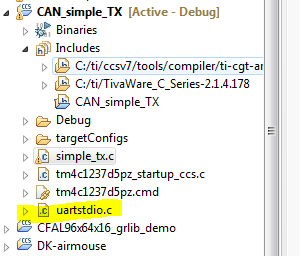
    The UART standard I/O routines are not in "driverlib.lib". What I do is copy the file "C:\ti\TivaWare_C_Series-2.1.4.178\utils\uartstdio.c" to the project. I basically just do a drag and drop.

    Unfortunately the peripheral examples like these CAN projects are not good projects to start with. They are generic, and assume the user is already familiar with how to setup the build environment. Hopefully this will get you going.