This thread has been locked.

If you have a related question, please click the "Ask a related question" button in the top right corner. The newly created question will be automatically linked to this question.

TM4C123GH6PM: missing PWM pulse

Part Number: TM4C123GH6PM

Hi, I use PWM signal at TM4C123... and I have missing pulses, where I have no Idea what is wrong in code,  pls give me a hint.

  • Hi,
    First of all please elaborate how you are generating the PWM signal? Are you using the PWM module or the GPTM module in PWM mode or generating PWM by software means. Can you show your code?
  • "what's wrong in code"

    3rd page, 7th line from the middle up, 28th char from the right.
  • Hi Charles, here my code:
    I have 2 PWM , one for forward and one for reverse drive, the controller is realizes in SW and I checkes all possibilities for misfunction,
    I call the function MST_WritePWMMotor cyclic with a new value. but when driving, the value is never zero, I checked it. I have Port F4 to en-/disable the peripheral Motorcontroller.
    but please see below, thanks.
    //
    // initialize PWM for Motor
    //
    void MST_InitPWM0(void)
    {
    // enable sysclock
    SysCtlPWMClockSet(SYSCTL_PWMDIV_16);

    // Enable the PWM0/1 peripheral
    SysCtlPeripheralEnable(SYSCTL_PERIPH_PWM0);
    SysCtlPeripheralEnable(SYSCTL_PERIPH_PWM1);
    SysCtlPeripheralEnable(SYSCTL_PERIPH_GPIOB); // PWM outputs
    SysCtlPeripheralEnable(SYSCTL_PERIPH_GPIOF); // Enable Motor

    // ... and wait for the PWM0 module to be ready.
    uiSysTickCompareTimeout = MST_TIM_Read_Systick(); while (!SysCtlPeripheralReady(SYSCTL_PERIPH_PWM0)) { if (MST_TIM_Read_Systick() > uiSysTickCompareTimeout + SYS_TICK_TIMEOUT) break;}

    // configure Pins
    GPIOPinConfigure(GPIO_PB6_M0PWM0);
    GPIOPinConfigure(GPIO_PB7_M0PWM1);

    GPIOPinTypeGPIOOutput(GPIO_PORTF_BASE, GPIO_PIN_4 );

    GPIOPinTypePWM(GPIO_PORTB_BASE, GPIO_PIN_6);
    GPIOPinTypePWM(GPIO_PORTB_BASE, GPIO_PIN_7);

    // Configure PWM generator for count down mode with immediate updates to parameters.
    PWMGenConfigure(PWM0_BASE, PWM_GEN_0, PWM_GEN_MODE_DOWN | PWM_GEN_MODE_NO_SYNC);
    PWMGenPeriodSet(PWM0_BASE, PWM_GEN_0, MST_PWM_LENGTH);

    PWMGenConfigure(PWM0_BASE, PWM_GEN_1, PWM_GEN_MODE_DOWN | PWM_GEN_MODE_NO_SYNC);
    PWMGenPeriodSet(PWM0_BASE, PWM_GEN_1, MST_PWM_LENGTH);
    // update PWM wenn Zähler = 0
    PWMOutputUpdateMode(PWM0_BASE, PWM_OUT_0_BIT, PWM_OUTPUT_MODE_SYNC_LOCAL);
    PWMOutputUpdateMode(PWM0_BASE, PWM_OUT_1_BIT, PWM_OUTPUT_MODE_SYNC_LOCAL);

    PWMOutputInvert(PWM0_BASE, PWM_OUT_0_BIT | PWM_OUT_1_BIT, true);

    // Set the pulse width of PWM0
    PWMPulseWidthSet(PWM0_BASE, PWM_OUT_0, 0);

    // Set the pulse width of PWM1
    PWMPulseWidthSet(PWM0_BASE, PWM_OUT_1, 0);

    // Start the timers in generator 0 & 1
    PWMGenEnable(PWM0_BASE, PWM_GEN_0);
    PWMGenEnable(PWM0_BASE, PWM_GEN_1);

    // Enable the outputs.
    PWMOutputState(PWM0_BASE, (PWM_OUT_0_BIT | PWM_OUT_1_BIT), true);
    }

    //static int iPWM_Faktor = 3;
    //
    // write PWM Signal to MOTOR-driver and enable Motor
    //
    void MST_WritePWMMotor(uint32_t uiDir, uint32_t uiPWM)
    {
    if (uiPWM != 0)
    {
    // enable Motor
    GPIOPinWrite(GPIO_PORTF_BASE, GPIO_PIN_4, GPIO_PIN_4);

    if (uiDir == MST_MOT_DIRECTION_UP)
    {
    // clear opposit direction
    PWMPulseWidthSet(PWM0_BASE, PWM_OUT_1, 0);
    // set new value
    PWMPulseWidthSet(PWM0_BASE, PWM_OUT_0, uiPWM);
    }
    else
    {
    PWMPulseWidthSet(PWM0_BASE, PWM_OUT_0, 0);
    // Set the pulsewidth
    PWMPulseWidthSet(PWM0_BASE, PWM_OUT_1, uiPWM);
    }
    }
    else
    {

    MST_PWM_StopMotor();
    }
    }

    void MST_PWM_StopMotor(void)
    {
    // stop PWM and reset PIN
    PWMPulseWidthSet(PWM0_BASE, PWM_OUT_0, 0);
    PWMPulseWidthSet(PWM0_BASE, PWM_OUT_1, 0);

    // disable Motor (direct to motor-controller)
    GPIOPinWrite(GPIO_PORTF_BASE, GPIO_PIN_4, 0);


    }
  • Hi,

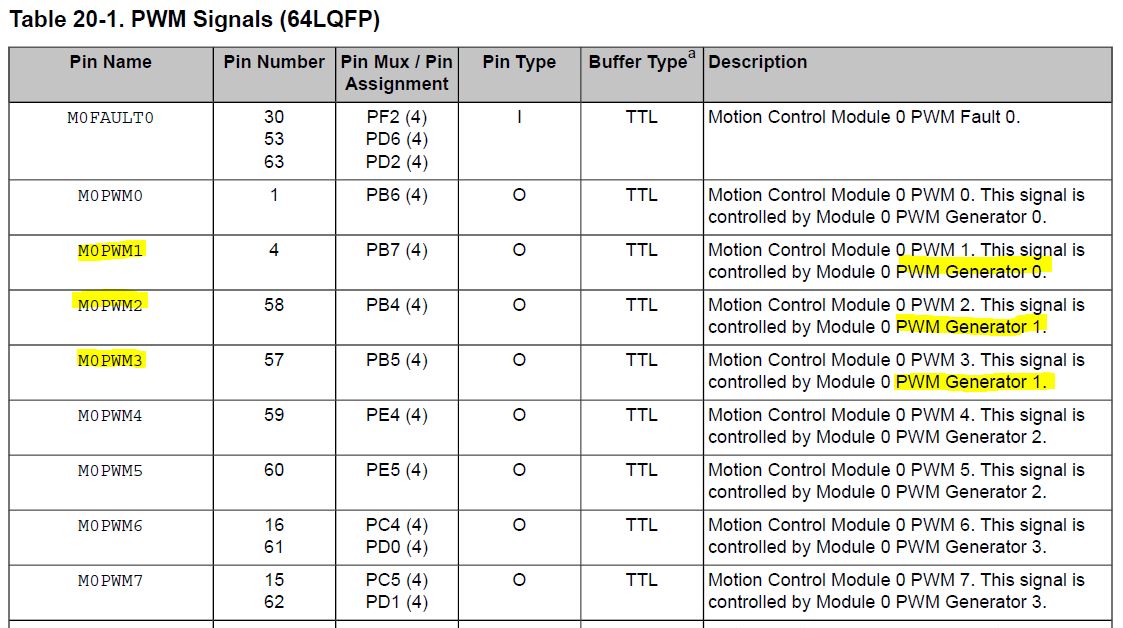
     First of all, if you want to PWM_GEN_1 then this generator is associated with M0PWM2 and M0PWM3. M0PWM1 is associated with PWM_GEN_0.

     How are you calling the MST_WritePWMMotor? What do you mean you are calling it cyclically? I don't see you enabling interrupt so you most likely are not changing the duty cycle in the ISR. If you are calling the MST_WritePWMMotor within a while(1) loop then it will not work as desired. Sometime the counter may have already passed the new duty cycle you are trying to write. 

  • Hi, Thanks for the hint with the generator.

    The MST_WritePWMMotor function is called in the timer interrupt, when a new PWM value is calculated, I guess, the new PWM-value is set when the counter is starting a new cycle, witch can be synchronized with PWM_OUTPUT_MODE_SYNC_LOCAL. If I understand you right,  the new PWM can only be set in the Interruptfunction?

  • "here my code"

    consider using dual slope here. if the counter is above / below the compare value you are setting, in single slope operations (up / down counters), you miss a pulse.
  • Your understanding is correct. The timer interrupt is asynchronous to the PWM as to where the counter value is at the moment you are trying to change the match value. Sometimes, the counter has already passed the new duty cycle (match value) that you are trying to set and you will miss the PWM generation. You should try to change the duty cycle with respect to the PWM edge (i.e. rise, fall or both). You can generate PWM interrupt as such.
  • I've not "slogged thru" the full detail - yet is it NOT concerning that: "Only a single (or few) PWM Pulses are missed" - yet the WRONG PWM Generator code assignment was implemented?

    How then did the PWM even become successfully  generated?    (even while suffering,  "PWM Interruptus")    Something here is improperly reported - or otherwise NOT right...

    In situations as this - firm/I long have found - that our FOCUS upon, "ONE PWM Generator at a time" - and resultant Success"  far trumps,  "Multiple PWM Generators - all in play - and (NO SURPRISE) - cascade of issues arrive!       "KISS" dictates that, "Small, focused, measurable & systematic steps" - rather than (pardon) "witches brew" -  best, "Speeds, Eases & Enhances" client-user success.     ALWAYS...

  • Hi cb1,
    The poster said he is generating two PWMs. You are correct that there are two problems. One PWM has missing pulses and the other PWM is just not generated. Looking at his scope cap the channel A1 is just flat low.

    [Edit] Because the wrong pin is selected for M0PWM1 and hence it is staying flat. 

  • Thank you, Charles. As stated - I had NOT "slogged thru" (fine detail) simply reacted to the FAILED PWM encoding - to insure THAT was well noted.   

    As always - "TOO MANY ingredients (often) SPOILS the Soup" - and (sometimes/OFTEN) client-user  projects - AS WELL...

    KISS - via Singular Focus, upon Measurable & Systematic STEPS - always leads to the best outcomes - w/minimal Krash/Burn...   (KISS Violations - witnessed here daily - leads to, "far too FEW"  able to Self-Resolve!)

  • sorry now i'm totally confused...
    The PWM pulse is not cyclic missing, it is missed all 1 till 2 seconds, and not at every PWM-Update, let me resume:
    I should not call the function PWMPulseWidthSet(...) asyncron I have to setup an Interrupt when the counter is zero an the write to the PWM Register? regards, Ewald
  • No. here is only one problem. only one PWM is generated at a time, the other is set to zero. but the missing pulse is the problem, these occures in steps for 1 - 2 seconds not periodiclly at evers write cycle. regards Ewald
  • So have you tried to change duty cycle only after the PWM edge interrupt?
  • do you mean this:
    PWMGenIntTrigEnable(PWM0_BASE, PWM_GEN_0, PWM_INT_CNT_ZERO);
    rgds, E.
  • Yes, that is correct.

    As suggested by cb1, please start with one PWM at a time. After both PWMs are working individually then you can combine both together in your final project. It will be easier for you to debug this way.
  • Thank you, Charles - and (to poster) ...  REALLY it will be EASIER for you  (and for your helper crüe)  (here) - as well.

    Too MANY Variables (initially) greatly  adds to YOUR  DIFFICULTY by:

    • making your issue or problem far harder for you to reasonably & properly - detail & explain
    • finding the "key cause" - when many "items prove suspect"
    • this extra:  time, effort & confusion - is forced upon you - again due to, "too much IN PLAY"
    • the "read & absorb" time & effort - demanded of your support team - is (also) significantly  (and perhaps unfairly) increased.    Many here - require assistance!

    It has LONG been established - that,  "One small, well focused, measurable & systematic Step at a Time" (i.e. KISS) - yields the BEST RESULTS - for ALL CONCERNED...

  • Thanks I coded it, but now it is not working, I will have a look tomorrow, rgds. E.
  • Please double check and make sure you enable the PWM0 interrupt with PWMIntEnable(PWM0_BASE, PWM_INT_GEN_0).
  • Hi Charles

    The interrupt function heled, many thenks!

    Another problem, I have a board here with chrased at the customer. I thougt it is the power supply, tested it and power is ok. Then I connected to the IDE and it works fine, then disconnect, it seems so that there is no SW in the flash. the TI-Controllers are new to me, have you a hint for me, where to look at first? Thanks.

    rgds E.

  • Hi,
    Glad your problem is solved.

    Can you please open a new thread for new problem? I don't know what you meant the board is "chrased" a the customer. Do you mean "erased"?
  • Might "chrased" be a NEW "Hybrid" ... combining Crashed and Erased?
  • Hi Charles

    The CPU crashed, means it worked and suddenly the CPU lost all the flash content (it seems so - no LED was blinking, its the same when no power, but power is/was ok) now I erased the whole CPU with the Launchpad an reprogrammed it new in my IDE, and now the CPU is working, also standalone, It is suspect to me... If You have an idea, let me know. Thanks for your support, regardes Ewald

  • Hi Ewald,
    What was running in the flash before? Can you elaborate about your firmware that was in the flash? Did you turn off the clock in your code? I can image that the LED doesn't blink. That may be code dependent. But I can't image the flash is erased by itself. When it didn't work, did you read the flash content after reconnect to the target? Were you sure the flash became all F's?
  • Hi Charles
    I'm sorry, I'm not really familiar to the IDE, normally I have no standalone programmer (exept Launchpad) and I was in hurry for deliver. The Clock (LED blinking) is generated in the main() funktion and the downcount for the delay in a timerinterrupt (1 ms cycle), If the flash was erased I could not give an answer... next time I will take more care what happend... but many thanks for your support, regards Ewald
  • Ewald,
    No problem. If this problem occurs again where you think the flash is erased, please try to reconnect. In the CCS memory browser window you can save the specified range of the flash memory to a file system. Of course you can view it in CCS memory browser window to see if the flash is erased or not. I have not come across any reports that the flash content is erased inadvertently when you are not in any sort of flash write cycle operation.

    I will close this thread. Should you have new problem please open a new thread.