This thread has been locked.

If you have a related question, please click the "Ask a related question" button in the top right corner. The newly created question will be automatically linked to this question.

TM4C1294NCPDT: "USB Driver Malfunctioned pop up error"

Part Number: TM4C1294NCPDT

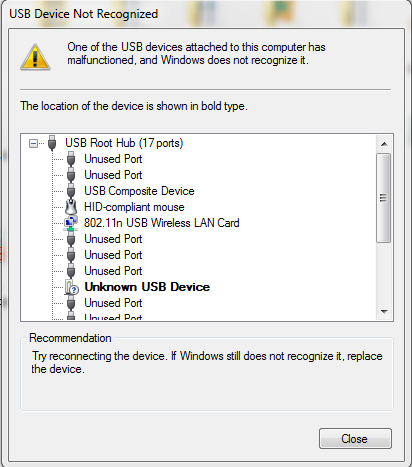
I am working with the TM4C129EXL evaluation kit. I am using it with a Windows 7 machine (64-bit).  The Evaluation kit is not recognized by Windows.  This is what that happens when I tried to  plug Evaluvation kit:

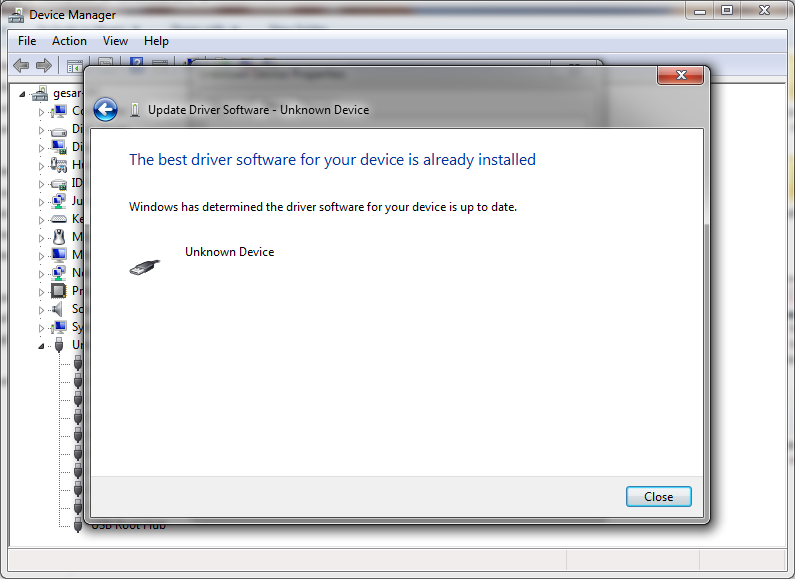
When I plug in the EK-TM4C129EXL evaluation kit into a USB port and I get a pop up Windows balloon saying "Device not recognized.  "One of the USB devices attached to this computer has malfunctioned and Windows does not recognize it...."  Under "Universal Series Bus controllers" in the hardware manager the board is listed as as an "Unknown Device".  In attempting to update the driver I can either get a message saying the proper driver is already installed or there is an error in installing the driver. 

Need help badly... 

  • Hello Naveen,

    I would recommend the following steps:

    1) Install the latest drivers for TivaWare (you will need to Manually install by browsing to the folder and having Windows install drivers from that folder): software-dl.ti.com/.../SW-TM4C-2.1.4.178.PATCH-1.0.zip
    2) If that doesn't resolve it, try a different USB cable as sometimes issues like this can be resolved by using another cable. A bad cable can cause those errors.

    If neither of these resolve the issue, please let me know what USB example you are using.
  • When i tried to update the Drivers manually, Windows couldn't able to find the device.. It showed the evaluation board as unknown Device. Although Windows notified evaluation board as a  Unknown device I tried to update the drivers manually, but It showed me a dialog box with the message that the Driver is up to date.  The following are the error messages in  chronological order

  • Hello Naveen,

    And have you tried a different USB cable? Just yesterday another user had issues with device being not recognized and it was solved w/ USB cable swap.
  • Hi Jacobi,

                     I have also tried with many USB Cables, still the board was not recognized by Windows 7.

  • Hello Naveen,

    Looking at your screenshots I don't see the StellarisWare ICDI port showing up, so is the issue with the ICDI port? Or are you using one of our TivaWare USB examples? Which of the two USB ports are you plugging into the PC?

    If it's for the ICDI, then you may need the ICDI drivers from http://www.ti.com/tool/STELLARIS_ICDI_DRIVERS

  • Hello Ralph,
    In order to install the ICDI Drivers the Windows has to recognize the evaluation kit. In my case windows doesn't identify the evaluation board when it is connected. Also If I connect the evaluation kit to another computer, that computer connects with evaluation kit. I still cannot able to figure out the issue...

    With regards,
    Naveen kumar E.S.
  • Hello Naveen,

    If you have an unknown USB device, you can manually direct Windows 7 to install the correct drivers. I've used Windows 7 for years prior (now primarily on Win 10) with LaunchPads of all sorts from TM4C to MSP430 to CC32xx and Win 7 will allow manual driver installs for all of them. Windows 7 is actually one of the easiest OS to work with on a USB standpoint.

    What OS does the other PC use? Are you using the same cable? Do you have a second LaunchPad kit to test with (though if your current kit works on one PC I would very much doubt the kit is the issue)?
  • Hi Jacobi,

                 The other PC also uses same OS Windows 7 Ultimate. In that system also I've used same cable. It is obvious that there is no problem with USB cable. We don't have backup evaluation kit. Mainly we develop Firmware on defective PC.  I tried manually direct Windows 7 to install the correct drivers, but windows prompts that "Driver is up to date"

    With regards,

    Naveen kumar E.S.

  • Hello Naveen,

    Okay, understood.

    Since Windows 7 thinks the latest driver is installed, the only thing I can think of is:

    1) Have Windows uninstall the current driver
    2) Try and manually install correct driver afterwards

    If Windows tries to automatically update the driver on it's own, you may need to find a way to turn that off.

    Ultimately this seems to be a Win 7 issue as I have not come across any situations that match yours since we released our latest drivers, and even then the issues were on Win 10 and not Win 7 which had a very strong track record of the USB drivers being recognized by the OS. Given another Win 7 machine is having no issues, it looks to be isolated to your one PC.

    You may want to Google for information on how to resolve such an error from Win 7 perspective.
  • Hi Jacobi,

                      In other machine where I mentioned that the Evaluation kit connects encountered a problem while uploading the program to the Kit. It shows following error while uploading the build file to the controller. I have installed the Stellaris ICDI Drivers on new machine.

  • Hello Naveen,

    That makes me strongly suspect that the JTAG Debug port got locked somehow.

    Please use LMFlash Programmer follow the Unlock Process outlined in Section 5.3.1 of our JTAG guide: http://www.ti.com/lit/an/spma075/spma075.pdf