


Tool/software: Code Composer Studio
Hi,
I am trying to update some measurement result on a website. In past I did it with SSI and CGI functionalities of http it was working fine but I had to refresh the whole page in order to update the field. I am trying to do it now with JavaScript and XML functionality. I have the problem with my variable being displayed on the web page. On a high-level I test it with ADC measurement that I convert to 2 integers (one representing integer and fraction) and use the TI usnprintf() function. With this function I have it converted to string and return this in a psFile struct. On the web page I get sth like below. Any clues from experienced users?
The usnprintf() doesn't support float that is why I use two variables to represent it in a string. I have used original sprintf function to convert float to str. This takes much more stack space and I saw similar unreadable signs on the screen.
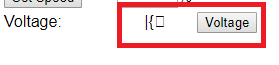
The code responsible for returning handle to updated data:
fs_open(const char *pcName)
{
.
.
.
.
 //
    // Voltage
    //
    else if(ustrncmp(pcName, "/voltage", 8) == 0)
    {
        uint32_t pui32ADC0Value2[1], pui32ADC0Value_i2, pui32ADC0Value_f2;
        float pui32ADC0Valuef2;


        char pcBuf[5];
        ADCSequenceDataGet(ADC0_BASE, 3, pui32ADC0Value2);
        pui32ADC0Valuef2=(float)pui32ADC0Value2[0]/4096.0*3.3;
        pui32ADC0Value_int2=(int)pui32ADC0Valuef2;
        pui32ADC0Value_frac2=(int)((pui32ADC0Valuef2-pui32ADC0Value_int2)*1000);


        usnprintf(pcBuf, 5, "%d.%d",pui32ADC0Value_int2,pui32ADC0Value_frac2);

        psFile->data = pcBuf;
        psFile->len = strlen(pcBuf);
        psFile->index = psFile->len;
        psFile->pextension = NULL;
        return(psFile);
    }
.
.
}
The part of the JavaScript responsible for this part:
function voltage()
{
    var req = false;

    function VoltageComplete()
    {
        if(req.readyState == 4)
        {
            if(req.status == 200)
            {
                document.getElementById("voltage").innerHTML = "<div>" +
                                                  req.responseText + "</div>";
            }
        }
    }

    if(window.XMLHttpRequest)
    {
        req = new XMLHttpRequest();
    }
    else if(window.ActiveXObject)
    {
        req = new ActiveXObject("Microsoft.XMLHTTP");
    }
    if(req)
    {
        req.open("GET", "/voltage?id" + Math.random(), true);
        req.onreadystatechange = VoltageComplete;
        req.send(null);
    }
}

The http code related to JavaScript voltage() function:
                                    <td>Voltage:</td>
                                    <td>
                                        <div id="voltage" align="center">-</div>
                                    </td>
                                    <td>
                                        <input id="voltage_in" value="Voltage" onclick="voltage();" type="button">
                                    </td>
Thank you in advance.

