This thread has been locked.

If you have a related question, please click the "Ask a related question" button in the top right corner. The newly created question will be automatically linked to this question.

CCS: Connect Kentec LCD Boosterpack be used in TIVA ware RTOS

Other Parts Discussed in Thread: EK-TM4C1294XL

Tool/software: Code Composer Studio

Dear friend,

I am experimenting with EK-TM4C1294XL and trying the workshops.

I manage to try Lab16 of CPL_Workbook.pdf. Things worked as intended.

I also tried labs for RTOS for TM4C123G development board and also worked as it suppose to.

I tried to combine lab16 (from CPL_WOrkbook) and RTOS lab4.

The new project compile successfully but nothing on the LCD screen.

I believe I am de the right configuration for my EK-TM4C1294XL.

My question, can  the Connect Kentec LCD Boosterpack work with TIVA C series RTOS?

Many thanks for your help in advance. :) 

  • There is no inherent reason that the Kentec LCD Boosterpack would not work with TIRTOS. Do you have the interrupt vectors set correctly?
  • As I said, I am experimenting or trying to familiarise myself with CSS and EK-TM4C1294XL.

    I took the last step ( the Widget  example) from lab16  

    and changed the Lab04 of (TI_RTOS_Kernel_Workshop_Lab_Manual_rev4.00.pdf) TI_RTOS_Kernel_Workshop_Lab_Manual_rev4.00.pdfwhich is just RTOS example which blink a LED to accomodate the Widget example.

    The widget example in lab16 and after all the setting, there is

    while(1)

    {

    WidgetMessageQueueProcess();

    }

    at the end of main which I assume, it continuously checking the LCD and processing any data.

    In the RTOS example, the RTOS functions are hardcoded

    Task_Params_init(&taskParams);

       taskParams.arg0 = 1000;

       taskParams.stackSize = TASKSTACKSIZE;

       taskParams.stack = &task0Stack;

       Task_construct(&task0Struct, (Task_FuncPtr)heartBeatFxn, &taskParams, NULL);

    and the function heartBeatFxn is defined as

    Void heartBeatFxn(UArg arg0, UArg arg1)

    {

    //  

      while(1)

       {

    Task_sleep((unsigned int)arg0);

    GPIO_toggle(Board_LED0);

       }

    }

    which continuously toggle the GPIO.

    I just replaced the toggle function by WidgetMessageQueueProcess(), thus

    Void heartBeatFxn(UArg arg0, UArg arg1)

    {

    //  

      while(1)

       {

           WidgetMessageQueueProcess();

          Task_sleep((unsigned int)arg0);

         //  GPIO_toggle(Board_LED0);

       }

    }

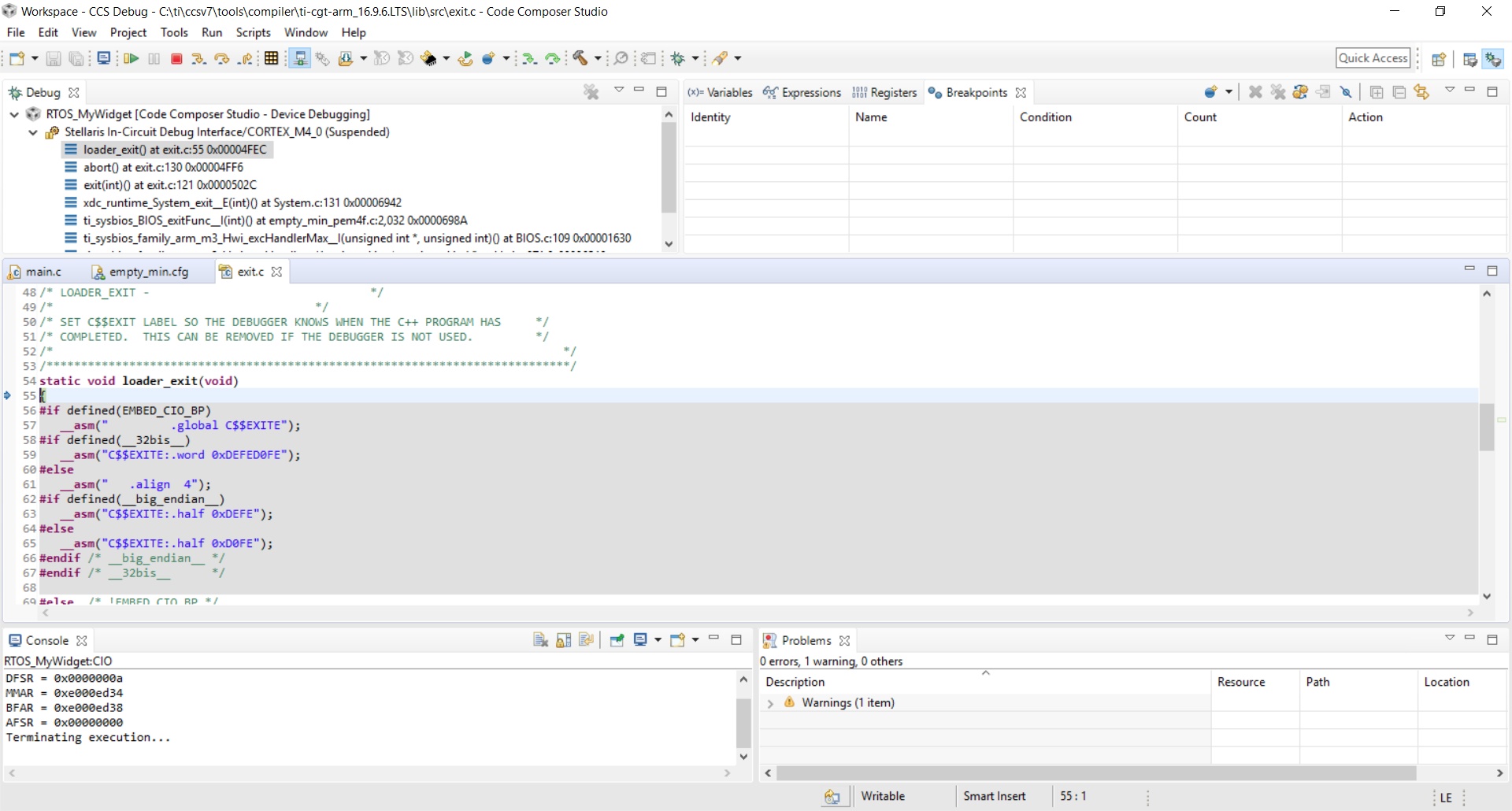
    I was hopping it will do same effect as in lab16. Also the program seem terminating  which it not suppose to.

    talking about interrupt, I couldn't tell which one from this example.

    The modified main of RTOS lab04 is 

    /*
     * Copyright (c) 2015, Texas Instruments Incorporated
     * All rights reserved.
     *
     * Redistribution and use in source and binary forms, with or without
     * modification, are permitted provided that the following conditions
     * are met:
     *
     * *  Redistributions of source code must retain the above copyright
     *    notice, this list of conditions and the following disclaimer.
     *
     * *  Redistributions in binary form must reproduce the above copyright
     *    notice, this list of conditions and the following disclaimer in the
     *    documentation and/or other materials provided with the distribution.
     *
     * *  Neither the name of Texas Instruments Incorporated nor the names of
     *    its contributors may be used to endorse or promote products derived
     *    from this software without specific prior written permission.
     *
     * THIS SOFTWARE IS PROVIDED BY THE COPYRIGHT HOLDERS AND CONTRIBUTORS "AS IS"
     * AND ANY EXPRESS OR IMPLIED WARRANTIES, INCLUDING, BUT NOT LIMITED TO,
     * THE IMPLIED WARRANTIES OF MERCHANTABILITY AND FITNESS FOR A PARTICULAR
     * PURPOSE ARE DISCLAIMED. IN NO EVENT SHALL THE COPYRIGHT OWNER OR
     * CONTRIBUTORS BE LIABLE FOR ANY DIRECT, INDIRECT, INCIDENTAL, SPECIAL,
     * EXEMPLARY, OR CONSEQUENTIAL DAMAGES (INCLUDING, BUT NOT LIMITED TO,
     * PROCUREMENT OF SUBSTITUTE GOODS OR SERVICES; LOSS OF USE, DATA, OR PROFITS;
     * OR BUSINESS INTERRUPTION) HOWEVER CAUSED AND ON ANY THEORY OF LIABILITY,
     * WHETHER IN CONTRACT, STRICT LIABILITY, OR TORT (INCLUDING NEGLIGENCE OR
     * OTHERWISE) ARISING IN ANY WAY OUT OF THE USE OF THIS SOFTWARE,
     * EVEN IF ADVISED OF THE POSSIBILITY OF SUCH DAMAGE.
     */
    
    /*
     *  ======== empty_min.c ========
     */
    /* XDCtools Header files */
    #include <xdc/std.h>
    
    /* BIOS Header files */
    #include <ti/sysbios/BIOS.h>
    #include <ti/sysbios/knl/Task.h>
    
    /* TI-RTOS Header files */
    // #include <ti/drivers/EMAC.h>
    #include <ti/drivers/GPIO.h>
    // #include <ti/drivers/I2C.h>
    // #include <ti/drivers/SDSPI.h>
    // #include <ti/drivers/SPI.h>
    // #include <ti/drivers/UART.h>
    // #include <ti/drivers/USBMSCHFatFs.h>
    // #include <ti/drivers/Watchdog.h>
    // #include <ti/drivers/WiFi.h>
    
    /* Board Header file */
    #include "Board.h"


    // added from grlib_dem project
    #include <stdint.h>
    #include <stdbool.h>
    #include "inc/hw_memmap.h"
    #include "inc/hw_types.h"
    #include "driverlib/interrupt.h"
    #include "driverlib/sysctl.h"
    #include "driverlib/gpio.h"
    #include "grlib/grlib.h"
    #include "grlib/widget.h"
    #include "grlib/canvas.h"
    #include "grlib/pushbutton.h"
    //#include "Kentec320x240x16_ssd2119_8bit.h"
    //#include "touch.h"
    
    #include "drivers/Kentec320x240x16_ssd2119_spi.h"
    #include "drivers/touch.h"
    
    
    uint32_t ui32SysClkFreq;
    
    extern tCanvasWidget g_sBackground;
    extern tPushButtonWidget g_sPushBtn;
    
    void OnButtonPress(tWidget *pWidget);
    
    Canvas(g_sHeading, &g_sBackground, 0, &g_sPushBtn,
            &g_sKentec320x240x16_SSD2119, 0, 0, 320, 23,
            (CANVAS_STYLE_FILL | CANVAS_STYLE_OUTLINE | CANVAS_STYLE_TEXT),
            ClrBlack, ClrWhite, ClrRed, g_psFontCm20, "LED Control", 0, 0);
    
    Canvas(g_sBackground, WIDGET_ROOT, 0, &g_sHeading,
            &g_sKentec320x240x16_SSD2119, 0, 23, 320, (240 - 23),
            CANVAS_STYLE_FILL, ClrBlack, 0, 0, 0, 0, 0, 0);
    
    RectangularButton(g_sPushBtn, &g_sHeading, 0, 0,
            &g_sKentec320x240x16_SSD2119, 60, 60, 200, 40,
            (PB_STYLE_OUTLINE | PB_STYLE_TEXT_OPAQUE | PB_STYLE_TEXT |
                    PB_STYLE_FILL), ClrGray, ClrWhite, ClrRed, ClrRed,
                    g_psFontCmss22b, "Toggle LEDs", 0, 0, 0, 0, OnButtonPress);
    
    bool g_LedsOn = false;
    
    void OnButtonPress(tWidget *pWidget)
    {
        g_LedsOn = !g_LedsOn;
    
        if(g_LedsOn)
        {
            GPIOPinWrite(GPIO_PORTN_BASE, GPIO_PIN_0 | GPIO_PIN_1, 0xFF);
        }
        else
        {
            GPIOPinWrite(GPIO_PORTN_BASE, GPIO_PIN_0 | GPIO_PIN_1, 0x00);
        }
    }
    
    // end of added
    
    #define TASKSTACKSIZE   512
    
    Task_Struct task0Struct;
    Char task0Stack[TASKSTACKSIZE];
    
    /*
     *  ======== heartBeatFxn ========
     *  Toggle the Board_LED0. The Task_sleep is determined by arg0 which
     *  is configured for the heartBeat Task instance.
     */
    Void heartBeatFxn(UArg arg0, UArg arg1)
    {
    //
       while(1)
        {
    
           Task_sleep((unsigned int)arg0);
          //  GPIO_toggle(Board_LED0);
           WidgetMessageQueueProcess();
    
        }
    }
    
    /*
     *  ======== main ========
     */
    int main(void)
    {
        Task_Params taskParams;
    
        /* Call board init functions */
        Board_initGeneral();
        // Board_initEMAC();
        Board_initGPIO();
        // Board_initI2C();
        // Board_initSDSPI();
        // Board_initSPI();
        // Board_initUART();
        // Board_initUSB(Board_USBDEVICE);
        // Board_initUSBMSCHFatFs();
        // Board_initWatchdog();
        // Board_initWiFi();
    
        // intilaisation for grlib project
    
    
        ui32SysClkFreq = SysCtlClockFreqSet((SYSCTL_XTAL_25MHZ |
                SYSCTL_OSC_MAIN | SYSCTL_USE_PLL |
                SYSCTL_CFG_VCO_480), 120000000);
    
        SysCtlPeripheralEnable(SYSCTL_PERIPH_GPION);
        GPIOPinTypeGPIOOutput(GPIO_PORTN_BASE, GPIO_PIN_0|GPIO_PIN_1);
        GPIOPinWrite(GPIO_PORTN_BASE, GPIO_PIN_0|GPIO_PIN_1, 0x00);
    
        Kentec320x240x16_SSD2119Init(ui32SysClkFreq);
    
        TouchScreenInit(ui32SysClkFreq);
    
        TouchScreenCallbackSet(WidgetPointerMessage);
    
        WidgetAdd(WIDGET_ROOT, (tWidget *)&g_sBackground);
    
        WidgetPaint(WIDGET_ROOT);
    
        // end of intialisation
    
        /* Construct heartBeat Task  thread */
        Task_Params_init(&taskParams);
        taskParams.arg0 = 1000;
        taskParams.stackSize = TASKSTACKSIZE;
        taskParams.stack = &task0Stack;
        Task_construct(&task0Struct, (Task_FuncPtr)heartBeatFxn, &taskParams, NULL);
    
        /* Turn on user LED  */
        GPIO_write(Board_LED0, Board_LED_ON);
    
        /* Start BIOS */
        BIOS_start();
    
        return (0);
    }
    

    The screenshot below shows the program terminating.

  • Hi Bob,

    Thank you for the reply.
    Can elaborate on how you set the interrupt vector for the LCD?
    Many thanks