This thread has been locked.

If you have a related question, please click the "Ask a related question" button in the top right corner. The newly created question will be automatically linked to this question.

TM4C123GH6PM: Configure SSI signals to high impedance

Part Number: TM4C123GH6PM


Hi,

How do we configure the SSI to high impedance?

We are connecting a QSPI flash between the MCU and a FPGA.

This QSPI flash is shared by the MCU and FPGA through SPI.

MCU SSI will be required to be high impedance state when the FPGA is accessing the flash.

Thank you.

  • When the pins that are used as QSPI are configured as general purpose input pins, they are high impedance.
  • We are connecting a QSPI flash between the MCU and a FPGA. 

    Both have access to the flash at different timing.

    We need to use SSI pins only when we need to update the QSPI flash, after this is done, we have to set the SSI pins as high impedance and let the FPGA take over the flash.

    Questions:

    - can we configure SSInClk/SSInFSS/SSInRx/SSInTx signals as GPIO and SSI signals dynamically (anytime we wanted) or they can only be pre-configured (cannot be changed during operation)?

  • The pins can be reconfigured by software as needed.

  • Hi Crosby,

    Do you have an example code how to configure SSI to high impedance?

    Sorry I am quite new to microcontroller coding.

    Thank you.

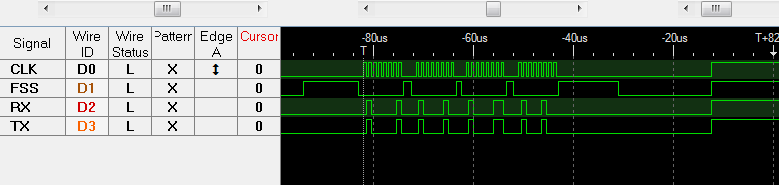
  • Here is a routine that sends some data out the SSI, then turns the pins into GPIO inputs. Finally, the pins are configured with pull-ups so you can see the effect in the logic analyzer picture.

    #include <stdint.h>
    #include <stdbool.h>
    #include "inc/hw_types.h"
    #include "inc/hw_memmap.h"
    #include "driverlib/sysctl.h"
    #include "driverlib/gpio.h"
    #include "driverlib/ssi.h"
    #include "driverlib/pin_map.h"
    
    unsigned char u8DataTx[4] = {'A','B','C','D'};
    unsigned char u8DataRx[4];
    
    
    int
    main(void)
    {
        uint32_t  ui32Index, ui32DataPut, ui32DataGet;
    
        SysCtlClockSet(SYSCTL_SYSDIV_1 | SYSCTL_USE_OSC | SYSCTL_OSC_MAIN |
                       SYSCTL_XTAL_16MHZ);
        // The SSI2 peripheral must be enabled for use.
        SysCtlPeripheralEnable(SYSCTL_PERIPH_GPIOB);
        SysCtlPeripheralEnable(SYSCTL_PERIPH_SSI2);
        GPIOPinConfigure(GPIO_PB4_SSI2CLK);
        GPIOPinConfigure(GPIO_PB5_SSI2FSS);
        GPIOPinConfigure(GPIO_PB6_SSI2RX);
        GPIOPinConfigure(GPIO_PB7_SSI2TX);
        GPIOPinTypeSSI(GPIO_PORTB_BASE, GPIO_PIN_4 | GPIO_PIN_5 | GPIO_PIN_6 | GPIO_PIN_7);
        SSIConfigSetExpClk(SSI2_BASE, SysCtlClockGet(), SSI_FRF_MOTO_MODE_0,
                           SSI_MODE_MASTER, 1000000, 8);
        SSIEnable(SSI2_BASE);
    
        //
        // Send n bytes of data.
        //
        for(ui32Index = 0; ui32Index < 4; ui32Index++)
        {
            ui32DataPut = (uint32_t)u8DataTx[ui32Index];
            SSIDataPut(SSI2_BASE, ui32DataPut);
            SSIDataGet(SSI2_BASE, &ui32DataGet);
            u8DataRx[ui32Index] = (uint8_t)ui32DataGet;
        }
    
        // Now configure the SPI pins as digital inputs
        GPIOPinTypeGPIOInput(GPIO_PORTB_BASE, GPIO_PIN_4 | GPIO_PIN_5 | GPIO_PIN_6 | GPIO_PIN_7);
        // Configure with pull-ups
        GPIOPadConfigSet(GPIO_PORTB_BASE, GPIO_PIN_4 | GPIO_PIN_5 | GPIO_PIN_6 | GPIO_PIN_7,
                         GPIO_STRENGTH_2MA, GPIO_PIN_TYPE_STD_WPU);
    }
    

  • Thank you, I will try it out.