This thread has been locked.

If you have a related question, please click the "Ask a related question" button in the top right corner. The newly created question will be automatically linked to this question.

CCS/TM4C1294NCPDT: FaultISR debugging

Part Number: TM4C1294NCPDT


Tool/software: Code Composer Studio

Hello,

My application is getting stuck in the FaultISR function.  I followed the directions in spma043.pdf but my Fault Address is not listed in the data sheet.

NVIC_FAULT_STAT 0x00020000 Configurable Fault Status [Memory Mapped] 

NVIC_FAULT_ADDR 0xE000EDF8 Bus Fault Address [Memory Mapped] 

My MSP register does not seem to be pointing to a valid exception stack frame.

MSP 0x20017E40 MSP Register [Core] 

I am suspecting a stack overflow.

What would be the cause/fix for a stack overflow?

Robert

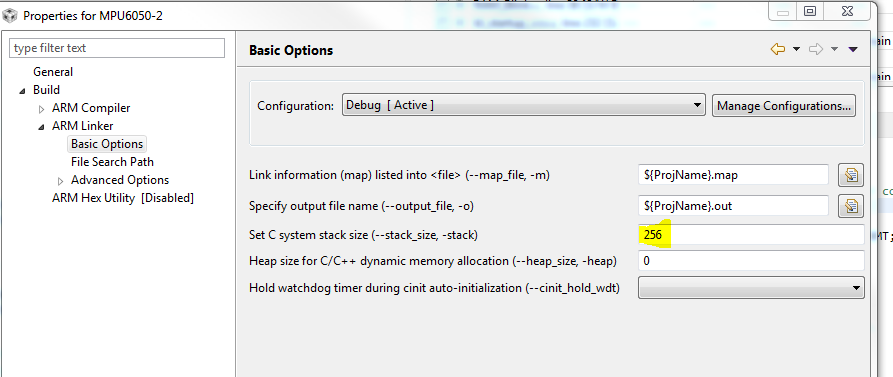
  • Change the stack size by modifying two things. First, right click on the project and select "Show Build Settings".  Expand the ARM Linker options, under Basic Options increase the stack size as shown.

    Second, change the same value at the end of the linker command file:

  • My original stack size was 2048 and I increased it to 4096.

    The fault state changed but the MSP register still points to .bss section
    MSP 0x20017E30 MSP Register [Core]
    NVIC_FAULT_STAT 0x00000400 Configurable Fault Status [Memory Mapped]
  • Hello Robert,

    You can test for Stack Overflow with this method: e2e.ti.com/.../2731229
  • That fault code is an imprecise abort. That means the address could not be captured. (This happens because writes are buffered and the fault is not detected until the CPU has already finished with the write.) Set a breakpoint in your abort routine. Look at the code pointed to by the link register. Figure out what the previous two or three instructions were doing. Look at the contents of the registers. You can usually deduce what caused the abort from that information.
  • The link register looks corrupted.

    LR 0xFFFFFFE9 General Purpose Register 14 - Link Register [Core] 

  • Well, that explains why you got a fault. The CPU tried to execute from address 0xFFFFFFE8, which is part of a non-execute memory space. Now the question is why. Often this comes from a corrupt stack and popping something other than a return address from the stack. The other option is an incorrect function pointer. You can look at the stack in a memory window. The stack grows down (toward smaller addresses), so look at the addresses less the current stack pointer location (above in the memory window) to see if you can identify which routines were called before the error, and look at the larger addresses (below in the memory window) to help identify the routines which called the one in which the error occurred. My other suggestion is to use breakpoints and stepping to see where in the code the error occurs. Once you know where in the code the error occurs, the error itself often becomes obvious.
  • I believe that I have solved my stack overflow bug but I am still getting FaultISR errors.

    My fault state indicates "Imprecise Data Bus Fault"

    NVIC_FAULT_STAT 0x00000400 Configurable Fault Status [Memory Mapped] 

    Fault address does not have a corresponding memory model address.

    NVIC_FAULT_ADDR 0xE000EDF8 Bus Fault Address [Memory Mapped] 

    My link register does not look valid.

    LR 0xFFFFFFF1 General Purpose Register 14 - Link Register [Core] 

    My stack pointer is valid and the last two return addresses are in the functions "plug_holes" and "mem_free".

  • New data regarding the FaultISR.

    My application uses LWIP to implement a TCP and UDP connection to the same static IP but different ports.  The TCP connection is used to send command strings to the hardware and the UDP connection sends a data packet out every 10ms that contains the input state of the I/O channels.

    The application does not use an RTOS.

    The test that causes the FaultISR performs the following:

    1. Open a TCP connection
    2. Send configuration commands and queries.
    3. Enable UDP broadcast.
    4. Close TCP connection.

    If I loop this test I will eventually get a FaultISR.

    If I don't enable the UDP broadcast the applications runs without error.

    Looking at Wireshark it seems as if the FaultISR is preceded by a UDP broadcast right after a TCP packet sent from the client. 

    Is there something I need to add to my application in order for UDP and TCP to coexist?

    Robert

  • Sorry, this sounds like a software memory leak. It does not sound like a hardware issue. You might try searching: savannah.nongnu.org/.../
  • I was just looking at my map file and I noticed that my stack size does not match my settings.  I set the stack size to 4096 and then to 8192 and after building the length is always 800.  I modified the cmd file and the build options.

    run origin load origin length init length attrs members

    ---------- ----------- ---------- ----------- ----- -------

    00000000 00000000 0000e550 0000e550 r-x

    00000000 00000000 00000200 00000200 r-- .intvecs

    00000200 00000200 0000d83e 0000d83e r-x .text

    0000da40 0000da40 00000978 00000978 r-- .const

    0000e3b8 0000e3b8 00000198 00000198 r-- .cinit

    20000000 20000000 00018cbc 00000000 rw-

    20000000 20000000 0000026c 00000000 rw- .vtable

    2000026c 2000026c 00017f2a 00000000 rw- .bss

    20018198 20018198 00000800 00000000 rw- .stack

    20018998 20018998 00000324 00000000 rw- .data

  • Hi Robert,

    Have a look at lwipopts.h UDP configuration, packet buffers etc... Also enable lwip #debug, output to virtual COM port console.
  • Are you working on a project that you inherited from someone else? It is acting like they have some customization that is overriding the size you set in the configuration. Check the command line that invokes the linker for more than one string "--stack_size=".

  • Likewise to Bob's stack checking;

    Robert Applebee said:
    If I don't enable the UDP broadcast the applications runs without error.

    Do you have DNS client enabled or does your application do any IOT name query or enable proxy behind firewall etc.?

    One way to find out, e.g. enable TCP/UDP stats output via DEBUG=1 inside lwipopts.h ...

  • I see the issue that is preventing me from changing the stack size but I don't know what is causing it.

    My project link settings seem to be out of sync.

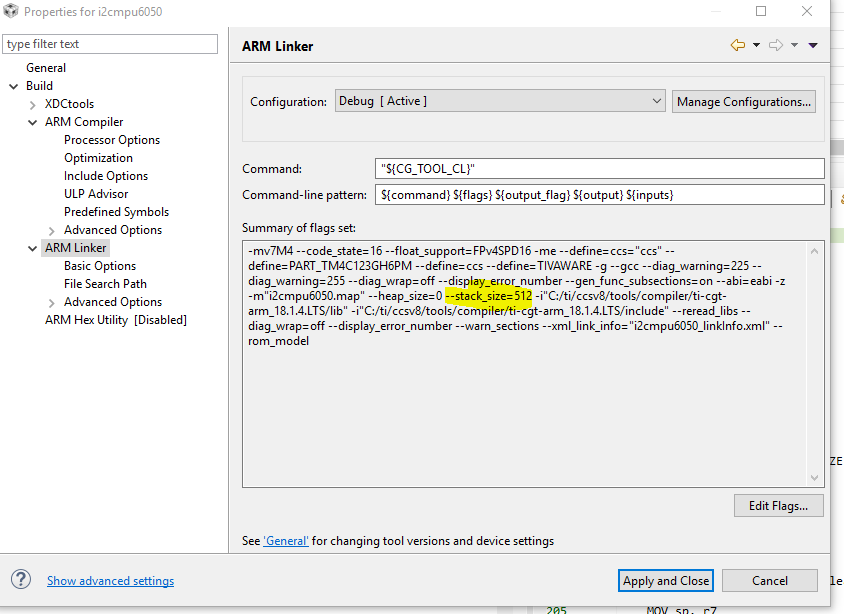
    This is the Summary of flags set from the "Show Build Settings..." panel.
    -mv7M4 --code_state=16 --float_support=FPv4SPD16 --abi=eabi -me -Ooff --advice:power="1,2,3,4,5.2,5.4,7,9,10,12" -g --gcc --define=ccs="ccs" --define=PART_TM4C1294NCPDT --define=TARGET_IS_TM4C129_RA0 --define=EK_TM4C129_BP1 --diag_warning=225 --diag_wrap=off --display_error_number --gen_func_subsections=on --ual -z -m"test.map" --stack_size=1024 --heap_size=2048 -i"C:/ti/ccsv8/tools/compiler/ti-cgt-arm_18.1.2.LTS/lib" -i"C:/ti/ccsv8/tools/compiler/ti-cgt-arm_18.1.2.LTS/include" --reread_libs --diag_wrap=off --display_error_number --warn_sections --xml_link_info="PoE_linkInfo.xml" --rom_model

    This is from the "Console" window after a build.
    Building target: "PoE.out"
    Invoking: ARM Linker
    "C:/ti/ccsv8/tools/compiler/ti-cgt-arm_18.1.2.LTS/bin/armcl" -mv7M4 --code_state=16 --float_support=FPv4SPD16 --abi=eabi -me -Ooff --advice:power="1,2,3,4,5.2,5.4,7,9,10,12" -g --gcc --define=ccs="ccs" --define=PART_TM4C1294NCPDT --define=TARGET_IS_TM4C129_RA0 --define=EK_TM4C129_BP1 --diag_warning=225 --diag_wrap=off --display_error_number --gen_func_subsections=on --ual -z -m"enet_lwip_ccs.map" --stack_size=2048 --heap_size=0 -i"C:/ti/ccsv8/tools/compiler/ti-cgt-arm_18.1.2.LTS/lib" -i"C:/ti/ccsv8/tools/compiler/ti-cgt-arm_18.1.2.LTS/include" --reread_libs --diag_wrap=off --display_error_number --warn_sections --xml_link_info="PoE_linkInfo.xml" --rom_model -o "PoE.out" "./adcUtil.obj" "./commands.obj" "./platform.obj" "./poe.obj" "./pwmUtil.obj" "./spi.obj" "./startup_ccs.obj" "./tcpio.obj" "./common/commands.obj" "./common/dispatch.obj" "./common/protocol.obj" "./drivers/pinout.obj" "./utils/lwiplib.obj" "./utils/uartstdio.obj" "./utils/ustdlib.obj" "../PoE.cmd" -llibc.a -l"C:/ti/TivaWare_C_Series-2.1.4.178/driverlib/ccs/Debug/driverlib.lib"
  • I am using TFVC for this project.  Could this be causing the link setting issue?

  • I don't think TFVC inherently caused the issue, however if you started with a project from someone else who used a different way of initializing the stack and heap, that may be why you are unable to make changes in the standard way. Are you comfortable exporting the project to a .zip file for me to look at? You can do a friend request and then you will be able to e-mail it to me directly instead of posting the project if that helps.
  • When you build (compile and link) the project, do you use Code Composer to run the build (Project -> Build Project, or the "hammer" icon) or do you run an external make file? The .zip file as I received it did not have a "test.map" file in the debug directory. Instead it had a "enet_lwip_ccs.map" file. When I used Code Composer to build the project, I got a stack size of 1024 and a heap size of 2048, just as expected.
  • I do use CCS to build the project.  Event though I set the map file name to "test.map" it always names it "enet_lwip_ccs.map" and no mater what I set the stack size to the map file reports it as 800.

    SEGMENT ALLOCATION MAP

    run origin  load origin   length   init length attrs members

    ----------  ----------- ---------- ----------- ----- -------

    00000000    00000000    0000e550   0000e550    r-x

     00000000    00000000    00000200   00000200    r-- .intvecs

     00000200    00000200    0000d83a   0000d83a    r-x .text

     0000da3c    0000da3c    00000978   00000978    r-- .const

     0000e3b8    0000e3b8    00000198   00000198    r-- .cinit

    20000000    20000000    00018cbc   00000000    rw-

     20000000    20000000    0000026c   00000000    rw- .vtable

     2000026c    2000026c    00017f2a   00000000    rw- .bss

     20018198    20018198    00000800   00000000    rw- .stack

     20018998    20018998    00000324   00000000    rw- .data

  • Let's try this. I renamed the project to PoE2 and exported it to the attached .zip file. Import this new project and build it. See if that gives the correct stack and heap sizes.

    /cfs-file/__key/communityserver-discussions-components-files/908/PoE2.zip

  • The imported project builds the correct stack size and also the correct map file name. I guess that my TFVC project has an issue.
  • How do you setup/display the virtual com port console?
  • Yet you do not mention has enabled RDP faulted the MCU after tweaking the stack size? Are you simply assuming the stack size is the cause of RDP faulting issue?
  • Many in forum use PUTTY terminal emulator. Or if CCS debug built in terminal for virtual COM, ICDI ports MCU UART0 into CCS. You may find the CDC virtual serial driver INS file under Tivaware windows drivers folders.