This thread has been locked.

If you have a related question, please click the "Ask a related question" button in the top right corner. The newly created question will be automatically linked to this question.

CCS/EK-TM4C129EXL:

Part Number: EK-TM4C129EXL
Other Parts Discussed in Thread: TM4C129ENCPDT, TM4C123GH6PM

Tool/software: Code Composer Studio

Hello,I use this eval board like compiler for other chip TI TMC129CNC, but I think I erase firmware of the eval board. Where can I get or download Image of eval board?

  • There are two microcontrollers on the EK-TM4C129EXL board. One for running the programs you develop, the TM4C129ENCPDT, and a TM4C123GH6PM that runs the JTAG and virtual serial port which connect by USB to the PC. Which firmware do you think you erased? The example that blinks the LED which runs on the TM4C129ENCPDT can be found in TivaWare at:

    C:\ti\TivaWare_C_Series-2.1.4.178\examples\boards\ek-tm4c129exl\blinky

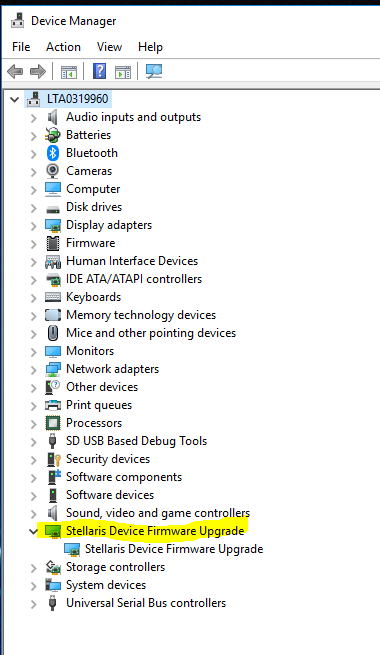
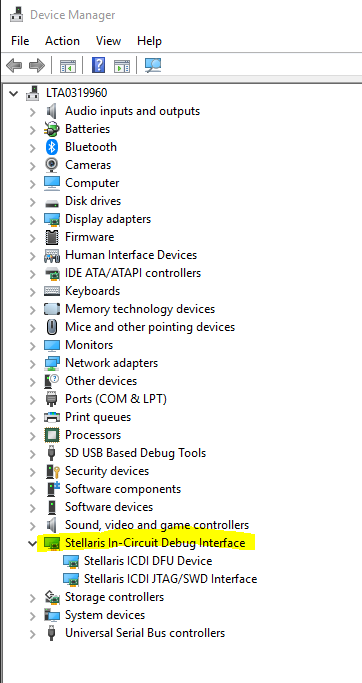
    If the firmware for the ICDI (in-circuit debug interface) has been erased, you will not see the "Stellaris In-Circuit Debug Interface" in your device manager.

    Instead, you will see "Stellaris Device Firmware Upgrade".

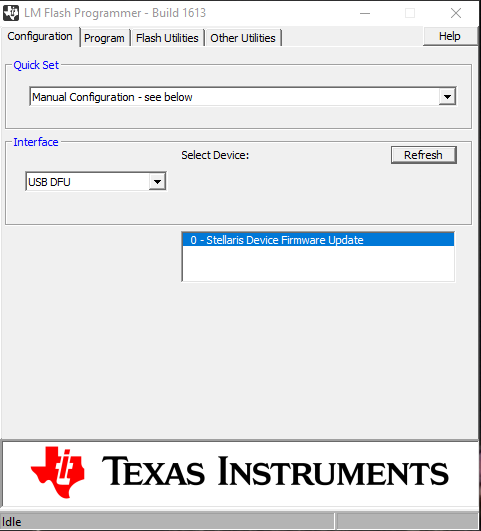
    You can use the utility "LM Flash Programmer" to reprogram the ICDI. First configure LM Flash programmer manually to use USB DFU mode. You should see "Stellaris Device Firmware Update" in the selection box below.


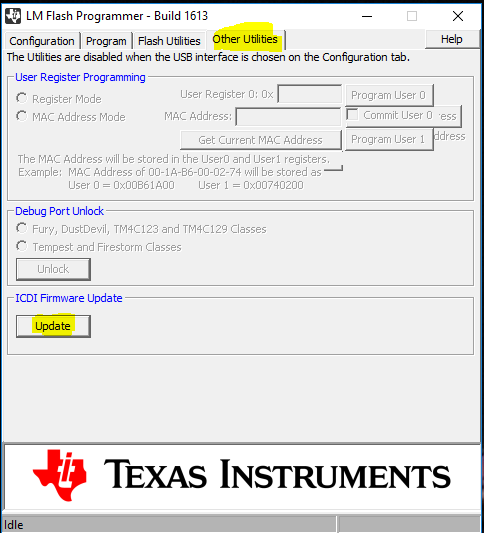
    Then select the "Other Utilities" tab and then "Update".

  • I updated eval board, when I connect target device and want to download bin file, LM flasher said :" ""ERROR"", Unable to initialize target - 0! "
  • Please tell me what you see in your device manager on the PC when you connect the USB cable.
  • I have not heard back from you. I assume you have resolved this issue. If not, please reply to this post with an answer to my question above.