This thread has been locked.

If you have a related question, please click the "Ask a related question" button in the top right corner. The newly created question will be automatically linked to this question.

CCS/TM4C123GH6PM: #10247-D null: creating output section

Expert 1030 points

Part Number: TM4C123GH6PM

Tool/software: Code Composer Studio

Hi. I'm fairly new to Tiva MCU programs being compiled under CCS (or anywhere) and seem to be having trouble with what I think is the .map file. My program, which is partly visible in the attached word file, is looping infinitely when it gets to executing the SysCtlClockSet() function - which is the first call in main() - and the Debugger quits, citing problems with NMI or Hardware Faults. From what I can see in the Problems window, I wonder if the problem is with either the stack pointer or program counter not being properly initialised. I would have thought the IDE would have assigned some realistic values to these registers at startup. Also, what is the proper sequence of SysCtlPeripheralxxx calls when one wants to initialise a Port? Can anyone help me here? Thanks, Harry.
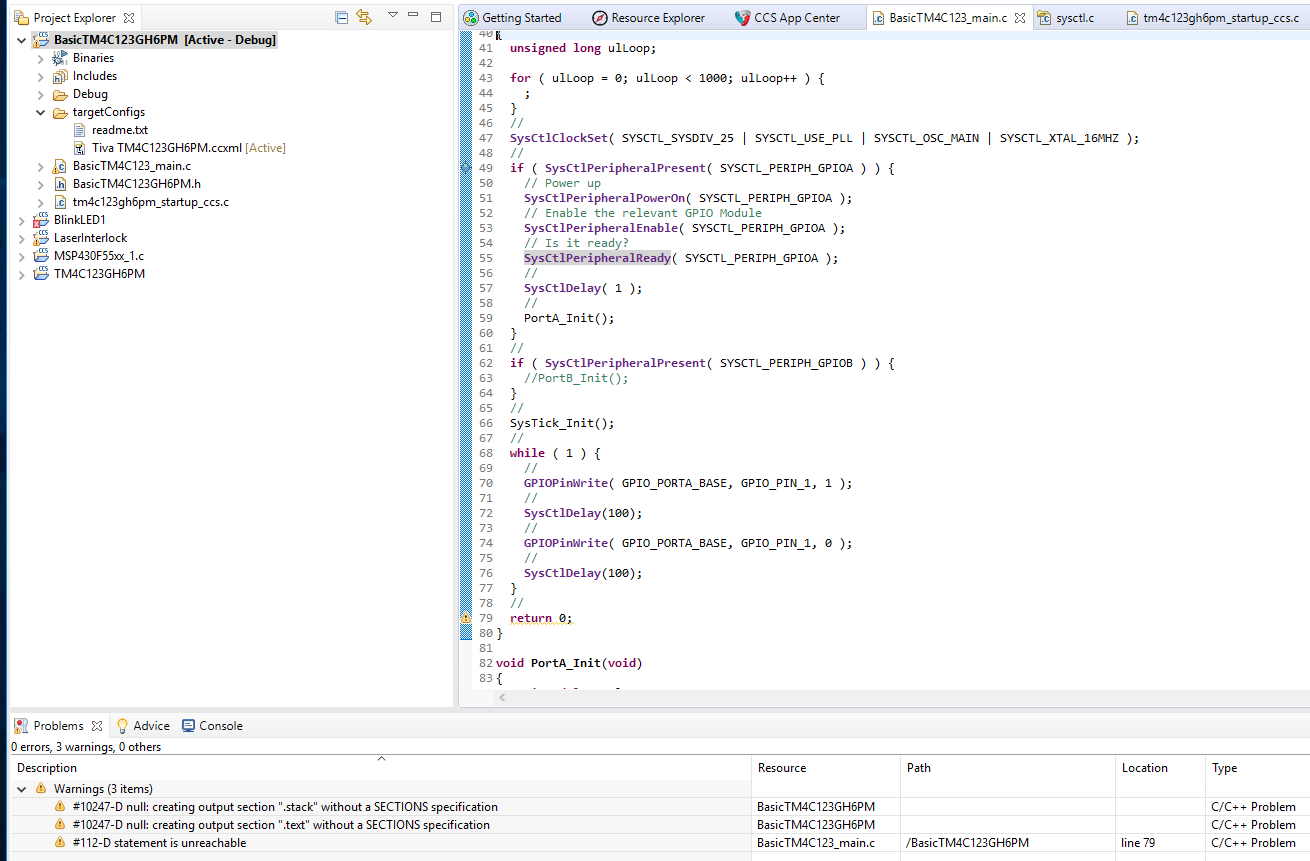
  • Your project doesn't contain a linker .cmd file. It is the linker command file which specifies the placement of sections in memory regions.

    With no linker command file the linker produces warnings of the form 'creating output section ".stack" without a SECTIONS specification', and picks an arbitrary memory region to place the sections. This can cause a failure at runtime, e.g. if the linker places the stack into flash.

    When you create a new project for a tm4c123gh6pm by default CCS should add the tm4c123gh6pm.cmd linker command file. If you go to the General project properties you should be able to select a linker command file for the device:

    See TI Linker Command File Primer for some background information.

  • Hi Chester. Thanks for that; it seems to have solved the problem. I can now step past the SysCtlPeripheralPresent() function. Do you have any recommendations about my other question, the order of calls for initialising a peripheral Port? Should I PowerOn(), then Enable() and finally check if it's Ready(), or should I PowerOn(), then check for Ready() before i call Enable()? Thanks, again. Harry.
  • halo said:
    Do you have any recommendations about my other question, the order of calls for initialising a peripheral Port?

    The SysCtlPeripheralPowerOn() function modifies the Peripheral Power Control (PCx) registers. The PCx registers are only on the TM4C129 series devices, and not on the TM4C123 series device you are using. Therefore, there is no need to call SysCtlPeripheralPowerOn().

    [Note that even for the TM4C129 series devices SysCtlPeripheralPowerOn() is only supported on a sub-set of the peripherals, as documented in the TivaWare Peripheral Driver Library users's guide and device datasheets.]

    The recommendation is to call Enable() followed, by Ready() in a loop to wait for the peripheral to be ready, as that matches the Programming Examples shown in the TivaWare Peripheral Driver Library users's guide. E.g.:

    //
    // Enable the GPIOA peripheral
    //
    SysCtlPeripheralEnable(SYSCTL_PERIPH_GPIOA);
    //
    
    // Wait for the GPIOA module to be ready.
    //
    while(!SysCtlPeripheralReady(SYSCTL_PERIPH_GPIOA))
    {
    }

  • Hi Chester. Some clarification, please. In section 10.3 on page 656 of Tiva TM4C123GH6PM Microcontroller Data Sheet (June 12, 2014) it mentions enabling the port peripheral clock before anything else. In section 14.3 page 280 of the Tivaware Peripheral Driver Library July 25, 2016, however, there is no mention of enabling a peripheral clock. Can you look at my code in the attached file and tell me if you think it will work? Also, the GPIOPinConfigure() function may need to be called somewhere. Thanks. Harry.

    CCS TM4C GPIOA Init.docx

  • Hello Halo

    Couple comments:

    1) SysCtlPeripheralPresent isn't really needed unless you are planning to develop code across multiple TM4C devices which would have variance in the peripherals available. Very few times this is used.

    2) You are right that the GPIOPinConfigure API is not needed for what you trying to do. It is used to configure a GPIO for specific peripherals like the ADC, Timer, UART, etc., it's basically for the GPIO muxing as a single pin will have many functions, but by default it will just be a standard GPIO so if you only need that, you don't need GPIOPinConfigure.

    3) If you use GPIOPinTypeGPIOOutput then you don't need to call either GPIOPadConfigSet or GPIODirModeSet as those two calls are made by GPIOPinTypeGPIOOutput, so you have redundant code there, unless in the case of GPIOPadConfigSet, you want to change the push-pull settings, but you shouldn't need to in most cases.

    The code should run as is though, it just can be improved.

    Regarding the comment about peripheral clocks, that is correct but only for peripherals with clocks associated with them. GPIO pins do not have that. However, for an ADC for example, you would first Enable the ADC peripheral and the GPIO port that will be used with the ADC, then configure the GPIO (which doesn't have a clock), and then configure the ADC clock via the ADCClockConfigSet API (there are ClockConfigSet API's for all peripherals that need this step), and then lastly finish the rest of the ADC configuration. Hopefully this explains that portion of what the D/S was trying to communicate.
  • Hi Ralph. Thanks for that; it was very helpful. My program is now doing what it is supposed to do, so everything is now sorted out. Regards, harry.