This thread has been locked.

If you have a related question, please click the "Ask a related question" button in the top right corner. The newly created question will be automatically linked to this question.

RTOS/TM4C1290NCPDT: Where is the system clock being set in example?

Part Number: TM4C1290NCPDT


Tool/software: TI-RTOS

I'm using the usbserialdevice_DK_TM4C129X_TI example as the base for my code.  I'm curious where the system clock is getting set; I've traced through the code, and I know that the USB function requires at least a 60MHz clock, but all I can find is a call to SysCtlPLLEnable().

Thanks.

  • Hi Doug,

    Find this code line below.

    //
    // Set the clocking to run directly from the crystal at 120MHz.
    //
    g_ui32SysClock = MAP_SysCtlClockFreqSet((SYSCTL_XTAL_25MHZ | SYSCTL_OSC_MAIN |  SYSCTL_USE_PLL | SYSCTL_CFG_VCO_480), 120000000);

    -kel

  • Thanks Kel,

    1) can you tell me where the documentation for g_ui32SysClk is documented.

    2) I'm curious where this is set in the example I mentioned as I'm trying to learn what code is running that I can see and what code is "magically" running from somewhere not intuitive to the casual observer.

    Doug

  • Hi,

    The ui32SysClk is the return of MAP_SysCtlClockFreqSet(). You can see more details about this at "SW-TM4C-DRL-UG-2.1.4.178" doc which can be found at "C:\ti\TivaWare_C_Series-2.1.4.178\docs".

    ui32SysClk return is "The actual configured system clock frequency in Hz or zero if the value could not be changed due to a parameter error or PLL lock failure."

    You can see where the system clock is set at main()

    int
    main(void)
    {
    uint32_t ui32TxCount, ui32RxCount, ui32Fullness, ui32SysClock, ui32PLLRate;
    tRectangle sRect;
    char pcBuffer[16];
    #ifdef USE_ULPI
    uint32_t ui32Setting;
    #endif

    //
    // Set the system clock to run at 120MHz from the PLL.
    //
    ui32SysClock = MAP_SysCtlClockFreqSet((SYSCTL_XTAL_25MHZ |
    SYSCTL_OSC_MAIN | SYSCTL_USE_PLL |
    SYSCTL_CFG_VCO_480), 120000000);

    To learn more specifics about System Clock see datasheet under Clock Configuration.

    http://www.ti.com/lit/ds/symlink/tm4c129xnczad.pdf

    -kel

  • Hi Markel, Doug,

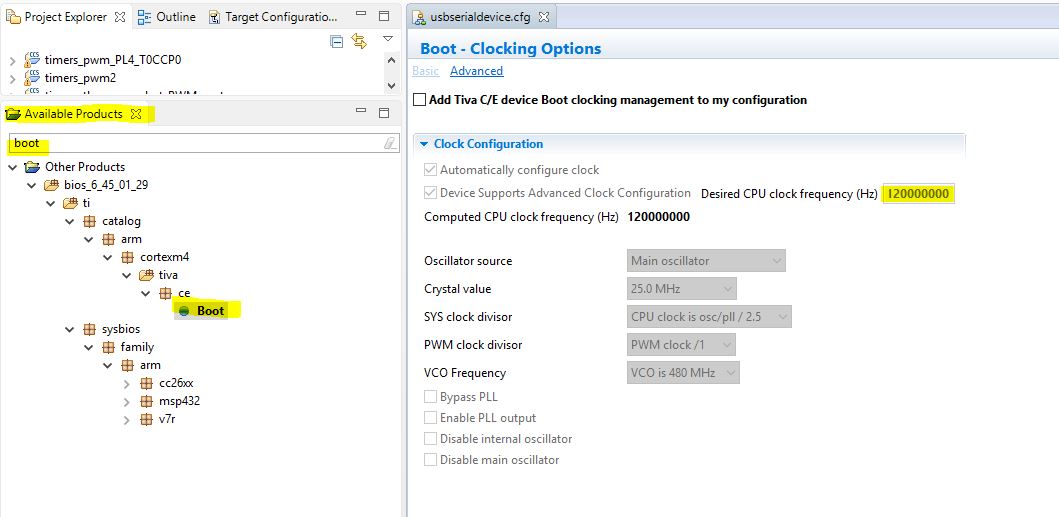
      Thank you very much for community members to interact with each other. Your question/answer will definitely help those people who are searching for the relevant posts. One thing I notice is that Markel is referencing a TivaWare USB example while Doug is referring to an TI-RTOS example. So let me also chime in here a bit. For TI-RTOS, the clock configuration is done as part of the boot process. Please see below. Type "boot" in the TI-RTOS Available Products you will find the Boot and the clock configuration. I think the TI-RTOS kernel will call the TivaWare library to configure the clock but this is done deep inside the SYS/BIOS kernel and it will not be as obvious as in non-TI-RTOS TivaWare examples.   

  • Thanks Charles!

    Apologies in advanced if I should be able to find this somewhere in the documentation, but when I open an "Available Products" window, it shows: "Shows modules on the package path of a RTSC project.  This view is currently empty because there is no RTSC Configuration File open.

    Doug

  • Hi Doug,

      How did you open the "Available Products"? 

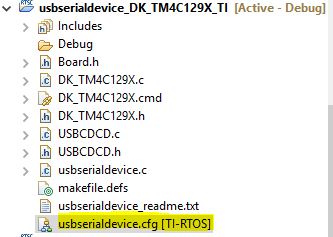
      This is what I did. Right click on the usbserialdevice.cfg file and select Open With->XGCONF and you will see the "Available Products" pane.