A related question is a question created from another question. When the related question is created, it will be automatically linked to the original question.
If you have a related question, please click the "Ask a related question" button in the top right corner. The newly created question will be automatically linked to this question.
TMS570LS3137: Not able to open HET IDE application
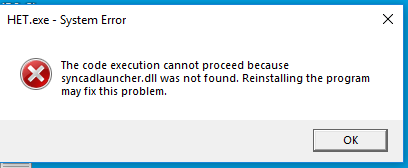
syncadlauncher.dll can be found at locations "C:\SynaptiCAD\bin\win32\" and "C:\SynaptiCAD\bin\x64\" assuming HET IDE was installed at the default location. If these are missing from your installation, I recommend re-installing HET IDE by downloading it from the link here: http://www.ti.com/tool/HET_IDE
Could find syncadlauncher.dll in C:\SynaptiCAD\bin\win32 and not in C:\SynaptiCAD\bin\x64. Already downloaded the IDE from the same link and getting the error. Please let me know the way forward.
Thanks for confirming. Is this on Windows 7 or Windows 10? I couldn't reproduce this on Windows 10.
If it isn't too much trouble, could you please try running the installer again as an Administrator? The installation is not correctly placing the .dll for some reason. I suspect it could be due to lack of write permissions.
If it still doesn't work, you could copy the .dll file into the folder of HET.exe which is located at C:\Program Files (x86)\Texas Instruments\Hercules\HET IDE\03.05.01\ as a workaround.
Yes it is from C:\SynaptiCAD\bin\win32. However, I recommend trying to reinstall with Admin privileges first as there may be other files that were not correctly installed. First try with just syncadlauncher.dll and let me know how it goes.
After copying syncadlauncher.dll, it starts asking other .dll. So, tried by copying all *.dll files into C:\Program Files (x86)\Texas Instruments\Hercules\HET IDE\03.05.01\, it started working for me.
Thank you for the update, I'm glad to hear it's working. If there isn't anything else you need assistance with, please mark this thread as 'Resolved' and I will close it out. Thanks.
This may not apply to you, but I just spoke with my colleague who mentioned they had seen this issue before when the .zip file was not unzipped before running the installer.