This thread has been locked.

If you have a related question, please click the "Ask a related question" button in the top right corner. The newly created question will be automatically linked to this question.

CCS/TM4C123GH6PM: TI RTOS Runtime Object Viewer CCSv9

Part Number: TM4C123GH6PM


Tool/software: Code Composer Studio

I have recently upgraded from CCSv8 to CCSv9. This has caused some issues when trying to launch ROV (Runtime Object Viewer) during a debug session:
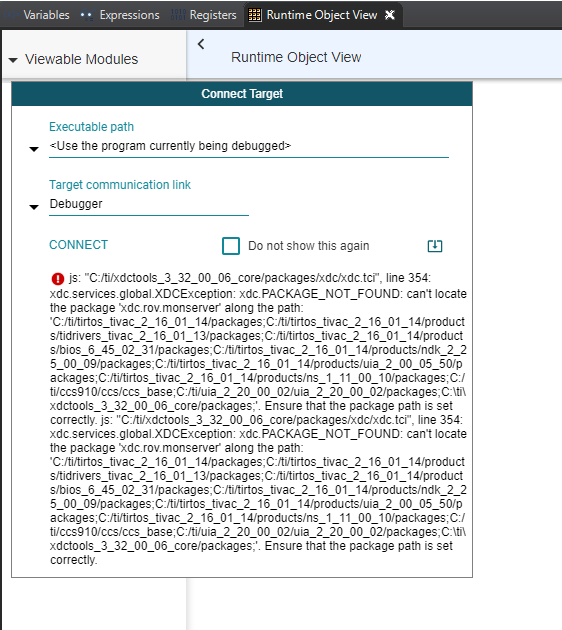
I have followed the system paths and all necessary components are installed where expected. 

Is there another path setting that needs to be changed? Perhaps as a result of moving from CCSv8 to CCSv9? 

Many Thanks,

Tom

  • Hi Tom,

    TI-RTOS for TivaC does not work with the new Runtime Object View (ROV) in CCS (8.x or 9.x). You need to use the ROV Classic. The basic content is the same.

    Todd

  • Hi Todd, 

    Thanks for your reply. 

    Is ROV for TIVA-C supported in CCSv7? I may be mistaken, but I thought I had previously used ROV with TIVA-C to measure Individual Task Stack Peak values. Is there a way to get this value with classic ROV?

    Tom.

  • Tom,

    Let's standardize on the name (I know....we should have been more consistent!)

    For the "Old ROV" that works with TI-RTOS for TivaC, there has been multiple names in CCS and in general conversation: other names are RTOS Object View, RTSC Object View, ROV or ROV Classic. I'll call this ROV Classic in this thread. This has been in many versions of CCS. This can be used with any version of TI-RTOS (also called SYS/BIOS). It supports both ELF and COFF file format.

    For the "New ROV", we've been better! The names you'll see are Runtime Object View, ROV2, or ROV. This started in CCS 8.x as a beta and now fully supported in CCS 9.x. This can only be used with TI-RTOS (SYS/BIOS) that are compatible with XDCtools 3.50 and higher (...this rules out TI-RTOS for TivaC since it needs 3.3x). It only supports ELF file format. I'll call this ROV2 in this thread.

    Both show the same basic data: tasks stack peak, semaphore counts, SysMin output, etc. I mention the main advantages of ROV2 for completeness:

    1. You can have multiple views open (e.g. Tasks->Detailed, HeapMem->basic, etc.).

    2. It supports graphs (cool for looking at memory usage over time).

    3. You can save all the data to a (readable) file that can be looked at later.

    4. You can import a dashboard that specifies all the views to be shown. This allows fast setup of the debug env.

    5. Can update independent with non-intrusive reading of memory (for devices that support it). ROV Classic made single stepping in the debugger a little cumbersome since every step in the debugger triggered ROV Classic to read a memory for the active view. This slowed single step debugging down.

    6. Alpha support to allow customers to add their own content into a view.

    So you can stick with ROV classic in the newer CCS versions and have the same experience that you had in CCS7. 

    Todd