This thread has been locked.

If you have a related question, please click the "Ask a related question" button in the top right corner. The newly created question will be automatically linked to this question.

CCS: SDSPI with qssi external flash memory

Other Parts Discussed in Thread: EK-TM4C129EXL, TIDM-TM4C129SDRAMNVM, TM4C129ENCPDT

Tool/software: Code Composer Studio

Hello,

board: EK-TM4C129EXL, TIDM-TM4C129SDRAMNVM
compiler: 18.12.2 LTS
TI-RTOS: 2.16.08

I have the following booster pack assembled: TIDM-TM4C129SDRAMNVM and the shipped examples are running well, namely: ektm4c129_qssi_example. I have also modified the fatsd_EK_TM4C129EXL_TI example project file EK_TM4C129EXL.c with the following configuration to make the SSI1 interface to use the SDCard on the booster pack :

/*
 *  =============================== SDSPI ===============================
 */
/* Place into subsections to allow the TI linker to remove items properly */
#if defined(__TI_COMPILER_VERSION__)
#pragma DATA_SECTION(SDSPI_config, ".const:SDSPI_config")
#pragma DATA_SECTION(sdspiTivaHWattrs, ".const:sdspiTivaHWattrs")
#endif

#include <ti/drivers/SDSPI.h>
#include <ti/drivers/sdspi/SDSPITiva.h>

SDSPITiva_Object sdspiTivaObjects[EK_TM4C129EXL_SDSPICOUNT];

const SDSPITiva_HWAttrs sdspiTivaHWattrs[EK_TM4C129EXL_SDSPICOUNT] = {

    {
      .baseAddr = SSI1_BASE,

      .portSCK = GPIO_PORTB_BASE,
      .pinSCK = GPIO_PIN_5,
      .portMISO = GPIO_PORTE_BASE,
      .pinMISO = GPIO_PIN_5,
      .portMOSI = GPIO_PORTE_BASE,
      .pinMOSI = GPIO_PIN_4,
      .portCS = GPIO_PORTB_BASE,
      .pinCS = GPIO_PIN_4,
    },
    {
        .baseAddr = SSI3_BASE,

        .portSCK = GPIO_PORTQ_BASE,
        .pinSCK = GPIO_PIN_0,
        .portMISO = GPIO_PORTQ_BASE,
        .pinMISO = GPIO_PIN_3,
        .portMOSI = GPIO_PORTQ_BASE,
        .pinMOSI = GPIO_PIN_2,
        .portCS = GPIO_PORTP_BASE,
        .pinCS = GPIO_PIN_4,
    }
};

const SDSPI_Config SDSPI_config[] = {
    {
        .fxnTablePtr = &SDSPITiva_fxnTable,
        .object = &sdspiTivaObjects[0],
        .hwAttrs = &sdspiTivaHWattrs[0]
    },
    {
        .fxnTablePtr = &SDSPITiva_fxnTable,
        .object = &sdspiTivaObjects[1],
        .hwAttrs = &sdspiTivaHWattrs[1]
    },
    {NULL, NULL, NULL}
};

/*
 *  ======== EK_TM4C129EXL_initSDSPI ========
 */
void EK_TM4C129EXL_initSDSPI(void)
{
    /* SDSPI0 configuration */
    /* Enable the peripherals used by the SD Card */
    SysCtlPeripheralEnable(SYSCTL_PERIPH_SSI1);//

    /* Configure pad settings */
    GPIOPadConfigSet(GPIO_PORTB_BASE,
                     GPIO_PIN_5 | GPIO_PIN_4,
                     GPIO_STRENGTH_4MA, GPIO_PIN_TYPE_STD);

    GPIOPadConfigSet(GPIO_PORTE_BASE,
                     GPIO_PIN_5,
                     GPIO_STRENGTH_4MA, GPIO_PIN_TYPE_STD_WPU);

    GPIOPadConfigSet(GPIO_PORTB_BASE,
                     GPIO_PIN_4,
                     GPIO_STRENGTH_4MA, GPIO_PIN_TYPE_STD);

    GPIOPinConfigure(GPIO_PB5_SSI1CLK);     //
    GPIOPinConfigure(GPIO_PE5_SSI1XDAT1);   //
    GPIOPinConfigure(GPIO_PE4_SSI1XDAT0);   //

    /* SDSPI1 configuration */
    /* Enable the peripherals used by the SD Card */
    SysCtlPeripheralEnable(SYSCTL_PERIPH_SSI3);

    /* Configure pad settings */
    GPIOPadConfigSet(GPIO_PORTQ_BASE,
                     GPIO_PIN_0 | GPIO_PIN_2,
                     GPIO_STRENGTH_4MA, GPIO_PIN_TYPE_STD);

    GPIOPadConfigSet(GPIO_PORTQ_BASE,
                     GPIO_PIN_3,
                     GPIO_STRENGTH_4MA, GPIO_PIN_TYPE_STD_WPU);

    GPIOPadConfigSet(GPIO_PORTP_BASE,
                     GPIO_PIN_4,
                     GPIO_STRENGTH_4MA, GPIO_PIN_TYPE_STD);

    GPIOPinConfigure(GPIO_PQ0_SSI3CLK);
    GPIOPinConfigure(GPIO_PQ3_SSI3XDAT1);
    GPIOPinConfigure(GPIO_PQ2_SSI3XDAT0);

    /*
     *  These GPIOs are connected to PA2 and PA3 and need to be brought into a
     *  GPIO input state so they don't interfere with SPI communications.
     */
    GPIOPinTypeGPIOInput(GPIO_PORTA_BASE, GPIO_PIN_2);
    GPIOPinTypeGPIOInput(GPIO_PORTA_BASE, GPIO_PIN_3);

    SDSPI_init();
}

The SD card can be formatted to fat file system. So, both hardware are tested. SD Card is tested with fatFs and qssi is tested with the original example. 

My goal is use FatFs on QSSI flash memory. 

If I use the fatfs example but with jumper position on qssi on boosterpack, the fatfs can not created.

Can you please help me how can I use SDSPI_fxn functions to work with QSSI Flash memory? As I saw, SDSPI_ is used to interface with external storage.

Thank you for your help!

  • Hi Daniel,

      I don't think the TI-RTOS supports the QSSI "advanced" mode. Perhaps that is the problem. Below please find a simple example that uses QSSI advanced mode. Look for the SSIAdvModeSet() API call. I will also suggest you look through the ektm4c129_qssi_example code that you pointed out and search how the advanced mode API is called and used to interface with the external QSSI flash. With that, I hope you can adapt to the TI-RTOS SDSPI.  I think you are the first person I'm aware to ask question about interfacing the TIDM-TM4C129SDRAMNVM using TI-RTOS. If you can get it to work with TI-RTOS please do share with the community. It will great benefit the community who are looking for the same solution in the future. 

    //*****************************************************************************
    //
    //! \addtogroup ssi_examples_list
    //! <h1>Quad-SSI Master (quad_ssi)</h1>
    //!
    //! This example shows how to configure the SSI0 as Quad-SSI Master and the SSI1
    //! as a Quad-SSI slave. The master will send four characters on the master to
    //! to the slave using the advanced Quad mode. In Quad-SSI mode, four bits are
    //! sent on each SSICLK. Once the Quad-SSI slave receives the four characters in
    //! its receive FIFO it will generate an interrupt.
    //!
    //!
    //! This example uses the following peripherals and I/O signals.  You must
    //! review these and change as needed for your own board:
    //! - SSI0 peripheral
    //! - GPIO Port A peripheral (for SSI0 pins)
    //! - SSI0Clk    - PA2
    //! - SSI0Fss    - PA3
    //! - SSI0DATA0  - PA4
    //! - SSI0DATA1  - PA5
    //! - SSI0DATA2  - PA4
    //! - SSI0DATA3  - PA5
    //!
    //! - SSI1 peripheral
    //! - GPIO Port B, D, E peripheral (for SSI1 pins)
    //! - SSI0Clk    - PB5
    //! - SSI0Fss    - PB4
    //! - SSI0DATA0  - PE4
    //! - SSI0DATA1  - PE5
    //! - SSI0DATA2  - PD4
    //! - SSI0DATA3  - PD5
    //!
    //! This example requires board level connection between the SSI0 and SSI1.
    //!
    //! The following UART signals are configured only for displaying console
    //! messages for this example.  These are not required for the example.
    //! - UART0 peripheral
    //! - GPIO Port A peripheral (for UART0 pins)
    //! - UART0RX - PA0
    //! - UART0TX - PA1
    //!
    //! This example uses the following interrupt handlers.  To use this example
    //! in your own application you must add these interrupt handlers to your
    //! vector table.
    //! - IntSSI1Handler.
    //
    //*****************************************************************************
    
    //*****************************************************************************
    //
    // Global flag
    //
    //*****************************************************************************
    volatile uint32_t g_breceiveFlag = 0;
    
    //*****************************************************************************
    //
    // Number of bytes to send and receive.
    //
    //*****************************************************************************
    #define NUM_SSI_DATA            4
    
    //*****************************************************************************
    //
    // This function sets up UART0 to be used for a console to display information
    // as the example is running.
    //
    //*****************************************************************************
    void
    InitConsole(void)
    {
        //
        // Enable GPIO port A which is used for UART0 pins.
        // TODO: change this to whichever GPIO port you are using.
        //
        SysCtlPeripheralEnable(SYSCTL_PERIPH_GPIOA);
    
        //
        // Configure the pin muxing for UART0 functions on port A0 and A1.
        // This step is not necessary if your part does not support pin muxing.
        // TODO: change this to select the port/pin you are using.
        //
        GPIOPinConfigure(GPIO_PA0_U0RX);
        GPIOPinConfigure(GPIO_PA1_U0TX);
    
        //
        // Enable UART0 so that we can configure the clock.
        //
        SysCtlPeripheralEnable(SYSCTL_PERIPH_UART0);
    
        //
        // Use the internal 16MHz oscillator as the UART clock source.
        //
        UARTClockSourceSet(UART0_BASE, UART_CLOCK_PIOSC);
    
        //
        // Select the alternate (UART) function for these pins.
        // TODO: change this to select the port/pin you are using.
        //
        GPIOPinTypeUART(GPIO_PORTA_BASE, GPIO_PIN_0 | GPIO_PIN_1);
    
        //
        // Initialize the UART for console I/O.
        //
        UARTStdioConfig(0, 115200, 16000000);
    
    }
    
    //*****************************************************************************
    //
    // When the received FIFO is half-full, an interrupt will be generated.
    //
    //*****************************************************************************
    void
    IntSSI1Handler(void)
    {
        uint32_t ui32Status;
    
        // Read SSIMIS (SSI Masked Interrupt Status)
        ui32Status = SSIIntStatus(SSI1_BASE, true);
        SSIIntClear(SSI1_BASE, ui32Status);
        SSIIntDisable(SSI1_BASE, SSI_RXFF);
    
        g_breceiveFlag = 1;
    }
    
    
    //*****************************************************************************
    //
    // Configure SSI0 in Quad-SSI master Freescale (SPI) mode and SSI1 in Quad-SSI
    // slave mode. The SSI0 will send out 4 bytes of data in advanced Quad mode and
    // the SSI1 slave will receive the 4 bytes of data also in Quad-mode. The slave
    // will generate interrupt upon receiving the 4 bytes of data.
    //
    //
    //*****************************************************************************
    int
    main(void)
    {
        uint32_t ui32SysClock;
    
        uint32_t pui32DataTx[NUM_SSI_DATA];
        uint32_t pui32DataRx[NUM_SSI_DATA];
        uint32_t ui32Index;
    
        //
        // Set the clocking to run directly from the external crystal/oscillator.
        // TODO: The SYSCTL_XTAL_ value must be changed to match the value of the
        // crystal on your board.
        //
        ui32SysClock = MAP_SysCtlClockFreqSet((SYSCTL_XTAL_25MHZ |
                                           SYSCTL_OSC_MAIN |
                                           SYSCTL_USE_OSC), 25000000);
    
        //
        // Set up the serial console to use for displaying messages.  This is
        // just for this example program and is not needed for SSI operation.
        //
        InitConsole();
    
        //
        // Display the setup on the console.
        //
        UARTprintf("SSI ->\n");
        UARTprintf("Mode: Advanced Quad-SPI\n");
        UARTprintf("Data: 8-bit\n\n");
    
        //
        // The SSI0 and SSI1 peripheral must be enabled for use.
        //
        ROM_SysCtlPeripheralEnable(SYSCTL_PERIPH_SSI0);
        ROM_SysCtlPeripheralEnable(SYSCTL_PERIPH_SSI1);
    
        //
        // For this example SSI0 is used with PortA[7:2].  The SSI1 uses
        // PortB, PortD and PortE for the SSICLK, SSIFss and the 4 data pins.
        // The actual port and pins used may be different on your part,
        // consult the data sheet for more information.  GPIO port A needs
        // to be enabled so these pins can be used.
        // TODO: change this to whichever GPIO port you are using.
        //
        SysCtlPeripheralEnable(SYSCTL_PERIPH_GPIOA);
        SysCtlPeripheralEnable(SYSCTL_PERIPH_GPIOB);
        SysCtlPeripheralEnable(SYSCTL_PERIPH_GPIOD);
        SysCtlPeripheralEnable(SYSCTL_PERIPH_GPIOE);
    
        //
        // Configure the pin muxing for SSI0 functions on PA[7:2].
        // Configure the pin muxing for SSI1 functions on PB, PD and PE.
        // TODO: change this to select the port/pin you are using.
        //
        GPIOPinConfigure(GPIO_PA2_SSI0CLK);
        GPIOPinConfigure(GPIO_PA3_SSI0FSS);
        GPIOPinConfigure(GPIO_PA4_SSI0XDAT0);
        GPIOPinConfigure(GPIO_PA5_SSI0XDAT1);
        GPIOPinConfigure(GPIO_PA6_SSI0XDAT2);
        GPIOPinConfigure(GPIO_PA7_SSI0XDAT3);
        GPIOPinConfigure(GPIO_PB5_SSI1CLK);
        GPIOPinConfigure(GPIO_PB4_SSI1FSS);
        GPIOPinConfigure(GPIO_PE4_SSI1XDAT0);
        GPIOPinConfigure(GPIO_PE5_SSI1XDAT1);
        GPIOPinConfigure(GPIO_PD4_SSI1XDAT2);
        GPIOPinConfigure(GPIO_PD5_SSI1XDAT3);
    
        //
        // Configure the GPIO settings for the SSI pins.  This function also gives
        // control of these pins to the SSI hardware.  Consult the data sheet to
        // see which functions are allocated per pin.
        // The pins are assigned as follows:
        //      PA7 - SSI0DATA3
        //      PA6 - SSI0DATA2
        //      PA5 - SSI0DATA1
        //      PA4 - SSI0DATA0
        //      PA3 - SSI0Fss
        //      PA2 - SSI1CLK
        //      PD5 - SSI1DATA3
        //      PD4 - SSI1DATA2
        //      PE5 - SSI1DATA1
        //      PE4 - SSI1DATA0
        //      PB4 - SSI1Fss
        //      PB5 - SSI1CLK
        // TODO: change this to select the port/pin you are using.
        //
        GPIOPinTypeSSI(GPIO_PORTA_BASE, GPIO_PIN_7 | GPIO_PIN_6 | GPIO_PIN_5 |
                       GPIO_PIN_4 | GPIO_PIN_3 | GPIO_PIN_2);
        GPIOPinTypeSSI(GPIO_PORTB_BASE, GPIO_PIN_5 | GPIO_PIN_4 );
        GPIOPinTypeSSI(GPIO_PORTD_BASE, GPIO_PIN_5 | GPIO_PIN_4 );
        GPIOPinTypeSSI(GPIO_PORTE_BASE, GPIO_PIN_5 | GPIO_PIN_4 );
    
        //
        // Configure and enable the SSI0 port for SPI master mode.  Use SSI0,
        // system clock supply, idle clock level low and active low clock in
        // freescale SPI mode, master mode, 2MHz SSI frequency, and 8-bit data.
        // For SPI mode, you can set the polarity of the SSI clock when the SSI
        // unit is idle.  You can also configure what clock edge you want to
        // capture data on.  Please reference the datasheet for more information on
        // the different SPI modes.
        //
        SSIConfigSetExpClk(SSI0_BASE, ui32SysClock, SSI_FRF_MOTO_MODE_0,
                           SSI_MODE_MASTER, 2000000, 8);
    
        //
        // Configure and enable the SSI1 port for SPI slave mode.
        //
        SSIConfigSetExpClk(SSI1_BASE, ui32SysClock, SSI_FRF_MOTO_MODE_0,
                           SSI_MODE_SLAVE, 2000000, 8);
    
    
        // Enable Quad-SSI mode for both SSI0 and SSI1
        SSIAdvModeSet(SSI0_BASE, SSI_ADV_MODE_QUAD_WRITE);
        SSIAdvModeSet(SSI1_BASE, SSI_ADV_MODE_QUAD_READ);
    
    
        // Hold the Fss pin low during transfers. The Fss will be controlled directly
        // by the SSIAdvDataPutFrameEnd(). If calling SSIAdvDataPutFrameEnd to
        // write data to the FIFO, the Fss is de-asserted for the corresponding data.
        SSIAdvFrameHoldEnable(SSI0_BASE);
    
        //
        // Enable processor interrupts.
        //
        IntMasterEnable();
    
        //
        // Enable SSI1 interrupt on RX FIFO full
        //
        SSIIntEnable(SSI1_BASE, SSI_RXFF);
    
        //
        // Enable the SSI0 interrupts on the processor (NVIC).
        //
        IntEnable(INT_SSI1);
        //
        // Enable the SSI0 and SSI1 modules.
        //
        SSIEnable(SSI0_BASE);
        SSIEnable(SSI1_BASE);
    
        //
        // Read any residual data from the SSI port.  This makes sure the receive
        // FIFOs are empty, so we don't read any unwanted junk.  This is done here
        // because the SPI SSI mode is full-duplex, which allows you to send and
        // receive at the same time.  The SSIDataGetNonBlocking function returns
        // "true" when data was returned, and "false" when no data was returned.
        // The "non-blocking" function checks if there is any data in the receive
        // FIFO and does not "hang" if there isn't.
        //
        while(SSIDataGetNonBlocking(SSI0_BASE, &pui32DataRx[0]))
        {
        }
        while(SSIDataGetNonBlocking(SSI1_BASE, &pui32DataRx[0]))
        {
        }
    
        //
        // Initialize the data to send.
        //
        pui32DataTx[0] = 'Q';
        pui32DataTx[1] = 'S';
        pui32DataTx[2] = 'S';
        pui32DataTx[3] = 'I';
    
        //
        // Display indication that the SSI0 is transmitting data.
        //
        UARTprintf("SSI0 Sent:\n  ");
        UARTprintf("'Q' 'S' 'S' 'I' ");
    
        //
        // Send 4 bytes of data.
        //
        for(ui32Index = 0; ui32Index < NUM_SSI_DATA; ui32Index++)
        {
    
            SSIDataPut(SSI1_BASE, 0); // Dummy write to start slave
    
            //
            // Send the data using the "blocking" put function.  This function
            // will wait until there is room in the send FIFO before returning.
            // This allows you to assure that all the data you send makes it into
            // the send FIFO.
            //
            if (ui32Index == (NUM_SSI_DATA - 1)) {
                // Calling SSIAdvDataPutFrameEnd on the last data will put out the
                // data and de-assert the the Fss pin
                SSIAdvDataPutFrameEnd(SSI0_BASE, pui32DataTx[ui32Index]);
    
            } else {
                SSIDataPut(SSI0_BASE, pui32DataTx[ui32Index]);
    
            }
        }
    
    
        //
        // Wait until SSI1 receives the half-full interrupt on the RX FIFO
        //
        while (g_breceiveFlag == 0);
    
        //
        // Display indication that the SSI is receiving data.
        //
        UARTprintf("\nSSI1 Received:\n  ");
    
        //
        // Receive 4 bytes of data.
        //
        for(ui32Index = 0; ui32Index < NUM_SSI_DATA; ui32Index++)
        {
            //
            // Receive the data using the "blocking" Get function. This function
            // will wait until there is data in the receive FIFO before returning.
            //
            SSIDataGet(SSI1_BASE, &pui32DataRx[ui32Index]);
    
            //
            // Since we are using 8-bit data, mask off the MSB.
            //
            pui32DataRx[ui32Index] &= 0x00FF;
    
            //
            // Display the data that SSI1 received.
            //
            UARTprintf("'%c' ", pui32DataRx[ui32Index]);
        }
    
        //
        // Return no errors
        //
        while (1);
    }

  • Hi Charles,

    Thank you for your detailed reply. Before I start the work, let me tell you the application that I would like to complete. Maybe you have a much better solution / advice.

    We are using TM4C129ENCPDT in production with external EPI RAM that you can find on the booster back mentioned in my first post in our custom desing. It works flawlessly, however the application needs to save the last N acquired samples continuously into a NVM to keep this data for the next boot.

    My first thought was to use FatFs for storing sampled data and the booster pack: TIDM-TM4C129SDRAMNVM came into my mind. I could make the SD Card work but we dont want to use SDCard becase of the the fact that, users can not access to SD Cards because of the housing. So there is no need for removable NVM. The booster pack has QSSI, soldered onto the pcb so it is an obvious choice. Unfortunately, the SDSPI_fxn calls failed thats why I started this topic.

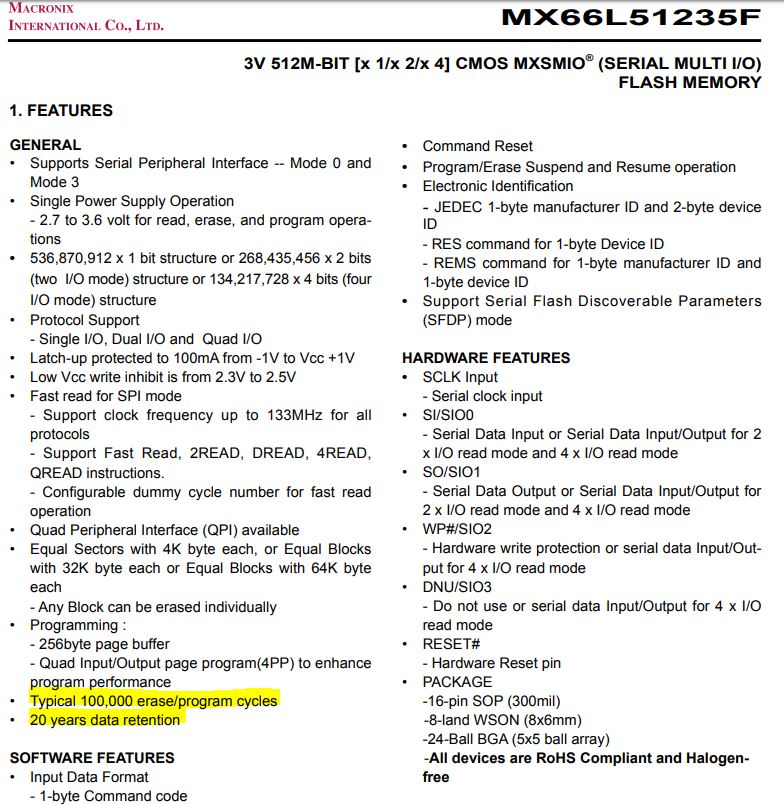
    Right now, I am a little bit worried about the type of NVM. What is the expected lifetime (number of writes) does this NVM has? We need to make this NVM work for a long time. Should we use eMMC instead? We need to be compatible with TM4C and MSP432E.

    Any idea?

    PS: If I implement the QSSI I will post it. 

  • Hi Daniel,

      I found in the BOM list the 512Mb is a Macronix Quad SPI Serial Flash. The link to the datasheet is provided below. 

    The write cycle is specified to 100,000 cycles. Is this enough for you? You will need to do some Google searching, try Digikey or Mouser for NVM if your application requires more write cycles. 

     Again, please do share with us how you get it to work using TI-RTOS SDSPI driver in Advanced QSSI mode. I will close the thread for now. But you can always reopen by posting to this thread when you have something to share.