Part Number: EK-TM4C1294XL
Tool/software: TI-RTOS
Dear Team,
How to debug UART in UART echo example for EK-TM4C1294XL, UART echo example compiled & running, But how to check and debug that is send and receive data.
Thanks & Regards
Suresh
This thread has been locked.
If you have a related question, please click the "Ask a related question" button in the top right corner. The newly created question will be automatically linked to this question.
Part Number: EK-TM4C1294XL
Tool/software: TI-RTOS
Dear Team,
How to debug UART in UART echo example for EK-TM4C1294XL, UART echo example compiled & running, But how to check and debug that is send and receive data.
Thanks & Regards
Suresh
Hi Suresh,
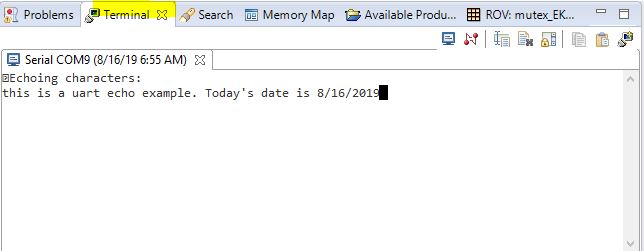
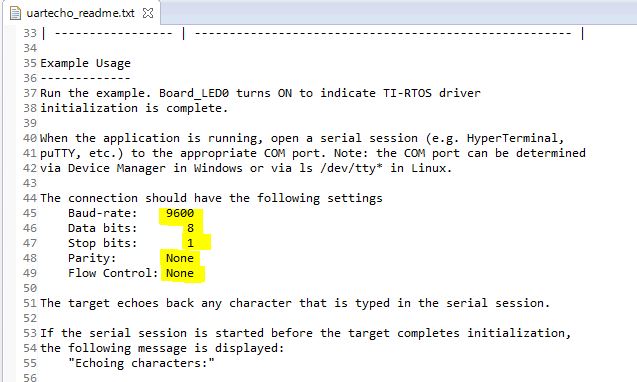
Are you running the TI-RTOS example? If yes, there is a uartecho_readme.txt file in the project directory. Below is the excerpt. You need to open a terminal window such as hyperterminal or you can use the CCS built-in terminal window. Configure your terminal window with the matching connection setting such as the baud rate, data bits and etc. The echo example is meant to echo whatever is received by your UART module back to the sending host. In your terminal window you just type something. These characters are then sent to the MCU and the MCU will echo them back and this is why you see the same characters (what you type is what you see) appear in the terminal window. If you are running a TivaWare uart echo example it will be the same concept. You just need to open a terminal window. For TivaWare uart example, the baud rate is normally set to 115200 instead of 9600. So make sure you match the correct setting in the terminal window.
Hello Charles,
Thank you so much for quick reply,
Im Using TI-RTOS only, I want to UART5, 6, 7 can you help me with example because uartecho example not working.
No Response received in terminal window or docklight, etc...
I have changed following lines in the specified files. but not working.
EK_TM4C1294XL.c
SysCtlPeripheralEnable(SYSCTL_PERIPH_UART5);
GPIOPinConfigure(GPIO_PC6_U5RX); //GPIO_PA5_U3TX
GPIOPinConfigure(GPIO_PC7_U5TX); //GPIO_PA6_U2RX
GPIOPinTypeUART(GPIO_PORTC_BASE, GPIO_PIN_6 | GPIO_PIN_7);
const UART_Config UART_config[] = {
{
.fxnTablePtr = &UARTTiva_fxnTable,
.object = &uartTivaObjects[0],
.hwAttrs = &uartTivaHWAttrs[0]
},
{
.fxnTablePtr = &UARTTiva_fxnTable,
.object = &uartTivaObjects[1],
.hwAttrs = &uartTivaHWAttrs[1]
},
{NULL, NULL, NULL}
};
const UARTTiva_HWAttrs uartTivaHWAttrs[EK_TM4C1294XL_UARTCOUNT] = {
{
.baseAddr = UART0_BASE,
.intNum = INT_UART0,
.intPriority = (~0),
.flowControl = UART_FLOWCONTROL_NONE,
.ringBufPtr = uartTivaRingBuffer[0],
.ringBufSize = sizeof(uartTivaRingBuffer[0])
},
{
.baseAddr = UART5_BASE,
.intNum = INT_UART5,
.intPriority = (~0),
.flowControl = UART_FLOWCONTROL_NONE,
.ringBufPtr = uartTivaRingBuffer[1],
.ringBufSize = sizeof(uartTivaRingBuffer[1])
}
};
EK_TM4C1294XL.h
typedef enum EK_TM4C1294XL_UARTName {
EK_TM4C1294XL_UART0 = 0,
EK_TM4C1294XL_UART5 = 1,
EK_TM4C1294XL_UARTCOUNT
} EK_TM4C1294XL_UARTName;
Board.h
#define Board_UART5 EK_TM4C1294XL_UART5
uartecho.c
uart = UART_open(Board_UART5, &uartParams);
Thanks in Advance !!!
Suresh
Hi,
Only UART0 is connected (hardwired) to the ICDI debug probe. The on-board (I assume you are using the EK-TM4C1294XL lauchPad) ICDI will only convert the UART0 to USB to appear as a virtual COM port on the host computer. You cannot use UART5/6/7 as is using the launch pad. You can certainly use any UART modules on the MCU but only UART0 is connected to the ICDI. If you want the UART5/6/7 to appear as a COM port on your computer you will need to use a FTDI chip. You can test UART5/6/7 without the COM port. What you can do is to setup a loopback between them for experiment. For example. setup a loopback between UART5 and UART6. The UART5 can send something to UART6 and vice versa.
Refer to the EK-TM4C1294XL lauchPad user's guide for details.
Hi,
Can you share me an example of uartParams readCallback, uartParams writecallback, It is not working in above mention application
EK-TM4C1294XL
Thanks & Regards
Suresh
Please refer to the TI-RTOS user's guide for details. Below is the excerpt.
Once the UART has been initialized, you can open UART instances. Only one UART index can be used
at a time. If the index is already in use, the driver returns NULL and logs a warning. Opening a UART
requires four steps:
1. Create and initialize a UART_Params structure.
2. Fill in the desired parameters.
3. Call UART_open() passing in the index of the UART from the configuration structure and Params.
4. Save the UART handle that is returned by UART_open(). This handle will be used to read and write
to the UART you just created.
For example:
UART_Handle uart;
UART_Params uartParams;
Board_initUART(); // Calls UART_init for you
/* Create a UART with data processing off. */
UART_Params_init(&uartParams);
uartParams.writeDataMode = UART_DATA_BINARY;
uartParams.readDataMode = UART_DATA_BINARY;
uartParams.readReturnMode = UART_RETURN_FULL;
uartParams.readEcho = UART_ECHO_OFF;
uart = UART_open(Board_UART, &uartParams);
Options for the writeMode and readMode parameters are UART_MODE_BLOCKING and
UART_MODE_CALLBACK.
• UART_MODE_BLOCKING uses a semaphore to block while data is being sent. The context of the
call must be a SYS/BIOS Task.
• UART_MODE_CALLBACK is non-blocking and will return while data is being sent in the context of
a Hwi. The UART driver will call the callback function whenever a write or read finishes. In some
cases, the action might have been canceled or received a newline, so the number of bytes
sent/received are passed in. Your implementation of the callback function can use this information
as needed.
I think the below posts will help.