This thread has been locked.

If you have a related question, please click the "Ask a related question" button in the top right corner. The newly created question will be automatically linked to this question.

LMFLASHPROGRAMMER: LMFLASH tool command line mode errorlevel 0xC000 0005

Part Number: LMFLASHPROGRAMMER
Other Parts Discussed in Thread: EK-TM4C1294XL, UNIFLASH,

Device: EK-TM4C1294XL

Scenario: Any attempt to dump more than 512KB of flash memory using cli mode. For instance: 

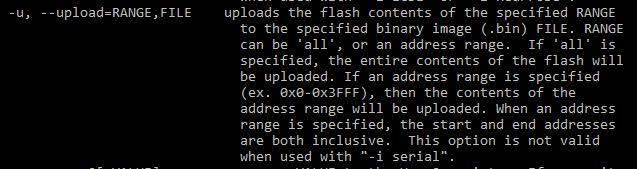
lmflash -q ek-tm4c1294xl -u 0x00000-0x8FFFF,test.bin

Result: LMFLASH cli tool crashes with errorlevel = -1 073 741 819 (0xC000 0005)

The same attempt works when using GUI. Why does it fail when executed from command line? Is there a fix or workaround available?

  • Hi,

      You specify -u 0x00000-0x8FFFF. The 8FFFF is equal to 589823. To specify 1MB, you should use 0xFFFFF or use 'all' to dump the entire content. 

  • Hi Charles,

    For the range 0x00000-0xFFFFF the outcome is the same -- LMFLASH cli tool crashes (errorlevel 0xC000 0005).

    In my previous example I have used 576KB range intentionally - just to demonstrate you that the tool crashes for any range larger than 512KB.

    Anyway, 576KB range is still smaller than 1MB range, so the tool should not crash.

    What exactly does errorlevel 0xC000 0005 stand for?

    Br,
    Marcin Okarma

  • Hi Marcin,

      Yes, I can repeat the same problem. For me, I don't get errors but the program just got stuck above 512kB. The tool was developed quite a while back. Currently, there is no much I can help here as there is no plan for a new LM flash programmer version. You can use the GUI mode or if CLI is what must be used in your environment then i will suggest you use Uniflash tool. The Uniflash tool also provides CLI mode for programming and uploading the memory. The Uniflash tool is supported by our TI CCS team so if you have any questions you can open a thread in the CCS forum. You can download Uniflash from http://www.ti.com/tool/UNIFLASH. Once downloaded you can find the user's guide in <Uniflash_Installation>/docs/quick_start_guide. 

  • To see the value of errorlevel you can:

    echo %errorlevel%

    Anyway, thanks for the explanation. I was able to proceed with uniflash scripts from CCS (ccs930/ccs/ccs_base/scripting/examples/uniflash/cmdLine)

  • Marcin Okarma said:
    What exactly does errorlevel 0xC000 0005 stand for?

    That is the Windows error for an Access Violation.

    If I attach the Microsoft Visual Studio debugger to the lmflash program, the the Microsoft Visual Studio debugger reports an access violation at the point the "Uploading.." percentage progress stops when trying to upload more than 512KB:

    After this access violation, Windows terminates lmflash.

    Without the source code not sure what the problem is, but maybe the cli mode only allocates a 512KB buffer for storing the flash content leading to an access violation when attempts to store off the end of the buffer.

  • I suspect the same - too small buffer. I do not know the history of TI product line but it is possible that back then, when the LMFlash tool was under development, they only had chips with up to 512KB of flash memory.

    Anyway, support for chips with more than 512KB of flash was added at some point in time because it works for GUI mode. But I guess it was not properly tested for CLI mode. Therefore this bug exists.

    By the way, if there are no plans to update LMFlash (or event fix existing errors), then why it is still listed on the product pages? For instance on: https://www.ti.com/tool/EK-TM4C1294XL under Development Tools section.

  • Hello Marcin,

    LMFlashProgrammer still offers a number of useful features beyond flashing memory including Debug Port Unlock, UART, Ethernet & USB DFU, and the ability to update the Stellaris ICDI firmware in case of corruption. I personally use it heavily on a weekly basis as a support engineer for TM4C and do not see any value in removing it from TI.com due to a bug that impacts a very limited use case. 

  • That's a fair point.

    I thought that new UniFlash tool was supposed to replace LMFlashProgrammer. It is good to know that there are some tasks that cannot be done with the UniFlash - and this is were LMFlashProgrammer comes in handy.

    On the other hand, if the LMFlashProgrammer is still heavily used (by you and the customers), I don't understand why can't it be updated from time to time just to fix some small issues, and to make it even better tool then it is right now.

    Br,
    Marcin

  • Hello Marcin,

    FYI that Debug Port Unlock is offered in both - but LMFlash tends to be quicker / easier to use for that.

    As for updating it... I don't know all the past details but LMFlash wasn't actually developed by TI but by Luminary (hence the name). Some updates include TI branding occurred at some point but that was the extent of modification. My understanding is that we aren't able to update it but I can't say that I've truly deep dived that topic, and I wouldn't be surprised if the source code is actually available to us. Given we are finishing up the new TivaWare release, this is an item I'll keep in mind as we continue to refresh collateral for TM4C.