This thread has been locked.

If you have a related question, please click the "Ask a related question" button in the top right corner. The newly created question will be automatically linked to this question.

TM4C1294NCPDT: udma_demo TX output question

Part Number: TM4C1294NCPDT
Other Parts Discussed in Thread: EK-TM4C1294XL

I'm trying to use udma with UART

For that, I'm studying with udma_demo in tiva example.

In this example, uart1 only output some logs. Not the data which is not in TxBuf.

I checked uart1 tx line with oscilloscope but, it's not sending dummy data.

Is this because of loopback mode?

What can I do for print dummy data in TxBuf that transmitted by udma uart?

  • Hi,

      You can remove the loopback mode and instead connect the UARTTX and UARTRX pins together if you want to see the data on the TX pin.

  • Hi, Charles Tsai

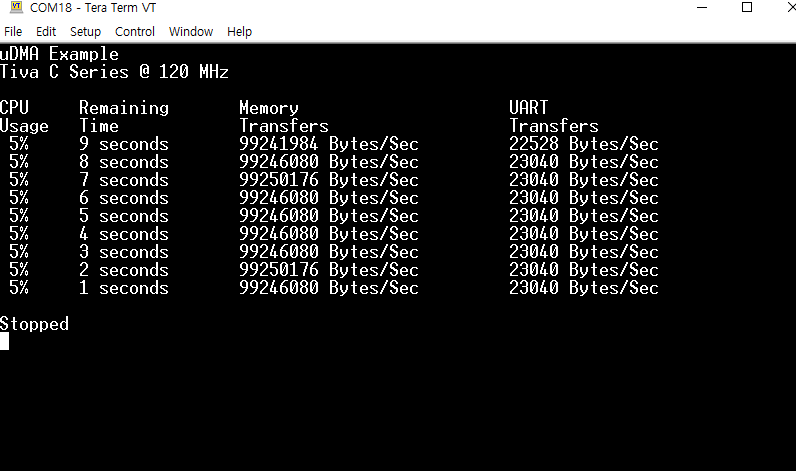
    udma_demo 's output is this

    this messege is printed by UARTprintf();

    but in the example, they made dummy data

    for(ui16Idx = 0; ui16Idx < UART_TXBUF_SIZE; ui16Idx++)
        {
            g_ui8TxBuf[ui16Idx] = ui16Idx;
        }

    and send by DMA

     //
            // Start another DMA transfer to UART1 TX.
            //
            ROM_uDMAChannelTransferSet(UDMA_CHANNEL_UART1TX | UDMA_PRI_SELECT,
                                       UDMA_MODE_BASIC, g_ui8TxBuf,
                                       (void *)(UART1_BASE + UART_O_DR),
                                       sizeof(g_ui8TxBuf));
    
            //
            // The uDMA TX channel must be re-enabled.
            //
            ROM_uDMAChannelEnable(UDMA_CHANNEL_UART1TX);

    I want check 'g_ui8TxBuf' is transmitting in uart

    but 'g_ui8TxBuf' is not printed in UART1 terminal.

    How can I check it?

  • Hi,

      Are you using the EK-TM4C1294XL LaunchPad board or your custom board? On the LaunchPad board, only UART0 (default) and UART2 can be connected to the virtual terminal. Please see below excerpt from the LaunchPad user's guide.

    Using the jumpers JP4 and JP5, Controller Area Network (CAN) digital receive and transmit signals can be optionally routed to the BoosterPack 2
    interface. The location of these signals is consistent with the CAN interface on the Tiva C Series TM4C123G LaunchPad and the Stellaris
    LM4F120 LaunchPad. In the default configuration, UART0 is used for the ICDI virtual UART and CAN is not present on the BoosterPack headers.
    In this configuration, the ROM serial bootloader can be used over the ICDI virtual UART. When the jumpers are configured for CAN on the
    BoosterPack, then UART2 must be used for the ICDI virtual UART.

    If you want to use the UART1 then you need to have an external USB to UART adapter such as FT232R. See below links.

    I think the easiest way for you is to change the example to use the UART0 instead of UART1.