


Part Number: EK-TM4C123GXL
Tool/software: Code Composer Studio
Hi there,
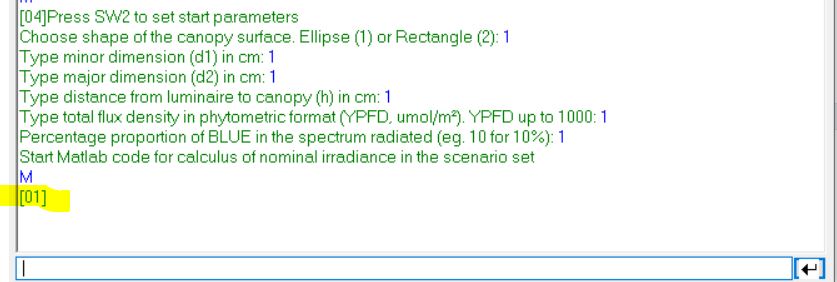
I want to communicate the TIVA with Matlab by UART. The data sending by Matlab to TIVA is fine. However, when i try to scan the data in Matlab sent from TIVA it does not work properly. Probably because the Matlab only receive byte by byte. So I tried to slip the values in char and then concatanate them on matlab again. It did not work also as I use a terminal to see data sent and TIVA sends variables as [xx] format. For example, if I send a variable char '"x" equal to 1, it sends [01] instead. I printed the situation for better explaining and the pertinent lines of code are showing bellow also for both:
TIVA code
                    aux = UARTCharGet(UART0_BASE);
                    if(aux=='M')
                    {
                        //while(UARTCharsAvail(UART0_BASE))
                        //{
                        UARTCharPutNonBlocking(UART0_BASE, 'canopy_shape');
                        UARTCharPut(UART0_BASE,canopy_shape);
                        UARTCharPut(UART0_BASE,'s');
                        UARTCharPut(UART0_BASE,area_vetor[0]);
                        UARTCharPut(UART0_BASE,area_vetor[1]);
                        UARTCharPut(UART0_BASE,area_vetor[2]);
                        UARTCharPut(UART0_BASE,area_vetor[3]);
                        UARTCharPut(UART0_BASE,area_vetor[4]);
                        UARTCharPut(UART0_BASE,'s');
                        UARTCharPut(UART0_BASE,height_vetor[0]);
                        UARTCharPut(UART0_BASE,height_vetor[1]);
                        UARTCharPut(UART0_BASE,height_vetor[2]);
                        UARTCharPut(UART0_BASE,'s');
                        flag_menu=7;
                        GPIOPinWrite(GPIO_PORTF_BASE, GPIO_PIN_2, 0x00);
                        //} //while
                    }
You guys always get the problem and solve it very quickly here. Thanks for that. Hope it repeats this time :)
Best regards

