This thread has been locked.

If you have a related question, please click the "Ask a related question" button in the top right corner. The newly created question will be automatically linked to this question.

CCS/TM4C129ENCPDT: System reset after wrong clock setting

Part Number: TM4C129ENCPDT
Other Parts Discussed in Thread: SEGGER

Tool/software: Code Composer Studio

Hi community,
I'm using a custom board with the TM4C129ENCPDT uC. I'm trying to set my board for USB connection and, to do that, I'm using the usb_dev_bulk example as reference. 
I do not have an external oscillator, but I wrongly set the clock as in the example, using:

ui32SysClock = MAP_SysCtlClockFreqSet((SYSCTL_XTAL_25MHZ | SYSCTL_OSC_MAIN | SYSCTL_USE_PLL | SYSCTL_CFG_VCO_480), 120000000);

I already programmed my board several times, but with the clock settings as follow:

SysCtlClockFreqSet(SYSCTL_OSC_INT | SYSCTL_USE_PLL | SYSCTL_CFG_VCO_320, 80000000);

The problem is that after I update the wrongly firmware ( using CCS v10.1.0, and the SEGGER J-Link as connector ) CCS gives me this error:
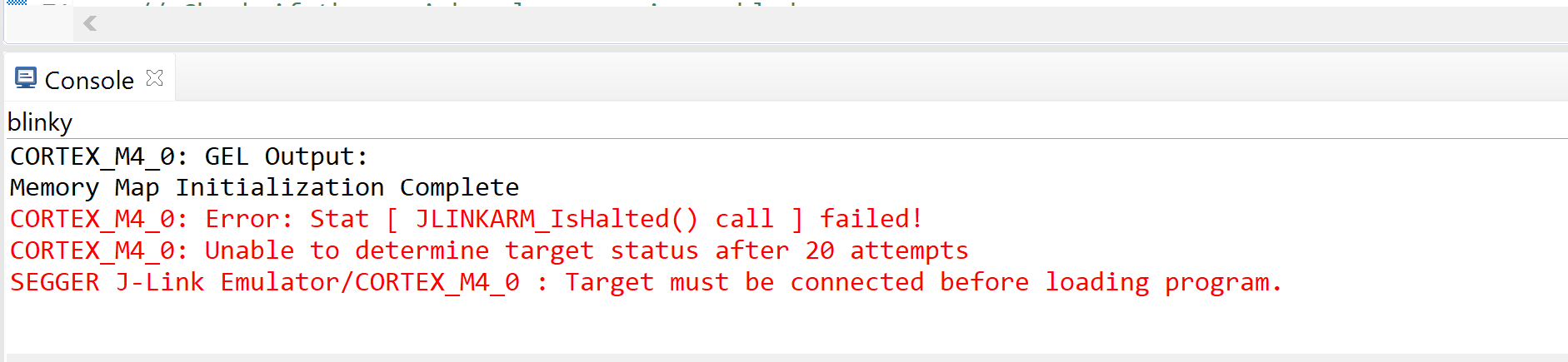


Obviously I connected the target and supplied it.
I already search in the forum and I've found different answers, but nothing works. If you know, there is a way to solve this problem?

Thanks!

Federico

  • Federico Mereu said:
    The problem is that after I update the wrongly firmware ( using CCS v10.1.0, and the SEGGER J-Link as connector ) CCS gives me this error

    According to Steps for unlocking a TM4C based application with the help of Segger J-link try:

    Could you please open J-Link Commander, execute the command "unlock lm3sxxx" and follow the instructions?

    Failing that, you have a TI debug probe such as a Stellaris ICDI, XDS100v2 or XDS110?

    CCS supports a "Debug Port Unlock" using one those TI debug probes, but not with a J-Link.

  • Federico Mereu said:
    I'm using a custom board with the TM4C129ENCPDT uC. I'm trying to set my board for USB connection and, to do that, I'm using the usb_dev_bulk example as reference. 
    I do not have an external oscillator, but I wrongly set the clock as in the example, using:

    The TM4C129ENCPDT datasheet contains the following about the USB Clock Control:

    I.e. if you are using the internal integrated USB PHY the MOSC must be the clock source, which implies using an external oscillator.

    I think this is because the internal oscillator won't meet the frequency accuracy for the USB clock source.

  • Hello Federico,

    Chester is correct regarding the clock settings, you need an external oscillator for USB. The API you used is trying to use an external oscillator and cannot which is why the device locked. Invalid clock setting is the most common reason for a locked device. The J-Link API should work, let us know.

  • Thank you Chester for your reply.
    I tried with J-Link Commander but it doesn't work. Unfortunately I don't have the TI probes, so I cannot solve the problem.
    Thanks
    Federico