This thread has been locked.

If you have a related question, please click the "Ask a related question" button in the top right corner. The newly created question will be automatically linked to this question.

CCS/TMS570LS3137: Producing PWM using N2HET advanced config settings

Part Number: TMS570LS3137
Other Parts Discussed in Thread: HALCOGEN

Tool/software: Code Composer Studio

Hello,

I tried to produce a PWM signal using Halcogen Het settings for pwm and observe the PWM signal on N2HET pin.

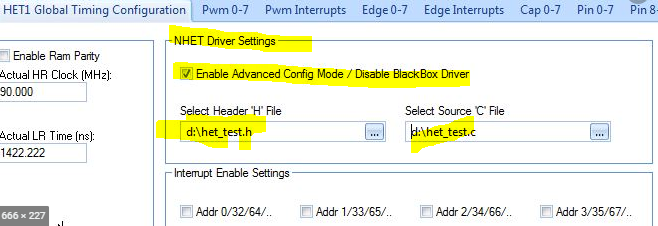
Now I am trying to produce this pwm using advanced config mode. I used the code that consists of only two instruction in second image. I tried to simulate this code in  HET Ide app. There was no error there. But when I debug  this het code to turn into .c and .h file and load these 2 files in advanced config mode part, then generate halcogen and run code composer ,there is no signal on pin.

Do you think that  using this assembly code is enough to produce pwm signal? Is there anny different settings except loading c and h file of het code , enable het driver and interrupt ? 

(The main target of why I am struggling to produce pwm with this method is to be able to observe that this simple het assembly code  can work on het. Because before trying that, we try to send sci data over n2het pin and we can not understand why it did not work, because of assmbly code or halcogen setting.)
  • Hello,

    When you call the hetInit() it is supposed to load your N2HET program to the N2HET. Please check if the hetInit() contains the below memory copy call. The hetInit() not only load the N2HET code to the N2HET RAM but also initialize the N2HET registers. The hetInit() should begin with initialization of N2HET1 register followed by intialization of N2HET1 RAM and then followed by initialization of N2HET2 registers and finally the the initialization of the N2HET2 RAM.

    (void)memcpy((void*)hetRAM1, (void*)HET_INIT0_PST, sizeof(HET_INIT0_PST)); //for N2HET1

    If you don't see the above line in the hetInit() then please check two things.

    1. In HalCoGen make sure in the "Driver Enable" tab you have selected N2HET1 or N2HET2, or both drivers.

    2. In the N2HET1 tab->N2HET1 Global Timing Configuration tab, configure LR and HR which should be same in your HET IDE simulation. 

    4. Including *.c and *.h in "Enable Advanced Config  Mode / Disable BlackBox Driver" panel is enough.