This thread has been locked.

If you have a related question, please click the "Ask a related question" button in the top right corner. The newly created question will be automatically linked to this question.

UNIFLASH: UniFlash fails with error 1170, although it can be done with CCS.

Part Number: UNIFLASH
Other Parts Discussed in Thread: TM4C1290NCPDT

Nice to meet you.

I'm using a translation site, so I'm sorry if there is something wrong with it.

When I start UniFlash with a ccxml file that can be connected with CCS, it fails with an error.

The procedure is as follows.
1. Select the ccxml file used by CCS from "Create Session From Existing Target Configuration File".
2. Select "Flash Image (s)".
3. Click "Load Image (s)".
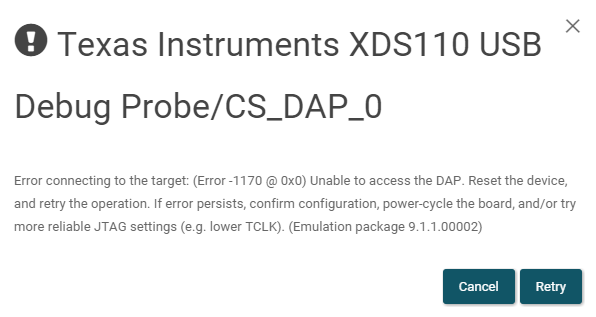
Why can't UniFlash do it when it's done with CCS?
Am I missing something?

Attach the used ccxml as text.

<?xml version="1.0" encoding="UTF-8" standalone="no"?>
<configurations XML_version="1.2" id="configurations_0">
    <configuration XML_version="1.2" id="configuration_0">
        <instance XML_version="1.2" desc="Texas Instruments XDS110 USB Debug Probe" href="connections/TIXDS110_Connection.xml" id="Texas Instruments XDS110 USB Debug Probe" xml="TIXDS110_Connection.xml" xmlpath="connections"/>
        <connection XML_version="1.2" id="Texas Instruments XDS110 USB Debug Probe">
            <instance XML_version="1.2" href="drivers/tixds510cs_dap.xml" id="drivers" xml="tixds510cs_dap.xml" xmlpath="drivers"/>
            <instance XML_version="1.2" href="drivers/tixds510cortexM.xml" id="drivers" xml="tixds510cortexM.xml" xmlpath="drivers"/>
            <property Type="choicelist" Value="0" id="Power Selection">
                <choice Name="Target supplied power" value="0">
                    <property Type="choicelist" Value="0" id="Voltage Selection">
                        <choice Name="User specified value" value="1">
                            <property Type="stringfield" Value="3.3" id="Voltage Level"/>
                        </choice>
                    </property>
                </choice>
            </property>
            <property Type="choicelist" Value="1" id="The JTAG TCLK Frequency (MHz)">
                <choice Name="Fixed with user specified value" value="SPECIFIC">
                    <property Type="stringfield" Value="100kHz" id="-- Enter a value from 100.0kHz to 2.5MHz"/>
                </choice>
            </property>
            <platform XML_version="1.2" id="platform_0">
                <instance XML_version="1.2" desc="Tiva TM4C1290NCPDT" href="devices/tm4c1290ncpdt.xml" id="Tiva TM4C1290NCPDT" xml="tm4c1290ncpdt.xml" xmlpath="devices"/>
            </platform>
        </connection>
    </configuration>
</configurations>

<Reference>
XDS110
TIVA TM4C1290NCPDT
Code Composer Studio Version: 10.1.0.00010
UniFlash Version: 6.0.0.2710

  • Hello,

    This question was assigned to the wrong group. Please give the new question owner a day or so to respond.

    Regards,

    Nick

  • Hello,

    Are you able to program the board with your XDS110 in CCS as well?

    Usually that error is something that would indicate the device may be locked, in which case it wouldn't program in CCS and would need to be unlocked.

  • Hello,

    Excuse me, what was wrong?
    I want to be careful, so I would appreciate it if you could tell me.

    Best Regards.

  • Hello,

    It can be programmed with CCS.
    If you couldn't do it with CCS before, you can do it by lowering TCLK.

    Just in case, I unlocked it and then used UniFlash, but I still get error 1170.

    Best Regards.

  • Hello,

    Have you tried making a new configuration by selecting the MCU you are using and then the XDS110 debugger? Does that work?

    If so, maybe compare the .ccxml file for that with the one that doesn't work. Could be an issue with settings perhaps.

    You can download the file on the top part, it would look like this:

    Configured Device : Texas Instruments XDS110 USB Debug Probe > TIVA TM4C1290NCPDT [more info] [download ccxml]

  • Hello,

    I created a new configuration and tried it out.
    As before, I get error 1170 and it doesn't work.

    Best Regards.

  • Hello,

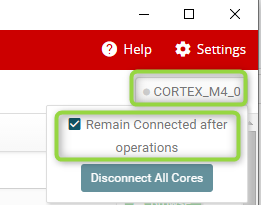
    In UniFlash, can you enable the option to "Remain Connected after operations"?

    Thanks

    ki

  • Hello,

    Yes, it was enabled.

    Best Regards.

  • Can you enable Debug Server Logging and try to flash the target again?

    You can enable it from the settings: https://e2e.ti.com/support/tools/ccs/f/81/p/819208/3031370#3031370

    Thanks

    ki

  • Hello,

    I enabled it and tried again.
    I will attach the log.3630.ds.log

    Best Regards.

  • Thank you. I will send the log to engineering for analysis. I will pass on any updates to you as I received them.

  • I was able to test your CCXML file with this hardware and UniFlash v6.0 but did not see the same issue.

    The log file doesn't provide many clues. It really just says the DAP on the Cortex M4 cannot be accessed. That often means the code on the M4 has put the chip in a bad state causing the core to be inaccessible from the debug port. Since CCS is able to access the device in your case, I cannot explain why it would also not be accessible from UniFlash.

    Both UniFlash and CCS use the same underlying software to access the device. Your version of CCS has a slightly newer version of the software stack than your version of UniFlash, but there are minimal differences between these two versions.

    Would you be able to confirm whether you have the same issue with UniFlash v6.1? It uses the same version of software as CCS 10.1.0. You can download a copy from here.

  • Hello,

    I tried it with UniFlash v6.1.0.2829, but I can't do it with the same problem.

    I will also attach this log.ds2.log

    Best Regards.

  • I'm kind of fishing for clues as to what might be different between CCS and UniFlash. The new log doesn't have anything that helps.  Here are some questions that may add some more information.

    • Can you confirm that you are using Windows 10? I only tested with Windows 10. If you're using a different OS, I can give that a try.
    • Do see the same problem if you use the Cloud version of UniFlash (invoke it from here). It should be the same problem. If it is different, it may provide a clue.
    • Can you generate a debug server log from CCS for a successful programming operation? I can use this to see what CCS may be doing differently. To generate a log from CCS, go to the help->CCS Support, select debug server log, enable it and provide a file. After the programming operation completes, exit CCS to ensure the full file content is flushed to the file.

    Thanks!

  • Hello,

    • The OS I'm using is Windows 10.
    • The cloud version of UniFlash does not proceed from the image below.Therefore, it is not possible.
    • I have obtained the CCS log, so I will attach it.debug_server_ccs.log

    Best Regards.

    Postscript:
    I understand why the cloud version is not possible.
    "Fsutil 8dot 3name" was invalid.

    When implemented, the same 1170 phenomenon occurs.
    I will attach the log.ds_cloud.log

  • I'm still not seeing what could be different.

    One thing I did notice was the CCS log is from a different user than the UniFlash logs. Are these also from different PCs?

  • Hello,

    Yes, I was using another PC.
    I tried it on the same PC, but the result is the same.

    Regards,

  • Hi,

    Can you run another test for me? I want to eliminate the GUI being the issue, so please try using our DSLite command line in both CCS and UniFlash and see if you are able to connect to your device in both cases.

    In UniFlash, go to the following directory:

      <uniflash_installDir>\deskdb\content\TICloudAgent\win\ccs_base\DebugServer\bin\

    In CCS, this directory:

      <ccs_installDir>\ccs\ccs_base\DebugServer\bin\

    In both directories, run the following command to load a program (please use the same ccxml in both cases):

    > DSLite.exe flash -e -c <pathToCCXML> <pathToImage>

    Can you report the output you get back in both cases? Let me know if you have any questions on these steps.

    Thanks,

    Ricky

  • Hello,

    When I executed it according to the procedure I was taught, I can do it with CCS, but not with UniFlash.
    I will attach the result of doing it with the DS Lite command. 

    DSLite version 10.1.0.2076
    Configuring Debugger (may take a few minutes on first launch)...
    	Initializing Register Database...
    	Initializing: CS_DAP_0
    	Executing Startup Scripts: CS_DAP_0
    	Initializing: CORTEX_M4_0
    	Executing Startup Scripts: CORTEX_M4_0
    CORTEX_M4_0: GEL Output: 
    Memory Map Initialization Complete
    Connecting...
    fatal: CORTEX_M4_0: Error connecting to the target: (Error -1170 @ 0x0) Unable to access the DAP. Reset the device, and retry the operation. If error persists, confirm configuration, power-cycle the board, and/or try more reliable JTAG settings (e.g. lower TCLK). (Emulation package 9.2.0.00002) 
    
     
    DSLite version 10.1.0.2013
    Configuring Debugger (may take a few minutes on first launch)...
    	Parsing connections/TIXDS110_Connection.xml
    	Parsing drivers/tixds510cs_dap.xml
    	Parsing drivers/tixds510cortexM.xml
    	Parsing devices/tm4c1290ncpdt.xml
    	Parsing routers/cs_dap.xml
    	Parsing ..\Modules\cs_dap_NotVisible.xml
    	Parsing cpus/cortex_m4.xml
    	Parsing ..\Modules\cortexM4_NotVisible.xml
    	Parsing ../Modules/Tiva_TM4C/sc4cc231e6pm/watchdog.xml
    	Parsing ../Modules/Tiva_TM4C/sc4ce290ncpz/ssi.xml
    	Parsing ../Modules/Tiva_TM4C/sc4ce290ncpz/uart.xml
    	Parsing ../Modules/Tiva_TM4C/sc4ce290ncpz/i2c.xml
    	Parsing ../Modules/Tiva_TM4C/sc4c1290kcpdt/pwm.xml
    	Parsing ../Modules/Tiva_TM4C/sc4ce93xh6pm/qei.xml
    	Parsing ../Modules/Tiva_TM4C/sc4ce290ncpz/timer.xml
    	Parsing ../Modules/Tiva_TM4C/sc4c1290kcpdt/adc.xml
    	Parsing ../Modules/Tiva_TM4C/sc4ce290ncpz/comp.xml
    	Parsing ../Modules/Tiva_TM4C/sc4cc231e6pm/can.xml
    	Parsing ../Modules/Tiva_TM4C/sc4c1290kcpdt/usb.xml
    	Parsing ../Modules/Tiva_TM4C/sc4ce290ncpz/gpio.xml
    	Parsing ../Modules/Tiva_TM4C/sc4ce290ncpz/eeprom.xml
    	Parsing ../Modules/Tiva_TM4C/sc4ce290ncpz/i2c.xml
    	Parsing ../Modules/Tiva_TM4C/sc4ce290ncpz/epi.xml
    	Parsing ../Modules/Tiva_TM4C/sc4ce290ncpz/timer.xml
    	Parsing ../Modules/Tiva_TM4C/sc4cc231e6pm/sysexc.xml
    	Parsing ../Modules/Tiva_TM4C/sc4c1290kcpdt/hib.xml
    	Parsing ../Modules/Tiva_TM4C/sc4ce290ncpz/flash.xml
    	Parsing ../Modules/Tiva_TM4C/tm4c1290ncpdt/sysctl.xml
    	Parsing ../Modules/Tiva_TM4C/sc4ce290ncpz/udma.xml
    	Parsing ../Modules/Tiva_TM4C/sc4ce290ncpz/ccm.xml
    	Parsing ../Modules/Tiva_TM4C/sc4ce290ncpz/nvic.xml
    	Parsing ../drivers/cortexM4_fpu.xml
    	Initializing Register Database...
    	Parsing C:\Users\Kaihatsu\AppData\Local\TEXASI~1\CCS\ccs1010\0\0\11724699218468951583.cache
    	Initializing: CS_DAP_0
    	Mapping registers: CS_DAP_0 - Core Registers
    	Mapping registers: CS_DAP_0 - Hidden
    	Building search data: CS_DAP_0
    	Executing Startup Scripts: CS_DAP_0
    	Initializing: CORTEX_M4_0
    	Mapping registers: CORTEX_M4_0 - Core Registers
    	Mapping registers: CORTEX_M4_0 - WATCHDOG0
    	Mapping registers: CORTEX_M4_0 - WATCHDOG1
    	Mapping registers: CORTEX_M4_0 - SSI0
    	Mapping registers: CORTEX_M4_0 - SSI1
    	Mapping registers: CORTEX_M4_0 - SSI2
    	Mapping registers: CORTEX_M4_0 - SSI3
    	Mapping registers: CORTEX_M4_0 - UART0
    	Mapping registers: CORTEX_M4_0 - UART1
    	Mapping registers: CORTEX_M4_0 - UART2
    	Mapping registers: CORTEX_M4_0 - UART3
    	Mapping registers: CORTEX_M4_0 - UART4
    	Mapping registers: CORTEX_M4_0 - UART5
    	Mapping registers: CORTEX_M4_0 - UART6
    	Mapping registers: CORTEX_M4_0 - UART7
    	Mapping registers: CORTEX_M4_0 - I2C0
    	Mapping registers: CORTEX_M4_0 - I2C1
    	Mapping registers: CORTEX_M4_0 - I2C2
    	Mapping registers: CORTEX_M4_0 - I2C3
    	Mapping registers: CORTEX_M4_0 - PWM0
    	Mapping registers: CORTEX_M4_0 - QEI0
    	Mapping registers: CORTEX_M4_0 - TIMER0
    	Mapping registers: CORTEX_M4_0 - TIMER1
    	Mapping registers: CORTEX_M4_0 - TIMER2
    	Mapping registers: CORTEX_M4_0 - TIMER3
    	Mapping registers: CORTEX_M4_0 - TIMER4
    	Mapping registers: CORTEX_M4_0 - TIMER5
    	Mapping registers: CORTEX_M4_0 - ADC0
    	Mapping registers: CORTEX_M4_0 - ADC1
    	Mapping registers: CORTEX_M4_0 - COMP
    	Mapping registers: CORTEX_M4_0 - CAN0
    	Mapping registers: CORTEX_M4_0 - CAN1
    	Mapping registers: CORTEX_M4_0 - USB0
    	Mapping registers: CORTEX_M4_0 - GPIO_PORTA_AHB
    	Mapping registers: CORTEX_M4_0 - GPIO_PORTB_AHB
    	Mapping registers: CORTEX_M4_0 - GPIO_PORTC_AHB
    	Mapping registers: CORTEX_M4_0 - GPIO_PORTD_AHB
    	Mapping registers: CORTEX_M4_0 - GPIO_PORTE_AHB
    	Mapping registers: CORTEX_M4_0 - GPIO_PORTF_AHB
    	Mapping registers: CORTEX_M4_0 - GPIO_PORTG_AHB
    	Mapping registers: CORTEX_M4_0 - GPIO_PORTH_AHB
    	Mapping registers: CORTEX_M4_0 - GPIO_PORTJ_AHB
    	Mapping registers: CORTEX_M4_0 - GPIO_PORTK
    	Mapping registers: CORTEX_M4_0 - GPIO_PORTL
    	Mapping registers: CORTEX_M4_0 - GPIO_PORTM
    	Mapping registers: CORTEX_M4_0 - GPIO_PORTN
    	Mapping registers: CORTEX_M4_0 - GPIO_PORTP
    	Mapping registers: CORTEX_M4_0 - GPIO_PORTQ
    	Mapping registers: CORTEX_M4_0 - EEPROM
    	Mapping registers: CORTEX_M4_0 - I2C8
    	Mapping registers: CORTEX_M4_0 - I2C9
    	Mapping registers: CORTEX_M4_0 - I2C4
    	Mapping registers: CORTEX_M4_0 - I2C5
    	Mapping registers: CORTEX_M4_0 - I2C6
    	Mapping registers: CORTEX_M4_0 - I2C7
    	Mapping registers: CORTEX_M4_0 - EPI0
    	Mapping registers: CORTEX_M4_0 - TIMER6
    	Mapping registers: CORTEX_M4_0 - TIMER7
    	Mapping registers: CORTEX_M4_0 - SYSEXC
    	Mapping registers: CORTEX_M4_0 - HIB
    	Mapping registers: CORTEX_M4_0 - FLASH_CTRL
    	Mapping registers: CORTEX_M4_0 - SYSCTL
    	Mapping registers: CORTEX_M4_0 - UDMA
    	Mapping registers: CORTEX_M4_0 - CCM0
    	Mapping registers: CORTEX_M4_0 - NVIC
    	Mapping registers: CORTEX_M4_0 - FPU
    	Mapping registers: CORTEX_M4_0 - Hidden
    	Building search data: CORTEX_M4_0
    	Applying virtual groups: CORTEX_M4_0 - USB0
    	Applying virtual groups: CORTEX_M4_0 - SYSCTL
    	Executing Startup Scripts: CORTEX_M4_0
    CORTEX_M4_0: GEL Output: 
    Memory Map Initialization Complete
    Connecting...
    GEL Expression: OnTargetConnect()
    Loading Program: Project_511.out
    	Preparing ... 
    	.text: 0 of 49624 at 0x0
    Erasing Flash.
    	.text: 32640 of 49624 at 0x0: 65%
    	.data: 0 of 2 at 0xffffe: 99%
    	Finished: 99%
    	Setting PC to entry point.: 99%
    Running...
    Success
    

    Regards,

  • Hi,

    Thanks for executing the test. The logs still show that it is working on CCS but not UniFlash, and we eliminated that the UniFlash GUI is the caused of the issue. But I still can't think of a reason why it would work in CCS but not in UniFlash.

    Can you do 1 more test for me?

    1. Start UniFlash

    2. Choose to open your CCXML

    3. Select an Image

    4. Go to "Standalone Command Line" tab and click on "Generate Package".

    5. Save the zip file to your machine and extract it.

    6. Go to that folder using command prompt, and run dslite.bat

    7. If you get the connection error, try copying the "ccs_base" folder from your CCS install <ccs_installDir>\ccs\ccs_base\ into the generated package folder

    8. Run dslite.bat again.

    Please let me know if the connection error goes away with these steps, and let me know if you have any questions on these steps.

    Thanks,

    Ricky

  • Hello,

    After executing up to step 8, the connection error was resolved.
    By the way, in step 6, a connection error occurred.
    For the time being, I will attach the output result.

    Executing default command:
    > dslite --mode flash -c user_files/configs/tm4c1290ncpdt.ccxml -l user_files/settings/generated.ufsettings -s VerifyAfterProgramLoad="No verification" -e -f -v "user_files/images/Project_511.out"  
    
    DSLite version 10.1.0.1986
    Configuring Debugger (may take a few minutes on first launch)...
    	Initializing Register Database...
    	Initializing: CS_DAP_0
    	Executing Startup Scripts: CS_DAP_0
    	Initializing: CORTEX_M4_0
    	Executing Startup Scripts: CORTEX_M4_0
    CORTEX_M4_0: GEL Output: 
    Memory Map Initialization Complete
    Connecting...
    fatal: CS_DAP_0: Error connecting to the target: (Error -1170 @ 0x0) Unable to access the DAP. Reset the device, and retry the operation. If error persists, confirm configuration, power-cycle the board, and/or try more reliable JTAG settings (e.g. lower TCLK). (Emulation package 9.1.1.00002) 
    
     
    Executing default command:
    > dslite --mode flash -c user_files/configs/tm4c1290ncpdt.ccxml -l user_files/settings/generated.ufsettings -s VerifyAfterProgramLoad="No verification" -e -f -v "user_files/images/Project_511.out"  
    
    DSLite version 10.1.0.2013
    Configuring Debugger (may take a few minutes on first launch)...
    	Initializing Register Database...
    	Initializing: CS_DAP_0
    	Executing Startup Scripts: CS_DAP_0
    	Initializing: CORTEX_M4_0
    	Executing Startup Scripts: CORTEX_M4_0
    CORTEX_M4_0: GEL Output: 
    Memory Map Initialization Complete
    Connecting...
    Loading Program: user_files/images/Project_511.out
    	Preparing ... 
    	.text: 0 of 49624 at 0x0
    Erasing Flash.
    	.text: 32640 of 49624 at 0x0: 65%
    	.data: 0 of 2 at 0xffffe: 99%
    	Finished: 99%
    	Setting PC to entry point.: 99%
    Verifying Program: user_files/images/Project_511.out
    	Preparing ... 
    	.text: 0 of 49624 at 0x0
    	.text: 32640 of 49624 at 0x0: 65%
    	.data: 0 of 2 at 0xffffe: 99%
    	Finished: 99%
    info: CORTEX_M4_0: Program verification successful for user_files/images/Project_511.out
    Running...
    Success
    

    Regards,

  • Hi,

    This is interesting.

    Can you rerun the steps and send me the non working package you get from step 4 (before you extract it) and the working package from step 7 (please zip it up first)? We might be able to detect the difference in these 2 packages.

    You can remove your image/program from the package first if you want.

    Thanks,

    Ricky

  • Hello,

    I will attach the package for which you re-executed the procedure.

    3782.uniflash_windows_step4.zip

    Step 7 cannot be attached because the package capacity (compressed 188MB) is large.
    How should I send it?

    Regards,

  • Hi,

    I'm not sure what the best way to send a large package is; but I tried downloading your step4 package and using it on my board, and I did not see any issues with it. So I'm stumped on what the issue might be.

    To reduce the package size, can you try the following steps independently, each time starting with the step 4 package:

      4a) copy over the \ccs_base\emulation\ folder from CCS10.1 into the step4 package and run dslite. Does it work?

      4b) copy over the \ccs_base\common\ folder from CCS10.1 into the step4 package and run dslite. Does it work?

      4c) copy over the \ccs_base\DebugServer\ folder from CCS10.1 into the step4 package and run dslite. Does it work?

    Sorry for giving you so many steps to try. At this point, I can figure out what is happening, and unfortunately, I cannot reproduce the issue on my end.

    Thanks,

    Ricky

  • Hello,

    Please don't apologize, thank you for your support.

    I tried each one.
    4a: Works.
    4b: Does not work.
    4c: Does not work.

    It works if you change only the emulation folder from the result.
    However, the capacity was still large, so I also tried it with the folder inside the emulation folder.
    It works if you change only the analysis folder from the result.
    Therefore, I will attach the analysis folder.

    analysis.zip

    Regards,

  • We're still looking for answers unfortunately. It is confusing that we cannot reproduce the issue here. The last result you provided was very interesting though, and provides some clues.

    Would you be able to generate a log from "Process Monitor" for the failing case? This is a Microsoft tool available here.

    The process monitor tool would need to be started just before starting UniFlash. Proceed to the point where UniFlash fails, and then save the log.  The log will be huge, but it does compress very well with tools like 7-zip. A standard "zip" would work too, but just be a bit larger. The log will almost certainly be too large to post here. Assuming that is the case, please contact me at awaterson @ ti.com and I will provide a link to a private upload site which could be used. You could also upload it to anywhere you feel is appropriate and I can pick it up from there (let me know by email).