This thread has been locked.

If you have a related question, please click the "Ask a related question" button in the top right corner. The newly created question will be automatically linked to this question.

CCS/TM4C1294NCPDT: Other microcontrollers forum

Part Number: TM4C1294NCPDT
Other Parts Discussed in Thread: EK-TM4C1294XL

Tool/software: Code Composer Studio

Hi Charles,

I used with EK-TM4C1294XL Evaluation Kit.

I used these examples boot projects.

but this prosses work for me just one time. i.e. I open LM flash in Configuration tab I choose Manual Configuration and Ethernet Interface. Then in the Program tab I choose "boot_emac_flash.bin" and press Program. Then I choose the next program "boot_demo_emac_flash.bin" and press Program. and everything work good. when I try to flash again the "boot_demo_emac_flash.bin" the "Attempting to connect" message come and the LM Flash blocked.

what am I missing?

can you have any idea?

Thanks,

Oshrit

  • Hello Oshrit,

    So when you did the process, did the first time you programmed the device, it was a blank device with the ROM boot loader used to load the main boot loader?

    Did you change the offset address for the Ethernet program when loading? If not, then you may have overwritten your boot loader application which is why you cannot boot load again.

  • Hello Ralph,

    Thank you for your quick answer.

    For the first question, I use with this Evaluation Kit a lot of times. but before I used boot_emac_flash program I erased all the flash. and everything work good just in the first time.

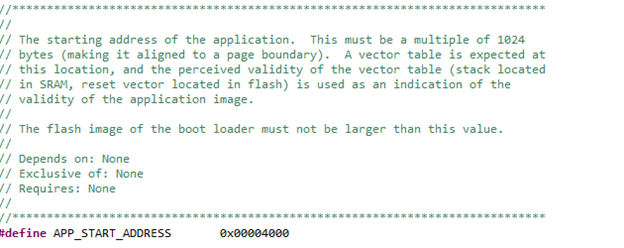
    For the second question, in the 'boot_emac_flash' program the starting address of the application at 0x00004000. (in bl_config.h) like image below:

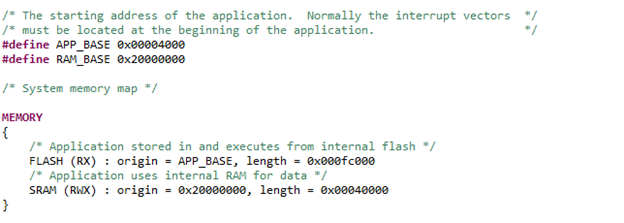
     In the "boot_demo_emac_flash" program, in boot_demo_emac_flash_ccs.cmd file the starting address of the application is 0x00004000. see the image below:

    Can you think I forgot something else?

    In the other hand, "boot_demo_emac_flash" program, when did I put a few lines in the comment the "boot_demo_emac_flash.bin" will flash from "LM Flash" over the Ethernet a lot of times.

    The lines is:

    // while(!g_bFirmwareUpdate)
    // {
    // GPIOPinWrite(GPIO_PORTN_BASE, GPIO_PIN_1, 0x0);
    // SysCtlDelay(g_ui32SysClockFreq / 6);
    // GPIOPinWrite(GPIO_PORTN_BASE, GPIO_PIN_1, GPIO_PIN_1);
    // SysCtlDelay(g_ui32SysClockFreq / 6);
    // }

    Do you have any idea?

    Thanks in advance,

    Oshrit

  • Hello Oshrit,

    I did some tests today and I think perhaps you did not power cycle / reset the MCU after the initial loading of the program to ensure the new code is executing.

    I noticed that LM Flash would hang after freshly loading code the very first time the boot loader is used to program the application and after reset then it worked fine.

    Removing those lines is forcing the boot loader to start without looking for a magic packet so that isn't too surprising it helps but that may not be practical for your application.

    If you feel you are still having issues, can you outline the exact steps taken so I can follow what you are doing step-by-step in order to identify what step may be going wrong? Alternatively, you can try and follow these:

    1. Run the enet_lwip.c example first. In the terminal window you will see the IP address acquired. Record this address.
    2. In the LM flash programmer, update the IP address from step 1 and also the MAC address from the back of the LaunchPad sticker in the Configuration tab.
    3. Now load the boot_emac_flash into your LaunchPad and run the program.
    4. In the Program tab for LM Flash, select the boot_demo_emac_flash.bin file.
    5. Hit the ‘Program’ button.

    The next time the device is started, the bootloader will jump to the application. This can be done via RESET button or power cycling the board fully.

  • Hello Ralph,

    Thank you for your detailed answer!

    I have tried all 5 steps listed above. And again everything work well.

    But when I repeat steps 4 and 5 the LM Flash blocked. like the image below:

    i.e. LM flash did not send the new boot_demo_emac_flash.bin file.

    I hope my problem more clear now. Do you have any idea?

    I have another question related to CCS, when I change the starting address to #define APP_BASE 0x00004000  and not #define APP_BASE 0x00000000 in boot_demo_emac_flash_css.cmd file I have a problem in the debug mode. i.e. when I press next step, after few lines the the program blocked and go to 0xe3c address (not in the address range).

    Do you know why?

    Maybe I need to configure the debug or properties to another configuration?

    Thanks in advance,

    Oshrit

  • Hello Ralph,

    Today I checked another process:

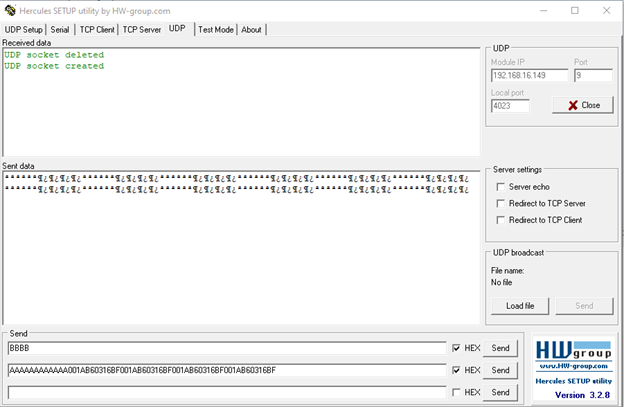
    I opened Hercules in the UDP tab I enter the Model IP and Port = 9. then I send the magic packet ("A*12 times + MAC address *4 times).

    You can see in the image below the magic packet:

    now in the LM flash I press on Program button and the program complete.

    So, I think that LM Flash doesn't send the magic packet to MCU's IP address.

    if I open wireshark: I see the TFTP packets.

    Then I saw the same problem in the E2E:

    and :

    but I didn't know what is the solution.

    Can you explain me, Please, what is the solution?

    I also saw eflash post:

    and also over the cmd didn't work.

    In conclusion, I think the first Post relate to my problem.

    Thanks for any idea,

    Oshrit

  • Hello Oshrit,

    Yes, I think it is more clear now. It sounds like you are not able to connect properly over Ethernet with the settings that are loaded into LM Flash.

    If you go to the Other Utilities tab, you can check the MAC address that is programmed into your device. If you had to unlock the device at some point, the MAC address that was pre-loaded into the LaunchPad will have changed. You can re-load the one from your sticker if needed (I would recommend making sure to check the Commit box or else it won't persist over power cycling).

    Another possible issue could be that a firewall of some sort is blocking the Ethernet connection. This can happen in office setups depending on your business's security policies for the internet. Ideally you will want the LaunchPad and the PC to be on the same network connection.

    One way to test for that would be to try and use the enet_io example and see if you can connect to your board that way.

    Regarding the question about APP_BASE, having the APP_BASE set to 0x00004000 works when you have the underlying boot loader programmed first. This is because the boot loader will then start executing code at 0x00004000. So if you do not have the boot loader project programmed and then try and program at 0x00004000, the code will not execute because it starts at 0x00000000 and finds no instructions so it would go into the ROM boot loader and wait for a firmware image.

  • Hello Oshrit,

    I just saw your latest post, sorry for missing that, I had pulled the thread up to reply before it arrived. I am going to loop our Ethernet expert in to help out more regarding what you reported here.

  • Hi Oshrit,

    Oshrit Taieb said:

    I opened Hercules in the UDP tab I enter the Model IP and Port = 9. then I send the magic packet ("A*12 times + MAC address *4 times).

    You can see in the image below the magic packet:

    now in the LM flash I press on Program button and the program complete.

    So, I think that LM Flash doesn't send the magic packet to MCU's IP address.

    if I open wireshark: I see the TFTP packets.

    Looks like you are seeing the similar issue that another post you referred to is also seeing. 

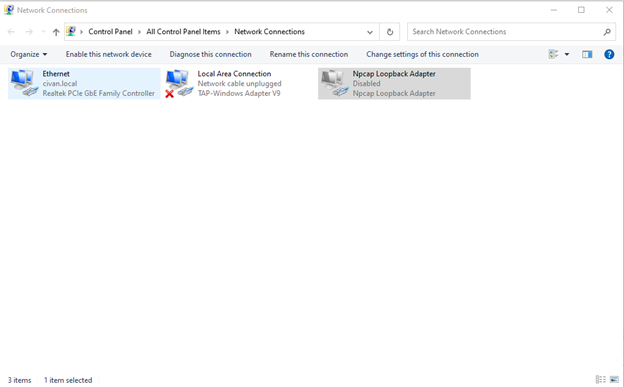
    Can you confirm one thing? If your PC only has one Ethernet interface then the LM flash programmer will correctly send the magic packet to that one? I think you can temporarily disable other Ethernet adapters in your Windows setting. If this is the case, then LM flash programmer is sending the magic packet to the wrong interface. As mentioned in the other posts you referred. While I understand the inconvenience it may have caused, there is currently no plan to update the LM flash programmer.  

  • Thanks a lot!!

    This resolved my problem.

    When I disable the "Npcap Loopback Adapter" the LM Flash send all the data to the target.

    When I enable it, the LM blocked.

    Thanks again,

    Oshrit