This thread has been locked.

If you have a related question, please click the "Ask a related question" button in the top right corner. The newly created question will be automatically linked to this question.

TM4C1294NCPDT: WriteDataCDC can't keep up at high data rate?

Part Number: TM4C1294NCPDT

The following test is based on TivaWare_C_Series-2.1.4.178:

I have been using WriteDataBulk to send data for years without any problem, around 400KB per seconds. To handle WriteDataBulk , I use LibUSB driver.

Recently, a customer wants me to switch to WriteDataCDC so that Windows and Linux can interface with my device with plain COM port driver.

Unfortunately, when using WriteDataCDC, i detects random data loss at high data rate, around 200KB/s, some data or chuck of data, simply turns to 0, does any one have similar issue?

btw, when comparing data of the two modes in WireShark, WriteDataBulk has the obvious advantage, it doesn't have the wrapper around data, and at high speed, it always sends data at huge packet, 8219 B
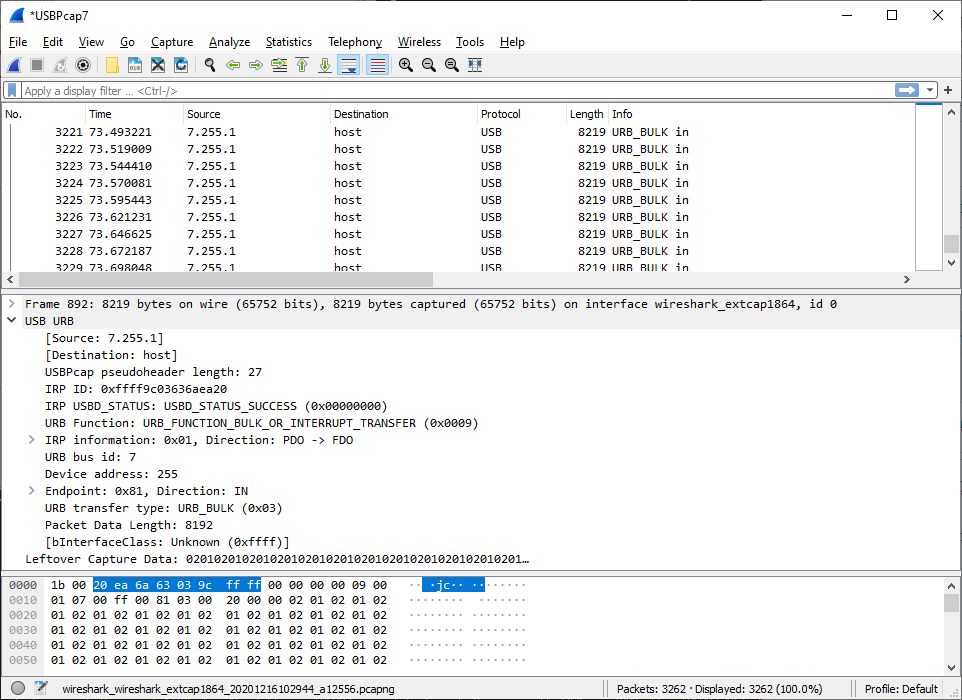
While in WriteDataCDC, packets are much smaller and every packet has wraper around the real data, significantly stress the USB stack
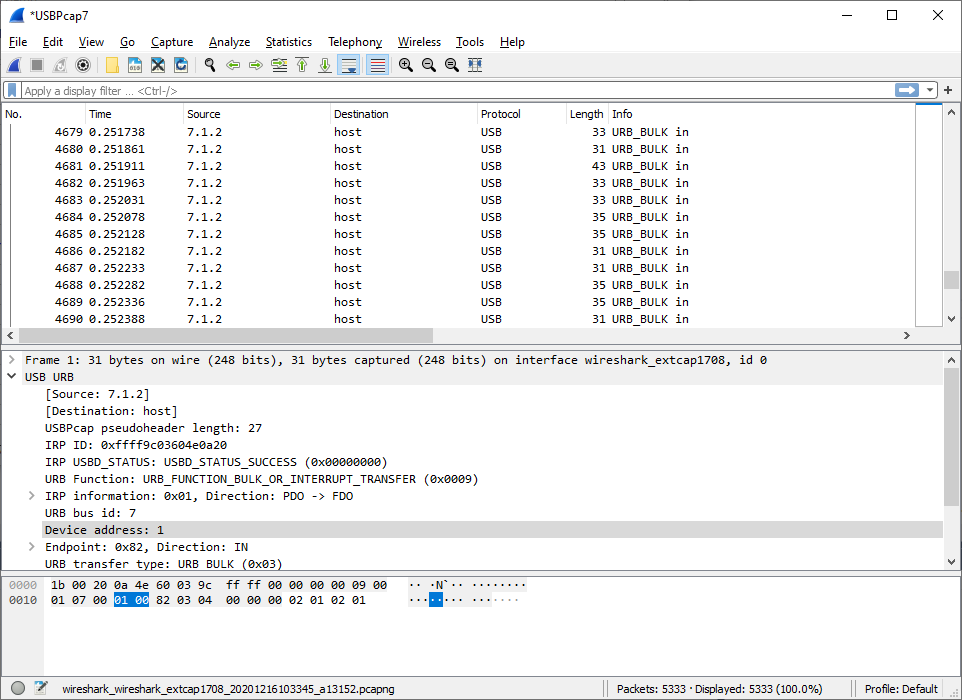
  • Here is the real packets on the wires, captured by Beagle USB 480, data is a ramp, with increment of 1

    WriteDataBulk  at 320KB/s, always 64B packet, and no data loss

    For WriteDataCDC, packet size is smaller and random, data loss is captured 

  • Hello David,

    I have some questions to start with here because while I understand the core issue, I don't have sufficient information to help guide you.

    First and foremost, is this using USB 2.0 Full Speed or USB 2.0 High Speed? I think from what I have seen, this is Full Speed but want to verify (High Speed requires an external PHY so if you don't have one, it's Full Speed).

    Next, is WriteDataCDC and WriteDataBulk APIs being executed on the TM4C, or is that on the Windows/Linux end?

    To that point, is the issue receiving data quick enough, transmitting it, or both for the TM4C? Data loss aside, that is a separate piece, but I am asking this regarding the throughput.

    Lastly, can you elaborate what is being used API wise on the TM4C side? Is this with out of the box applications that I can look at easily? Or something you developed?

    Also, I am assuming the TM4C is operating as the device in this case. Please let me know if I am wrong on that assumption.

    And thanks for the screenshots, I did see them before posting which actually helped a lot because I was confused by the 8192 length packets but 64 byte packets makes sense. 

  • Thanks for your reply!

    Here are some info:

    Full speed, PC is the host.

    WriteDataCDC and WriteDataBulk are executed on TM4C

    Data flow is basically one side, from TM4C to PC

    I will see if I can make change on your example to duplicate the problem.

  • Hello David,

    David Chance said:
    WriteDataCDC and WriteDataBulk are executed on TM4C

    Can you post the code for those two functions so I can review them to see what usblib API's are being used?

  • I stared at them for some time and didn't find any major difference :)

    uint32_t
    WriteDataBulk(uint8_t *pui8Data, uint32_t ui32NumBytes)
    {
    uint32_t ui32Loop, ui32Space, ui32Count;
    uint32_t ui32ReadIndex;
    uint32_t ui32WriteIndex;
    tUSBRingBufObject sTxRing;

    USBBufferInfoGet(&g_sTxBuffer, &sTxRing);
    ui32Space = USBBufferSpaceAvailable(&g_sTxBuffer);
    ui32Loop = (ui32Space < ui32NumBytes) ? ui32Space : ui32NumBytes;
    ui32Count = ui32Loop;
    ui32ReadIndex = (uint32_t)(pui8Data - g_pui8USBRxBuffer);
    ui32WriteIndex = sTxRing.ui32WriteIndex;

    while(ui32Loop)
    {


    g_pui8USBTxBuffer[ui32WriteIndex] = g_pui8USBRxBuffer[ui32ReadIndex];
    ui32WriteIndex++;
    ui32WriteIndex = (ui32WriteIndex == BULK_BUFFER_SIZE) ?
    0 : ui32WriteIndex;

    ui32ReadIndex++;
    ui32ReadIndex = (ui32ReadIndex == BULK_BUFFER_SIZE) ?
    0 : ui32ReadIndex;

    ui32Loop--;


    }

    USBBufferDataWritten(&g_sTxBuffer, ui32Count);
    return(ui32Count);


    }

    uint32_t
    WriteDataCDC(uint8_t *pui8Data, uint32_t ui32NumBytes)
    {
    uint32_t ui32Loop, ui32Space, ui32Count;
    uint32_t ui32ReadIndex;
    uint32_t ui32WriteIndex;
    tUSBRingBufObject sTxRing;

    USBBufferInfoGet(&g_psTxCDCBuffer, &sTxRing);
    ui32Space = USBBufferSpaceAvailable(&g_psTxCDCBuffer);
    ui32Loop = (ui32Space < ui32NumBytes) ? ui32Space : ui32NumBytes;
    ui32Count = ui32Loop;
    ui32ReadIndex = (uint32_t)(pui8Data - g_pui8USBRxCDCBuffer);
    ui32WriteIndex = sTxRing.ui32WriteIndex;

    while(ui32Loop)
    {


    g_pui8USBTxCDCBuffer[ui32WriteIndex] = g_pui8USBRxCDCBuffer[ui32ReadIndex];
    ui32WriteIndex++;
    ui32WriteIndex = (ui32WriteIndex == UART_BUFFER_SIZE) ?
    0 : ui32WriteIndex;

    ui32ReadIndex++;
    ui32ReadIndex = (ui32ReadIndex == UART_BUFFER_SIZE) ?
    0 : ui32ReadIndex;

    ui32Loop--;


    }

    USBBufferDataWritten(&g_psTxCDCBuffer, ui32Count);
    return(ui32Count);

    }

  • Do you have a prefer CDC example? I can see if I can make minimum change to duplicate or find out the problem

  • Hello David,

    Since you are using TivaWare 2.1.4 still let me attach a project for you which is now released in 2.2.0 but I had available for 2.1.4 as well.

    7180.usb_dev_cdcserial.zip

    If I recall, the code that uses these statuses were removed for the final released example as they did not add value, not sure if you'd need to remove them for this but figure I'd mention it:

    #define COMMAND_PACKET_RECEIVED 0x00000001
    #define COMMAND_STATUS_UPDATE   0x00000002
    #define COMMAND_RECEIVED        0x00000004

  • Downloaded your project and it compiles without error

    I changed target.config.ccxml to point to TI XDS 100v3 USB Debug Probe and checked Tiva TM4C1294NCPDT. Save the config and test connection to confirm it is OK

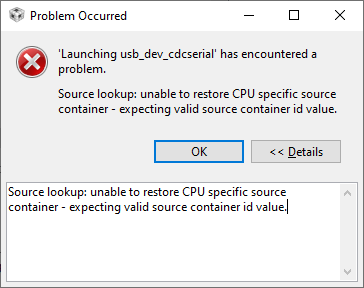
    After this, when I tried to run debug, it pops up this error (Since I don't import a new project often, it seems whenever I do, I will often run into problem like this, and I can never remember how I fixed it......)

    What did I miss? Thanks for your help in advance!

  • David Chance said:
    After this, when I tried to run debug, it pops up this error (Since I don't import a new project often, it seems whenever I do, I will often run into problem like this, and I can never remember how I fixed it......)

    I think that error can occur if the information in the .launch file is corrupt or was created by a previous version of CCS.

    Try Delete the .launch File

  • Thanks, this fixed the launching problem. I will move some codes to this project to see if I can repeat the problem

  • I rewrote my codes based on your example, and it works now, packets are no longer small ones. It must be somewhere in my codes that screwed up.

    Thanks!

  • Hi David,

    Excellent to hear that was sufficient! For future reference, we added quite a few example projects to 2.2.0.295 (full list in Release Notes) so while you are sticking with 2.1.4 for now, might not be bad to keep that in mind when looking for reference firmware. Pretty much everything would be compatible with 2.1.4 (just a few new APIs had been added). Hopefully that helps to know!

  • Thanks a lot!