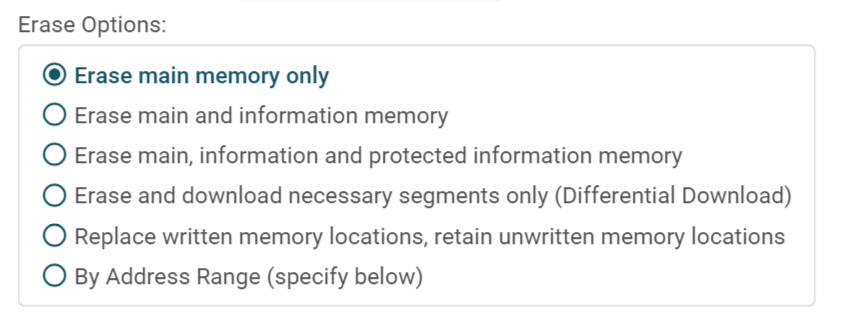
In Uniflash GUI screen, there is a button named "Mass Erase" and it can be used to erase the content before loading new FW.
This thread has been locked.
If you have a related question, please click the "Ask a related question" button in the top right corner. The newly created question will be automatically linked to this question.
HI David,
From the UniFlash Quick Start Guide (http://downloads.ti.com/ccs/esd/uniflash/docs/latest_qsguide.html), the stand-alone command line utility only does "Flash teh device". The mass erase option does not seem to be present with the stand-alone dslite.bat.
Srinivas
HI David,
At this time, the "mass erase" option does not seem feasible from the command line.
Srinivas
Hi David,
I created an internal request (https://jira.itg.ti.com/browse/UNIFLASH-1459) to add this feature. Hopefully, it will get incorporated in one of the future releases.
Srinivas
Hi David,
https://www.ti.com/tool/UNIFLASH tool has a "Alert Me" option to automatically send you an email when there is an update. Please include yourself through that option.
Srinivas
David,
Some follow-up information.
1. MSP430 has a setting to control erase during a program load. This erase operation will be issue before loading the program.
2. If you want to be sure that an erase is issue, you can use the '-b Erase' command in my previous post. You can also chain the program load in the same command by specifying the image in the command, like this:
> dslite -c <ccxml> -b Erase -e <image>
This will issue the Erase before (the -b means before) loading the image.
Let me know if you have additional questions.
Thanks,
Ricky