This thread has been locked.

If you have a related question, please click the "Ask a related question" button in the top right corner. The newly created question will be automatically linked to this question.

RM57L843: EMAC Source address is Zero(0) in Wire shark Capture

Part Number: RM57L843
Other Parts Discussed in Thread: DP83630

Hi all,

We are trying to establish the Ethernet communication between the RM57L843 via DP83630(In Launchpad XL2) & the Ethernet port in Laptop.

We are able to establish the physical layer & link layer. (ie) LINK & ACT Leds are blinking in the RJ45 Ethernet port of Launchpad XL2 <=> Laptop.

Using the wire shark tool, we have captured the Ethernet packets. As per the wire shark trace, we are not able to see the SW programmed source MAC address in the wire shark trace.(As per the attached screenshot). We could able to see the destination MAC address(255.255.255.255).

Below are the clarifications,

#Why we are not able to see the source MAC address in DHCP protocol transmission?

#In which register(RM57L843 & DP83630), Do we can see the DHCP protocol configuration information in Debug mode?

Could you please give your valuable feedback ?

Regards,

S.Saravanakumar
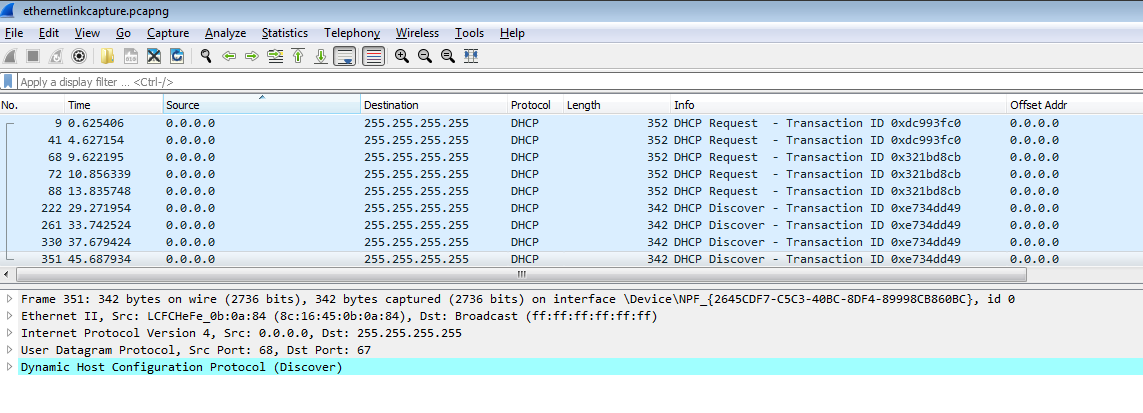
  • Hello,

    The microcontroller doesn't have registers to trace the DHCP's configuration. 

    I am not familiar to Wireshark. Do you set the display filters in wireshark properly?

  • Saravanakumar S93 said:
    Why we are not able to see the source MAC address in DHCP protocol transmission?

    The wireshark has captured the DHCP Request and HDCP Discover messages which are sent to a broadcast destination address (as per https://en.wikipedia.org/wiki/Dynamic_Host_Configuration_Protocol).

    Is wireshark running on the laptop the Launchpad XL2 is connected to, and can you tell if the Launchpad XL2 has successfully obtained an IP address from the DHCP sever?

    The DHCP Offer and DHCP Acknowledge messages sent from the DHCP Server to Client are sent to the unicast MAC address of the Client (Launchpad XL2) and so if the DHCP server is connected via a switch the laptop might not receive the DHCP Offer and DHCP Acknowledge messages.

  • Hi Chester Gillon,
    Thank you for the feedback.Here with I have attached the wireshark trace.

    Below are the connection setup,
    Laptop:1
      Only Lanuchpad XL2 USB port is connected

    Lapop:2
             From the Launchpad XL2 RJ45 port, CAT5 ethernet cable is connected. Wire shark tool is installed in this laptop.
             There is no external Ethernet switch device.

    Is wire shark running on the laptop the Launchpad XL2 is connected to, and can you tell if the Launchpad XL2 has successfully obtained an IP address from the DHCP sever?
    S.Saravanakumar:  In our SW, we have configured only for the MAC address. We have not given any IP address inside our SW.
                      As per the wire shark trace, DHCP Discover request taken the IP address 0.0.0.0


    The DHCP Offer and DHCP Acknowledge messages sent from the DHCP Server to Client are sent to the unicast MAC address of the Client (Launchpad XL2)
    and so if the DHCP server is connected via a switch the laptop might not receive the DHCP Offer and DHCP Acknowledge messages.
    S.Saravanakumar:  As per the attached wire shark trace, I could able to see the DHCP discover packet with Unicast type. I am not able to see the DHCP offer & DHCP acknowledge message from the wire shark    
                      trace.We have not connected the external Ethernet switch.Both the laptops are standalone. It is not connected with any network.

    Kindly give your valuable feedback on the same.


    Regards,
    S.Saravanakumar

    https://e2e.ti.com/cfs-file/__key/communityserver-discussions-components-files/908/ethrcapture_5F00_1.7z

  • Saravanakumar S93 said:
    Both the laptops are standalone. It is not connected with any network.

    Is there a DHCP server configured on the laptop?

    If not, the Launchpad XL2 won't be able to obtain an IP address using DHCP.

  • Hi Chester Gillon,

    Is there a DHCP server configured on the laptop?If not, the Launchpad XL2 won't be able to obtain an IP address using DHCP.
    S.Saravanakumar: I have checked with our IT System administrator. They have confirmed that, there is no DHCP server installed in the laptop. The Laptop installed with WIN10 Operating System.

                                   Wireshark tool is installed in the WIN10 OS installed laptop.

                                   Souce MAC address is taken from my laptop MAC address. But, in our Launchpad XL2 flashed SW contains different Source MAC address.

                                   We are getting the same behaviour for Unicast/Broadcast source MAC address configured in the Launchpad XL2.

                                   Also, we have not configured the IP address in Launchpad XL2 flashed SW. In this case as per the DHCP discover process captured in the wire shark packet analysis contains

                                   IP address as 0.0.0.0. Does this the valid IP address to establish the communication?

    Thank you.

    Regards,

    S.Saravanakumar

  • Hello,

    Launchpad is not connected a DHCP server. You can use a static IP for the launchpad, and connect to PC with a crossover cable. 

    I assume you have solved your issue already.

  • Hi QJ Wang,

    When, we are connecting across the same Launchpad XL2-RM57(2 nos), we should use the Cross cable.

    When we are connecting the single Launchpad XL2-RM57 with PC, we should use standard cable.Isnt it ?

    Regards,

    S.Saravanakumar

  • If you can connect board to a ethernet switch, and your PC uses the same switch, you can use the standard ethernet cable. If you connect your board to PC directly, you need a crossover cable.