This thread has been locked.

If you have a related question, please click the "Ask a related question" button in the top right corner. The newly created question will be automatically linked to this question.

TMS570LS3137: Linking with project with C++ exception handling enabled.

Part Number: TMS570LS3137


Hi,

I would like to develop a bare metal application for the TMS570LS3137 with ti-cgt-arm_20.2.4.LTS and use C++ with exception support.

C++ without exceptions is working nicely, but as soon as I add an exception to the code and the "exceptions" flag to the compiler arguments the linker is unhappy.

The documentation of ti mentions in section 5.8 that exception handling is supported, and in 7.1 its eplained how to link with exception support and in 7.1.8 teh naming convetion for the libraries.

But there are no libraries with the ending _eh installed on my computer by ti. I would expect a file like: "rtsv7R4_T_be_v3D16_eabi_eh"

As the documentation states clearly its supported I must have made some mistake. I downloaded the toolchain from: ARM-CGT Arm® code generation tools - compiler | TI.com and used ARM-CGT-19.

Could you please help me?

Best regards,

Karsten

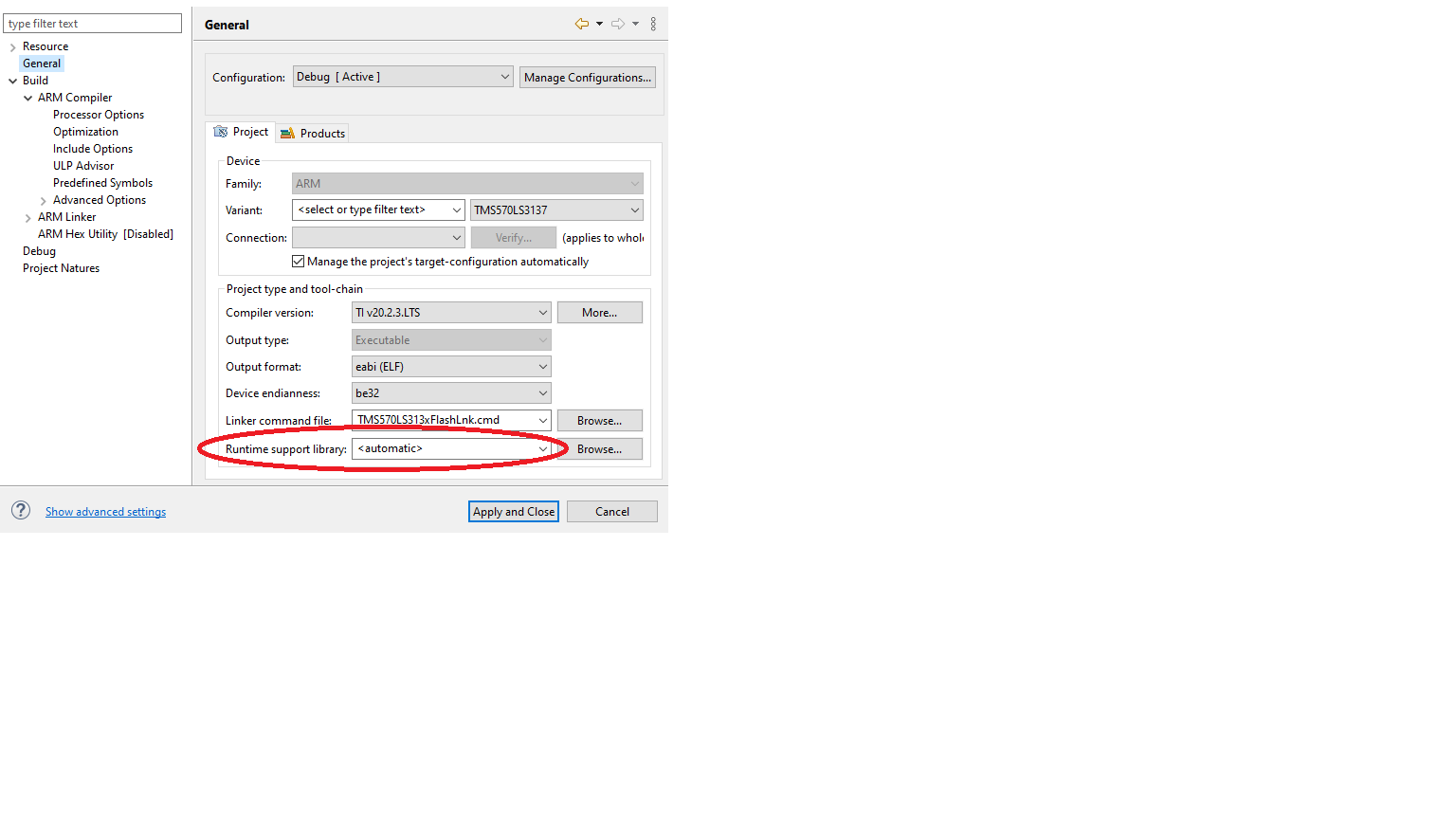
  • I presume you use Code Composer Studio (CCS) to organize and build your project.  In that case, be sure that in the project properties, you set the Runtime support library to automatic.  Under that setting, the linker automatically determines that a  RTS library with exception handling is required.  Since that library is not supplied with the compiler, it is automatically built.

    The screen shot below shows the related CCS setting.

    Thanks and regards,

    -George

  • Thanks a lot for the quick reply!

    Actually we are currently using an own makefile und would prefer to keep it that way.

    After some try and error I got the system to automatically generate libraries for me with the command:

    "C:/Tools/ti/ti-cgt-arm_20.2.4.LTS/bin/armcl.exe" --code_state=16 --issue_remarks --run_linker /d/prj/muc/build/debug/objs/src/main_app.cpp.o /d/prj/muc/build/debug/objs/src/main.c.o -o /d/prj/muc/build/debug/muc_app.out /d/prj/muc/lib/bsp/cfg/mem_ttc500_bl.lsf -m /d/prj/muc/build/debug/muc_app.map --reread_libs --rom_model --warn_sections --mapfile_contents=all --fill_value=0 --be32 --display_error_number --minimize_trampolines --diag_suppress=10068 --search_path=C:/Tools/ti/ti-cgt-arm_20.2.4.LTS/lib

    The problem was:

    - automatic linking is disabled if entry-point symbol "_c_int00" is defined (SPNU151V 4.3.1.1) - which was done by our board support library.

    - automatic linking - for me - is also disabled if I specify the command line argument: "--library=rtsv7R4_T_be_v3D16_eabi_eh.lib"

    Sadly it is still not working as the automatic library generation does not respect the code_state=16 command line argument and always tries to link in ARM mode instead of the requested thumb mode. Could you please give me some hints how to get it to generate the library in Thumb mode.

    Best regards,

    Karsten

  • Didn't resolve the issue: Please see my reply...

  • The linker should automatically work out that, based on how you built the code, the best library is rtsv7R4_T_be_v3D16_eabi_eh.lib.  Because it doesn't, I filed the entry EXT_EP-10247.  

    This is a related, but different issue ...

    user6407743 said:
    - automatic linking - for me - is also disabled if I specify the command line argument: "--library=rtsv7R4_T_be_v3D16_eabi_eh.lib"

    This is a known issue, with the entry EXT_EP-8118.  You are welcome to follow both entries with those links.

    So, how can you move forward?  There are two steps.

    1. Manually build the library rtsv7R4_T_be_v3D16_eabi_eh.lib
    2. Explicitly specify it when linking

    To learn how manually build a library, please search the TI ARM compiler manual for the sub-chapter titled Library-Build Process.  Some further tips:

    • Make sure the programs gmake, sh, and unzip are not in your executables PATH environment variable
    • Make sure the compiler executable armcl is in your executables PATH environment variable
    • Set the environment variable CCS_UTILS_DIR with a command similar to: set CCS_UTILS_DIR=C:\ti\ccs1011\ccs\utils
    • Make your local directory the one where all the libraries are installed.  In your case it is C:/Tools/ti/ti-cgt-arm_20.2.4.LTS/lib.

    This is the specific command to run: .\mklib --pattern=rtsv7R4_T_be_v3D16_eabi_eh.lib

    When you link, explicitly specify the library.  The linker invocation must end with: -l rtsv7R4_T_be_v3D16_eabi_eh.lib

    Thanks and regards,

    -George

  • Thanks a lot! For me it resolved the issue!