This thread has been locked.

If you have a related question, please click the "Ask a related question" button in the top right corner. The newly created question will be automatically linked to this question.

TMS570LS3137-EP: Unable to generate symbols for debugging.

Part Number: TMS570LS3137-EP
Other Parts Discussed in Thread: TMS570LS3137

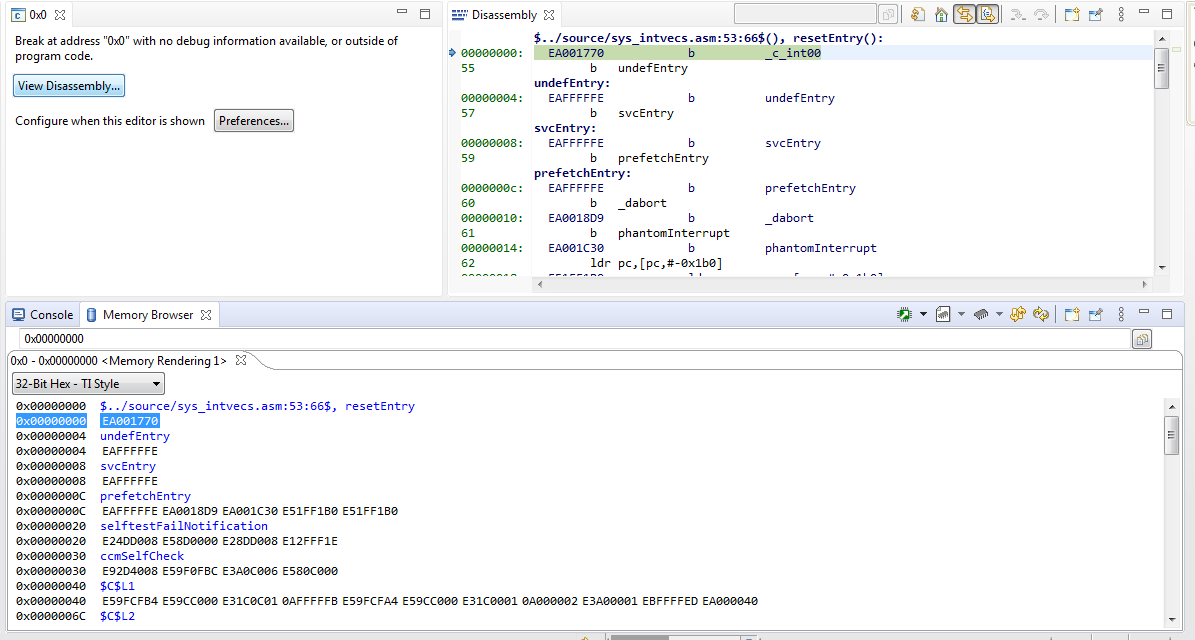
We are using TMS570ls3137 and CCS10.2 (compiler version is TIv20.2.4.LTS) in our project , the project is build without any issues and .out has been generated successfully, however when I wanted to debug the code it is showing "Break at address "0x0" with no debug information available, or outside of program code." after flashing code. I'm able to see my code  and program control at Disassembly window not in the source file. Could you please tell us how to resolve this issue?

I have attached snapshot for your reference.

  • With the default settings you should not have had a problem. Right click on your project in "Project Explorer" and select "Show Build Settings". Then select "Build", "Arm Compiler", "Advanced Options" , "Advanced Debug Options" and make sure that "Debugging model is set to "Full Symbolic debug". See below:

    If that does not work, try loading the attached simple project into your part and running it:

    /cfs-file/__key/communityserver-discussions-components-files/908/HelloWorld.zip

  • Hi Bob, 

    I have loaded the attached sample project and it is flashed, however program doesn't enter into debug mode. In disassembly window it is showing "No debug context". Could you tell me how to resolve this issue? 

  • Please verify that you loaded the code from "HelloWorld\Debug\HelloWorld.out" without recompiling the file. When loaded the code should run to main and look like this:

    Since yours does not, please open a memory window and verify the flash contents starting at address 0: It should look this. If not, you did not load the file correctly.

    0x00000000 EA001770 EAFFFFFE EAFFFFFE EAFFFFFE EA0018D9 EA001C30 E51FF1B0 E51FF1B0
    0x00000020 E24DD008 E58D0000 E28DD008 E12FFF1E E92D4008 E59F0FBC E3A0C006 E580C000
    0x00000040 E59FCFB4 E59CC000 E31C0C01 0AFFFFFB E59FCFA4 E59CC000 E31C0001 0A000002
    0x00000060 E3A00001 EBFFFFED EA000040 E59FCF8C E59CC000 E31C0102 0A000002 E3A00002
    0x00000080 EBFFFFE6 EA000039 E59F0F68 E3A0C009 E580C000 E59FCF5C E59CC000 E35C0000
    0x000000A0 0A000003 E59FCF4C E59CC000 E35C0000 1AFFFFFB E59FCFF4 E59CC000 E31C0004
    0x000000C0 1A000002 E3A00003 EBFFFFD4 EA000027 E59FCFDC E59CC000 E20CC0FF E35C0001
    0x000000E0 0A000001 E3A00004 EBFFFFCC E59F0FBC E3A0C004 E580C000 E59F0FB8 E3A0C004
    0x00000100 E580C000 E59F0EF4 E3A0C102 E580C000 E59F0FA4 E3A0C005 E580C000 E59F0ED4
    0x00000120 E3A0C00F E580C000 E59FCEC8 E59CC000 E35C0000 0A000003 E59FCEB8 E59CC000
    0x00000140 E35C0000 1AFFFFFB E59FCEB0 E59CC000 E31C0102 1A000002 E3A00002 EBFFFFAF
    0x00000160 EA000002 E59F0E94 E3A0C102 E580C000 E8BD8008 E24DD008 E58D0000 E3E000A3
    0x00000180 E3A0C00A E580C000 E3E0009F E59DC000 E580C000 E3E0C097 E59CC000 E31C0C01
    0x000001A0 0AFFFFFB E3E000A3 E3A0C005 E580C000 E28DD008 E12FFF1E E92D4008 E3A0C000
    0x000001C0 E58DC000 E59F0FD8 E3A0C401 E580C000 E59F0FD0 E59FCFD0 E580C000 E59F0FCC
    0x000001E0 E3A0C01A E580C000 E59F0FC4 E3E0C000 E580C000 E3A0C000 E58DC000 E59DC000
    0x00000200 E35C0020 2A000005 E59DC000 E28CC001 E58DC000 E59DC000 E35C0020 3AFFFFF9
    0x00000220 E59F0F90 E3A0C00A E580C000 EB0015B7 E8BD8008 E92D4000 E24DD014 E5CD200C
    0x00000240 E58D1004 E58D0000 E3A0C000 E58DC008 E59F0F50 E59DC000 E1A0C80C E580C000
    0x00000260 E5DDC00C E35C0000 0A000003 E59F0F34 E590C000 E38CC001 E580C000 E59F0F30
    0x00000280 E59DC004 E580C000 E3A0C000 E58DC008 E59DC008 E35C0020 2A000005 E59DC008
    0x000002A0 E28CC001 E58DC008 E59DC008 E35C0020 3AFFFFF9 E59F0EFC E3A0C00A E580C000
    0x000002C0 EB001592 E28DD014 E8BD8000 E92D400E E3A0C000 E58DC000 E3A0C000 E58DC004
    0x000002E0 E59F0F80 E3A0C000 E580C000 E3E000A7 E300C105 E580C000 E3E000A3 E3A0C005
    0x00000300 E580C000 E3E000A7 E300C10A E580C000 E3E00097 E3A0C001 E580C000 E3E0009F
    0x00000320 E3A0C001 E580C000 E3A0C000 E58DC000 E59DC000 E35C0040 2A000005 E59DC000
    0x00000340 E28CC001 E58DC000 E59DC000 E35C0040 3AFFFFF9 E59F0F0C E3A0C003 E580C000
    0x00000360 E59F0FAC E3A0C010 E580C000 E59F0FA4 E3A0CA02 E580C000 E59F0F9C E3A0C353
    0x00000380 E580C000 E59F0F94 E3A0C075 E580C000 E59F0F8C E3A0C393 E580C000 E59F0F84
    0x000003A0 E3A0C075 E580C000 E59F0F7C E3A0C3D3 E580C000 E59F0F74 E3A0C075 E580C000
    0x000003C0 E59F0F6C E59FCF6C E580C000 E59F0F68 E3A0C075 E580C000 E59F0F60 E59FCF60
    0x000003E0 E580C000 E59F0F5C E3A0C075 E580C000 E59F0F54 E59FCF54 E580C000 E59F0F50

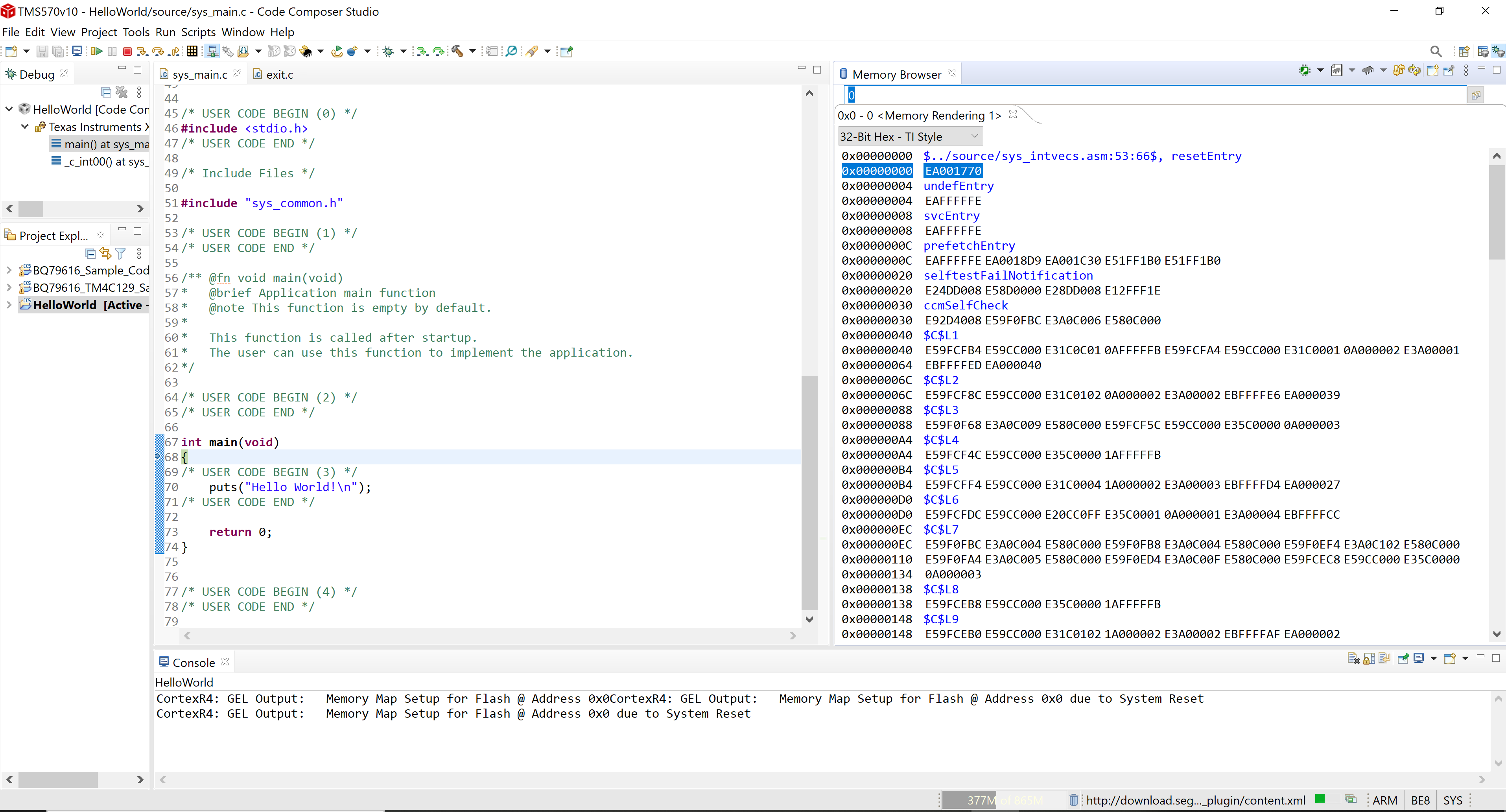
  • I have flashed the code as per the suggestion, still I got the same issue, I have attached snaps (captured memory , disassembly , and source code) for your reference, I just wanted to understand why it is showing no debug information at 0x0. The memory window data is inline with your attachment.

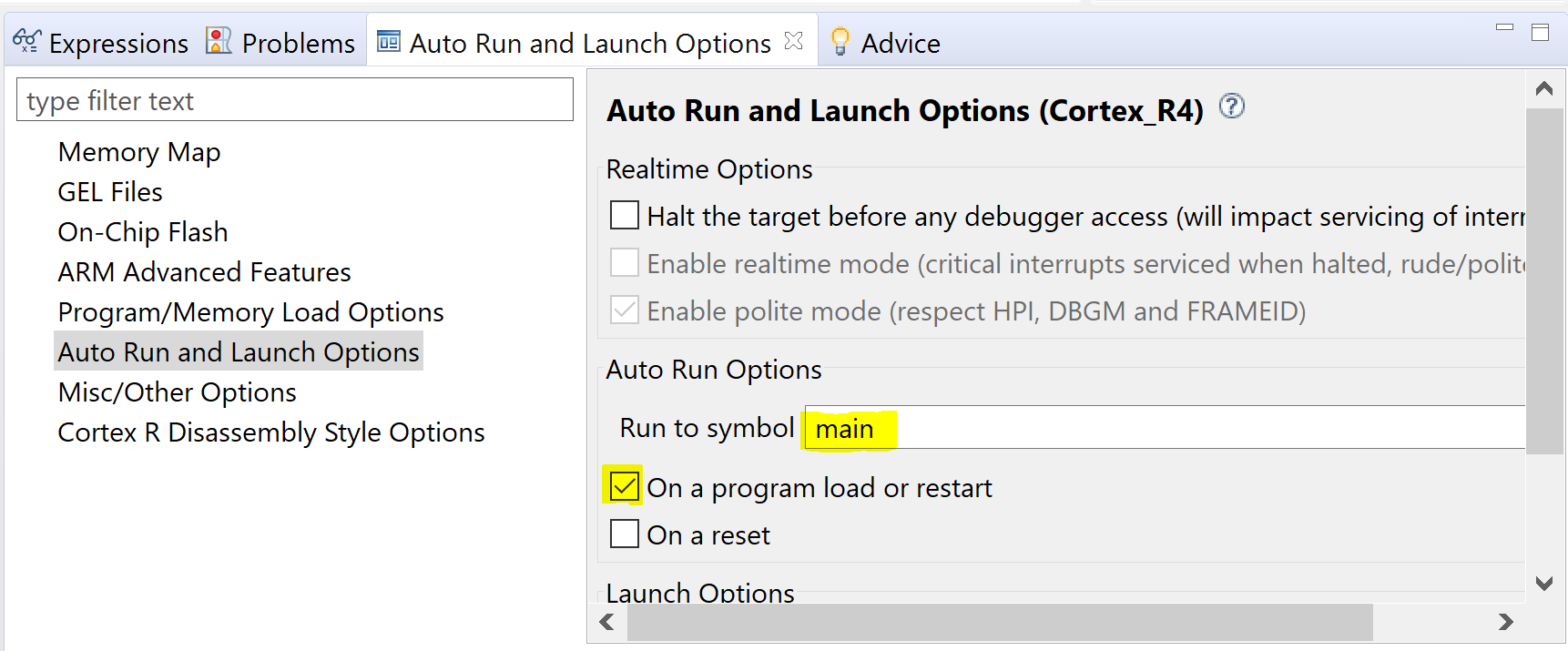
  • It looks like one of the default settings was changed in your CCS settings and the code is not automatically running to main. You can do an assembly step by clicking the small green arrow, or choosing "Run" -> "Assembly Step Into". Then you will execute the reset vector and jump into the C function _c_int00(). If you want to restore the ability to run to main on a program load, select "Tools" -> "ARM Advanced Features". Then select the "Auto Run and Launch Options" as shown in the image below. Enable "Run to symbol" "main" and check "On a program load or restart".