This thread has been locked.

If you have a related question, please click the "Ask a related question" button in the top right corner. The newly created question will be automatically linked to this question.

LAUNCHXL2-RM57L: LWIP program is not working as intended for any supported protocols

Part Number: LAUNCHXL2-RM57L

Hi All,

https://e2e.ti.com/support/microcontrollers/hercules/f/hercules-safety-microcontrollers-forum/445955/while-emacswizzledata-curr_bd--flags_pktlen-emac_buf_desc_owner-emac_buf_desc_owner

Currently, I am trying the LWIP program with Launchpad XL2-RM57L board.
As proposed in the above link solution, I have changed the PinMux port configuration settings as per the Launchpad XL2-RM57L.
But, still I am not able to ping the IP address. Apart from that proposed solution of Pinmux change item, Do i need to change any other modification? Does any body knows that ? Please let me know.
Thank you.

Regards,
S.Saravanakumar

  • Hello,

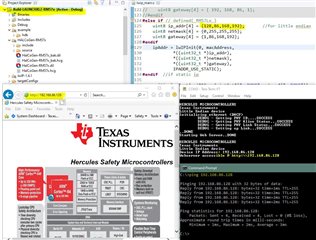
    I run the lwip demo on my launchpad, it works fine. My PC and the launchpad use the same network (connect to a ethernet switch). 

    Here is the location for lwip demo code:

    http://software-dl.ti.com/hercules/hercules_docs/latest/hercules/Examples/Examples.html#lightweight-ip-lwip-demo

  • I just did another ping test, it works as expected. PC uses WIFI, and Launchpad is connected to my router.

  • Hello,

    I was not able to insert a image file. This is the screenshot:

    I can ping my launchpad from my PC.

  • Hi QJ Wang,

    I am able to attach my working program from the local repository

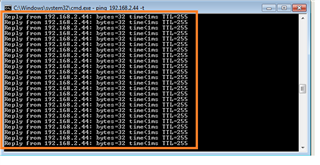
    Last Friday, I have resolved the issue with interrupt routine in lwip.main.c. I am able to ping the ip address,

    But, there is no packet transmitter in wireshark. Could you please check my program, & tell me the solution ?

    Why there is no TCP (or) UDP packet transmitted in wireshark?

    Thank you.

    Regards,

    S.Saravanakumar

    workinglwip13_3.zip

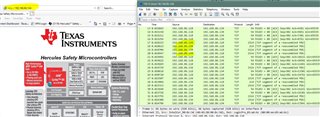
  • When capturing the packet with wireshark, please the retrieve the display image from192.168.2.44 (Launchpad will send the packet).

  • Herewith, I have attached the wireshark packet data. Launchpad is not transmitted any UDP (or) TCP packet data.
    We are able to capture the data with respect to ping request/reply(ICMP protocol) for the following IP=192.168.244.
    Like your wireshark data, we didn't get any TCP (or) UDP data.Can you check the same?

    In LWIP_STATS, I am getting the following data,
                                    Etharp(Receive)=282
                                    Etharp(Transmit)=1
                                    IP(Receive)=276
                                    IP(Transmit)=150
                                    ICMP(Receive)=150
                                    ICMP(Transmit)=150
        UDP(Receive)=125
        UDP(Transmit)=0
        TCP(Receive)=0
        TcP(Transmit)=0
    As per my current understanding in OSI Model layer, the received data reaches till Transport layer.20210313.zip

  • Wireshark can capture the TCP packets when I run TI lwip demo

    :

  • As I told you, refresh the connection to your board (192.168.2.44) after starting wireshark capture. Again, the MCU doesn't keep sending the packet to your PC, it only send the packet on demand. 

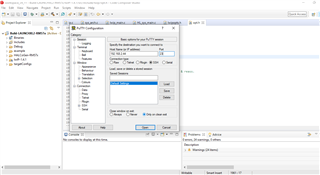
  • We have run the putty terminal software in the laptop. Wireshark tool is capturing the TCP packet data from Lap top
    As you told, in this case the trigger is from the putty Terminal tool installed in the laptop.

    Below are the details,
                Laptop IP address=192.168.2.45
                Launchpad XL2-RM57 board=192.168.2.44
                Putty Terminal SW/Wireshark Tool SW are installed in the laptop
                Launchpad XL2-RM57 board <=> Laptop is connected with Cross LAN Cable

    After power up, the LWIP demo SW itself is not sending the any packet data by default.
    Since, the trigger from the Putty terminal SW for TCP packet data. LWIP SW flashed in the Launchpad XL2-RM57 responded.
    We are getting the above observed behaviour with Cross LAN cable (or) 1:1 LAN cable.
    Does this behaviour correct ? As per the LWIP demo SW, the SW itself cannot able to Transmit the TCP packet data. Kindly give your valuable feedback.
    Here with I have attached the Wireshark captured data & putty terminal SW.

      20210319.zip

  • I don't have cross cable, so I am not able to do this test for you.

  • The problem is resolved. We should ensure the below things,

                # EMACCore0RxIsr(lwip_main.c)

                # EMACCore0TxIsr(lwip_main.c)

                # Run the wireshark terminal

                # Enable the webserver IP address(192.168.2.44) in the Internet explorer. You will be able to capture the TCP packets/IGMP packets in

                   the wireshark terminal software. I have configured the static IP address.