This thread has been locked.

If you have a related question, please click the "Ask a related question" button in the top right corner. The newly created question will be automatically linked to this question.

MSP432E401Y: NDK Memory Settings

Part Number: MSP432E401Y
Other Parts Discussed in Thread: SYSCONFIG

Hi,

I need to setup my simplelink_msp432e4_sdk_4_20_00_12 project for heavy client and server network usage.  I have SDRAM available and have configured the linker to use it as the heap.  The web browser will have many cgi calls back to the web server.  There are also another 8 to 9 client/server threads running.  I think because sockets don't close instantly they are using up the little memory assigned to the stack. 

Also, when the network calls run into what appears to be memory issues, it brings down the other non-networking tasks.  Is there a way to prevent the NDK from causing issues with the TI-RTOS and other tasks?

Regards,

-Mike

  • Hi,

    I assumed the heavy workload caused the threads blocked. I will check with the NDK design team for solution and get back to you. 

  • Hi Mike,

    I'm submitting a summary after our offline discussion. Please let us know if you have any further comments or questions.

    Regards,

    Luis R


    TI's Suggestion:

    First off, the reference guide documentation is actually quite good (~/simplelink_msp432e4_sdk_4_20_00_12/docs/ndk/ug/ug_ndk/03_network-application-development.html).

    It is important to understand what kind of shutdown is occurring.


    A “graceful” shutdown sequence involves both participants. One of the participants makes the close request (FIN), and the other acknowledges it (FIN ACK). The party requesting the close does need to hold onto the memory allocated to the socket connection until the FIN ACK comes in successfully, or some timeout (could be a minute or more) expires indicating that something went wrong.


    A shutdown that is not “graceful” typically occurs because of some kind of communications timeout. Either the TCP keepalive packets are missed, or some other error occurs. In this case, the stack needs to hold onto the memory allocated to the socket connection for a while in case the other end of the connection can recover and attempt a “graceful” shutdown. Typically this won’t occur as the other end is often in the middle of a power cycle, has a broken network cable, or some other serious infrastructure issue.


    Though it is unlikely that heap size is the issue (lots of SRAM memory available), the posting is not clear as to what “memory issue” is being faced. There are a lot of knobs that the NDK offers for tuning. SysConfig does a pretty good job at abstracting these for easy user configuration. I would have a look at the following options, and consider increasing most of them:


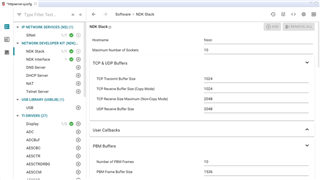
    1. NDK Stack -> Maximum Number of Sockets
    2. NDK Stack -> TCP & UDP Buffers
    3. NDK Stack -> PBM Buffers


    It is also good idea to ensure that each of the NDK created threads have enough stack size (ROV task view can provide insight). May also want to assess the task priority assignments as they compare to other application task priorities, but probably don’t need to make any changes there.


    1. NDK Stack -> NDK Created Threads


    Do we know the NDK DNS Server, DHCP Server, NAT, or Telnet Server is in use by the application? Some of these also have tuning parameters for capacity.


    Mike's feedback:

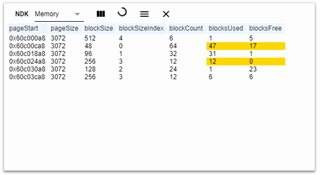
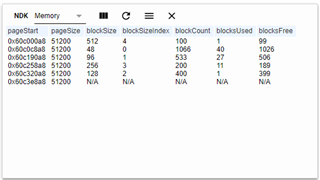
    Fortunately we have the ROV with NDK support, this is a very useful tool.  What I found in my testing is that the problem was occurring when one of the NDK -> Memory blocksFree went down to 0.  I tracked down the memory in Sysconfig to NDK Stack -> Memory Management Buffers based on the values shown.  I have since increased it from 3072 to 51200.  I have not run into the issue since. 


    Can you ask what they think about what I just stated?  I also notice that page 6 is N/A.  I assume this is because there are plenty of blocks now.


    TI's response:

    Yes, that is exactly the kind of things that would be expected to cause issues.

    I'm glad you are heading in the right direction and please keep us updated.