Other Parts Discussed in Thread: MOTORWARE
Before asking questions, I would like to thank you for your kindness.
I am using TMDSCNCD28069MISO controlCARD with HVMTP inverter board.
Not long ago, in an experiment, while removing a wire, the control card burned.
It is presumed that a short occurred by removing the wire without considering the capacitor.
Our team immediately prepared for the experiment again with a new control card(same model, different release version 0.4 --> 0.2, check with photo below).
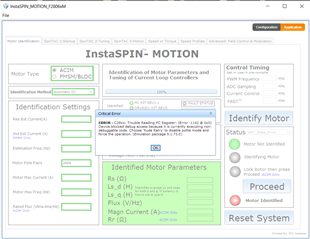
However, the 'instaSPIN_MOTION_F2806xM.exe' program could not identify the motor.
The error message is
"C28xx: Trouble Reading PC Register: (Error -1142 @ 0x0) Device blocked debug access because it is currently executing non-debuggable code. Choose 'Rude Retry' to disable polite mode and force the operation. (Emulation package 5.1.73.0)"
The connection with the previous one was exactly the same, and what has changed is that the release version of the control card was changed from 0.4 to 0.2 and there is an accident, short, with overcurrent.
Therefore, we assume that the HVMTP inverter board to be damaged due to a short or different problem is needed due to a difference in the release version of the control card.
Attach a picture of the damaged control card and the new control card and the inverter board we are using.
The motor we were trying to control is a 350W IPMSM.
The short occurred in the process of removing the remaining wires after using and remove 220V AC as the power source.