This thread has been locked.

If you have a related question, please click the "Ask a related question" button in the top right corner. The newly created question will be automatically linked to this question.

TMS320F28335: Code Coverage on C28x target

Part Number: TMS320F28335


I'm trying to generate a code coverage report for code executed from a dss script. I am encountering the following error:

WARNING: C28xx: AutoRun: Target not run as breakpoint could not be set: Error enabling this function: This task cannot be accomplished with the existing AET resources.

I did see this thread https://e2e.ti.com/support/tools/code-composer-studio-group/ccs/f/code-composer-studio-forum/489225/c28xx-autorun-target-not-run-as-breakpoint-could-not-be-set-error-enabling-this-function-this-task-cannot-be-accomplished-with-the-existing-aet-resources

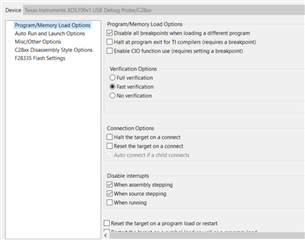
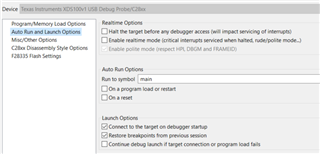
and gathered that I need to disable other hardware breakpoints for the code coverage to work properly.  I unchecked some options that mentioned requiring a breakpoint including Enable CIO functions (though upon further reading of the code coverage doc perhaps that one is necessary?) I've posted screenshots of the options I have for auto-run and program load, am I missing something? Is the fact that I'm kicking things off from DSS have anything to do with it?

Appreciate the help!
  • Hello,

    Is the fact that I'm kicking things off from DSS have anything to do with it?

    Yes.

    Modifying the debug settings via the CCS GUI with not make any impact when running DSS from a system console. You need to make sure to modify those settings from the same DSS script using DSS APIs.

    https://software-dl.ti.com/ccs/esd/documents/users_guide/sdto_dss_handbook.html#debugger-properties

    Thanks

    ki

  • Thanks Ki, I added the following lines of code and the error message went away. Unfortunately after running my script via dss I still do not see the pprofout.pdat file. Is there another step I am missing?

    session.options.setBoolean("HaltOnConnect", false)
    session.options.setBoolean("AutoRunToLabelOnRestart", false)
    session.options.setBoolean("AutoRunToLabelOnReset", false)

  • The compiler code coverage feature relies on C I/O so make sure you did not disable C I/O breakpoints (must keep the "Enable C I/O function use" option enabled). Also the program must reach the exit() routine from the RTS library.

    Assuming the above is accounted for, are you able to generate the pprofout.pdat when you run this manually using the CCS IDE?

  • Thanks Ki that is indeed what was happening. Strangely though I wasn't able to ever get my program to exit. Instead I call the ti stop profile function and put a breakpoint at a fake function testExit to return control of the program to dss. There was some other strange behavior but I was able to get past it. All good for now thanks!

    void main(void)
    {
        uint16_t i;
    
        for(i=0; i < MAX_TESTS; i++)
        {
            runTest();
        }
    
        _TI_stop_pprof_collection();
    
        testExit();
    }

  • I ran into another issue. When i try the Analyze step from this doc https://software-dl.ti.com/ccs/esd/documents/application_notes/appnote-code_coverage_compiler.html I don't get any .csv files created.

    I've confirmed the .pprofout.pdat file gets created everytime I run my dss script. The .pprofout.prf file does indeed get generated when I build under the Analyze configuration.

    I'm wondering if how I'm running the code is causing the issue as my code behaves a little differently than a normal program. I created a unit test framework that executes a function stored in a pointer address. Using dss I run a loop with a breakpoint where every time through I write a different function and associated parameters to the board from dss and then run till it loops around, go fetch the results from the board, write the new function and params rinse and repeat...

    One of the things I had to do was disable conditional linking as otherwise the linker doesn't think anything is being called from my main. So I'm wondering if maybe the way I'm executing my code is having an effect on the profiling that gets generated? I would imagine that a .csv file should have at least been created for main. I can confirm that code from all my other files does indeed get executed by inspecting how memory and registers change on the board.

    Any thoughts?

  • Can you share the pdat and prf files?

    Please start a private E2E conversation with me if you do not wish to share on a public forum.

    Also specify which exact CCS and compiler versions you are using.

    Thanks

    ki

  • I got the files. Thanks.

    I suspect the issue is the whitespaces in your paths to the source file. Both CCS and related build tools have had some issues properly handling it in some cases.

    I did a quick experiment and I am also unable to generate a csv file when I have source files in a directory with spaces. If I move the source files to a path without spaces then the csv files can get generated. Is this the case for you also?

    Thanks

    ki

  • that did the trick thanks Ki!

  • Thanks for confirming. I'll file a bug for this.

    ki